
Introduction
The Horsepower Pocket Pony is a compact, cordless, and rechargeable oscillating power scrubber designed for deep cleaning in tight spaces, grout lines, corners, and other hard-to-reach areas. Its powerful oscillating action and interchangeable brush heads make it a versatile tool for various cleaning tasks around your home.

Image: The Horsepower Pocket Pony in use, demonstrating its compact size and oscillating cleaning action on a tiled surface.
Important Safety Instructions
- Read and follow all warnings and instructions before using this product.
- Injury or property damage can result from improper use.
- Keep out of reach of children.
- Do not submerge the Pocket Pony in water for more than 30 minutes or at a depth greater than 36 inches.
- Always ensure the charging port is securely closed before use in wet conditions.
- Do not operate or charge the Pocket Pony in hot water above 110°F (43°C).
- Use only the charging cable provided with the product.
- Do not use metal objects, abrasive cleaners, or corrosive liquids with the product.
- Wear appropriate protective eyewear and gloves when using certain cleaning agents.
Package Contents
Your Horsepower Pocket Pony package includes the following items:
- Horsepower Pocket Pony main unit
- USB-C Charging Cable
- Grout Brush
- Soft Bristle Brush
- Hook & Loop Head
- X-Large Head
- Large Head
- 4 Scouring Pads
- 4 Polishing Pads
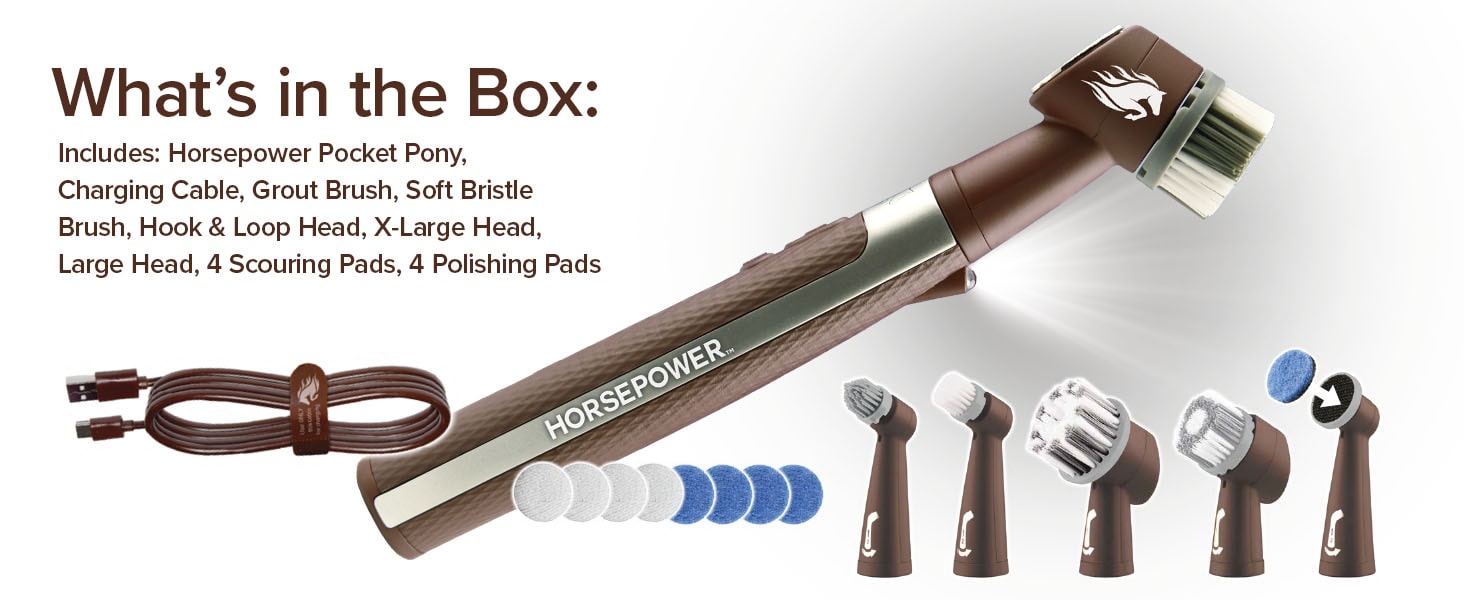
Image: A visual representation of all items included in the Horsepower Pocket Pony package, laid out neatly.
Setup
Charging the Battery
- Plug the supplied USB-C charging cable into the charging port on the Horsepower Pocket Pony.
- Connect the other end of the charging cable to a USB wall adapter (not included) and plug it into a wall outlet.
- The battery will fully charge in approximately 4-5 hours.
- The charging indicator light will flash red while charging and turn steady green when fully charged.
- Once fully charged, unplug the charging cable and securely close the charging port cover to maintain waterproofing.

Image: The Horsepower Pocket Pony connected to its charging cable, illustrating the charging process.
Attaching Brush Heads
- Ensure the Pocket Pony is powered off.
- Align the groove on the desired brush head with the connector on the main unit.
- Push the brush head down and turn it clockwise until it locks securely into place.
- To remove a brush head, turn it counter-clockwise and pull up.

Image: A display of the five different brush heads included with the Pocket Pony, highlighting their variety for different cleaning tasks.
Operating Instructions
Power On/Off
- To power on the Pocket Pony, press the Power Button once.
- To power off, press the Power Button a second time.
Using the LED Light
- To turn on the LED light, press the Light Button once.
- To turn off the LED light, press the Light Button a second time.

Image: The Pocket Pony with its built-in LED light illuminated, providing better visibility during cleaning.
Using Different Attachments
The Pocket Pony comes with various brush heads and pads for different cleaning needs:
- Grout Brush: Ideal for cleaning corners, narrow spaces, and grout lines. Run time: approx. 180 minutes.
- Soft Bristle Brush: Suitable for small surfaces and delicate fixtures. Not recommended for painted or polished surfaces, plastic, or faux leather. Run time: approx. 180 minutes.
- X-Large Head: For larger surfaces. Not recommended for painted or polished surfaces, plastic, or faux leather. Run time: approx. 50 minutes.
- Large Head: For moderate coverage, such as stovetops and refrigerators. Not recommended for painted or polished surfaces, plastic, or faux leather. Run time: approx. 60 minutes.
- Hook & Loop Head with Scouring/Polishing Pads: Use the Hook & Loop Head to attach the Scouring Pads for tough grime on pots and pans, or Polishing Pads for glass and smooth surfaces. Do not use the Hook & Loop Head alone. Run time: approx. 120 minutes.

Image: An illustration showing the different interchangeable heads and their recommended uses for customized cleaning.
Video: An official instructional video from BulbHead, the manufacturer, demonstrating the features and usage of the Horsepower Pocket Pony.
Maintenance
Cleaning
- After each use, wash the brush head under running water.
- For thorough cleaning, turn the product on and allow the brush head to clean itself in water for no more than 5 minutes.
- Dry the product and attachments with a soft cloth after cleaning.
- The main unit can be wiped clean with a damp cloth.
Storage
- Store the Horsepower Pocket Pony and its accessories in a cool, dry place away from direct sunlight.
Troubleshooting
| Problem | Possible Cause | Solution |
|---|---|---|
| Device not turning on | Low battery | Charge the device for 4-5 hours. |
| Brush head detaches during use | Brush head not securely attached | Ensure the brush head is pushed down and twisted clockwise until it locks. |
| Reduced cleaning performance | Worn brush head or incorrect attachment for task | Replace worn brush heads or select the appropriate attachment for the cleaning task. |
Specifications
| Feature | Detail |
|---|---|
| Product Dimensions | 2.17 x 1.38 x 3.74 inches |
| Item Weight | 1 pounds |
| Manufacturer | Bulbhead |
| Item Model Number | 18038 |
| Power Source | Rechargeable Battery |
| Waterproof Rating | IPX7 (Do not submerge more than 30 minutes or 36 inches deep) |
| Included Components | Horsepower Pocket Pony, Charging Cable, Grout Brush, Soft Bristle Brush, Hook & Loop Head, X-Large Head, Large Head, 4 Scouring Pads, 4 Polishing Pads |
Warranty & Support
For warranty information and customer support, please refer to the documentation included with your product or contact the manufacturer directly. Keep your purchase receipt for warranty claims.