1. Introduction
Thank you for choosing the Maycall MC-528 Two-Way Radio. This device is designed for reliable and clear communication across various environments. It features 16 FRS channels, a 1200mAh rechargeable battery, and comes with an earpiece for enhanced privacy and convenience. Please read this manual thoroughly to understand the proper operation and maintenance of your new two-way radio.
2. Package Contents
Upon unpacking, please verify that all items listed below are included in your package:
- MC-528 Walkie Talkies (Quantity: 10)
- Battery (Quantity: 10)
- Charger Base (Quantity: 10)
- Belt Clip (Quantity: 10)
- String (Quantity: 10)
- User Manual (Quantity: 1)
- Walkie Talkie Earpiece (Quantity: 10)
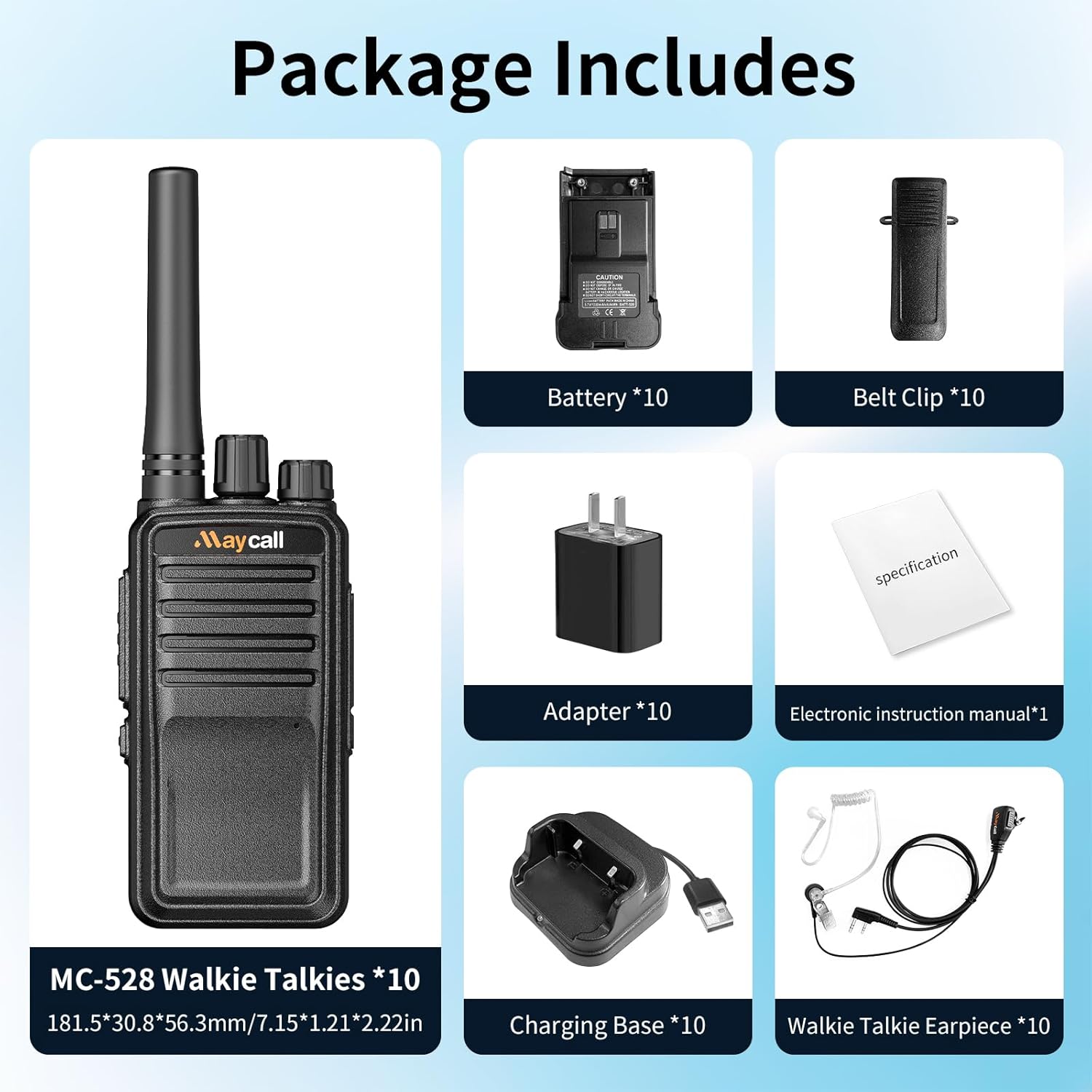
Image: Contents of the Maycall MC-528 Walkie Talkie package.
3. Product Overview
Familiarize yourself with the components and controls of your MC-528 Two-Way Radio.
3.1. Physical Components

Image: Front view of the MC-528 radio.

Image: Side view of the MC-528 radio with PTT and side key.
3.2. Controls and Ports
- Antenna: For transmitting and receiving signals.
- Channel Knob: Rotate to select one of the 16 available channels.
- Power/Volume Knob: Rotate to turn the radio on/off and adjust the volume.
- Push-to-Talk (PTT) Button: Press and hold to transmit your voice. Release to listen.
- Side Key 1: Programmable function key (e.g., Monitor, Scan).
- Earpiece/Microphone Jack: Connect the included earpiece or an external microphone.
- USB-C Charging Port: Located at the bottom for direct charging.
- Belt Clip: Removable clip for attaching the radio to your belt or clothing.
Video: An overview of the Maycall MC-528 Walkie Talkie, highlighting its features and design.
4. Setup
4.1. Battery Installation
The MC-528 radio uses a 1200mAh Li-ion battery. To install the battery:
- Ensure the radio is powered off.
- Align the battery with the battery compartment on the back of the radio.
- Gently push the battery into place until it clicks securely.
Video: Demonstrates the simple assembly of the walkie-talkie, including battery installation.
4.2. Charging the Battery
Before first use, fully charge the battery. The radio can be charged using the included charger base or directly via the USB-C port.
- Using the Charger Base: Connect the charger base to a power outlet using the provided adapter. Place the radio into the charging slot. The indicator light on the base will show the charging status.
- Using USB-C Direct Charge: Open the protective cover of the USB-C port at the bottom of the radio. Connect the USB-C cable to the radio and a compatible USB power source (e.g., computer, car charger, power bank).
A full charge typically takes 3-4 hours. The 1200mAh battery provides up to 24 hours of work time and 2-4 days of standby time.

Image: Various charging methods for the MC-528 radio.
5. Operating Instructions
5.1. Power On/Off and Volume Adjustment
To power on the radio, rotate the Power/Volume knob clockwise. You will hear a power-on tone. Continue rotating to increase the volume. Rotate counter-clockwise to decrease volume and power off.
5.2. Channel Selection
Rotate the Channel knob to select your desired communication channel (1-16). Ensure all radios in your group are set to the same channel for communication.
5.3. Transmitting and Receiving
To transmit, press and hold the PTT button on the side of the radio. Speak clearly into the microphone. Release the PTT button to stop transmitting and listen for a response.
Video: Demonstrates how to operate the Maycall MC-528 Walkie Talkie, including channel selection and PTT function.
5.4. Using the Earpiece
Connect the included ear hook earpiece to the earpiece/microphone jack on the side of the radio. This allows for private listening and hands-free communication. The earpiece is designed to fit comfortably and can be rotated for left or right ear use.

Image: Maycall Walkie Talkie Earpiece with Mic.
6. Maintenance
To ensure the longevity and optimal performance of your Maycall MC-528 Two-Way Radio, follow these maintenance guidelines:
- Cleaning: Use a soft, damp cloth to clean the radio's exterior. Do not use harsh chemicals or abrasive cleaners.
- Storage: Store the radio in a cool, dry place when not in use. Remove the battery if storing for extended periods.
- Battery Care: Avoid overcharging or completely draining the battery frequently. Charge the battery regularly, even if not in use, to maintain its health.
- Environmental Protection: While the radio is designed to be rugged and water-resistant, avoid prolonged exposure to extreme temperatures, direct sunlight, heavy rain, or submersion in water.
7. Troubleshooting
If you encounter issues with your MC-528 radio, refer to the following common problems and solutions:
- No Power: Ensure the battery is correctly installed and fully charged. Rotate the Power/Volume knob clockwise to turn on the radio.
- Cannot Transmit or Receive: Verify that all radios are on the same channel. Check if the volume is adjusted appropriately. Ensure the PTT button is fully pressed when transmitting.
- Poor Sound Quality: Check for obstructions between radios. Ensure the antenna is securely attached. Move to an open area if communicating over long distances or through obstacles.
- Short Battery Life: Ensure the battery is fully charged before use. Battery life can be affected by frequent transmissions or extreme temperatures. Consider replacing the battery if it's old and no longer holds a charge effectively.
- Earpiece Not Working: Ensure the earpiece is fully plugged into the jack. Check for any damage to the earpiece cable or connector.
8. Specifications
| Feature | Specification |
|---|---|
| Item Weight | 6.2 ounces |
| Product Dimensions | 1.21 x 2.21 x 7.14 inches |
| Item Model Number | MC-528 10Pcs |
| Batteries | 2 LR44 batteries required (included) |
| Brand | Maycall |
| Color | Black |
| Number of Channels | 16 |
| Special Feature | License free, Work out of the box |
| Frequency Range | FRS |
| Talking Range Maximum | 5 Kilometer |
| Voltage | 3.7 Volts |
| Water Resistance Level | Waterproof |
9. Warranty and Support
Maycall provides a 3-year warranty for the radio body and a 1.5-year warranty for accessories. We also offer a 45-day no-reason return policy. Beyond the warranty period, maintenance services are available, with buyers responsible for associated costs. For any inquiries or support, please contact us on Amazon. We aim to respond within 12 hours to ensure a hassle-free experience.


