
1. Safety Instructions
Please read and understand all safety instructions before operating the CTOLITY XP1000 Portable Power Station. Failure to follow these instructions may result in electric shock, fire, or serious injury.
- Do not disassemble, repair, or modify the unit.
- Do not expose the unit to fire or extreme temperatures.
- Avoid contact with liquids. Do not immerse the unit in water.
- Use only approved accessories and charging cables.
- Keep the unit away from children and pets.
- Ensure proper ventilation during use and charging to prevent overheating.
- Do not use the unit if it is damaged or appears to be malfunctioning.
2. Package Contents
Verify that all items are included in your package:
- XP1000 Portable Power Station
- AC Charging Cable (Input)
- Car Input Charging Cable (Car to XT60 Input)
- Solar Charging Cable (MC4 to XT60 Input)
- User Manual

Figure 2.1: What's in the Box
3. Product Overview
The CTOLITY XP1000 is a portable power station featuring a 1024Wh LiFePO4 battery and 1600W AC output (2600W surge). It is designed to provide reliable power for various applications, including outdoor camping, RV travel, and home backup during outages.

Figure 3.1: XP1000 Front Panel Overview
3.1. Ports and Controls
- Power Button: Turns the unit on/off.
- Liquid Crystal Display (LCD): Shows input/output power, battery percentage, remaining charge/discharge time, and status indicators.
- AC Output Ports (x2): 1600W pure sine wave AC output for household appliances.
- USB-A Ports (x4): QC3.0 (18W) for fast charging compatible devices.
- USB-C Ports (x2): One PD100W and one PD22.5W for high-speed charging of laptops, tablets, and smartphones.
- DC Car Charging Output (x2): 12V output for car-powered devices.
- LED Light: Integrated light with multiple modes.
- XT60 Input Port: For solar and car charging.
- AC Input Port: For wall charging.

Figure 3.2: Intuitive LCD Display
4. Setup
Before first use, ensure the power station is fully charged. Unpack the unit and all accessories. Place the power station on a stable, flat surface with adequate ventilation.
Video 4.1: Unboxing and Initial Setup of the CTOLITY XP1000 Power Station. This video demonstrates opening the package, identifying the included cables (solar, AC, car), and connecting the solar panel to the power station for charging.
5. Charging the Power Station
The XP1000 offers multiple charging options:
- AC Wall Outlet: Connect the AC charging cable to the power station's AC input port and then to a standard wall outlet. The unit can fully recharge in approximately 1.2 hours with 1000W AC input.
- Solar Panel: Connect a compatible solar panel (up to 500W) to the XT60 input port using the provided solar charging cable. The built-in MPPT charge controller optimizes solar input, allowing for a full charge in about 2 hours under optimal sunlight.
- Car Charger: Use the car input charging cable to connect the power station to your vehicle's 12V car outlet. This is ideal for recharging on the go.
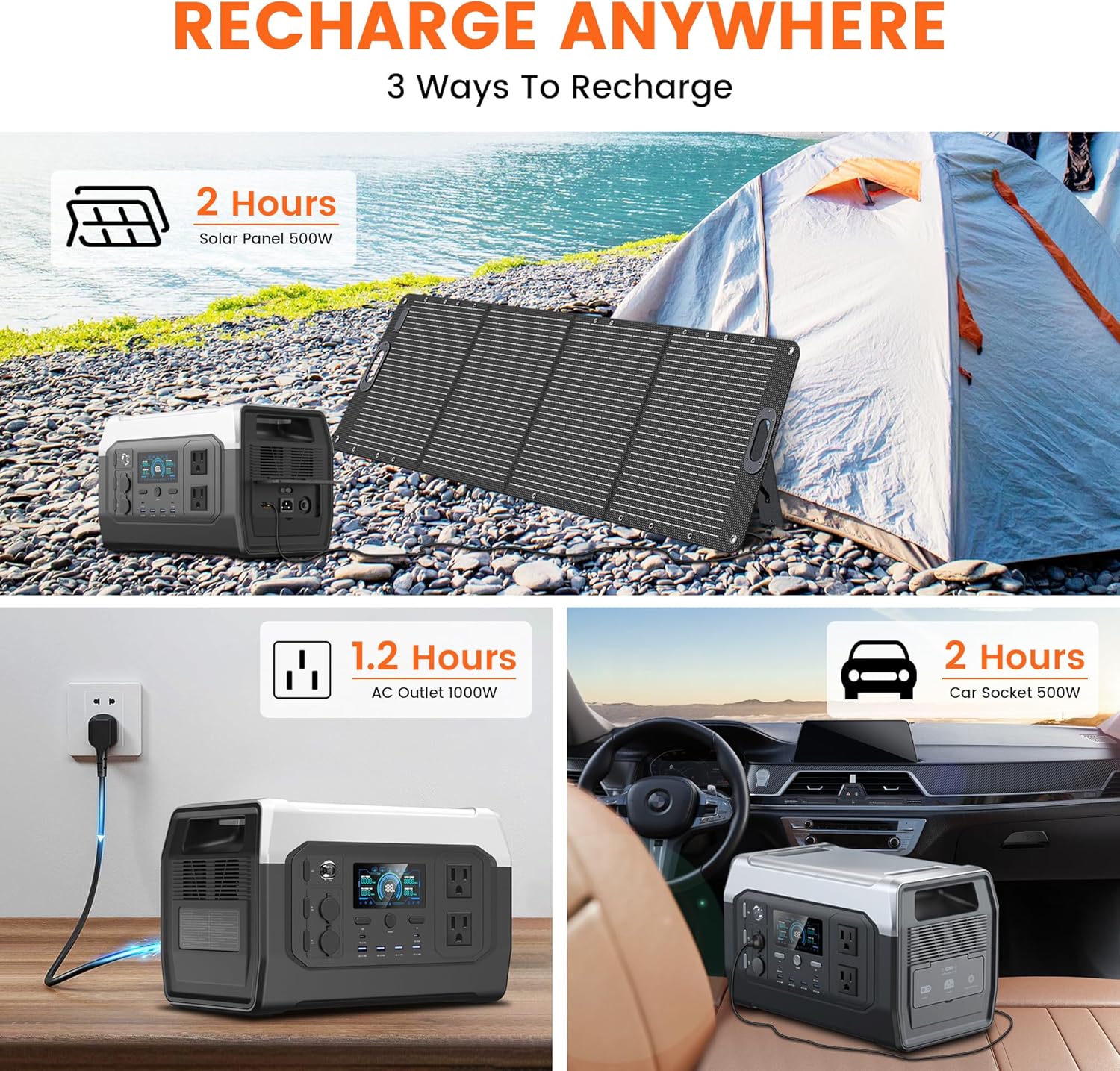
Figure 5.1: Recharge Anywhere

Figure 5.2: Charging Options
6. Operating the Power Station
To operate the XP1000, press the main power button to turn on the unit. The LCD will illuminate, displaying the battery status and other information. To activate specific output ports (AC, DC, USB), press their respective power buttons.
6.1. Connecting Devices
- AC Devices: Plug your AC appliances directly into the AC output ports. Ensure the total wattage does not exceed 1600W (or 2600W surge).
- USB Devices: Connect your USB-A or USB-C devices to the corresponding ports. The power station will automatically detect and deliver optimal charging.
- DC Devices: Plug 12V DC devices into the car charging output ports.
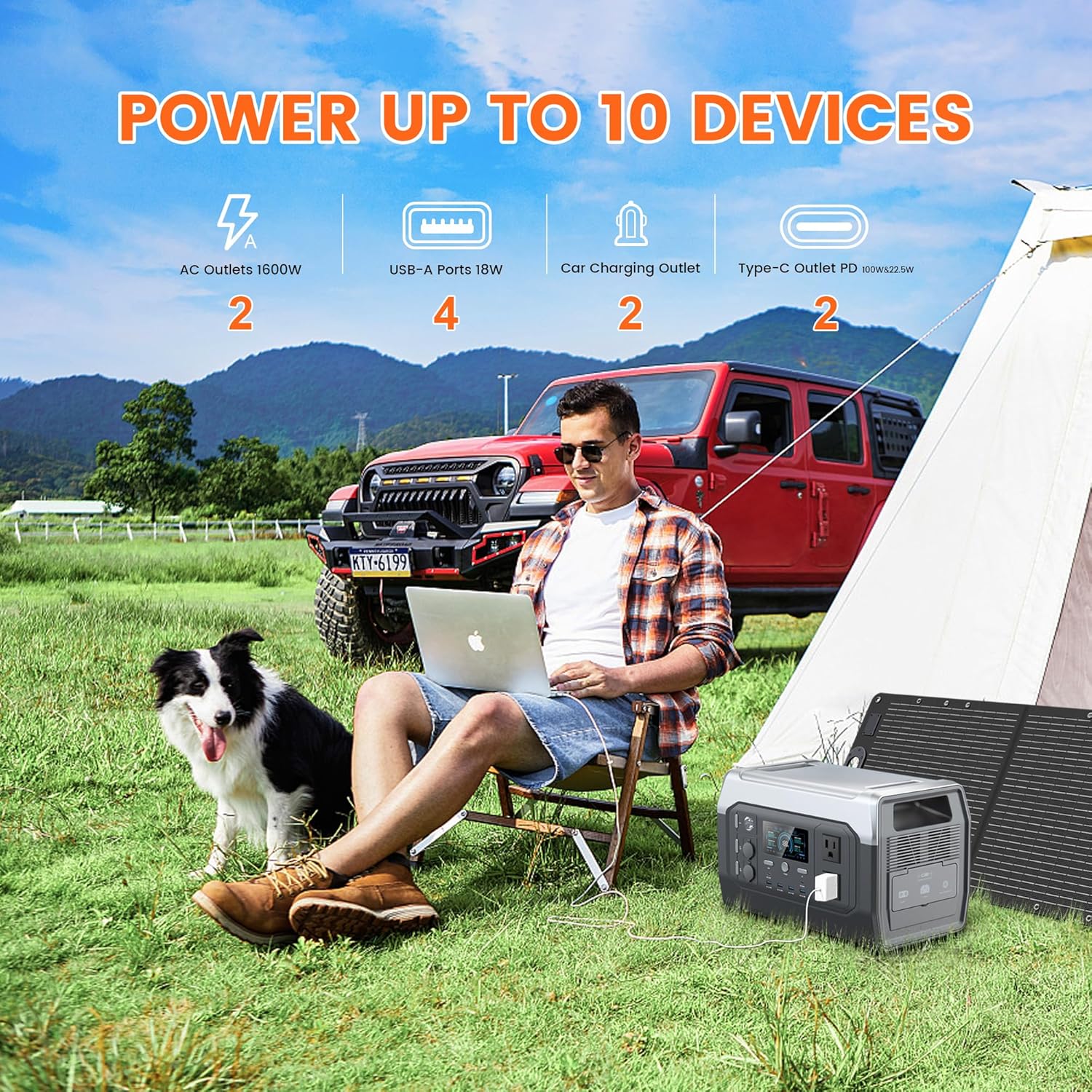
Figure 6.1: Power Up to 10 Devices

Figure 6.2: Power Your Needs
6.2. Applications
The XP1000 is versatile for various scenarios:
- Outdoor Activities: Power for camping, RV trips, outdoor movies, and remote work.
- Home Backup: Keep essential appliances running during power outages.
- Work Sites: Operate power tools where grid power is unavailable.

Figure 6.3: Take Power Outdoors

Figure 6.4: Home Emergency Power

Figure 6.5: Power for Tools
7. LED Light Function
The XP1000 includes an integrated LED light with multiple modes for various situations:
- Low: Provides soft illumination for general use.
- High: Brighter light for increased visibility.
- Strobe: Flashing light for signaling or emergencies.
- SOS: International Morse code signal for distress.

Figure 7.1: Bright Your Night

Figure 7.2: Light Up Anywhere
8. Battery Management System (BMS)
The CTOLITY XP1000 is equipped with advanced LiFePO4 (Lithium Iron Phosphate) battery cells, known for their long lifespan of over 3,000 charge cycles to 80% capacity. A sophisticated Battery Management System (BMS) is integrated to ensure safe and reliable operation. The BMS provides comprehensive protection features:
- Overcharge Protection
- Over-discharge Protection
- Over Current Protection
- Over Voltage Protection
- Short Current Protection
- Overload Protection
- Thermal Protection
- Battery Failure Protection
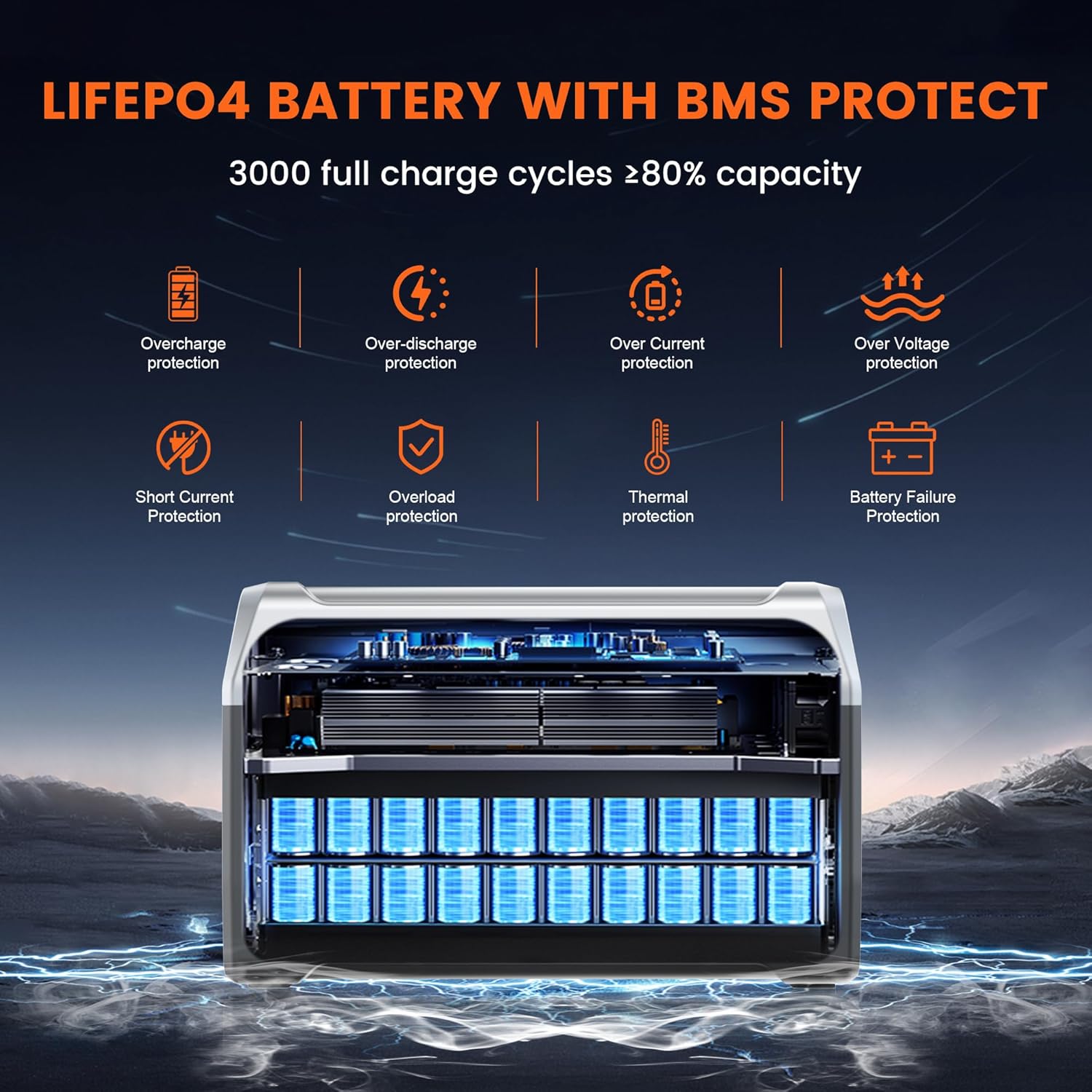
Figure 8.1: LiFePO4 Battery with BMS Protection

Figure 8.2: Safe and Long-Lasting BMS
9. Maintenance
To ensure the longevity and optimal performance of your XP1000 Portable Power Station, follow these maintenance guidelines:
- Storage: Store the unit in a cool, dry place away from direct sunlight and extreme temperatures. For long-term storage, charge the battery to 50-80% every 3-6 months.
- Cleaning: Use a dry, soft cloth to clean the exterior of the unit. Do not use abrasive cleaners or solvents.
- Ventilation: Ensure the ventilation vents are clear of dust and debris to prevent overheating.
- Battery Health: Avoid fully discharging the battery frequently to maximize its lifespan.
10. Troubleshooting
If you encounter issues with your XP1000, refer to the following common problems and solutions:
- Unit Not Turning On: Ensure the battery is charged. If not, connect to a power source.
- No Output from Ports: Check if the specific output button (AC, DC, USB) is pressed and illuminated. Ensure the connected device is within the power station's wattage limits.
- Slow Charging: Verify that the charging cable is securely connected. For solar charging, ensure panels are in direct sunlight and free from obstructions. Check the wattage of your AC adapter or solar panel.
- Overload Indicator: If the overload indicator appears on the LCD, disconnect some devices to reduce the load. The unit will automatically reset after a short period.
- Overheating Indicator: If the overheating indicator appears, move the unit to a cooler, well-ventilated area and allow it to cool down before resuming use.
If the problem persists, please contact CTOLITY customer support for assistance.
11. Specifications
| Brand | CTOLITY |
| Model Name | XP1000 portable power station |
| Wattage | 1024 Watt-hours |
| Output Wattage | 1600 Watts (2600W Surge) |
| Voltage | 110 Volts |
| Fuel Type | Electric |
| Power Source | Battery Powered |
| Battery Type | LiFePO4 (Lithium Iron Phosphate) |
| Battery Cycles | 3,000+ cycles to 80% capacity |
| AC Input | 1000W (Full charge in 1.2 hours) |
| Solar Input | Up to 500W (Full charge in ~2 hours) |
| Item Weight | 37.48 Pounds |
| Product Dimensions | 15.67"L x 8.97"W x 10.08"H |
| Material | ABS |
| Special Features | 1600W AC Output, Adjustable, BMS Protection, Fast charging, Portable |
12. Warranty and Support
The CTOLITY XP1000 Portable Power Station comes with a 1 Year Manufacturer Warranty. For warranty claims, technical support, or any questions regarding your product, please contact CTOLITY customer service through the retailer where you purchased the product or visit the official CTOLITY website for contact information.