
Introduction
Thank you for choosing the Hbada E3 Pro Ergonomic Office Chair. This manual provides essential information for the proper assembly, operation, and maintenance of your chair. Please read these instructions carefully before use to ensure optimal performance and longevity of your product.
The Hbada E3 Pro ergonomic office chair is designed for optimal comfort and support, meeting international standards such as IGR, BIFMA, SGS, TUV, and LONDON DESIGN AWARDS.
Package Contents
Before assembly, please ensure all components are present:
- Hbada E3 Pro Ergonomic Office Chair components
- Welcome Guide
- Assembly Tools (if included)
- Spare screws (if included)
Assembly Instructions
Assembly is required for this product. Please follow the steps below carefully. It is recommended to assemble the chair on a soft, clean surface to prevent damage.
Step 1: Attach the Casters to the Base
Insert the casters into the holes at the end of each leg of the chair base. Push firmly until they click into place.

Image Description: A close-up view of the chair's base with casters, illustrating how to attach the wheels to the star-shaped base. The image also shows the gas lift cylinder slot.
Step 2: Install the Gas Lift Cylinder
Place the gas lift cylinder into the center hole of the assembled chair base. Do not press the top button of the cylinder yet.
Step 3: Assemble the Seat and Backrest
Follow the instructions in the included welcome guide to attach the seat cushion, backrest, and armrests. Ensure all screws are securely tightened. The assembly process is designed to be straightforward, though some users may find assistance helpful during the final attachment of the seat to the backrest.

Image Description: A front-side view of the fully assembled Hbada E3 Pro ergonomic office chair in gray, showcasing its mesh backrest, adjustable headrest, and armrests.
Step 4: Attach the Assembled Seat to the Gas Lift
Carefully place the assembled seat onto the gas lift cylinder. The weight of the seat will secure it in place.
Operating Instructions (Adjustments)
The Hbada E3 Pro chair offers multiple adjustment options for personalized comfort and ergonomic support.
1. Seat Height Adjustment
Locate the lever on the right side under the seat. Pull the lever up to raise the seat. To lower the seat, pull the lever up while seated.
2. 3-Zone Dynamic Lumbar Support
The lumbar support system provides dynamic support with 8-way adjustment to prevent discomfort in the waist and back. Adjust the lumbar support by moving it up or down, and forward or backward, to find your ideal position. Some models feature a lift-and-click mechanism for vertical adjustment.

Image Description: A detailed view of the chair's backrest, highlighting the 3-zone dynamic lumbar support mechanism and its adjustability for spinal alignment (L1-L5).
3. 4D Dual-Axis Adjustable Headrest
The headrest can be adjusted in four dimensions to fully support your neck and head. Adjust its height, tilt angle, and forward/backward position to your preference.
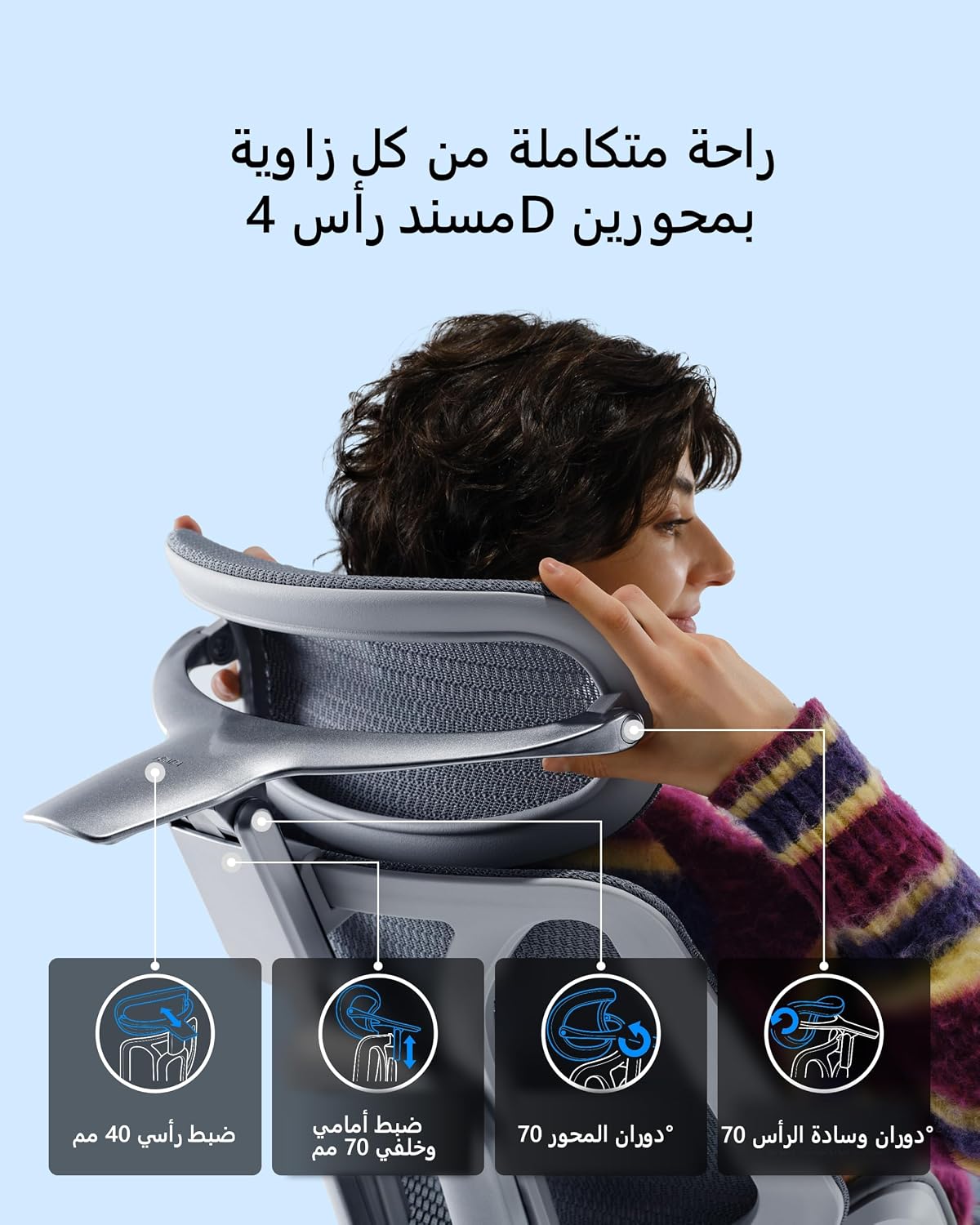
Image Description: A person adjusting the 4D dual-axis headrest of the Hbada E3 Pro chair, demonstrating its height, tilt, and rotational adjustments for neck and head support.
4. 6D Adjustable Armrests
The armrests offer multi-directional adjustment for optimal arm and shoulder support. Adjust their height, depth (forward/backward), width (inward/outward), and pivot angle (left/right rotation).

Image Description: A detailed illustration of the 6D adjustable armrests, showing their ability to move up/down, forward/backward, and rotate 360 degrees for comprehensive arm support.
5. Recline Function and Tilt Lock
The chair features a recline function with multiple locking positions, up to 140 degrees. Use the lever on the left side under the seat to adjust the recline angle and lock it in your desired position. The chair supports various postures from focused work to relaxed napping.
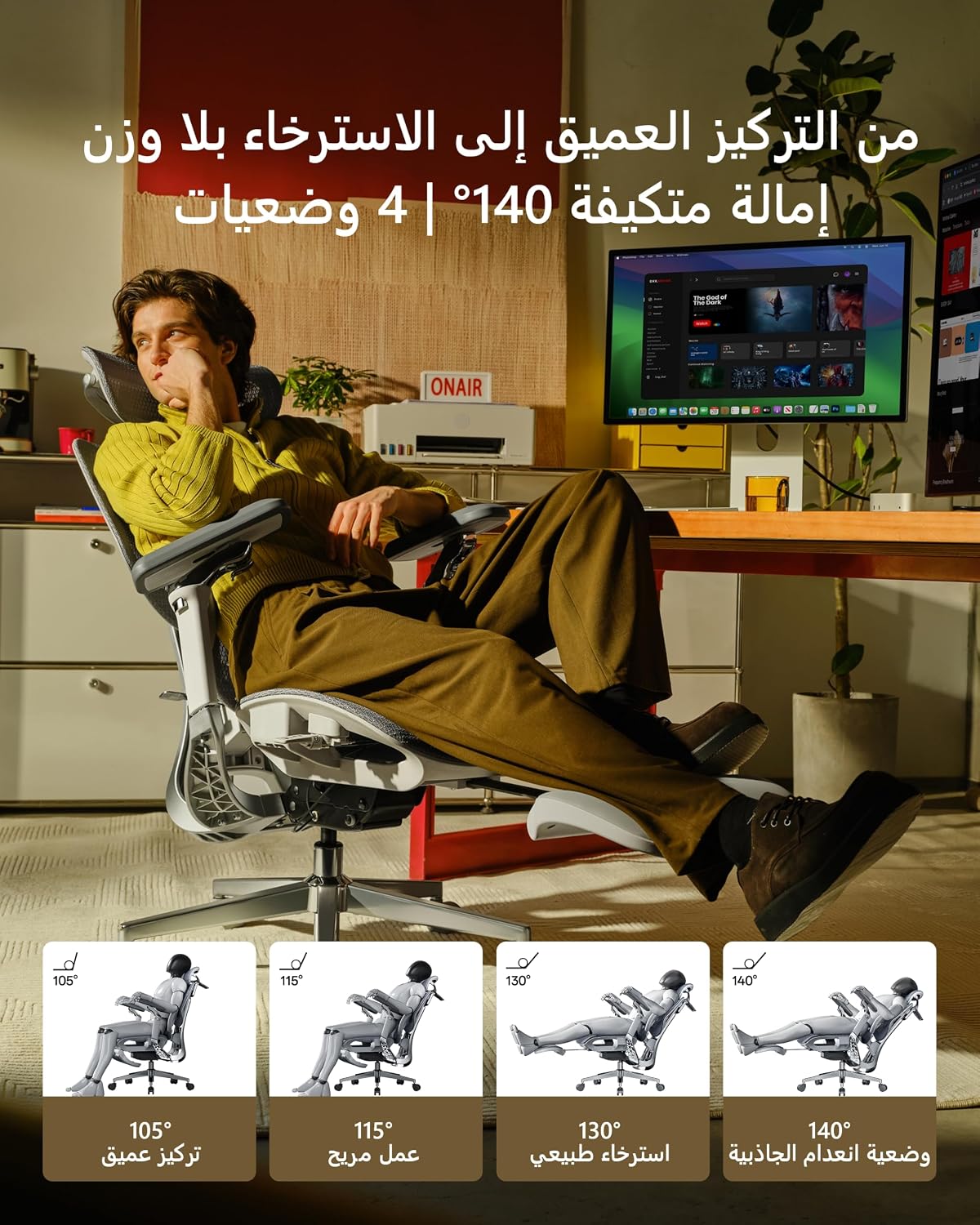
Image Description: A person demonstrating various recline positions of the Hbada E3 Pro chair, ranging from 105 degrees for deep focus to 140 degrees for a weightless relaxation posture.
6. Seat Depth Adjustment
Adjust the seat depth to ensure proper leg support and circulation. Locate the lever or button under the seat and slide the seat forward or backward.
Image Description: A composite image illustrating the seat depth adjustment mechanism (sliding the seat forward/backward) and the smooth-rolling casters of the Hbada E3 Pro chair.
Maintenance
Regular maintenance will help prolong the life and appearance of your Hbada E3 Pro chair.
- Cleaning: Wipe down the chair with a soft, damp cloth. For mesh areas, use a mild soap solution and blot dry. Avoid harsh chemicals or abrasive cleaners.
- Casters: Periodically check casters for hair or debris and clean as needed to ensure smooth movement.
- Fasteners: Occasionally check all screws and bolts to ensure they are tight. Re-tighten if necessary.
- Moving Parts: Do not lubricate the gas lift cylinder. Moving parts like armrests and recline mechanisms generally do not require lubrication.
Troubleshooting
| Problem | Possible Cause | Solution |
|---|---|---|
| Chair does not raise or lower | Gas lift cylinder malfunction or lever not engaged. | Ensure the height adjustment lever is fully engaged. If the problem persists, the gas lift cylinder may need replacement. Contact customer service. |
| Chair wobbles or feels unstable | Loose screws or improper assembly. | Check all assembly screws and tighten them securely. Ensure the chair base and gas lift are properly seated. |
| Casters do not roll smoothly | Debris (hair, dust) caught in casters. | Turn the chair over and carefully remove any debris from the caster wheels. |
| Lumbar support not adjusting | Adjustment mechanism stuck or not engaged. | Gently try to move the lumbar support in all directions. Refer to the operating instructions for the specific adjustment method (e.g., lift-and-click). |
Specifications
- Brand: Hbada
- Model: E3 Pro (E301)
- Color: Gray
- Product Dimensions (D x W x H): 80 cm x 40 cm x 50 cm (Note: These dimensions may refer to packaging or a specific component. Please refer to the product page for overall assembled dimensions.)
- Size: Oversized
- Material: Metal and Plastic Frame, Fabric Seat, Foam Filling
- Max Recommended Weight: 330 pounds (approx. 150 kg)
- Item Weight: 27.75 kg
- Assembly Required: Yes
- Back Style: Highback
- Arm Style: 6D Adjustable Armrests
- Leg Style: Wheel Base
- Usage: Indoor Office Chair
Warranty and Support
Your Hbada E3 Pro Ergonomic Office Chair comes with the following:
- 3-Year Warranty: Covers manufacturing defects and major component failures under normal use.
- 30-Day Free Returns: If you are not satisfied with your purchase, you may return it within 30 days for a full refund.
- 15-Day Price Match Guarantee: If the price drops within 15 days of your purchase, you may be eligible for a price adjustment.
- Customer Service: For any questions, concerns, or warranty claims, please contact our friendly customer service team via the contact information provided in your welcome guide or on the official Hbada website.


