
1. Safety Guidelines
Before operating the mcokoe S159 drone, please read and understand all safety guidelines to ensure safe and responsible flight. Failure to follow these instructions may result in injury, damage to the drone, or property damage.
1.1 Flight Environment
- Fly in open areas, away from people, animals, buildings, and obstacles.
- Maintain a safe distance from power lines, trees, and water bodies.
- Do not fly in strong winds, heavy rain, snow, or fog.
- Ensure you have clear line of sight to the drone at all times.
- Respect local regulations and airspace restrictions.
1.2 Battery Safety
- Use only original mcokoe S159 batteries and charging cables.
- Do not overcharge or over-discharge batteries.
- Store batteries in a cool, dry place, away from direct sunlight and heat sources.
- Do not puncture, drop, or short-circuit batteries.
- If a battery swells, leaks, or shows any signs of damage, discontinue use immediately.
1.3 General Operation
- Always perform pre-flight checks before each flight.
- Ensure the drone is properly calibrated before take-off.
- Keep hands and face clear of rotating propellers.
- Do not operate the drone under the influence of alcohol or drugs.
- Begin with slow, controlled movements, especially if you are a beginner.
2. Package Contents
Verify that all items are present in your package before proceeding with setup.

Image: All components included in the mcokoe S159 drone package, featuring the drone, remote control, batteries, propellers, charging cable, and drone landing pad.
- Drone x 1
- Remote control with screen x 1
- Battery x 2
- Paddle (Propeller) x 4
- Charging cable x 1
- Drone landing pad x 1
- Color box x 1
- Storage bag x 1
3. Product Overview
The mcokoe S159 is a 4K GPS drone designed for aerial photography and videography, featuring obstacle avoidance and a remote controller with an integrated screen for real-time FPV.

Image: The mcokoe S159 drone, its remote controller, two batteries, spare propellers, a charging cable, and a carrying case.
3.1 Drone Features
- 4K HD Camera: Captures high-resolution photos and videos.
- GPS Positioning: Provides stable hovering, accurate return-to-home, and intelligent flight modes.
- Obstacle Avoidance: Helps prevent collisions during flight.
- Brushless Motors: Offers powerful and efficient flight performance.
- 5G FPV Transmission: Real-time video feed to the remote controller screen.
- Modular Batteries: Easy to install and replace, providing extended flight time.

Image: Close-up view of the mcokoe S159 drone's high-definition electrically adjustable lens, highlighting its EIS electronic anti-shake feature for enhanced stability and natural imaging.
3.2 Remote Controller
The remote controller features a built-in 5.9-inch LCD screen for real-time image transmission, eliminating the need for a separate phone connection.
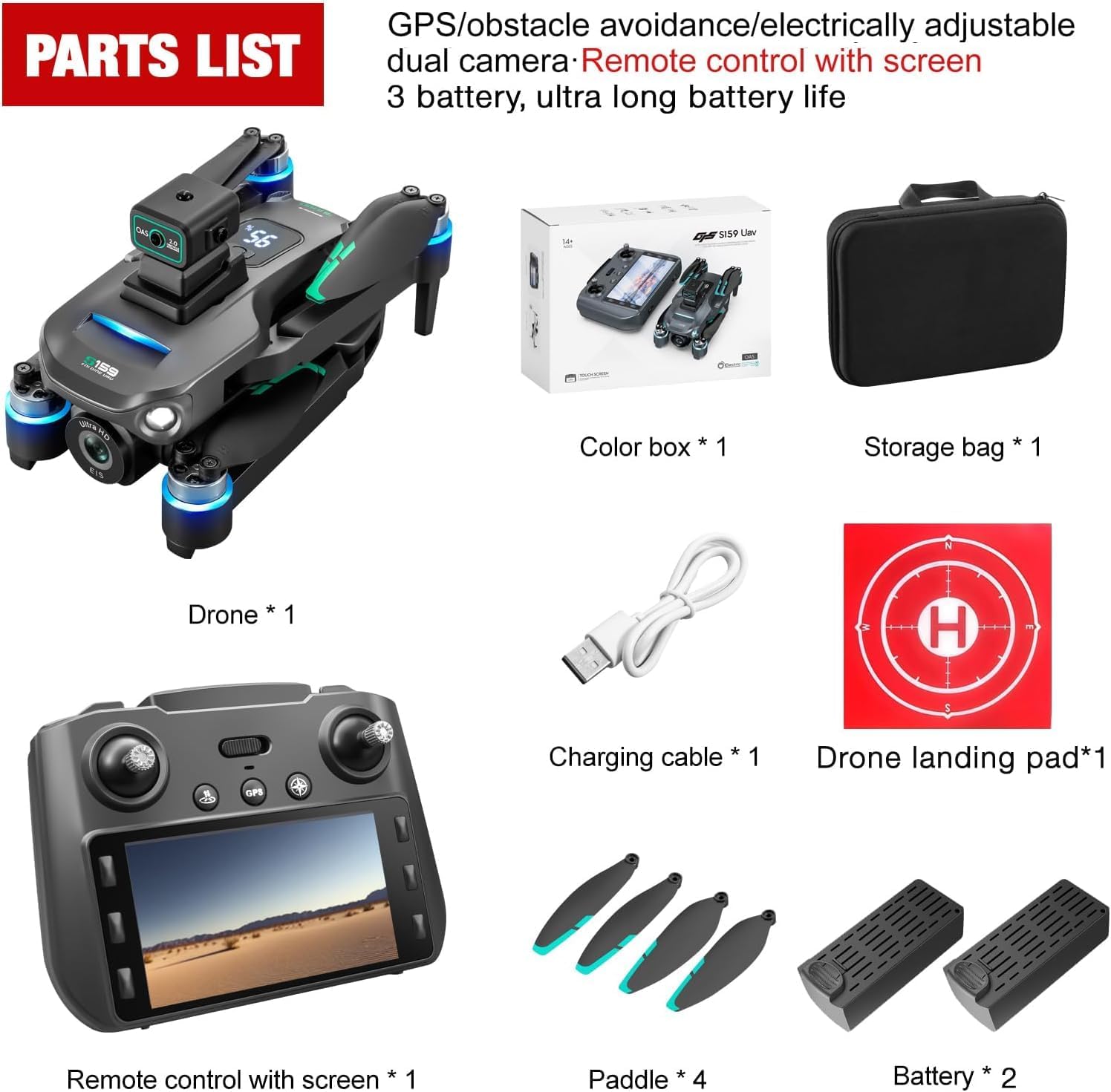
Image: Diagram of the mcokoe S159 remote control, labeling its various buttons and functions, including power switch, camera controls, speed switching, throttle, GPS switch, take off/land, return/set, function keys, screen switch, charging port, memory socket, and confirm key.
3.3 Product Video Overview

Video: An overview of the mcokoe S159 drone, showcasing its features such as 4K camera, 5.9-inch screen remote, GPS capabilities, obstacle avoidance, and flight stability.
4. Setup
4.1 Charging Batteries
- Connect the charging cable to the drone battery and a suitable USB power adapter (not included).
- Connect the charging cable to the remote controller's charging port.
- Charge until the indicator lights show a full charge. Charging time may vary.
4.2 Installing Drone Battery
- Ensure the drone is powered off.
- Insert the fully charged battery into the battery compartment on the drone until it clicks into place.
4.3 Propeller Installation
- Match the propellers with the corresponding motor arms (usually marked A and B).
- Attach the propellers firmly to the motor shafts. Ensure they are securely fastened to prevent detachment during flight.
5. Operating Instructions
5.1 Power On/Off
- Drone: Press and hold the power button on the drone until the indicator lights turn on.
- Remote Controller: Press and hold the power switch on the remote controller until the screen illuminates.
5.2 Pairing and Calibration
- Place the drone on a flat, level surface.
- Power on the drone, then the remote controller.
- Wait for the drone and remote to automatically pair. The indicator lights will change to solid.
- Perform Gyroscope Calibration: Move both joysticks to the bottom-left or bottom-right corners simultaneously until the drone lights flash, then release.
- Perform Geomagnetic Calibration: Follow the on-screen prompts or manual instructions to rotate the drone horizontally and vertically until calibration is complete. This is crucial for GPS accuracy.
5.3 Take-off and Landing
- One-Key Take-off: Press the 'Take off/land' button once. The drone will automatically ascend to a safe height and hover.
- Manual Take-off: Push both joysticks outwards and downwards to start the motors, then slowly push the left joystick (throttle) upwards to ascend.
- One-Key Landing: Press the 'Take off/land' button once. The drone will automatically descend and land.
- Manual Landing: Slowly pull the left joystick (throttle) downwards until the drone lands, then push both joysticks outwards and downwards to stop the motors.
5.4 Flight Modes

Image: The mcokoe S159 drone and its remote controller, illustrating the 'OWN SWITCHING' feature for selecting between Indoor Mode and Outdoor GPS Mode.
- Indoor Mode: For flight in enclosed spaces. GPS is disabled.
- Outdoor GPS Mode: For outdoor flight. GPS positioning provides enhanced stability and features. Ensure sufficient GPS satellites are acquired before flight.
5.5 Obstacle Avoidance
The drone is equipped with obstacle avoidance sensors. When an obstacle is detected, the drone will automatically adjust its flight path to avoid collision. This feature is most effective in open environments with clear obstacles.
5.6 Camera Operation
- Video Recording: Press the 'Camera up' button (or designated video button) on the remote controller to start/stop recording.
- Photo Capture: Press the 'Camera down' button (or designated photo button) on the remote controller to take a still picture.
- Ensure a memory card is inserted into the drone (if applicable) or the remote controller to save media.
5.7 Intelligent Flight Modes

Image: Visual representation of the mcokoe S159 drone's major functions, including Intelligent Follow, Waypoint flight, and Gesture photography.
- Intelligent Follow: The drone will automatically follow the remote controller or a designated subject.
- Waypoint Flight: Set a series of waypoints on the map via the remote controller, and the drone will fly along the specified path.
- Gesture Photography: Perform specific hand gestures to trigger photo or video capture. Refer to the remote controller screen for gesture recognition indicators.
5.8 Return to Home (RTH)
- Press the 'Return/Headless' button on the remote controller. The drone will automatically return to its take-off point.
- RTH is also triggered automatically when the battery is low or signal is lost (if GPS is active).
6. Maintenance
6.1 Cleaning
- Wipe the drone and remote controller with a soft, dry cloth after each use.
- Do not use harsh chemicals or solvents.
- Ensure no dust or debris accumulates in the motors or camera lens.
6.2 Storage
- Store the drone and accessories in the provided carrying case.
- Keep batteries charged to approximately 50-60% for long-term storage.
- Store in a cool, dry environment, away from direct sunlight and extreme temperatures.
6.3 Propeller Replacement
- Inspect propellers for cracks or damage before each flight.
- Replace damaged propellers immediately using the spare propellers provided.
- Ensure correct propeller type (A or B) is installed on the corresponding motor.
7. Troubleshooting
If you encounter issues with your mcokoe S159 drone, refer to the following common problems and solutions:
| Problem | Possible Cause | Solution |
|---|---|---|
| Drone does not power on | Low battery; Battery not installed correctly; Power button not pressed long enough | Charge battery fully; Reinstall battery securely; Press and hold power button for 2-3 seconds |
| Remote controller does not connect to drone | Drone or remote not powered on; Pairing failed; Interference | Ensure both are on; Repeat pairing process; Move to an area with less interference |
| Unstable flight / Drifting | Improper calibration; Strong winds; Damaged propellers | Perform gyroscope and geomagnetic calibration; Fly in calm conditions; Replace damaged propellers |
| Camera not taking still pictures (only video) | Incorrect mode selected; Software glitch | Ensure the correct button for photo capture is pressed (e.g., 'Camera down'); Restart drone and remote; Check for firmware updates. If issue persists, contact customer support. |
| Obstacle avoidance not working | Sensors blocked; Flying too fast; Complex environment | Clean sensors; Reduce flight speed; Fly in open areas with clear obstacles |
| Poor video transmission quality | Interference; Distance too far; Low battery | Fly in open areas; Stay within recommended range; Ensure batteries are charged |
8. Specifications
Detailed technical specifications for the mcokoe S159 drone:
| Feature | Specification |
|---|---|
| Brand | mcokoe |
| Model Name | S159 |
| Color | Black |
| Video Capture Resolution | 4K |
| Connectivity Technology | Wi-Fi |
| Video Capture Format | MP4 |
| Remote Control Technology | RF |
| Control Type | Remote Control |
| Maximum Range | 1500 Meters |
| Material | Plastic |
| Wireless Communication Technology | Wi-Fi, RF |
| Battery Cell Composition | Lithium Polymer |
| Are Batteries Included | Yes |
| Video Output Resolution | 4 megapixels |
| Remote Control Included? | Yes |
| Optical Sensor Technology | Optical Flow |
| Rechargeable Battery Included | Yes |
| UPC | 745248196831 |
| Item Weight | 2.33 pounds |
| Product Dimensions | 5 x 2 x 5 inches |
| Item Model Number | S159 |
9. Warranty and Support
For warranty information, technical support, or service inquiries, please refer to the contact information provided with your product packaging or visit the official mcokoe website. Keep your purchase receipt as proof of purchase.