
Introduction
This manual provides detailed instructions for the safe and efficient operation, maintenance, and charging of your TUNENGE S15 and S12Plus rechargeable keychain flashlights. Please read this manual thoroughly before use and retain it for future reference.

Image: The TUNENGE S15 (black) and S12Plus (clear) keychain flashlights, showcasing their compact design.
Product Features
- High Lumen Output: S15 up to 650 lumens, S12Plus up to 610 lumens.
- Multiple Light Modes: Main light with various brightness levels, and side lights with white, red, UV, and flashing options.
- Rechargeable: Built-in Lithium Polymer battery with Type-C fast charging.
- Magnetic Tail: Allows for hands-free attachment to metal surfaces.
- Compact Design: Ideal for everyday carry (EDC) and outdoor activities.
Setup and Charging
Initial Charge
Before first use, fully charge your flashlight. The device comes with a built-in Lithium Polymer battery.
- Locate the Type-C charging port on your flashlight.
- Connect the provided Type-C charging cable to the flashlight and a compatible USB power source (e.g., computer, wall adapter).
- The charging indicator light will illuminate red during charging.
- Charging is complete when the indicator light turns green. Full charge typically takes approximately 35 minutes.

Image: The TUNENGE S12Plus flashlight connected to a Type-C charging cable, showing the red charging indicator light.

Image: Close-up of the TUNENGE S15 flashlight showing the red light indicating charging and the green light indicating a full charge.
Operating Instructions
Main Light Operation (S12Plus Example)
- Extremely Bright Mode: Long press the power button to activate the extremely bright (Turbo) mode. Release the button to turn it off.
- Constant Light Modes:
- Double-tap the power button (within 0.5 seconds) to turn on the main light in a constant mode.
- Click the power button to cycle through brightness levels: Moonlight (3.5 lm), Low (35 lm), Medium (350 lm), High (500 lm), Turbo (610 lm).
- Long press the power button to turn off the main light.
- Memory Function: The flashlight will remember the last used constant light mode when turned off and will return to that mode when turned on again.
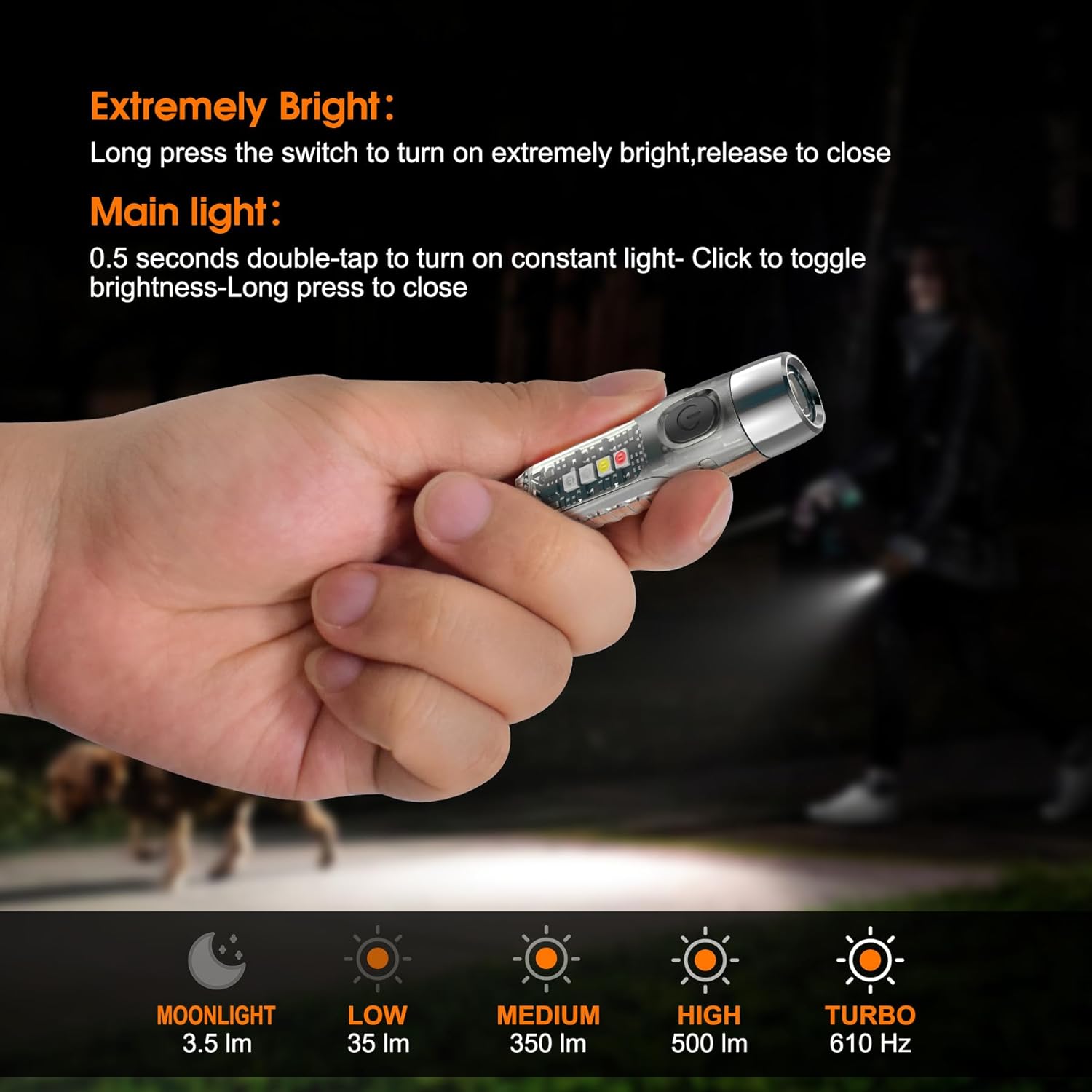
Image: A hand holding the TUNENGE S12Plus flashlight, illustrating the different main light brightness levels from Moonlight to Turbo.
Side Light Operation (S12Plus Example)
- Activate Side Lights: Quickly click the power button three times to turn on the side light.
- Cycle Modes: Click the power button to switch between the 6 available side light functions:
- White Light
- Red Light
- UV Light (395nm)
- White Light Flashing
- Red Light Flashing
- Red Blue Flashing
- Turn Off Side Lights: Long press the power button to turn off the side light.

Image: The TUNENGE S12Plus flashlight demonstrating its various side light modes, including white, red, UV, and flashing combinations.
Magnetic Tail Feature (S15 and S12Plus)
Both the S15 and S12Plus models are equipped with a magnetic tail. This allows the flashlight to be securely attached to metal surfaces, providing hands-free illumination for tasks such as vehicle repair, camping, or working in low-light conditions.

Image: The TUNENGE S15 flashlight attached magnetically to a metal surface, providing light for a person working with a saw.
Maintenance
- Cleaning: Wipe the flashlight with a soft, damp cloth. Do not use abrasive cleaners or solvents.
- Charging: Recharge the battery regularly to maintain optimal performance, especially if the flashlight has not been used for an extended period.
- Storage: Store the flashlight in a cool, dry place away from direct sunlight and extreme temperatures.
- Water Resistance: These flashlights are not water resistant. Avoid exposing them to water or high humidity to prevent damage.
Troubleshooting
- Flashlight not turning on:
- Ensure the battery is fully charged. Connect to a Type-C charger and check the indicator light.
- Verify that the power button is being pressed correctly according to the operating instructions (long press for Turbo, double-tap for constant modes).
- Dim light output:
- The battery may be low. Recharge the flashlight.
- Ensure the correct brightness mode is selected. Cycle through modes to check.
- Charging indicator not working:
- Check the charging cable and power source for proper connection.
- Try a different Type-C cable or USB power adapter.
Specifications
| Feature | TUNENGE S15 | TUNENGE S12Plus |
|---|---|---|
| Max Output | 650 Lumens | 610 Lumens (Main Light) |
| Beam Distance | 109 meters | 200 meters |
| Max Runtime | Up to 40 hours | Up to 40 hours |
| Charging Interface | Type-C | |
| Charging Time | Approx. 35 minutes | |
| Battery Type | Built-in 500mAh Lithium Polymer | |
| Material | Metal, Plastic | |
| Water Resistance | Not Water Resistant | |
| Drop Test Rating | 1.5 meters | |
| Weight | 21 grams | 19 grams |
| Light Source | LED (SST20 for S12Plus) | |
| Special Features | Magnetic Tail, Multiple Light Modes (White, Red, UV, Flashing) | |

Image: Infographic detailing key specifications of the TUNENGE S12Plus flashlight, including 610 lumens max output, 35 minutes Type-C charging, 200m beam distance, 40 hours max runtime, 1.5m drop test, and 19 grams weight.

Image: Infographic detailing key specifications of the TUNENGE S15 flashlight, including 650 lumens max output, 35 minutes Type-C charging, 109m beam distance, 40 hours max runtime, 1.5m drop test, and 21 grams weight.
Warranty and Support
For warranty information or technical support, please refer to the product packaging or contact TUNENGE customer service directly. Contact details are typically available on the official TUNENGE website or through your purchase platform.
For further assistance, you may visit the TUNENGE Store on Amazon.
Safety Information
- Do not shine the flashlight directly into eyes.
- Keep out of reach of children.
- Do not disassemble the flashlight; this may void the warranty and cause damage.
- Use only the provided or recommended charging cables.
- Avoid extreme temperatures and direct sunlight.