
Product Overview
The XTRONS 12.3 Inch Android 13 Car Stereo is an advanced multimedia system designed to upgrade your vehicle's infotainment experience. Featuring a large IPS touch screen, this unit provides seamless integration with your car's existing MIB system, offering enhanced navigation, entertainment, and connectivity options.
Key features include an Octa-core processor with 4GB RAM and 64GB ROM, a 1920x720 HD IPS display, Bluetooth 5.0, dual Wi-Fi band support, Global 4G LTE connectivity, and built-in Wireless CarPlay and Android Auto for a truly connected driving experience.

Figure 1: Front view of the XTRONS 12.3 Inch Android 13 Car Stereo, showcasing its large display and core specifications like Octa Core, 4GB RAM, 64GB ROM, 1920x720 HD IPS Screen, and Global 4G LTE.
Compatibility
This car stereo is specifically designed for the following Audi models and years:
- AUDI A3 (Typ 8V) (2013-2018) with MIB System
- AUDI S3 (Typ 8V) (2013-2018) with MIB System
- AUDI RS3 (Typ 8V) (2013-2018) with MIB System
It is crucial to verify your vehicle's compatibility before installation. The unit is designed to retain original car-centric functions such as speed, fuel level, safety warnings, original fiber optic sound system, radio, CD player, and Bluetooth.

Figure 2: Comparison of an Audi A3 dashboard before and after the installation of the XTRONS car stereo, demonstrating seamless integration.
Setup and Installation
1. Checking Software Version
Before proceeding with installation, please check your factory stereo's software version to ensure compatibility. Navigate to "Setup" or "Menu" > "Setup MMI" > "Settings" > "Version information" on your original car stereo. The unit is compatible with MSTD, MHI2, and MHIG software versions.

Figure 3: Visual guide for checking compatible Audi MMI software versions (MSTD, MHI2, MHIG) on the factory stereo.
2. Audi Music Interface (AMI) Compatibility
If your vehicle is equipped with an Audi Music Interface, you must connect the XTRONS AMI cable (firstly connected with the audio extension cable) to the Audi music interface. Both the AMI cable and audio extension cable are provided in the package.
Figure 4: Illustration of the Audi Music Interface and the necessary AMI and extension cables for proper connection.
3. Wiring Harness Connection
Carefully follow the wiring diagram to connect the main ISO wiring harness and other peripheral cables. Ensure all connections are secure to prevent malfunctions.
- ISO wiring harness
- Original CD port
- Microphone port
- Back Video Input, Reverse Camera Video Input
- CCD 12V, Reverse Camera ACC
- BACK, Reverse Control
- ACC
- Audio output
- USB port 1
- USB port 2
- Mini speaker
- GPS antenna
- 4G antenna
- 4G SIM Card Slot
- XTRONS 360° camera port (reserved part)
- LVDS port

Figure 5: Comprehensive diagram illustrating the wiring harness and various connection points for the XTRONS car stereo.
Operating Instructions
1. Touch Screen Operation
The 12.3-inch IPS touch screen provides intuitive control. Tap, swipe, and pinch gestures are supported for navigation through menus, applications, and media. The 1920x720 HD display ensures clear and vibrant visuals.

Figure 6: Visual examples of the multi-task display, Picture-in-Picture (PIP) functionality, the responsive IPS touch screen, and the convenient dual USB input ports.
2. Connectivity (Wi-Fi & 4G LTE)
The unit supports dual Wi-Fi bands (2.4GHz and 5GHz) for faster and more stable internet access. Additionally, it features Global 4G LTE connectivity. Simply insert a Micro-SIM card (not included) to enjoy mobile broadband. Note that 4G LTE supports internet data only, not phone calls.

Figure 7: Overview of the three internet access options: 4G LTE (up to 300Mbps), 5GHz Wi-Fi, and 2.4GHz Wi-Fi.
3. Wireless CarPlay and Android Auto
Enjoy seamless integration with your smartphone. Connect your iPhone wirelessly via Bluetooth for Apple CarPlay, or your Android phone wirelessly via Bluetooth or with a USB cable for Android Auto. This allows access to GPS, calls, music, and voice assistants (Google Assistant, Siri) directly from the car stereo.
4. Screen Mirroring
The unit also supports wireless screen mirroring, allowing you to display your smartphone's screen directly on the car stereo's display.

Figure 8: Demonstrations of Wireless CarPlay, Wireless/Wired Android Auto, and Wireless Screen Mirroring, showing how smartphone content is displayed and controlled on the car stereo.
5. Multi-task Display and Picture-in-Picture (PIP)
The large screen supports running two applications simultaneously, such as navigation and music. The Picture-in-Picture (PIP) feature allows you to keep a video playing in a small window while using other applications.
Maintenance
- Cleaning: Use a soft, dry cloth to clean the screen and exterior. Avoid abrasive cleaners or solvents.
- Software Updates: Periodically check for software updates from XTRONS to ensure optimal performance and access to new features. Follow the instructions provided with the update package.
- Environmental Conditions: Avoid exposing the unit to extreme temperatures, direct sunlight for prolonged periods, or excessive moisture.
Troubleshooting
| Problem | Possible Cause | Solution |
|---|---|---|
| Unit does not power on. | Loose power connection, blown fuse, incorrect wiring. | Check all power connections. Verify vehicle's fuse box and the unit's fuse. Ensure wiring matches the diagram. |
| No sound output. | Incorrect audio wiring, volume too low, mute enabled, incompatible audio settings. | Check audio cable connections. Increase volume. Disable mute. Adjust audio output settings in the system menu. Ensure AMI cable is correctly connected if applicable. |
| GPS signal weak or lost. | GPS antenna not properly installed or obstructed. | Ensure GPS antenna is installed in a clear location with an unobstructed view of the sky. Check antenna connection. |
| CarPlay/Android Auto not connecting. | Bluetooth pairing issue, USB cable fault, phone settings. | Ensure Bluetooth is enabled on both devices and paired correctly. Try a different USB cable if using wired connection. Check phone's CarPlay/Android Auto settings. |
| Touch screen unresponsive. | Temporary software glitch, screen damage. | Restart the unit (turn off car ignition and restart). If problem persists, contact support. |
Specifications
| Feature | Detail |
|---|---|
| Screen Size | 12.3 inches |
| Display Type | IPS Touch Screen |
| Resolution | 1920x720 HD |
| Operating System | Android 13 |
| Processor | Octa Core |
| RAM | 4GB DDR4 |
| ROM | 64GB Solid State |
| Bluetooth | Version 5.0 |
| Wi-Fi | Dual Band (2.4GHz/5GHz) |
| Mobile Connectivity | Global 4G LTE (Micro-SIM) |
| Car Integration | Wireless CarPlay, Wireless/Wired Android Auto, Screen Mirroring |
| Audio Output Mode | Stereo, Surround |
| Surround Sound Channel Configuration | 5.1 or 7.1 |
| Dimensions (Approx.) | 310mm (W) x 130mm (H) x 28mm (D) - main unit |

Figure 9: Approximate dimensions of the XTRONS 12.3 Inch Car Stereo unit.
Included Accessories
The following accessories are included with your XTRONS 12.3 Inch Android 13 Car Stereo:
- 1 x ISO Wiring Harness
- 1 x GPS Antenna
- 1 x Audio Cable
- 1 x AMI Cable
- 1 x 4G Antenna
- 1 x Mini Speaker
- 1 x Fix Mount
- 5 x Screws
- 1 x User Manual
- 1 x Installation Instruction
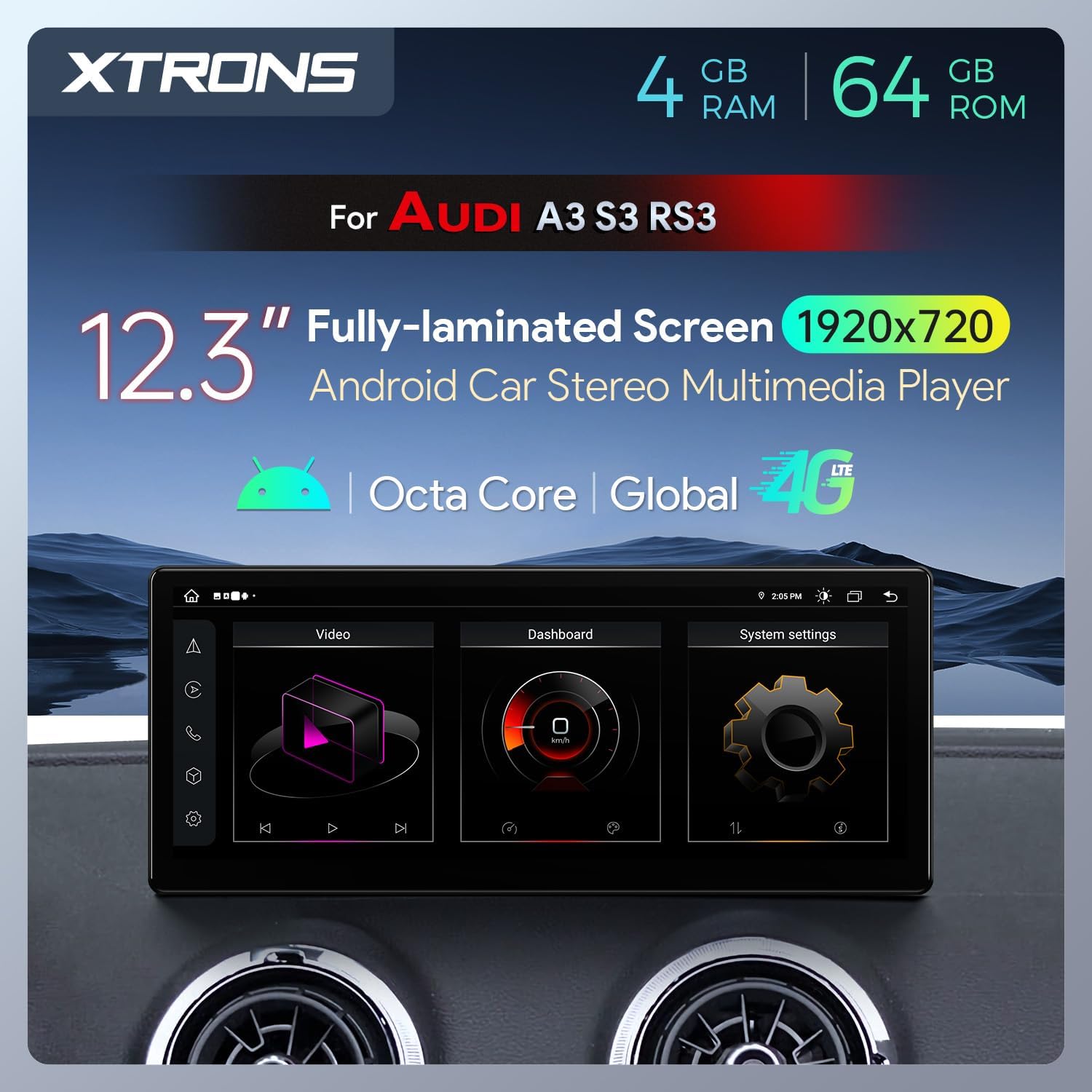
Figure 10: A visual representation of all accessories included in the product package.
Warranty and Support
For warranty information, technical support, or any inquiries regarding your XTRONS product, please refer to the official XTRONS website or contact their customer service directly. Keep your purchase receipt as proof of purchase for warranty claims.
Visit the XTRONS Store on Amazon for more information and support resources.