
VOLTCRAFT PSW 2000-12-G
VOLTCRAFT PSW 2000-12-G Pure Sine Wave Inverter Instruction Manual
Model: PSW 2000-12-G | Manufacturer Part Number: VC-14490410
1. Introduction
The VOLTCRAFT PSW 2000-12-G Pure Sine Wave Inverter is designed to convert 12V DC power from a battery into stable 230V AC pure sine wave power. This type of output is essential for operating sensitive electronic devices that require a clean and consistent power supply, such as televisions, computers, and audio systems, without interference or damage. Its microcontroller-controlled electronics ensure reliable performance and protection under various conditions, including overload and short circuits.
2. Safety Instructions
Please read and understand all safety instructions before operating the inverter. Failure to follow these instructions may result in electric shock, fire, or serious injury.
- Ventilation: Ensure the inverter is installed in a well-ventilated area. Do not block ventilation openings.
- Dry Environment: Operate the inverter only in dry conditions. Avoid exposure to water, rain, or excessive humidity.
- Correct Voltage: Connect the inverter only to a 12V DC power source. Do not connect to a 24V or higher DC source.
- Flammable Materials: Do not operate the inverter near flammable liquids, gases, or other combustible materials.
- Professional Installation: For permanent installations, it is recommended to consult a qualified electrician.
- Grounding: Ensure the inverter is properly grounded according to local electrical codes.
- Children and Pets: Keep the inverter out of reach of children and pets.
- Disassembly: Do not attempt to disassemble or modify the inverter. Refer all servicing to qualified personnel.
3. Package Contents
Verify that all items are present and undamaged upon unpacking.
- VOLTCRAFT PSW 2000-12-G Pure Sine Wave Inverter
- Instruction Manual
- DC Connection Cables (if included)
4. Product Overview
The VOLTCRAFT PSW 2000-12-G inverter features a robust design with multiple output options and cooling mechanisms.

Figure 1: Front-top view of the VOLTCRAFT PSW 2000-12-G inverter, showing the two AC outlets, USB port, and power button on the front panel.

Figure 2: Top view of the inverter, highlighting the VOLTCRAFT branding and model number on its blue casing.
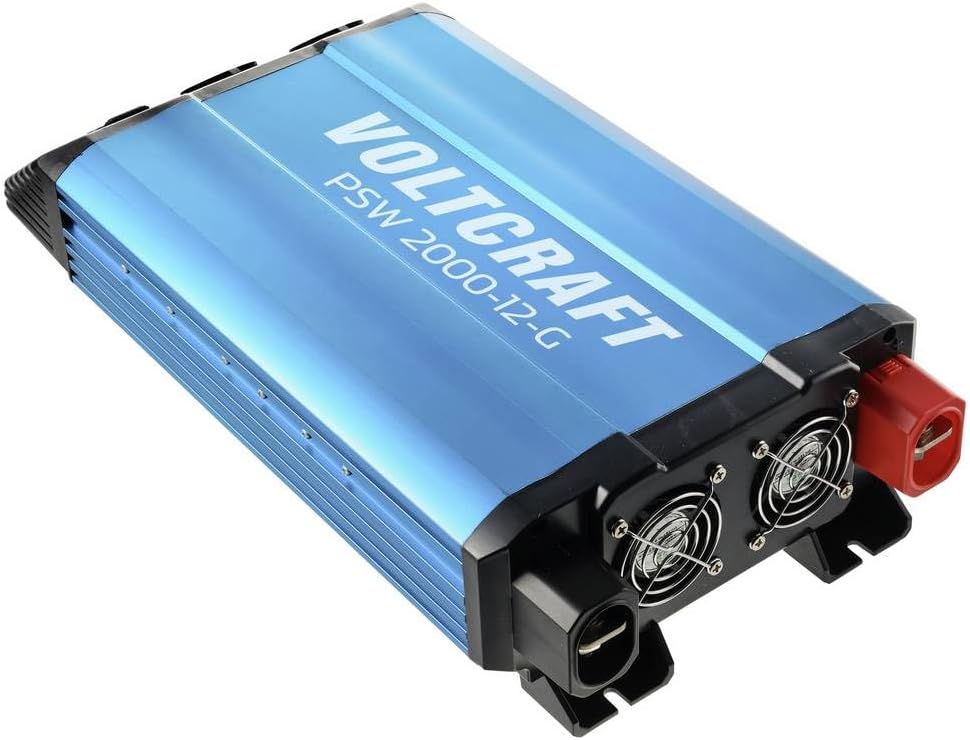
Figure 3: Rear-top view of the inverter, displaying the cooling fans and the robust DC input terminals (red for positive, black for negative).

Figure 4: Side view of the inverter, showing the heat sink fins for efficient thermal management.
5. Setup
Proper setup is crucial for safe and efficient operation of your inverter.
5.1. Location
- Choose a cool, dry, and well-ventilated area.
- Avoid direct sunlight, heat sources, and moisture.
- Ensure sufficient clearance around the inverter for airflow, especially around the cooling fans.
- Mount the inverter securely on a stable, non-flammable surface.
5.2. DC Input Connection
Connect the inverter to a 12V DC battery or power source.
- Ensure the inverter's power switch is in the OFF position.
- Use appropriate gauge cables for the power rating (2000W) to minimize voltage drop and prevent overheating.
- Connect the RED positive (+) cable to the positive (+) terminal of the inverter and then to the positive (+) terminal of the battery.
- Connect the BLACK negative (-) cable to the negative (-) terminal of the inverter and then to the negative (-) terminal of the battery.
- Ensure all connections are tight and secure to prevent loose contacts and sparking.
5.3. Grounding
Connect the inverter's chassis ground terminal to a reliable earth ground. This is a critical safety measure.
6. Operating Instructions
6.1. Powering On
- After ensuring all DC connections are secure, switch the inverter's power button to the ON position.
- The indicator light should illuminate, indicating the inverter is operational.
- The cooling fan may activate briefly during startup or when under load.
6.2. Connecting AC Devices
- Plug your 230V AC devices into the AC outlets on the front panel of the inverter.
- Ensure the total power consumption of all connected devices does not exceed the inverter's continuous power rating (2000W).
- For devices with high inrush current (e.g., motors, refrigerators), connect them one at a time.
6.3. USB Output
The inverter includes a USB port for charging compatible devices. Simply connect your USB device to the port.
6.4. Powering Off
- Disconnect all AC devices from the inverter outlets.
- Switch the inverter's power button to the OFF position.
- For long-term storage or maintenance, disconnect the DC input cables from the battery.
7. Maintenance
Regular maintenance ensures optimal performance and longevity of your inverter.
- Cleaning: Periodically clean the exterior of the inverter with a dry, soft cloth. Ensure ventilation openings are free from dust and debris. Do not use liquid cleaners.
- Connections: Regularly check all DC input connections for tightness. Loose connections can cause overheating and power loss.
- Battery Maintenance: Ensure your 12V DC battery is properly maintained and charged according to its manufacturer's instructions. A healthy battery is crucial for inverter performance.
- Storage: If storing the inverter for an extended period, disconnect it from the battery and store it in a cool, dry place.
8. Troubleshooting
This section addresses common issues you might encounter.
| Problem | Possible Cause | Solution |
|---|---|---|
| Inverter does not turn on | No DC input power; Loose battery connections; Low battery voltage; Blown fuse (internal) | Check battery connections and voltage; Ensure battery is charged; Consult a technician for internal fuse replacement. |
| No AC output | Overload; Over-temperature; Low/High input voltage; Faulty AC device | Reduce connected load; Allow inverter to cool; Check battery voltage; Test AC device on another power source. |
| Inverter shuts down | Overload protection activated; Over-temperature protection activated; Low battery voltage shutdown | Reduce load; Allow inverter to cool; Recharge or replace battery. |
| Fan runs constantly/loudly | High internal temperature; Heavy load | Ensure adequate ventilation; Reduce load if possible. This is normal operation under certain conditions. |
9. Specifications
| Feature | Specification |
|---|---|
| Brand | VOLTCRAFT |
| Model | PSW 2000-12-G |
| Manufacturer Part Number | VC-14490410 |
| Input Voltage | 12V DC |
| Output Voltage | 230V AC |
| Output Waveform | Pure Sine Wave |
| Continuous Power | 2000W |
| Weight | 2.5 kg |
| Protection Features | Overload, Short Circuit, Over-temperature, Low/High Voltage |
10. Warranty and Support
The VOLTCRAFT PSW 2000-12-G Pure Sine Wave Inverter comes with a minimum 2-year warranty from the date of purchase, covering manufacturing defects. For technical support, warranty claims, or service inquiries, please contact your retailer or the VOLTCRAFT customer service department. Please have your model number (PSW 2000-12-G) and proof of purchase available when contacting support.
Related documentsPSW 2000-12-G


Ask a question about this manual
Ask about setup, troubleshooting, compatibility, parts, safety, or missing instructions. Manuals+ will review the question and use this page’s manual context to help answer it.