
Introduction
The Pak RGB+IC LED Strip Lights provide versatile and dynamic lighting for various indoor environments. This manual outlines the installation, operation, and maintenance of your 16.4ft smart LED strip lights, featuring RGB+IC technology for enhanced color display, multiple control options, and music synchronization.
Video: Overview of Pak Upgraded Smart LED Strip Lights. This video demonstrates the product's features and installation process.
Package Contents
Verify that all items are present in the package:
- RGB Light Strip (1 unit)
- Power Adaptor (1 unit)
- Controller Cable (1 unit)
- Accessory Kit (1 unit)
- User Manual (1 unit)
Key Features
- Smart RGB+IC LED Lighting: Utilizes independent IC control for displaying multiple colors simultaneously on one strip, offering enhanced visual effects compared to traditional RGB lights.
- Multiple Control Ways: Control via the Smart Life APP, the physical control box on the USB cable, or intelligent voice control through Alexa and Google Assistant.
- Creative DIY Function: Features 20 customizable segments for color display, 16 million colors, 55 specified color card options, and 22 color combinations. The light strip is cuttable to desired lengths.
- Preset Scenes & Music Sync Mode: Includes 44 preset scene modes and a built-in high-sensitivity microphone for music synchronization, allowing lights to follow audio rhythms.
- Water Resistance & Easy Installation: Designed with a protective PU coating for water and dust resistance (IP44 rating for the strip only). Features adhesive backing for easy installation on dry, clean, and smooth surfaces.

Image: RGB+IC vs RGB comparison. This image illustrates the advanced color display capabilities of RGB+IC technology.

Image: RGB Solid Color vs RGB+IC Colorful Color. This image shows the difference in lighting effects between standard RGB and RGB+IC strips.
Setup and Installation
- Prepare the Surface: Ensure the installation surface is dry, clean, and smooth. Wipe down the area where the strip lights will be applied to remove any dust or debris.
- Measure and Cut (if necessary): If the strip light is too long for your desired application, locate the designated cutting marks on the strip. Cut only at these marks to avoid damaging the circuit.
- Adhere the Strip Lights: Carefully peel off the adhesive tape paper from the back of the strip. Press the strip firmly onto the prepared surface. Ensure good contact for secure installation.
- Connect Power: Connect the LED strip to the controller cable, then connect the controller cable to the power adaptor. Plug the power adaptor into a suitable power outlet.
- Download and Connect to App: Download the Smart Life APP from your device's app store. Follow the in-app instructions to add your Smart LED Strip Light. This typically involves searching for nearby devices and entering pairing mode.
Video: Easy to Install. This short video demonstrates the simple installation process of the LED strip lights.

Image: Ultra Bright & Water Resistant LED Light Strip. This image highlights the durability and flexibility of the strip.

Image: Clear PU Protective Coating. This image shows the protective layer on the LED strip.
Operating Instructions
1. Smart Life APP Control
The Smart Life APP provides comprehensive control over your LED strip lights. After connecting your device:
- Color Selection: Choose from 16 million colors, 55 specified color card options, and 22 color combinations.
- Scene Modes: Select from 44 preset scene modes to create various dynamic lighting effects.
- Brightness Adjustment: Adjust the light intensity to your preference.
- Timer Function: Set schedules for the lights to turn on or off automatically at specific times.
- DIY Customization: Create and save your own unique lighting patterns and color sequences.
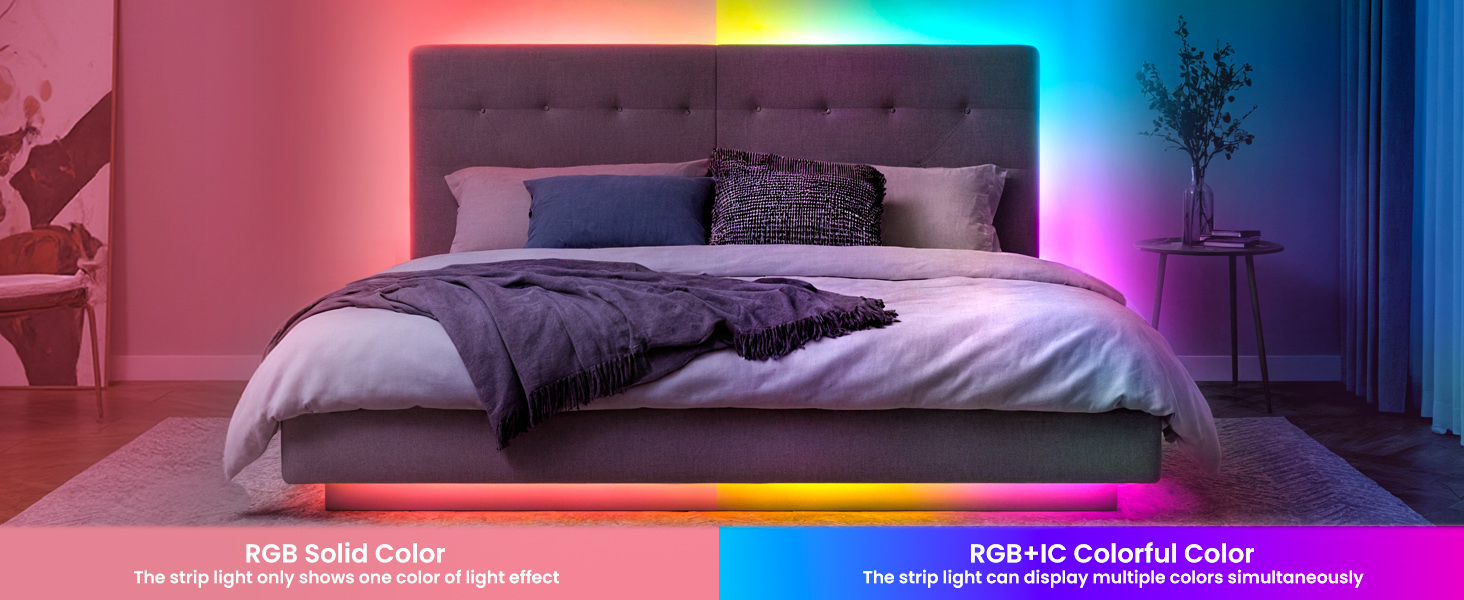
Image: Smart Bluetooth APP Control. This image displays the various features available through the mobile application.

Image: Intelligent Control via Smart Life App. This image shows multiple screenshots of the app's interface for controlling the lights.

Image: Timing Function. This image illustrates how to use the timer function for automated lighting.
2. Voice Control
Integrate your LED strip lights with Alexa or Google Assistant for hands-free control. Ensure your smart assistant device is properly linked to the Smart Life APP.
- Commands: Use commands such as "Alexa, dim the light to 70% brightness," or "Hey Google, turn on the background light."

Image: Multiple Control Ways. This image shows the various methods to control the LED strip lights, including voice commands.

Image: Hands-free Voice Control. This image demonstrates controlling the lights using voice commands with smart assistants.
3. Music Sync Function
The built-in high-sensitivity microphone in the control box allows the strip lights to synchronize with music or ambient sounds.
- Activation: Activate music sync mode via the Smart Life APP.
- Modes: Choose from various music modes to match the rhythm and style of your audio.

Image: Sync with Music. This image illustrates the music synchronization feature of the LED strip lights.
Care and Maintenance
- Cleaning: Gently wipe the strip lights with a dry, soft cloth. Avoid using harsh chemicals or abrasive cleaners.
- Placement: This product is designed for indoor use only. Do not expose to outdoor elements or excessive moisture.
- Protection: The strip light features a protective PU coating for water and dust resistance (IP44). However, the connection points and power adaptor are not waterproof. Ensure these components remain dry.
- Storage: When not in use for extended periods, store the strip lights in a cool, dry place away from direct sunlight.
Troubleshooting
- Lights not turning on: Check if the power adaptor is securely plugged into both the strip and the power outlet. Ensure the power button on the control box or app is activated.
- App connection issues: Verify that your smartphone's Bluetooth/Wi-Fi is enabled and within range of the strip lights. Restart the Smart Life APP and try pairing again. Ensure your Wi-Fi network is 2.4GHz.
- Incorrect colors or flickering: Check all connections for looseness. If the issue persists, try resetting the strip lights (refer to the app for specific reset procedures).
- Remote control not working: Ensure the remote has working batteries and is pointed directly at the control box.
- Voice control not responding: Confirm that your Alexa or Google Assistant device is properly linked to the Smart Life APP and has an active internet connection.
Technical Specifications
| Feature | Specification |
|---|---|
| Brand | Pak |
| Model Number | PAK544586 |
| Item Length | 16.4 Feet |
| Light Source Type | LED |
| Light Color | Multicolor (RGB+IC) |
| Number of Light Sources | 100 |
| Power Source | DC |
| Voltage | 24 Volts (DC) |
| Wattage | 7.5 watts |
| Maximum Compatible Wattage | 7.5 Watts |
| Control Method | App, Voice (Alexa, Google Assistant), Remote |
| Indoor/Outdoor Usage | Indoor |
| Material | Silicone Rubber |
| Item Weight | 9.6 ounces |
| Special Features | Customizable Segments, Dynamic RGB+IC Effects, Easy Adhesive Installation, Music Sync, Preset Scenes, Dimmable |
Warranty and Support
For warranty information and customer support, please refer to the contact details provided in the product packaging or visit the official Pak website. Keep your purchase receipt for warranty claims.