
Introduction
This manual provides essential information for the safe and effective operation of your Aootek Solar Motion Sensor Lights. Please read this manual thoroughly before installation and use, and retain it for future reference. These lights are designed to provide efficient and reliable outdoor illumination with advanced motion sensing capabilities and solar charging.
Safety Information
- Ensure the installation surface is stable and can support the weight of the light.
- Do not disassemble, repair, or modify the product. This may cause damage and void the warranty.
- Keep the solar panel clean to ensure optimal charging efficiency.
- Avoid placing the light in areas with constant shade, as this will reduce solar charging effectiveness.
- Do not stare directly into the LED light when it is on, as it may cause eye strain.
- Dispose of the product and its components responsibly according to local regulations.
Package Contents
Verify that all items are present in your package:
- Aootek Solar Motion Sensor Lights (6-Pack)
- Mounting Screws and Wall Plugs
- User Manual
- Integrated Rechargeable Lithium-ion Battery (pre-installed)

Image: The Aootek Solar Motion Sensor Lights, showing a pack of six units.
Product Features
The Aootek Solar Motion Sensor Lights are equipped with advanced features for superior outdoor illumination:
- 120 High-Efficient LEDs: Provides bright and wide-angle illumination.
- 270° Wide Angle Illumination: Enhances lighting coverage for larger areas.
- Sensitive PIR Motion Inductor: Detects motion up to 26 feet within a 120° angle.
- IP65 Waterproof Rating: Designed to withstand various outdoor weather conditions, including rain and frost.
- High Efficient Solar Panel: Features a PET laminated solar panel with up to 20.5% conversion rate using 1.2W Monocrystalline silicon for efficient charging.
- Durable Construction: Made from robust plastic material for long-lasting outdoor use.

Image: The light's all-weather readiness, highlighting its IP65 waterproof, heat-resistant, and frost-resistant properties.

Image: A visual comparison demonstrating the wider 270° lighting angle and extended sensing distance of Aootek lights.

Image: Illustration of the high solar conversion rate, showing charging time and lighting duration.
Setup and Installation
Follow these steps for proper installation:
- Choose a Location: Select a location that receives direct sunlight for at least 6-8 hours daily to ensure optimal charging. The light should be mounted at a height that allows the motion sensor to cover the desired area effectively.
- Activate the Light: Before mounting, press the front button to select your desired operating mode (see "Operating Modes" section).
- Mark Drill Holes: Hold the light against the wall or surface where you intend to install it. Use a pencil to mark the positions for the two mounting screws.
- Drill Holes: Use a drill to create holes at the marked positions. Insert the provided wall plugs into the drilled holes.
- Mount the Light: Align the light with the holes and secure it using the provided screws. Ensure the light is firmly attached.
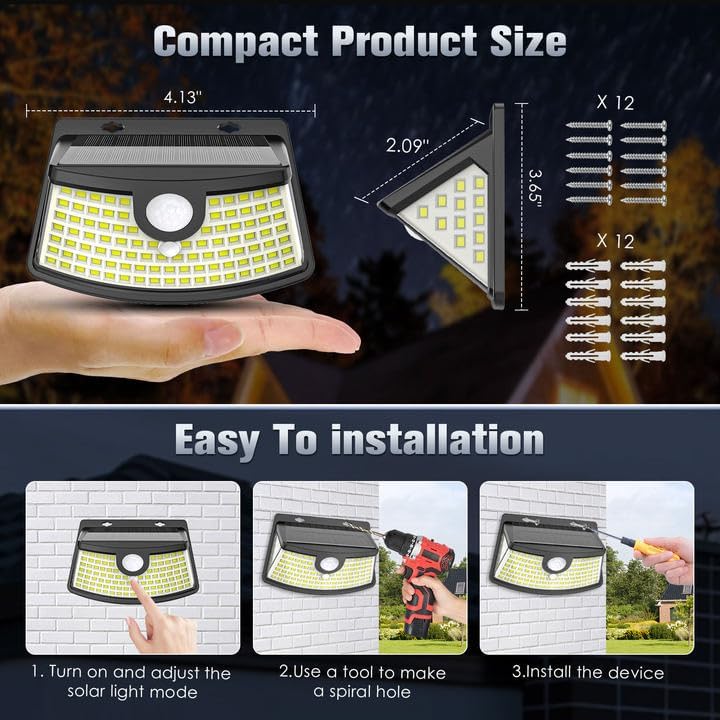
Image: Step-by-step guide for easy installation, including product dimensions.
Operating Modes
The Aootek Solar Motion Sensor Lights offer three distinct operating modes, selectable via the front button:
- Mode 1: Motion Sensor Light Mode
The lights remain off at night when no motion is detected. Upon detecting motion, the lights illuminate at 100% brightness for 25-30 seconds, then turn off completely.
- Mode 2: Permanent On All Night Mode
The lights automatically turn on at night and stay on at 10% brightness throughout the night, regardless of motion.
- Mode 3: Smart Brightness Control Mode
When no motion is detected, the light stays at a slightly dim brightness all night. When motion is detected, the light brightens to 100% for 25-30 seconds, then returns to its dim state.

Image: Visual representation of the three distinct lighting modes.
Maintenance
- Cleaning: Regularly wipe the solar panel with a soft, damp cloth to remove dust, dirt, and debris. A clean panel ensures maximum sunlight absorption and charging efficiency.
- Placement: Periodically check that the light's placement still allows for optimal sun exposure, especially if new foliage or structures have grown nearby.
- Battery: The integrated lithium-ion battery is designed for long-term use. No user maintenance is required for the battery.
Troubleshooting
| Problem | Possible Cause | Solution |
|---|---|---|
| Light does not turn on at night. | Insufficient solar charge. | Ensure the solar panel is in direct sunlight for 6-8 hours daily. Clean the solar panel. |
| Light is dim or only stays on for a short time. | Partial solar charge or cloudy weather. | Relocate the light to an area with more direct sunlight. Allow several sunny days for a full charge. |
| Motion sensor is not responding. | Sensor obstructed or incorrect mode. | Ensure the sensor is clear of obstructions. Verify the light is in Mode 1 or Mode 3. |
| Light flashes or behaves erratically. | Low battery or environmental interference. | Allow the light to charge fully in direct sunlight. Ensure no strong light sources are interfering with the sensor. |
Specifications
| Feature | Detail |
|---|---|
| Brand | Aootek |
| Model Name | AK06 |
| Light Source Type | LED |
| Number of Light Sources | 120 |
| Power Source | Solar Powered |
| Special Feature | Motion Sensor, Waterproof |
| Water Resistance Level | IP65 |
| Material | Plastic |
| Color | Black |
| Installation Type | Surface Mount |
| Item Weight | 1.72 pounds (for 6-pack) |
| Package Dimensions | 7.28 x 5 x 4.65 inches |
| UPC | 850071870039 |
Warranty and Support
This Aootek product comes with a Limited Warranty. For detailed warranty terms and conditions, please refer to the warranty card included in your package or contact Aootek customer support.
For technical assistance, troubleshooting, or any inquiries regarding your Aootek Solar Motion Sensor Lights, please contact our customer support team:
- Email: support@aootek.com (example email, replace with actual if available)
- Website: Visit the Aootek Store on Amazon

