
1. Introduction
The MESTEK EMF02R is a versatile 5-in-1 Electromagnetic Field (EMF) meter designed to detect and measure electric fields, magnetic fields, and radio frequency (RF) radiation. This rechargeable device provides accurate readings for various electromagnetic sources, including household appliances, WiFi signals, 5G signals, and base stations. It features a clear LCD display, audible and visual alarms, data hold, and maximum/average value measurement functions, making it an essential tool for assessing electromagnetic environments.

Figure 1: MESTEK EMF02R 5-in-1 EMF Meter with key features highlighted.
2. Safety Information
- Read all instructions carefully before using the device.
- Do not attempt to disassemble or modify the device. This may cause damage and void the warranty.
- Keep the device away from water and high humidity environments.
- Avoid exposing the device to extreme temperatures or direct sunlight for extended periods.
- Use only the provided charging cable or a compatible USB-C cable for charging.
- Dispose of the device and its battery according to local regulations. Do not incinerate.
3. Package Contents
Verify that all items are present in the package:
- 1 x MESTEK EMF02R EMF Meter
- 1 x USB Type-C Charging Cable
- 1 x User Manual (this document)
- 1 x EMF Meter Carry Bag

Figure 2: Package contents of the MESTEK EMF02R.
4. Product Overview
Familiarize yourself with the components and controls of the MESTEK EMF02R meter.

Figure 3: Labeled diagram of the MESTEK EMF02R components.
- Induction Probe: Detects electromagnetic fields.
- Display Screen: Shows measurement values, modes, and status indicators.
- Power On/Off Button: Press to turn the device on or off.
- SEL Button (Function Selection): Used to switch between Electric Field (E-field) and Magnetic Field (H-field) measurement modes.
- AVG/MAX Button: Toggles between average and maximum value display.
- HOLD Button: Freezes the current reading on the display.
- Alarm Button: Toggles the audible alarm on or off.
- RF Button (High-frequency Signal Selection): Activates Radio Frequency (RF) measurement mode.
- Charging Indicator Light: Indicates charging status.
- Type-C Charging Port: For connecting the USB-C charging cable.
5. Setup
5.1 Charging the Device
The MESTEK EMF02R is equipped with a 2000mAh/3.7V Lithium battery and supports USB-C charging.
- Connect the provided USB Type-C charging cable to the charging port on the device.
- Plug the other end of the cable into a standard USB power adapter (not included) or a computer's USB port.
- The charging indicator light will illuminate during charging.
- A full charge typically takes several hours. The indicator light will change or turn off once charging is complete.
- The device features a low battery indication on the display to alert you when charging is needed.

Figure 4: USB-C charging port and charging indicator.
6. Operating Instructions
6.1 Power On/Off
- To turn on the device, press and hold the Power On/Off button until the display illuminates.
- To turn off the device, press and hold the Power On/Off button until the display turns off.
- The device features an auto-shutdown function after 15 minutes of inactivity to conserve battery life.
6.2 Measurement Modes (RF, E-field, H-field)
The MESTEK EMF02R can measure three types of electromagnetic fields:
- RF (Radio Frequency) Radiation: Detects WiFi signals, 5G signals (30MHz ~ 8GHz), and microwave radiation.
- E-field (Electric Field) Radiation: Measures electric fields emitted by household appliances like TVs, laptops, and microwaves.
- H-field (Magnetic Field) Radiation: Measures magnetic fields from appliances such as refrigerators, washing machines, and air conditioners.

Figure 5: Switching between RF, E-field, H-field modes and using the HOLD function.
- High-frequency Signal Radiation Measurement (RF): Short press the RF button. The screen will display "RF" and show the high-frequency radiation measurement.
- E-field Radiation Measurement: Short press the SEL button. The screen will display "E-field" to enter electric field radiation measurement mode.
- Electromagnetic Field Radiation Measurement (H-field): Short press the SEL button again (after E-field mode). The screen will display "H-field" to enter electromagnetic field radiation measurement mode. Short press SEL button again to change the measurement unit (mG/µT).
6.3 Data Hold Function
To freeze the current reading on the display:
- Short press the HOLD button to lock the displayed data. The "HOLD" indicator will appear on the screen.
- Press the HOLD button again to unlock the data and resume real-time measurement.
6.4 MAX/AVG Measurement
The device can display either the instantaneous reading, the maximum value detected, or the average value detected.

Figure 6: Maximum (MAX) and Average (AVG) value display.
- Short press the AVG/MAX button to cycle through instantaneous, maximum (MAX), and average (AVG) readings during measurement.
6.5 Alarm Settings
The MESTEK EMF02R provides visual and audible alarms when radiation levels exceed predefined thresholds.
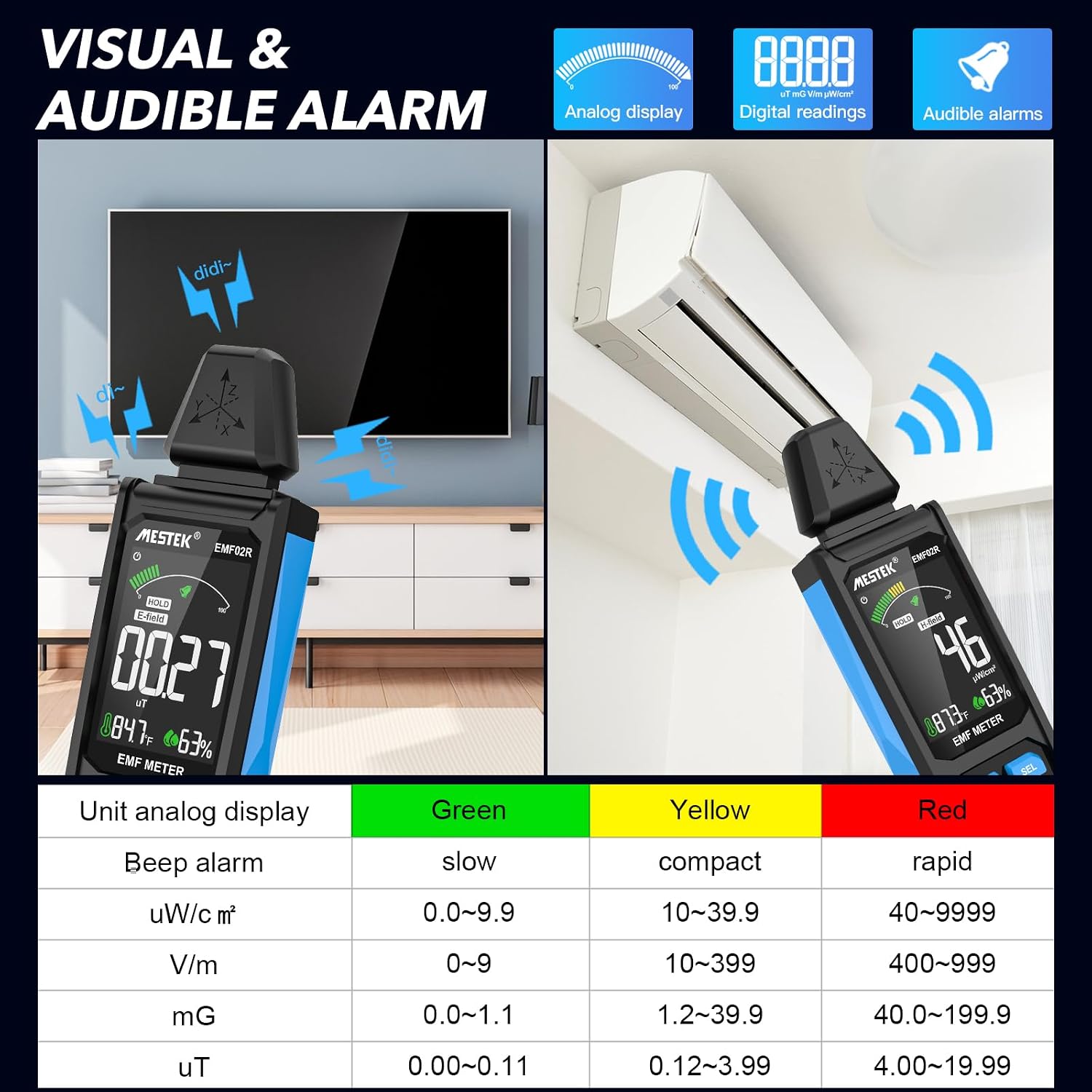
Figure 7: Visual and audible alarm thresholds.
- The display will show a color-coded bar (Green, Yellow, Red) indicating the radiation level.
- When the analog display reaches the yellow area, the device will emit an audible alarm, indicating that radiation levels are elevated.
- When the red area is reached, the alarm will become more rapid, indicating high radiation levels.
- To toggle the audible alarm on or off, short press the Alarm button.
6.6 Unit Switching and Temperature/Humidity Display
The device can display temperature and humidity, and allows switching between temperature units.

Figure 8: Temperature and humidity display with unit switching.
- The device displays ambient temperature in both Celsius (°C) and Fahrenheit (°F), and relative humidity (%).
- To switch between °C and °F, refer to the specific instructions in the device's on-screen menu or a dedicated button if available (not explicitly detailed in provided data, typically combined with another button press or a menu option).
7. Understanding Readings and Radiation Sources
The MESTEK EMF02R helps identify common sources of electromagnetic radiation in your environment.

Figure 9: Common sources of electromagnetic radiation.
- Radio Frequency (RF) Sources: Routers, cell phones, 5G towers, microwave ovens (when operating).
- Electric Field (E-field) Sources: TVs, laptops, power lines, ungrounded electrical appliances.
- Magnetic Field (H-field) Sources: Refrigerators, washing machines, induction cookers, motors, high-voltage cables.
When measuring, slowly move the meter closer to the suspected source. Observe the readings and the alarm indicators to determine the strength and type of radiation. If the radiation value reaches the yellow or red alarm zone, consider taking protective measures or increasing your distance from the source.
8. Maintenance
- Cleaning: Wipe the device with a soft, dry cloth. Do not use abrasive cleaners or solvents.
- Storage: Store the device in its carry bag in a cool, dry place, away from direct sunlight and extreme temperatures.
- Battery Care: For optimal battery life, charge the device regularly, even if not in frequent use. Avoid fully discharging the battery for extended periods.
9. Troubleshooting
| Problem | Possible Cause | Solution |
|---|---|---|
| Device does not turn on. | Low battery or no charge. | Charge the device using the USB-C cable. |
| Inaccurate readings. | Interference from other electronic devices; device not held correctly. | Move away from other electronics; ensure the probe is directed towards the source. |
| Audible alarm not working. | Alarm function is turned off. | Press the Alarm button to activate it. |
| Display is frozen. | Data Hold function is active. | Press the HOLD button to release. |
10. Specifications
- Measurement Modes: Electric Field (E-field), Magnetic Field (H-field), Radio Frequency (RF)
- RF Frequency Range: 30MHz ~ 8GHz
- Magnetic Field Units: mG / µT (switchable)
- Electric Field Units: V/m
- RF Field Units: uW/cm²
- Display: Large Color LCD Screen
- Battery: 2000mAh/3.7V Lithium Ion (rechargeable)
- Charging Port: USB Type-C
- Auto Power Off: 15 minutes of inactivity
- Additional Features: Data Hold, MAX/AVG measurement, Audible/Visual Alarm, Low Battery Indication, Temperature & Humidity Display
- Item Weight: 15.2 ounces
- Package Dimensions: 7 x 2 x 1 inches
11. Warranty and Support
MESTEK provides comprehensive customer support for your EMF02R meter.
- Warranty: 24 months after-sale service.
- Technical Support: 7/24 customer service available.
- Replacement Policy: If the meter is damaged within 24 months of purchase, please contact MESTEK customer service for a replacement.
For assistance, please refer to the contact information provided with your purchase or visit the official MESTEK website.


