Introduction
This instruction manual provides essential information for the proper installation, maintenance, and care of your Iirios Q7 Cordless Vacuum HEPA Filter 2-pack. These filters are designed to maintain the optimal performance and air filtration quality of your Iirios Q7 Pro Cordless Vacuum.
Safety Information
- Always turn off and unplug your Iirios Q7 Pro Cordless Vacuum before attempting to install, remove, or clean the HEPA filter.
- Keep filters out of reach of children.
- Do not operate the vacuum cleaner without a filter properly installed. This can damage the motor and reduce cleaning efficiency.
- Ensure the filter is completely dry before reinstallation to prevent mold growth or damage to the vacuum.
Product Overview
The Iirios Q7 HEPA filter is a crucial component of your vacuum's filtration system. It is designed to capture fine dust particles, allergens, and other microscopic debris, ensuring cleaner exhaust air and maintaining strong suction power. This package includes two (2) reusable HEPA filters for convenient replacement.
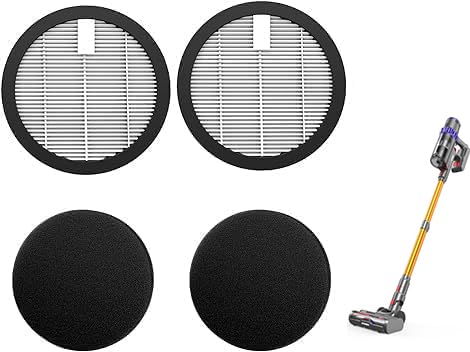
Image: The Iirios Q7 Cordless Vacuum HEPA filter, showing its cylindrical shape and pleated filtration material.
Installation
Follow these steps to install or replace the HEPA filter in your Iirios Q7 Pro Cordless Vacuum:
- Power Off: Ensure the vacuum cleaner is turned off and disconnected from its power source.
- Locate Dustbin: Detach the dustbin from the main body of the vacuum cleaner. Refer to your vacuum's specific manual for dustbin removal instructions.
- Remove Old Filter: Twist or pull the existing HEPA filter from its housing within the dustbin. Dispose of the old filter responsibly if it is no longer reusable or cleanable.
- Insert New Filter: Carefully insert the new Iirios Q7 HEPA filter into the designated slot. Ensure it is seated firmly and correctly to create a proper seal.
- Reassemble: Reattach the dustbin to the vacuum cleaner, ensuring it clicks securely into place.
Maintenance
Regular maintenance of your HEPA filter is essential for prolonging its lifespan and ensuring efficient vacuum performance. The Iirios Q7 HEPA filters are reusable.
- Cleaning Frequency: It is recommended to clean the HEPA filter every 2-4 weeks, depending on usage.
- Cleaning Procedure:
- Remove the filter as described in the Installation section.
- Tap the filter gently over a trash can to remove loose dust and debris.
- Rinse the filter under cool, running water until the water runs clear. Do not use detergents or hot water.
- Allow the filter to air dry completely for at least 24 hours before reinstallation. Do not use a dryer or direct heat, as this can damage the filter material.
- Replacement: Replace the HEPA filter every 3-6 months, or sooner if you notice a significant decrease in suction power, persistent odors, or visible damage to the filter, even after cleaning.
Troubleshooting
- Reduced Suction Power: If your vacuum's suction power decreases, check the HEPA filter. It may be clogged with fine dust. Clean or replace the filter as necessary. Ensure the filter is installed correctly and securely.
- Unusual Odors: Persistent odors emanating from the vacuum may indicate a dirty or saturated filter. Clean or replace the HEPA filter.
- Filter Does Not Fit: Ensure you have the correct filter model (Q7Hepa) for your Iirios Q7 Pro Cordless Vacuum. Refer to the product specifications or contact customer support if unsure.
Specifications
| Brand | Iirios |
| Model Info | Q7Hepa |
| Item Weight | 6.7 ounces |
| Product Dimensions | 1 x 1 x 1 inches |
| Compatible Device | Iirios Q7 Pro Cordless Vacuum |
| Material Type | Plastic |
| Included Components | HEPA Filter (2-pack) |
| Reusability | Reusable |
Warranty and Support
For warranty information or technical support regarding your Iirios Q7 Cordless Vacuum HEPA filters, please refer to the documentation included with your Iirios Q7 Pro Cordless Vacuum or visit the official Iirios website. You may also contact Iirios customer service for assistance.