
meross MTS205B
Meross MTS205B Smart Wi-Fi Thermostat for Boiler and Water Underfloor Heating User Manual
Model: MTS205B
Introduction
This manual provides detailed instructions for the installation, operation, and maintenance of your Meross MTS205B Smart Wi-Fi Thermostat. This thermostat is designed for boiler and water-fed underfloor heating systems, offering smart control and energy efficiency.

Image: The Meross MTS205B Smart Wi-Fi Thermostat displayed alongside its mobile application interface, showing current temperature and control options.
Please read this manual thoroughly before installation and use to ensure proper functionality and safety.
Important Compatibility Information
Before proceeding with installation, it is crucial to verify compatibility with your existing heating system. The Meross MTS205B thermostat is specifically designed for boiler and water-fed underfloor heating systems. It is not compatible with electric heating systems.

Image: Visual representation indicating the Meross MTS205B thermostat is compatible with boiler and water underfloor heating systems, but explicitly not with electric heating systems.
To confirm compatibility, please scan the QR code below or visit the provided link:

Image: QR code for checking product compatibility. Scan this code to access the Meross compatibility checker online.
Compatibility Check Link: meross.com/en-gc/compatibility-check/mts205b-eu
Setup and Installation
Pre-installation Requirements:
- Wi-Fi Network: Requires an exclusive 2.4 GHz Wi-Fi network. 5 GHz networks are not supported.
- Installation Type: Designed for embedded wall installation, suitable for 86 mm or 67 mm electrical boxes.
- Power Supply: Requires a wired connection with both a phase wire and a neutral wire.
Wiring Instructions:
The thermostat requires specific wiring for proper operation. A minimum of 4 wires are required for boiler systems and 3 wires for underfloor heating systems. Ensure power is turned off at the main circuit breaker before attempting any wiring.

Image: Wiring diagram illustrating the connection of live (brown) and neutral (blue) wires for the Meross MTS205B thermostat within an embedded wall box (dimensions 86mm x 86mm, depth ≥32mm).
Note: The diagram above primarily illustrates boiler wiring. Refer to the full instruction manual (often available via the Meross app or website) for detailed wiring information specific to your heating system type.
App Installation and Device Pairing:
- Download the Meross app from your smartphone's app store (iOS or Android).
- Create a Meross account or log in if you already have one.
- Follow the in-app instructions to add your MTS205B thermostat. This typically involves putting the thermostat into pairing mode and connecting it to your 2.4 GHz Wi-Fi network.
Operating Instructions
Basic Operation:
The thermostat features a minimalist design with a sleek glass panel for easy temperature adjustment.

Image: A hand adjusting the temperature on the Meross MTS205B thermostat's touch-sensitive glass panel, highlighting its ease of use.
You can adjust the temperature directly on the device or through the Meross app. The app also allows for setting various modes and schedules.
Voice and Remote Control:
The Meross MTS205B is compatible with popular smart home platforms, enabling convenient voice and remote control.
- Voice Control: Compatible with Amazon Alexa, Google Assistant, and Google Nest. Simply use voice commands to adjust settings (e.g., "Alexa, set the temperature to 22 degrees Celsius").
- Remote Control: Control your heating system from anywhere using the Meross app on your smartphone, provided you have an internet connection.

Image: The Meross MTS205B thermostat shown alongside Amazon Echo Dot and Google Home Mini devices, illustrating its seamless integration with voice control platforms.
Scheduling and Smart Features:
Optimize your heating schedule and benefit from intelligent features designed for comfort and energy saving.
- Programmable Schedule: Set up to 8 period settings within the Meross app for a 7x24 hour graphical schedule. This allows the thermostat to automatically turn your heating on and off according to your routine, helping to save energy costs.
- Summer Mode: This mode is designed for cooling systems, such as air source heat pumps, to optimize cooling performance during warmer months and maintain an ideal ambient temperature.
- Open Window Detection: The thermostat can detect when a window is open for ventilation and will automatically pause heating for a period to prevent energy waste.
- Dual Sensor System: Equipped with two temperature sensors. The integrated sensor provides precise air temperature measurements. An external sensor can be utilized if the thermostat is not installed within the heated room, for example, in sauna applications.
- Heating Tracking: The Meross app allows you to track your heating system's status, view temperature curves, and monitor cumulative heating duration. By inputting your heating tariff, the app can also assist in estimating your heating expenses.
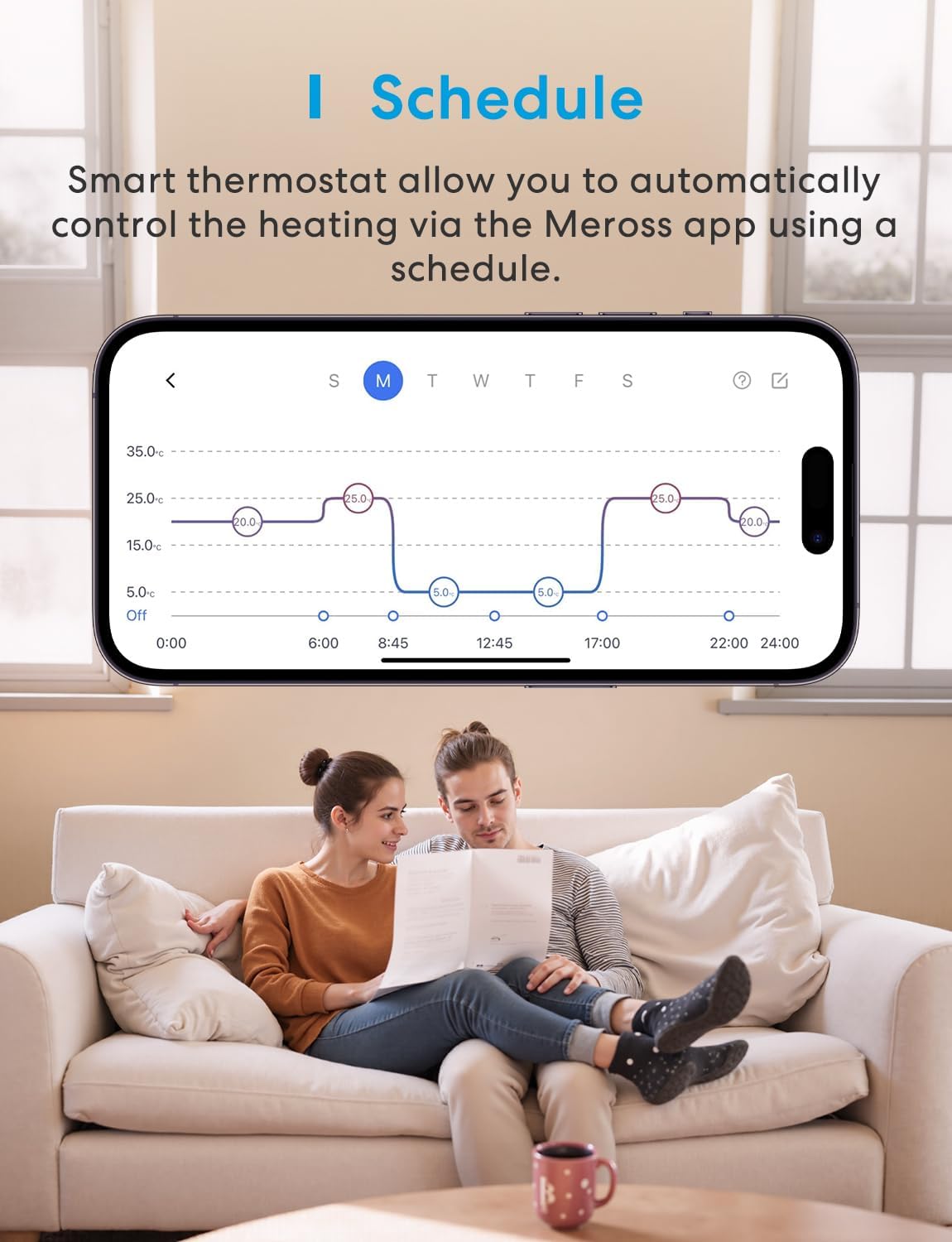
Image: Screenshot of the Meross app displaying a graphical 7-day heating schedule, allowing users to program temperature settings for different times and days.

Image: A woman opening a window, demonstrating the thermostat's ability to detect an open window and temporarily stop heating to conserve energy.
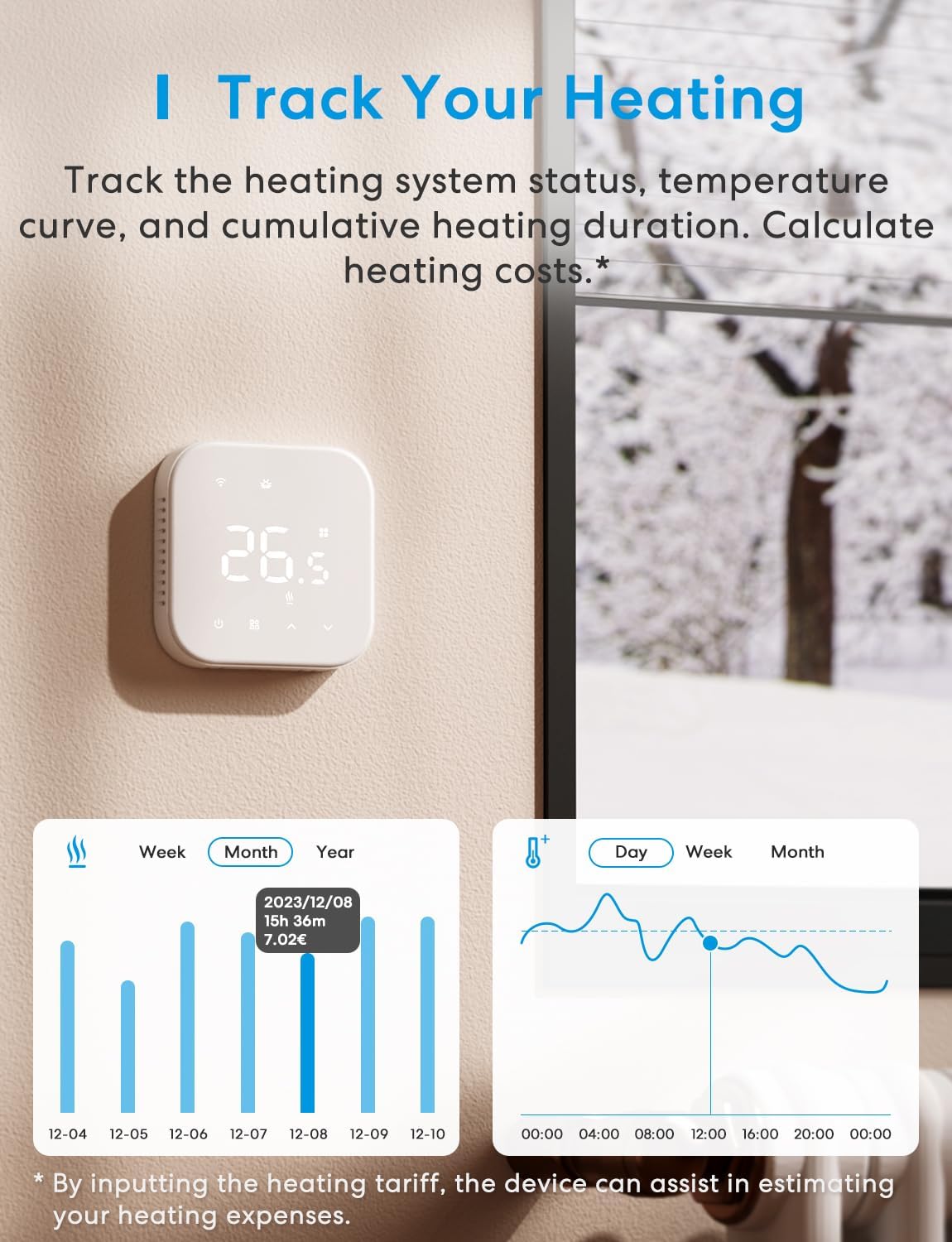
Image: Screenshots from the Meross app displaying heating usage statistics by week, month, and year, along with a temperature curve graph over time, enabling users to track and estimate heating costs.
Maintenance
To ensure optimal performance and longevity of your Meross MTS205B thermostat, follow these simple maintenance guidelines:
- Cleaning: Gently wipe the thermostat's screen and body with a soft, dry cloth. Avoid using abrasive cleaners or solvents, which can damage the surface.
- Software Updates: Regularly check the Meross app for available firmware updates. Keeping your device's software up-to-date ensures you have the latest features and security enhancements.
- Environmental Conditions: Ensure the thermostat is not exposed to extreme temperatures, direct sunlight, or excessive humidity, as these can affect its accuracy and lifespan.
Troubleshooting
If you encounter issues with your Meross MTS205B thermostat, refer to the following common troubleshooting steps:
- No Power/Display Off:
- Check the main circuit breaker to ensure power is supplied to the thermostat.
- Verify that the phase and neutral wires are correctly connected according to the wiring diagram.
- Wi-Fi Disconnection:
- Ensure your Wi-Fi router is powered on and functioning correctly.
- Confirm the thermostat is within range of your 2.4 GHz Wi-Fi network.
- Restart your Wi-Fi router and the thermostat.
- If the issue persists, try re-pairing the device through the Meross app.
- Inaccurate Temperature Readings:
- Ensure the thermostat is not installed near heat sources (e.g., direct sunlight, lamps) or drafts, which can affect sensor accuracy.
- If using an external sensor, ensure it is properly connected and positioned.
- Voice Control Not Working:
- Verify that your Meross account is correctly linked to your Alexa or Google Home account.
- Check your internet connection.
- Ensure your voice assistant device is powered on and connected to the internet.
For further assistance, please contact Meross customer support.
Specifications
| Feature | Detail |
|---|---|
| Brand | Meross |
| Model Number | MTS205B |
| Color | White |
| Dimensions (L x W x H) | 32 x 86 x 86 mm |
| Weight | 141 grams |
| Voltage | 230 Volts |
| Connectivity Technology | Wi-Fi (2.4 GHz only) |
| Controller Type | App, Amazon Alexa, Google Assistant |
| Special Features | Window Sensor, Programmable, Dual Temperature Sensor |
| Temperature Control Type | Smart/Remote |
| Specific Uses | Boiler, Water Underfloor Heating |
| Temperature Range | 5 °C to 35 °C |
| Temperature Accuracy | ± 0.1 °C |
| Power Source | Electric Cable (Wired) |
| Included Components | Power cable, mounting hardware |
Warranty and Support
For information regarding warranty coverage, technical support, or to access additional resources, please visit the official Meross website or contact their customer service directly.
Meross Official Website: www.meross.com
Seller Support: For purchase-related inquiries, you may also contact the seller, Meross-Shuzu-EU, via your Amazon order details.
Related documentsMTS205B


Ask a question about this manual
Ask about setup, troubleshooting, compatibility, parts, safety, or missing instructions. Manuals+ will review the question and use this page’s manual context to help answer it.