
1. Product Overview
The Lufeiya 47-inch White Desk (Model: LFY-JC2D3SK47-White) is designed for home office, study, or bedroom use. It features a spacious work surface, a pull-out keyboard tray, two fabric drawers, and three storage shelves. Constructed from P2 particle wood board and metal, the desk is designed to be scratch-resistant, anti-collision, and waterproof.
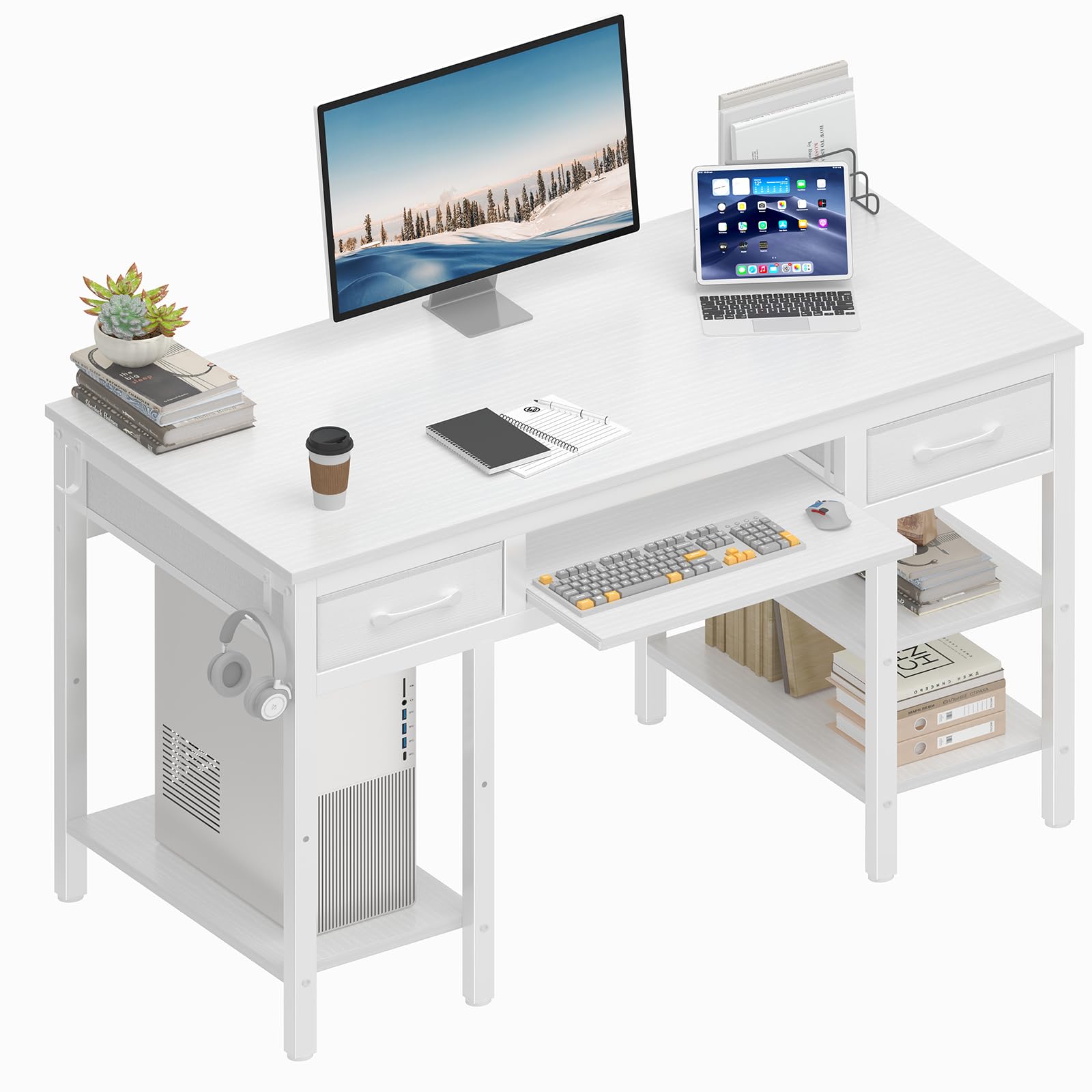
Image 1.1: Overview of the Lufeiya 47-inch White Desk in a home office setting.
Key Features:
- Spacious Work Surface: Provides ample space for computer, monitor, and other office essentials.
- Pull-out Keyboard Tray: Accommodates full-size 108-key or 87-key keyboards with space for a mouse.
- Two Fabric Drawers: Offers convenient storage for office supplies, documents, or personal items.
- Three Storage Shelves: Adjustable height for customized storage of books, decor, or computer towers.
- Two Removable Iron Hooks: Ideal for hanging headphones, bags, or other accessories.
- Durable Construction: Made from P2 particle wood board and metal frame, featuring scratch-resistant, anti-collision, and waterproof properties.
2. Setup Instructions
Before beginning assembly, ensure all components are present and undamaged. A detailed instruction manual and all necessary tools are included in the package. No additional tools are required for assembly.
2.1 Unpacking and Component Check
- Carefully unpack all contents from the box.
- Refer to the included parts list in the separate instruction manual to verify all components and hardware are present.
- Place all components on a soft, clean surface to prevent scratches during assembly.

Image 2.1: Detailed product dimensions and component layout for assembly reference.
2.2 Assembly Steps
Follow the step-by-step instructions provided in the separate assembly manual. The general assembly process involves:
- Attaching the desk legs to the main tabletop.
- Installing the keyboard tray slides and the tray itself.
- Assembling and inserting the fabric drawers.
- Mounting the storage shelves at your desired height.
- Attaching the removable iron hooks.
Ensure all screws and fasteners are tightened securely, but do not overtighten to avoid damaging the wood. The assembly is designed to be quick and straightforward.

Image 2.2: The pull-out keyboard tray, designed for smooth operation and easy assembly.

Image 2.3: The storage shelves can be installed at two different heights to customize space.
3. Operating Instructions
3.1 Using the Keyboard Tray
The keyboard tray is designed to slide out smoothly for comfortable typing and slide back in to save space. It can accommodate most standard 108-key or 87-key keyboards along with a mouse. Plastic accessories on the tray prevent the keyboard from slipping.
- To extend: Gently pull the tray forward until it locks into place.
- To retract: Push the tray back into the desk until it is fully recessed.
3.2 Utilizing Storage Options
The desk offers versatile storage solutions:
- Fabric Drawers: Use the two fabric drawers for organizing documents, stationery, or other small items. These drawers are lightweight and easy to access.
- Storage Shelves: The three shelves can be adjusted to two different heights during assembly to suit your storage needs. They are suitable for books, binders, or a computer tower.
- Removable Hooks: Attach the two iron hooks to either side of the desk to hang headphones, bags, or other personal items for easy access.

Image 3.1: The two fabric drawers provide spacious storage for organization.

Image 3.2: Removable iron hooks for hanging headphones or bags.
4. Maintenance
To ensure the longevity and appearance of your Lufeiya desk, follow these maintenance guidelines:
- Cleaning: Wipe the desk surface with a soft, damp cloth. Avoid abrasive cleaners or harsh chemicals, as these can damage the finish. The desk surface is waterproof, allowing for easy cleaning of spills.
- Protection: While the desk is scratch-resistant and anti-collision, it is recommended to use coasters for drinks and placemats for hot items to prevent potential damage.
- Hardware Check: Periodically check all screws and fasteners to ensure they remain tight. Retighten if necessary to maintain stability.
- Fabric Drawers: The fabric drawers can be spot cleaned with a mild detergent and damp cloth. Allow to air dry completely.

Image 4.1: The desk features a waterproof surface for easy cleaning and adjustable leg pads for stability.
5. Troubleshooting
If you encounter any issues with your Lufeiya desk, please refer to the following common solutions:
- Desk Wobbles: Ensure all screws and bolts are securely tightened. Check that the desk is placed on a level surface. The adjustable leg pads can be used to compensate for uneven floors.
- Keyboard Tray Sticks: Check for any obstructions in the slide mechanism. Ensure the tray is properly aligned on its rails. Clean the rails if dust or debris is present.
- Drawers Do Not Slide Smoothly: Verify that the fabric drawers are correctly assembled and inserted into their compartments. Ensure no items inside the drawers are obstructing their movement.
- Missing Parts: If any parts are missing upon unpacking, please contact customer support immediately for assistance.
6. Specifications
| Feature | Specification |
|---|---|
| Brand | Lufeiya |
| Model Number | LFY-JC2D3SK47-White |
| Product Dimensions (D x W x H) | 18.9" x 47.2" x 31.1" |
| Item Weight | 34 Pounds |
| Color | White |
| Material Type | Engineered Wood, Metal |
| Top Material Type | FSC-Certified Wood |
| Base Material | Metal |
| Number of Drawers | 2 (Fabric) |
| Storage Options | 2 Fabric Drawers, 3 Storage Shelves |
| Special Feature | Keyboard Tray Included, Removable Hooks, Adjustable Leg Pads |
| Assembly Required | Yes (Tools Included) |
7. Customer Support
Lufeiya is committed to providing professional customer support and efficient replacement services. If you have any questions, concerns, or experience quality issues with your desk, please do not hesitate to contact our customer service team.
Please refer to your purchase documentation or the Lufeiya official website for contact information.


