
1. Introduction
This manual provides essential information for the proper installation, operation, and maintenance of the Itron 100W+ ERT Communication Module, model ERW-1300-403. This module is designed to enhance water flow meter communication capabilities, offering advanced data transmission and security features. Please read this manual thoroughly before attempting any installation or operation.
2. Product Overview
The Itron 100W+ ERT Communication Module represents the fourth generation of Itron's 100 series water communication modules. It integrates with compatible water meters to provide efficient and secure data transmission. Key enhancements include the SCM+ message protocol, which delivers more comprehensive consumption data, improved fixed network performance, and enhanced security features. The module also offers improved meter consumption resolution, supporting up to 9 dials (1/100th gallon).

Figure 2.1: Front view of the Itron 100W+ ERT Communication Module, showing its compact design and primary housing.
3. Key Features
- Itron 100W+ Encoder ERT Communication Module
- Integral connectors for register interface
- Dedicated telemetry connector
- Antenna connector for enhanced signal transmission
- Manufactured in the USA
- Supports SCM+ message protocol for detailed consumption data
- Enhanced security and fixed network performance
- Improved meter consumption resolution to 9 dials (1/100th gallon)
4. What's in the Box
Upon unpacking, verify that the following item is present:
- Itron 100W+ ERT Communication Module (ERW-1300-403)
If any components are missing or damaged, please contact your supplier immediately.
5. Setup
The Itron 100W+ ERT Communication Module is designed for professional installation. Incorrect installation may lead to improper operation or damage. Always refer to local codes and regulations.
5.1. Pre-Installation Checklist
- Ensure the water meter is compatible with the 100W+ module.
- Verify all necessary cables and connectors are available.
- Confirm the installation environment is suitable (e.g., temperature, humidity).
5.2. Connection Steps
- Connect to Water Meter Register: Carefully align and connect the module's integral register connector to the compatible water meter register. Ensure a secure fit.
- Telemetry Device Connection (Optional): If using an optional telemetry device, connect it to the designated telemetry connector on the module.
- Antenna Connection: Attach the external antenna to the antenna connector on the module. Position the antenna for optimal signal reception according to site-specific requirements.

Figure 5.1: Side view of the module illustrating the integral connectors for register, telemetry, and antenna.
After all connections are made, secure the module in its intended mounting location. Refer to the water meter's specific installation guidelines for mounting procedures.
6. Operating
The Itron 100W+ ERT Communication Module operates autonomously once properly installed and connected to a compatible water meter. It functions by collecting consumption data from the meter's register and transmitting it wirelessly using the ERT (Encoder Receiver Transmitter) protocol.
6.1. Data Transmission
The module periodically transmits consumption data in the SCM+ message format. This format provides enhanced data resolution and security compared to previous generations. Data is typically collected by a fixed network infrastructure or mobile reading devices.
6.2. Status Indicators
The module may include visual indicators (e.g., LEDs) to denote operational status or communication activity. Consult the specific product documentation or Itron support for detailed information on interpreting these indicators.
7. Maintenance
The Itron 100W+ ERT Communication Module is designed for minimal maintenance. Regular inspections can help ensure continued reliable operation.
- Visual Inspection: Periodically inspect the module and its connections for any signs of physical damage, corrosion, or loose connections.
- Cleaning: If necessary, gently clean the exterior of the module with a soft, dry cloth. Do not use abrasive cleaners or solvents.
- Environmental Protection: Ensure the module remains protected from extreme environmental conditions beyond its specified operating range.
No user-serviceable parts are inside the module. Do not attempt to open the casing.
8. Troubleshooting
If the Itron 100W+ ERT Communication Module is not functioning as expected, consider the following basic troubleshooting steps:
- No Data Transmission:
- Verify all connections (register, telemetry, antenna) are secure and properly seated.
- Ensure the antenna is correctly positioned and free from obstructions.
- Confirm the water meter is operational and providing data to the module.
- Intermittent Communication:
- Check for potential sources of radio frequency (RF) interference near the module or antenna.
- Inspect antenna cabling for damage.
For persistent issues or complex problems, contact Itron technical support or a qualified service technician. Do not attempt unauthorized repairs.
9. Specifications
The following specifications apply to the Itron 100W+ ERT Communication Module ERW-1300-403:
| Attribute | Value |
|---|---|
| Model Number | 100W+ (ERW-1300-403) |
| Manufacturer | Itron |
| Package Dimensions | 7 x 4 x 3 inches |
| Item Weight | 12 ounces |
| Communication Protocol | ERT (SCM+ message) |
| Consumption Resolution | Up to 9 dials (1/100th gallon) |
| ASIN | B0DSJ1XD12 |
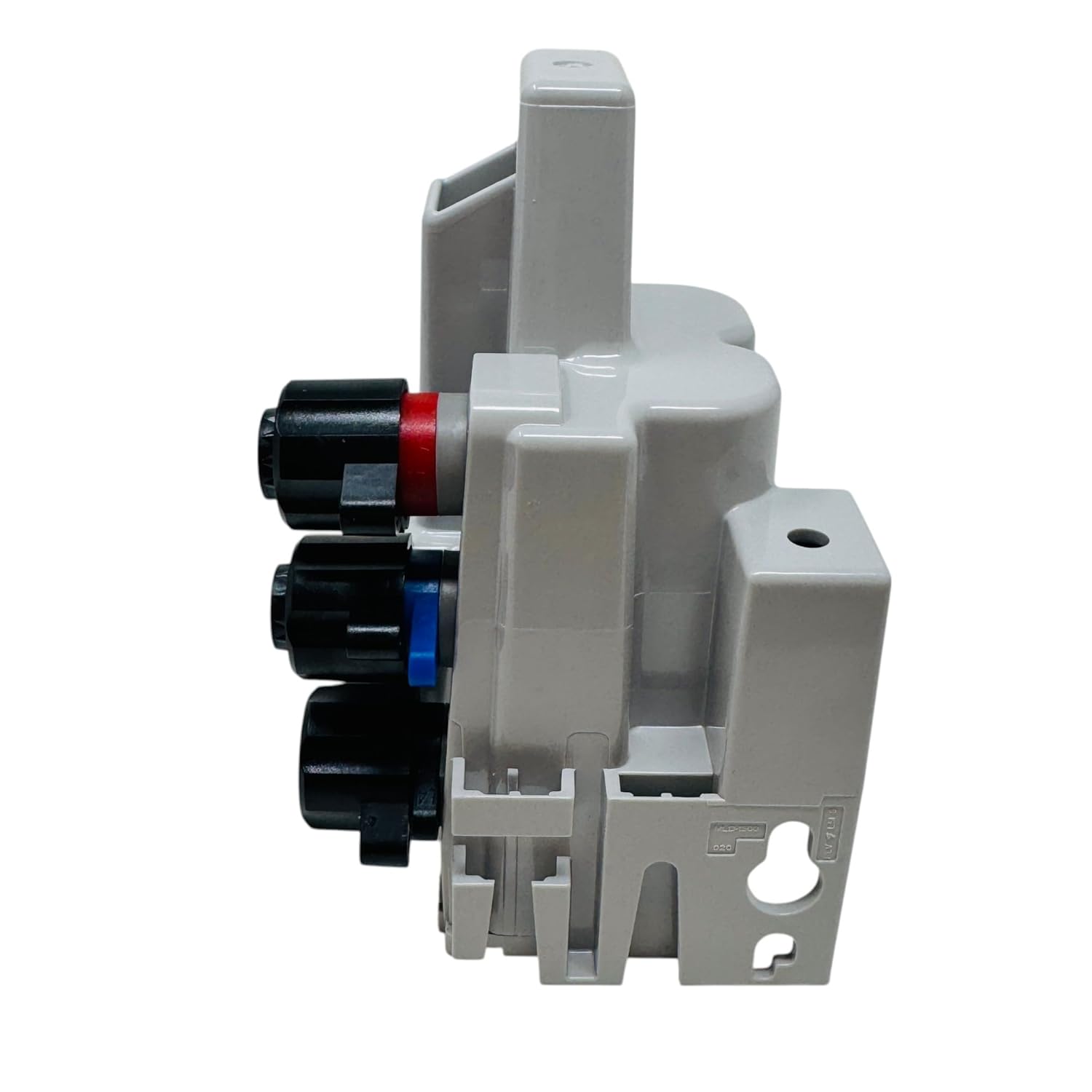
Figure 9.1: Top view of the module, displaying the product label with model number, FCC ID, and serial number 79672273.
10. Warranty Information
Itron products are typically covered by a manufacturer's limited warranty against defects in materials and workmanship. The specific terms and duration of the warranty may vary. Please refer to the official warranty statement provided with your purchase or visit the Itron website for detailed information. Keep your proof of purchase for warranty claims.
11. Support
For technical assistance, product inquiries, or to report issues, please contact Itron customer support through their official channels. You may find contact information on the Itron website or in the documentation accompanying your product.
- Itron Official Website: www.itron.com
- Customer Service: Refer to the website for regional contact numbers.


