
1. Product Overview
The GODOX IT30Pro is a compact and portable TTL mini camera flash light designed for various photography needs. It features a full-color touchscreen, a built-in 2.4GHz X System for wireless control, and an integrated diffuser. Its lightweight design and quick-release foot make it suitable for on-location work.

Image 1.1: GODOX IT30Pro Mini Camera Flash Light and included accessories.
Key Features:
- Compact Design: Weighing approximately 120g, ideal for portability.
- TTL Auto-Exposure: Provides accurate flash output by metering light through the lens.
- 2.8" Full-Color Touchscreen: Intuitive interface for settings adjustment.
- 2.4GHz X System: Supports both Master and Receiver modes for wireless multi-light setups.
- High-Speed Sync (HSS): Up to 1/8000s, with a special 'S' version supporting up to 1/80000s for Sony cameras.
- Built-in Diffuser: Offers soft, even lighting without external modifiers.
- Quick Mount, Quick Release: Facilitates fast attachment and detachment from the camera.
- Long Battery Life & USB-C Charging: Up to 560 full-power flashes per charge with 1.5s recycle time, and fast USB-C charging.
2. Setup and Installation
2.1 Charging the Battery
The IT30Pro is equipped with a built-in lithium-ion battery. Before first use, ensure the battery is fully charged. Use the provided USB-C cable to connect the flash to a compatible USB power source.

Image 2.1: Charging the IT30Pro via USB-C cable.
2.2 Mounting the Flash
To attach the IT30Pro to your camera's hot shoe:
- Align the flash's hot shoe foot with your camera's hot shoe.
- Slide the flash onto the hot shoe until it clicks into place. The quick-release mechanism ensures a secure fit.
- To remove, press the quick-release button (located on the side for C/N/F/O versions) and slide the flash off.

Image 2.2: The IT30Pro mounted on a camera.

Image 2.3: Illustration of the quick-release button for mounting and dismounting.
3. Operating Instructions
3.1 Power On/Off
Press and hold the power button to turn the flash on or off. The 2.8" full-color touchscreen will illuminate upon startup.
3.2 Navigating the Touchscreen Interface
The IT30Pro features a responsive touchscreen for adjusting settings. Swipe through menus and tap options to select. A traditional rotary dial is also available for fine-tuning flash output.
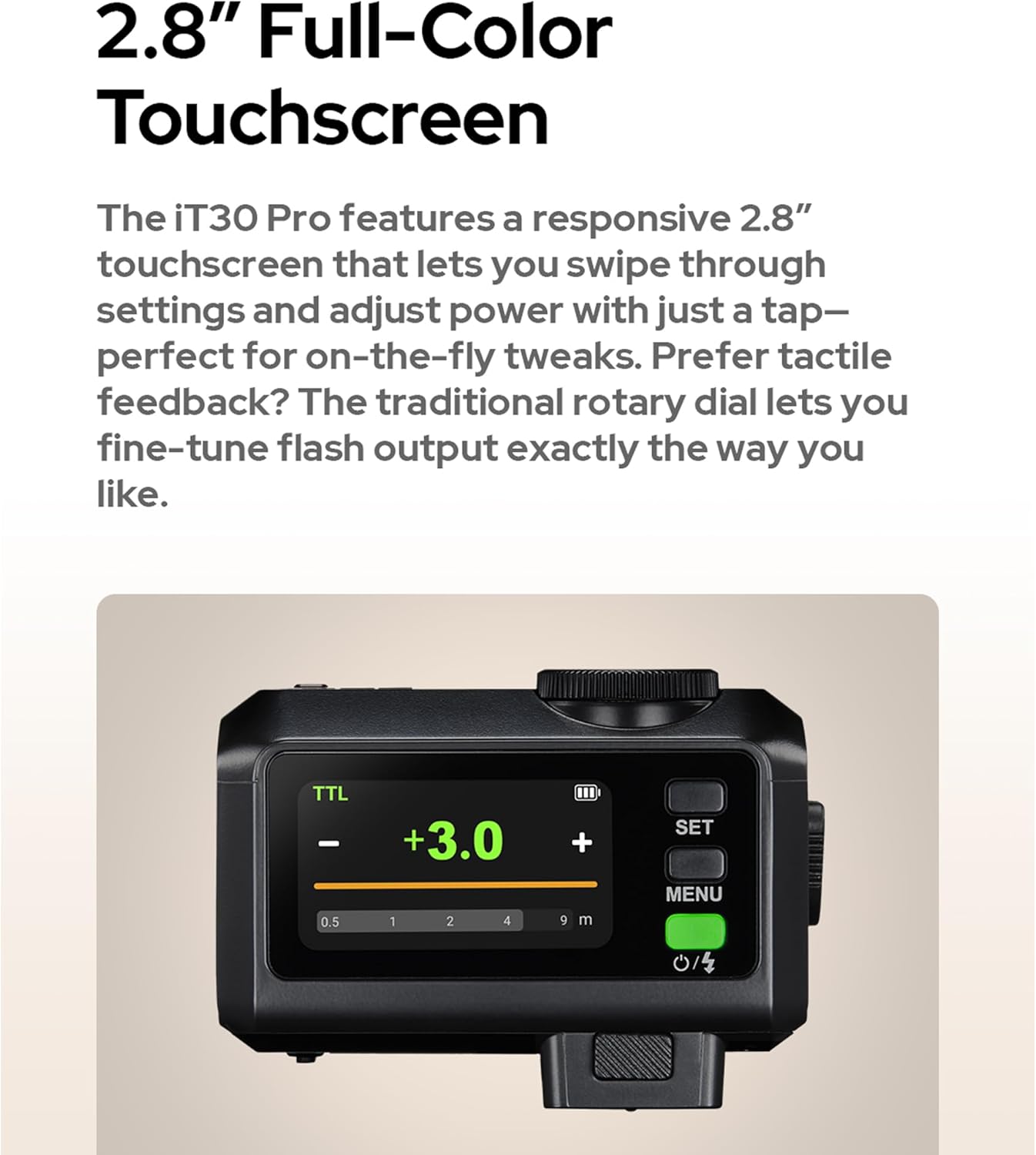
Image 3.1: The 2.8-inch full-color touchscreen interface.
3.3 TTL Auto-Exposure Mode
In TTL mode, the IT30Pro automatically measures the light through your camera's lens and calculates the optimal flash output for balanced exposure. This mode is suitable for various lighting conditions and simplifies flash photography.
3.4 Wireless Operation (2.4GHz X System)
The IT30Pro includes a built-in Godox 2.4GHz X system, allowing it to function as both a Master and Receiver unit. This enables flexible multi-light setups. To use wireless functionality:
- Set the IT30Pro to Master or Receiver mode via the touchscreen menu.
- Pair with a compatible Godox 2.4GHz wireless flash trigger (e.g., X3 trigger) or other Godox 2.4GHz flashes.
- Adjust channel and group settings to match your other flash units.

Image 3.2: Example of a multi-light setup using the IT30Pro's wireless capabilities.
3.5 Advanced Flash Modes
The IT30Pro supports several advanced flash modes for creative control:
- High-Speed Sync (HSS): Allows flash synchronization at shutter speeds up to 1/8000s, useful for freezing fast motion or using wide apertures in bright conditions. The 'S' version for Sony cameras supports global-shutter flash sync up to 1/80000s.
- Front/Rear-Curtain Sync: Controls whether the flash fires at the beginning or end of the exposure.
- Multi Mode: Fires a series of rapid flashes during a single exposure to capture multiple movements of a subject.
- Flash Exposure Compensation (FEC): Adjusts the flash output relative to the camera's metered exposure.

Image 3.3: The IT30Pro in use, highlighting advanced control options.
3.6 Using the Built-in Diffuser
The IT30Pro features a retractable diffuser. To activate, simply flick the lever on the side of the flash. This diffuser softens the light output, providing wider coverage and more flattering illumination, especially for close-up subjects.

Image 3.4: Visual demonstration of the built-in diffuser in both off and on positions.
4. Maintenance and Care
- Keep the flash unit dry. Do not expose it to rain or moisture.
- Clean the flash head and touchscreen with a soft, dry cloth. Avoid abrasive cleaners or solvents.
- Store the flash in a cool, dry place when not in use.
- Avoid dropping or subjecting the flash to strong impacts.
- Regularly charge the battery to maintain its health, even if not used frequently.
5. Troubleshooting
5.1 Flash Not Firing
- Ensure the flash is securely mounted on the camera's hot shoe.
- Check battery level and recharge if necessary.
- Verify that the flash is powered on.
- Confirm camera and flash settings are compatible (e.g., flash mode, sync speed).
- If using wireless mode, ensure proper pairing, channel, and group settings.
5.2 Inconsistent Exposure
- Check if TTL mode is selected and functioning correctly.
- Adjust Flash Exposure Compensation (FEC) if the flash is consistently over or underexposing.
- Ensure the flash head is clean and not obstructed.
- Verify that the camera's metering mode is appropriate for the scene.
5.3 Touchscreen Unresponsive
- Restart the flash unit.
- Ensure the screen is clean and free of moisture or debris.
- If the issue persists, contact customer support.
6. Specifications
| Feature | Detail |
|---|---|
| Model | IT30Pro |
| Unit Weight | 120g (approx. 0.26 lbs) |
| Package Dimensions | 7.28 x 4.72 x 2.76 inches |
| Batteries | 1 Lithium Ion battery (included) |
| Connectivity Technology | USB, Bluetooth (for control) |
| Wireless System | Godox 2.4GHz X System |
| High-Speed Sync | Up to 1/8000s (1/80000s for 'S' version on Sony) |
| Recycle Time | 1.5 seconds |
| Full-Power Flashes | Up to 560 per charge |
| Screen | 2.8" Full-Color Touchscreen |
7. Warranty and Support
7.1 Warranty Information
Please refer to the warranty card included with your product for specific warranty terms and conditions. GODOX products typically come with a limited manufacturer's warranty covering defects in materials and workmanship.
7.2 Customer Support
For technical assistance, troubleshooting, or service inquiries, please visit the official GODOX website or contact their customer support team. You can find contact information on the GODOX website: www.godox.com.