
1. Introduction
Thank you for choosing the Takki 300W Solar Generator with 40W Solar Panel. This portable power station (Model TP638) is designed to provide reliable power for various applications, including outdoor camping, emergency backup, and home use. With a 240Wh capacity and multiple output ports, it can charge and power a wide range of electronic devices and small appliances. This manual provides essential information for the safe and efficient operation, maintenance, and troubleshooting of your device. Please read this manual thoroughly before use and retain it for future reference.
2. Important Safety Information
- Do not disassemble, repair, or modify the unit. Incorrect reassembly may cause fire or injury.
- Do not expose the unit to fire or extreme temperatures (above 60°C / 140°F).
- Do not use or store the unit in a bathroom or in areas exposed to water or moisture.
- Do not drop, strike, or subject the unit to strong impacts.
- Keep out of reach of children and pets.
- Use only approved accessories and chargers.
- Ensure proper ventilation during use and charging to prevent overheating.
- If the unit emits smoke, odor, or unusual noise, discontinue use immediately and contact support.
3. Package Contents
Verify that all items listed below are included in your package:
- Takki 300W Portable Power Station (Model TP638)
- Takki 40W Foldable Solar Panel
- AC Wall Charger
- Car Charging Cable
- User Manual
4. Product Overview
Familiarize yourself with the components of your Takki Portable Power Station and Solar Panel.
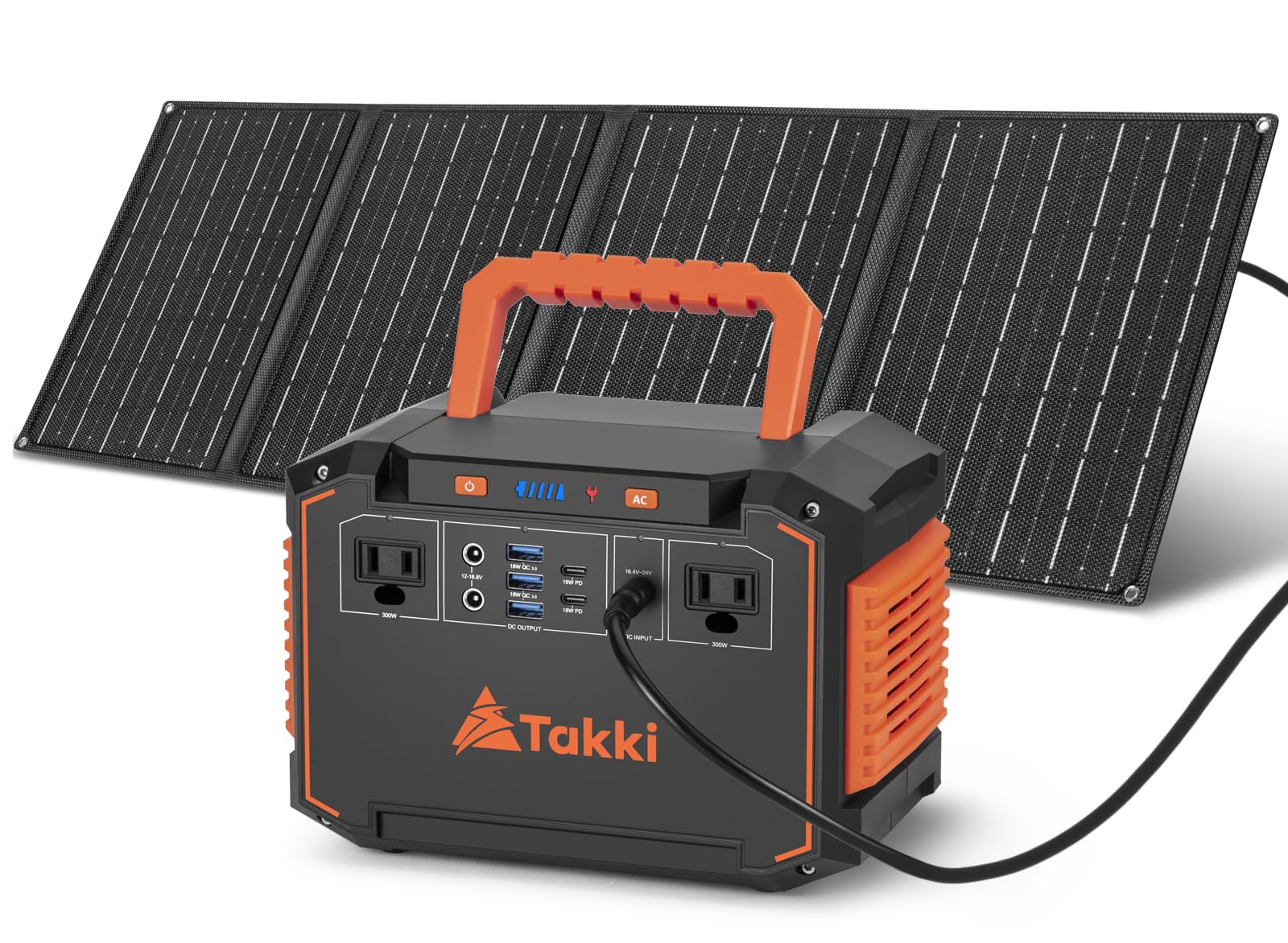
Figure 4.1: Takki 300W Portable Power Station and 40W Solar Panel. This image displays the main power station unit and the accompanying foldable solar panel, showcasing their compact design.
4.1. Portable Power Station (Model TP638)
The power station features a robust design with multiple output ports and an intuitive display.

Figure 4.2: Detailed view of the Takki Portable Power Station's output ports and cooling fan. This diagram highlights the 2 DC output ports, 3 USB-A QC3.0 ports, 2 USB-C PD 18W ports, and 2 AC output sockets, along with the integrated cooling fan for thermal management.
- AC Output Sockets (x2): 110V, 300W (350W Peak) for household appliances.
- USB-A Ports (x3): QC 3.0 18W for fast charging compatible devices.
- USB-C Ports (x2): 18W (5V/3A) for modern devices.
- DC Output Ports (x2): 12V for car refrigerators, vacuum cleaners, etc.
- LCD Display: Shows battery level, output status, and input power.
- LED Light: Integrated for illumination.
- Cooling Fan: Automatically activates to maintain optimal operating temperature.
4.2. 40W Foldable Solar Panel
The included 40W solar panel is designed for portability and efficient solar charging.

Figure 4.3: Dimensions of the Takki Portable Power Station and its folded solar panel. The power station measures approximately 8.74 x 5.27 x 5.98 inches, and the folded solar panel is 8.11 x 10.7 inches, highlighting their compact and travel-friendly design.
- Foldable Design: Compact for easy transport and storage.
- Integrated Cable: For direct connection to the power station.
- Kickstand: Allows for optimal angle adjustment towards the sun.
5. Setup
5.1. Initial Charging
Before first use, fully charge the power station using the AC wall charger. This ensures the battery is calibrated and ready for optimal performance.
- Connect the AC wall charger to the input port on the power station.
- Plug the charger into a standard wall outlet.
- The LCD display will indicate charging status. Charge until the battery indicator shows 100% or full.
5.2. Connecting the Solar Panel
To charge the power station using the solar panel:

Figure 5.1: Takki Solar Generator with Solar Panel deployed in a camping environment. This image illustrates the power station connected to the solar panel, ready for outdoor charging.
- Unfold the 40W solar panel and position it in direct sunlight.
- Adjust the angle of the solar panel for maximum sun exposure.
- Connect the solar panel's output cable to the DC input port on the power station.
- The LCD display will show the input wattage, indicating that solar charging is active.
6. Operating Instructions
6.1. Powering On/Off
- To turn on the power station, press and hold the main power button for a few seconds. The LCD display will illuminate.
- To turn off the power station, press and hold the main power button again until the display turns off.
6.2. Using AC Outlets
The two 110V AC outlets provide power for devices up to 300W (350W peak).
- Ensure the power station is on.
- Press the AC power button to activate the AC outlets. The AC indicator on the display will light up.
- Plug your device into an AC outlet.
- After use, press the AC power button again to turn off the AC output and conserve battery.
6.3. Using USB Ports (USB-A & USB-C)
The power station includes 3 QC 3.0 18W USB-A ports and 2 18W USB-C ports for charging mobile devices.
- Ensure the power station is on.
- Press the USB power button to activate the USB outputs. The USB indicator will light up.
- Connect your device to the appropriate USB-A or USB-C port.
- The USB outputs will automatically shut off after 20 seconds if the DC draw is too low or if devices are fully charged. To prevent this for small devices, activate the AC output even if no AC device is connected.
6.4. Using DC Ports
The two 12V DC ports are suitable for car accessories like car refrigerators, vacuum cleaners, and dash cams.
- Ensure the power station is on.
- Press the DC power button to activate the DC outputs. The DC indicator will light up.
- Plug your 12V DC device into a DC port.
- After use, press the DC power button again to turn off the DC output.
6.5. Estimated Device Charging Capacities
The 240Wh capacity allows for multiple charges or hours of operation for various devices:

Figure 6.1: Infographic detailing the estimated charging capacities of the Takki 240Wh power station for various devices. Examples include 12+ charges for an iPhone (14), 7+ charges for a tablet (30W), 4+ charges for a laptop (50W), and 5+ hours for a 40W CPAP machine.
- Mobile Phone (approx. 12+ charges)
- Tablet (approx. 7+ charges)
- Laptop (approx. 4+ charges)
- Camera (approx. 20+ charges)
- CPAP Machine (40W, approx. 5 hours)
- Small Fan (10W, approx. 20+ hours)
- Mini Car Refrigerator (40W, approx. 5 hours)
Note: Actual usage times may vary based on device power consumption and battery health.
7. Charging the Power Station
Your Takki power station can be recharged using three methods:

Figure 7.1: Diagram illustrating the three charging methods for the Takki Portable Power Station: AC wall outlet, solar panel, and car charger. Estimated charging times are also shown for each method.
7.1. AC Wall Outlet Charging
- Connect the AC wall charger to the power station's input port and then to a standard wall outlet.
- Charging time from 0% to 80% is approximately 5 hours, and a full charge takes about 8 hours.
7.2. Solar Panel Charging
- Connect the 40W solar panel to the power station's DC input port.
- Place the solar panel in direct sunlight, ensuring no shadows obstruct it.
- Charging time from 0% to 80% is approximately 7-8 hours under optimal sunlight conditions.
- Charging speed is affected by sunlight intensity, angle, and weather conditions.
7.3. Car Charger Charging
- Connect the car charging cable to the power station's DC input port and then to your vehicle's 12V cigarette lighter socket.
- Charging time for a full charge is approximately 8-10 hours.
8. Maintenance
8.1. Storage
- Store the power station in a cool, dry place, away from direct sunlight and extreme temperatures.
- For long-term storage, charge the unit to 50-80% every 3-6 months to maintain battery health.
- Avoid storing in areas with high humidity or corrosive substances.
8.2. Cleaning
- Use a soft, dry cloth to clean the exterior of the power station and solar panel.
- Do not use abrasive cleaners or solvents.
- Ensure all ports are free from dust and debris.
9. Troubleshooting
| Problem | Possible Cause | Solution |
|---|---|---|
| Power station does not turn on. | Battery is completely depleted. | Charge the power station using the AC wall charger. |
| No output from AC/USB/DC ports. | Output port not activated. | Press the corresponding AC, USB, or DC power button to activate the output. |
| Device not charging or charging slowly. | Device requires more power than available; cable issue; power station low on charge. | Check device power requirements (max 300W for AC). Ensure cables are functional. Recharge the power station. |
| Solar panel not charging the power station. | Insufficient sunlight; incorrect connection; panel obstructed. | Ensure direct sunlight and optimal panel angle. Verify cable connection. Remove any obstructions. |
| Power station automatically shuts off. | Overload protection; low battery; idle shutdown. | Reduce connected load. Recharge the power station. For low DC draw, activate AC output to prevent USB idle shutdown. |
10. Specifications
| Feature | Detail |
|---|---|
| Brand | Takki |
| Model Name | TP638 |
| Wattage (Capacity) | 240 Wh |
| Output Wattage | 300 W (Running), 350 W (Peak) |
| Voltage | 110 V AC |
| Fuel Type | Solar |
| Power Source | Electric |
| Runtime | 5 hours (at 300W load) |
| Item Weight | 2.8 kg (6.21 lbs) |
| Item Dimensions (L x W x H) | 22.2 x 13.4 x 15.2 cm (8.74 x 5.27 x 5.98 inches) |
| Solar Panel Included | 40W Foldable Solar Panel |
| Total Power Outlets | 9 (2 AC, 3 USB-A, 2 USB-C, 2 DC) |
| Material Type | ABS |
| Additional Features | Foldable Handle, Portable, Super Quiet, USB Port |
11. Warranty and Support
Takki products are designed for reliability and performance. This product comes with a standard manufacturer's warranty against defects in materials and workmanship. For specific warranty terms and conditions, please refer to the warranty card included with your purchase or visit the official Takki website.
If you encounter any issues or have questions regarding your Takki 300W Solar Generator, please contact Takki customer support. Have your model number (TP638) and purchase information ready when contacting support for faster service.
Manufacturer: Shenzhen Sbase Electronics Technology Co.,Ltd

