
1. Introduction
This manual provides detailed instructions for the safe and efficient operation of your PREXISO PLC10GLIT Rechargeable Green Cross Line Laser Level. Please read all instructions carefully before use to ensure optimal performance and safety.
Safety Information
- WARNING: Do not look directly into the laser beam. Direct exposure can cause eye injury.
- This device emits Class 2 laser radiation.
- Keep the device out of reach of children.
- Do not attempt to modify or disassemble the laser level.
- Use only specified batteries and charging accessories.
2. Package Contents
Verify that all items listed below are included in your package:
- PREXISO Green Cross Line Laser Level (Model: PLC10GLIT)
- Rechargeable Li-ion Battery (pre-installed or included separately)
- USB-C Charging Cable
- Magnetic L-Bracket
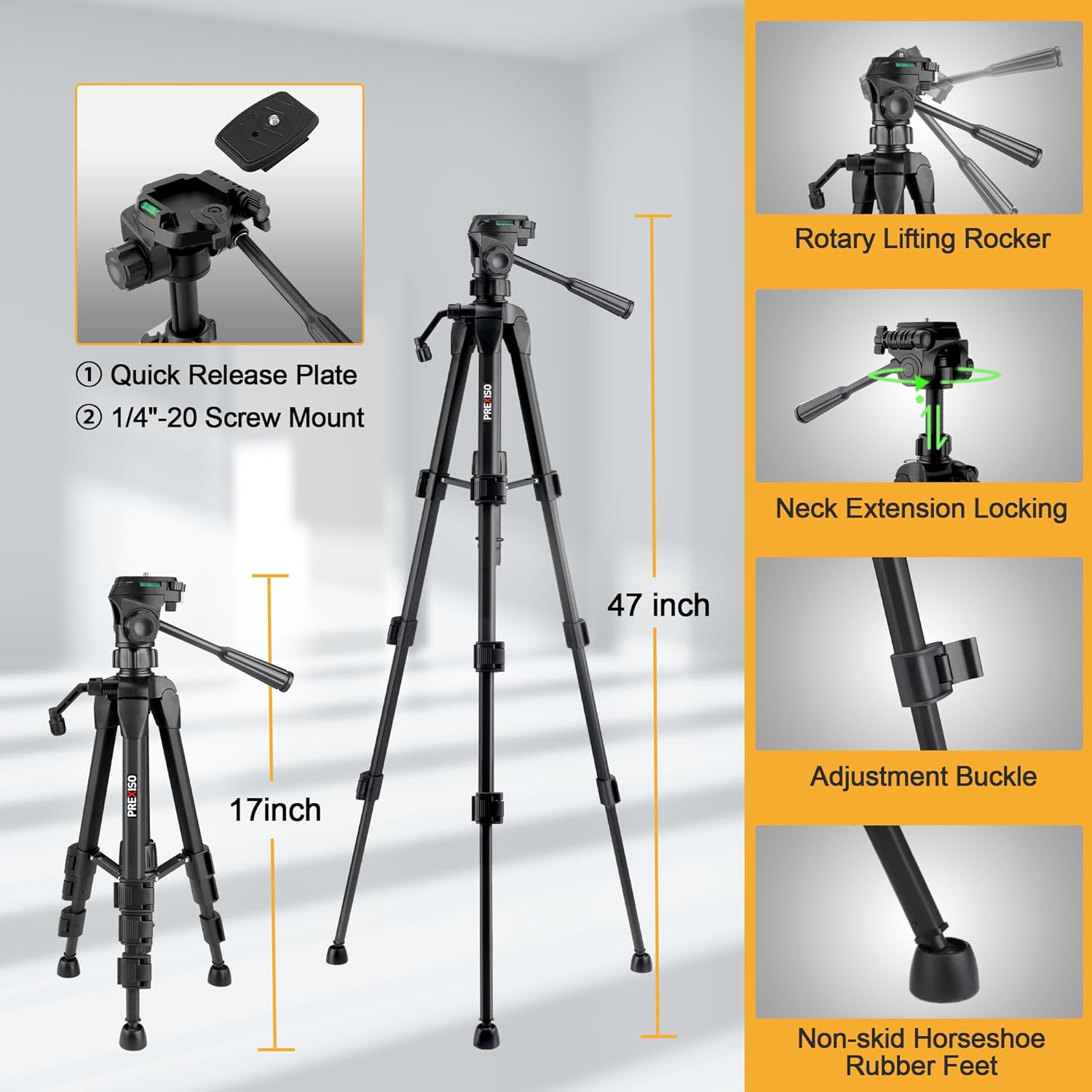
- 1.2m Aluminum Tripod with 1/4″-20 mount
- Carry Case / Storage Bag
- User Manual

3. Setup
3.1 Battery Installation & Charging
The device uses a built-in rechargeable Li-ion battery. Ensure the battery is charged before first use.
- Locate the battery compartment on the bottom of the laser level.
- Insert the Li-ion battery, ensuring correct polarity.
- Close the battery compartment securely.
- Connect the USB-C charging cable to the Type-C port on the device and to a suitable USB power source.
- The LED indicator will show red during charging and turn green when fully charged.

3.2 Tripod Setup
The included 1.2m aluminum tripod provides a stable platform for precise leveling.
- Extend the tripod legs to the desired height and secure them using the adjustment buckles.
- Attach the laser level to the tripod's 1/4″-20 screw mount.
- Adjust the tripod head using the rotary lifting rocker and neck extension locking mechanism for fine positioning.
3.3 Magnetic L-Bracket Attachment
The integrated magnetic L-bracket allows for versatile mounting on metal surfaces.
- Attach the laser level to the L-bracket via the 1/4″-20 screw.
- The strong magnets on the L-bracket can securely hold the device to metal studs, beams, or other ferrous materials.
- The bracket also features anti-slip rubber pads for added stability.
4. Operating Modes
4.1 Self-Leveling Mode
This mode automatically levels the laser lines for accurate horizontal and vertical projections.
- Slide the pendulum lock switch to the "Auto" (unlocked) position. The LED will turn green.
- Place the laser level on a stable surface. The device will self-level within a 5° range.
- If the device is outside the 5° self-leveling range, the laser lines will flash, and a red LED alert will activate. Adjust the device's position until the lines are steady and the LED is green.

4.2 Manual Mode (Lock Mode)
Use this mode to project laser lines at any desired angle, useful for diagonal applications.
- Slide the pendulum lock switch to the "Manual" (locked) position.
- Press and hold the power button for 2 seconds to activate the laser lines.
- The laser lines will now be locked and can be projected at any angle without flashing.
4.3 Brightness Adjustment
The laser level features three adjustable brightness settings for optimal visibility in various lighting conditions.
- Short press the brightness button (usually indicated by a sun icon) on the top of the device to cycle through the three brightness modes (100%, 70%, 40%).

5. Versatile Applications
The PREXISO PLC10GLIT is designed for a wide range of professional and DIY tasks, including:
- Tile layout and installation
- Backsplash installation
- Cabinet fitting
- Hanging pictures and artwork
- Door and window calibration
- Framing and general home renovation projects

6. Specifications
| Model Number | PLC10GLIT |
| Laser Type | Green Cross Line Laser (520 nm) |
| Self-Leveling Range | ± 5° |
| Accuracy | ± 1/4″ at 30 ft |
| Indoor Working Range | Up to 20 m (65 ft) |
| Brightness Modes | 3 (100%, 70%, 40%) |
| Power Source | Rechargeable Li-ion Battery (included) |
| Charging Port | USB Type-C |
| Continuous Use Time | Up to 6 hours |
| IP Rating | IP54 (Dust and Splash Proof) |
| Tripod Mount Thread | 1/4″-20 |
| Tripod Height | 1.2 m (47 inches) |
| Item Weight | 1.83 kg |
| Manufacturer | HANGZHOU GREAT STAR INDUSTRIAL CO.,LTD |

7. Maintenance
- Keep the laser level clean and free from dust and debris. Use a soft, dry cloth for cleaning.
- Store the device in its carry case when not in use to protect it from damage.
- Avoid exposing the device to extreme temperatures or direct sunlight for prolonged periods.
- Regularly check the battery for any signs of damage or leakage.
8. Troubleshooting
8.1 Laser Lines are Flashing
If the laser lines are flashing in self-leveling mode, it indicates the device is outside its 5° self-leveling range. Adjust the position of the laser level until the lines become steady and the LED indicator turns green.
8.2 Laser Not Turning On
- Ensure the battery is fully charged.
- Check if the pendulum lock switch is in the correct position (Auto for self-leveling, Manual for locked lines).
- If in Manual mode, ensure the power button is pressed and held for 2 seconds to activate.
9. Warranty and Support
Your PREXISO PLC10GLIT Rechargeable Green Cross Line Laser Level comes with a 2-year manufacturer's warranty. For warranty claims, technical support, or any inquiries, please contact the manufacturer or your retailer with your purchase details.
10. Official Product Videos
PREXISO Laser Level with Tripod - Rechargeable Dual Modules
This video provides an overview of the PREXISO Laser Level, highlighting its features, including the rechargeable dual modules and tripod compatibility. It demonstrates the product in various usage scenarios.
PREXISO Rechargeable Laser Level Self Leveling
This video showcases the self-leveling capabilities of the PREXISO Rechargeable Laser Level, demonstrating how it automatically adjusts to provide accurate lines for your projects.


