
1. Introduction
Thank you for purchasing the Lamicall Car Tablet Holder. This product is designed to provide a stable and adjustable viewing experience for passengers in the rear seat of your vehicle. Featuring a durable aluminum extendable arm and a foldable design, it offers convenience and entertainment during car journeys. Please read this manual carefully before installation and use to ensure proper function and safety.
2. Product Features
- Two-Axis Extendable & Metal Arm: Upgraded from previous versions, this holder features a robust aluminum arm that extends to the center of the rear seat, allowing multiple passengers to view the screen comfortably. Its metal construction ensures enhanced durability and stability.
- Foldable Design: Both the holder and its claws are foldable. This space-saving design prevents obstruction when not in use and ensures children can safely enter and exit the vehicle without interference.
- Headrest Bar Compatibility (94-160mm): Designed to fit headrest bars with a distance between 94mm and 160mm. It includes a unique stable lock mechanism at the base of the headrest bar attachment, ensuring a secure fit even during bumpy rides.
- Wide Clamp & Thick Case Support: Compatible with smartphones and tablets ranging from 4.7 to 13 inches. The improved silicone clips can accommodate devices with cases up to 26mm thick, providing secure holding without scratching your device.
- 360-Degree Rotation & Adjustable Angle: Equipped with a 360-degree rotatable ball joint, allowing for easy switching between portrait and landscape modes, as well as vertical and horizontal screen adjustments. This ensures optimal viewing angles for all passengers without needing to remove the device.
- Easy Installation: The car tablet holder can be installed on headrest bars without any tools. Simply attach and lock it into place. Its quick installation and removal make it convenient to transfer between vehicles.
- Wide Compatibility: Supports a broad range of devices including iPads (iPad 2025, iPad 10th Gen, iPad 9th Gen, 11/10.2/12.9 inch, iPad mini 2/3/4/5/6, iPad Air 1/2/3/4/5, iPad Pro 9.7/10.2/10.5/12.9), iPhones (iPhone 2025/2024, iPhone Air, iPhone 17/17 Pro/17 Pro Max, iPhone 16/16 Plus/16 Pro/16 Pro Max, iPhone 15/15 Plus/15 Pro/15 Pro Max, iPhone 14, iPhone 13/12/11 Pro max XS Max XR X 8/7/6/6s Plus), Samsung Galaxy Tab, Huawei MatePad, Fire HD 10/8, and Nintendo Switch.
3. Package Contents
- 1 x Lamicall Car Tablet Holder (Model: STCH04-JP-B)
- 1 x Instruction Manual
4. Specifications
| Specification | Detail |
|---|---|
| Brand | Lamicall |
| Model Number | STCH04-JP-B |
| Color | Black |
| Mounting Type | Headrest |
| Compatible Devices | 4.7-13 inch smartphones and tablets (iPad, iPhone, Android, Kindle, Fire HD, Nintendo Switch) |
| Max Case Thickness | 26mm |
| Headrest Bar Distance | 94mm - 160mm |
| Material | Aluminum, Silicone, Plastic |
| Rotation | 360 degrees |
5. Setup and Installation
- Prepare the Headrest: Ensure the headrest is clean and free from obstructions. The holder is designed for headrest bars with a distance between 94mm and 160mm.
- Attach the Holder: Slide the holder onto one of the headrest bars. Then, adjust the width of the holder to fit snugly around both headrest bars.
- Secure the Lock: Once positioned, engage the stable lock mechanism at the base of the holder by rotating it as indicated by the arrow. This will firmly secure the holder to the headrest bars.

Image: Close-up of the stable lock mechanism, showing how to secure the holder to the headrest bars.
- Insert Your Device: Gently pull apart the spring-loaded clamps of the holder and insert your smartphone or tablet. The silicone pads will protect your device from scratches and provide a firm grip. The holder supports devices from 4.7 to 13 inches and cases up to 26mm thick.

Image: The holder securely gripping different sized devices, including one with a thick protective case.
- Adjust the Arm: Extend the aluminum arm to the desired length. The two-axis design allows for flexible positioning, including extending it towards the center of the rear seat for shared viewing.
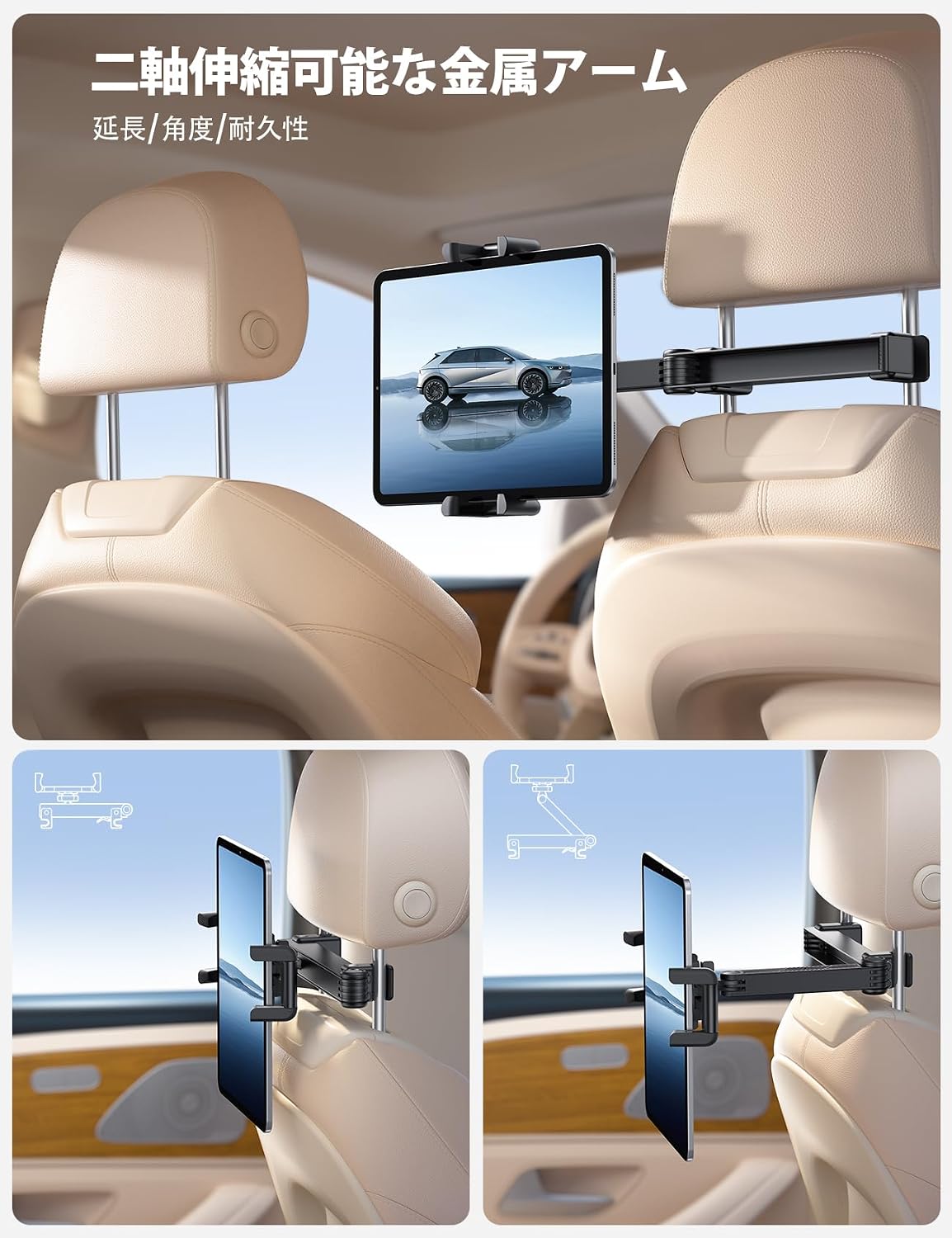
Image: The extendable arm positioning a tablet for optimal viewing by multiple rear passengers.
- Adjust Viewing Angle: Use the 360-degree rotatable ball joint to set your preferred viewing angle and orientation (portrait or landscape). Tighten the adjustment knob to fix the angle.

Image: Demonstrating the 360-degree rotation for flexible viewing angles.
6. Operating Instructions
- Extending/Retracting the Arm: To extend the arm, gently pull it outwards. To retract, push it back towards the headrest. Ensure the arm is fully retracted when not in use or when passengers are entering/exiting the vehicle.
- Adjusting Device Orientation: Loosen the adjustment knob slightly, rotate your device to the desired portrait or landscape orientation, and then tighten the knob to secure it.
- Folding the Holder: When the holder is not in use, fold the clamps and the arm inwards towards the headrest. This minimizes its profile and prevents it from being an obstruction.

Image: The holder folded for safety and space-saving when not in use.
7. Maintenance
- Cleaning: Wipe the holder with a soft, damp cloth. Avoid using harsh chemicals or abrasive cleaners, as they may damage the finish or materials.
- Inspection: Periodically check all moving parts and connections to ensure they are secure. If any part appears loose or damaged, discontinue use and contact customer support.
- Storage: When not in use for extended periods, store the holder in a cool, dry place, preferably in its original packaging.
8. Troubleshooting
- Holder feels loose on headrest: Ensure the stable lock mechanism is fully engaged. Verify that the headrest bar distance is within the compatible range (94-160mm).
- Device is not held securely: Check that your device (with or without case) fits within the 4.7-13 inch range and that the case thickness does not exceed 26mm. Ensure the clamps are fully gripping the device.
- Difficulty adjusting the arm or angle: Loosen any adjustment knobs before attempting to reposition. If the arm feels stiff, ensure no debris is obstructing the joints.
- Arm does not extend to the center: Ensure the arm is fully extended and that there are no obstructions in the car interior preventing its movement.
9. Warranty and Support
Lamicall products come with a standard manufacturer's warranty. For specific warranty details, please refer to the warranty card included with your product or visit the official Lamicall website. If you encounter any issues or require assistance, please contact Lamicall customer support through the retailer where you purchased the product or via the contact information provided on the Lamicall website.