
Introduction
This manual provides detailed instructions for the setup, operation, maintenance, and troubleshooting of your wheelfun 1/14 HUINA RC Metal Excavator Model 1594. Please read this manual thoroughly before operating the product to ensure safe and optimal performance.
Product Features
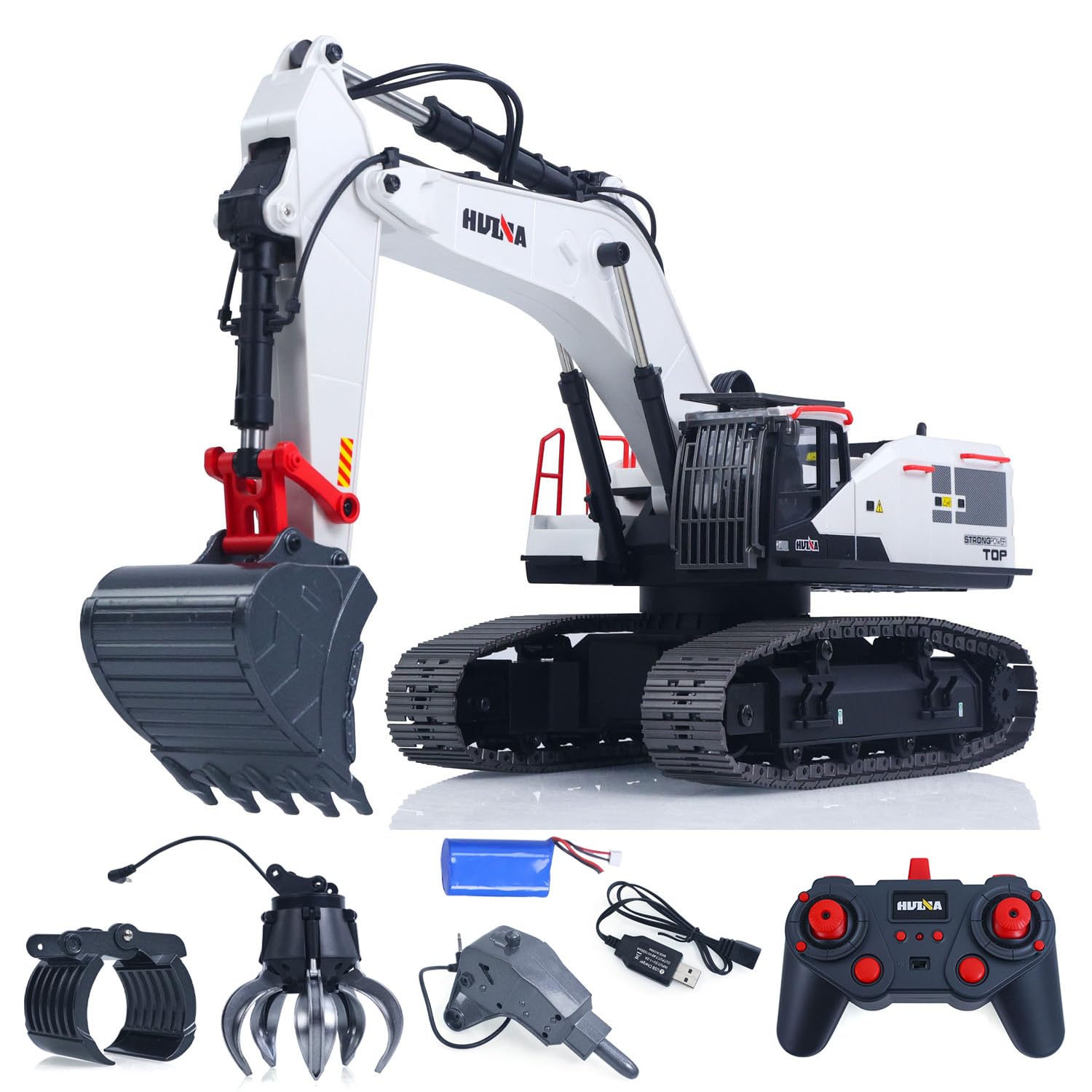
- Versatile Accessories: Comes with multiple interchangeable accessories including a bucket, drill, ball claw, and wooden claw for various tasks and enhanced play.
- Realistic Experience: Equipped with built-in lights and sound effects for an immersive operating experience, simulating a real construction site.
- Responsive Control: Features a 2.4G remote controller for stable signal transmission and sensitive operation, suitable for different skill levels.
- Extended Playtime: Includes a high-performance body battery and USB charging cable for convenient and quick charging.
- Educational Benefits: Promotes creativity, hands-on skills, coordination, and problem-solving abilities, ideal for family and group play.
What's in the Box
The product package includes the following items:
- 1 x RC Metal Excavator Model 1594
- 1 x 2.4G Remote Control
- 1 x Body Battery (Lithium-Ion)
- 1 x USB Charging Cable
- Interchangeable Accessories (Bucket, Drill, Ball Claw, Wooden Claw)
Setup Instructions
1. Unboxing and Initial Inspection
Carefully remove all components from the packaging. Inspect for any damage or missing parts. Ensure all accessories are present.
2. Charging the Excavator Body Battery
- Locate the body battery and the USB charging cable.
- Connect the body battery to the USB charging cable.
- Plug the USB charging cable into a compatible USB power source (e.g., computer, USB wall adapter).
- Allow the battery to charge fully before first use. The charging indicator on the cable will typically change color when charging is complete.

3. Installing Remote Control Batteries
- The 2.4G remote controller requires batteries (sold separately). Refer to the remote control's battery compartment for the correct battery type and quantity (typically AA or AAA).
- Use a small screwdriver to open the battery compartment on the back of the remote control.
- Insert the batteries, ensuring correct polarity (+/-).
- Close the battery compartment and secure it with the screw.
4. Powering On and Pairing
- Turn on the excavator using its power switch (usually located on the underside or rear).
- Turn on the remote controller using its power switch.
- The excavator and remote control should automatically pair. If pairing fails, turn both devices off and on again, ensuring they are close to each other.
Operating Instructions
1. Basic Controls
The 2.4G remote controller allows for precise control of the excavator's movements and functions. Familiarize yourself with the joystick and button layout.
- Movement: Use the left and right joysticks to control the forward, backward, and turning movements of the tracks.
- Arm/Boom Control: Use specific buttons or joystick movements to raise/lower the main boom and extend/retract the arm.
- Bucket/Attachment Control: Operate the bucket or attached accessory (e.g., ball claw, drill) using designated buttons or joystick actions.
- Cab Rotation: The excavator's cab can rotate 360 degrees. Use the corresponding control for rotation.
- Lights and Sound: Activate or deactivate the built-in lights and sound effects using dedicated buttons on the remote control.
2. Changing Accessories
The excavator comes with interchangeable accessories to perform different tasks. To change an accessory:
- Ensure the excavator is powered off.
- Carefully remove the pin securing the current attachment to the arm.
- Detach the current accessory.
- Align the desired accessory (e.g., drill, ball claw) with the arm's attachment points.
- Insert the pin to secure the new accessory. Ensure it is firmly in place.
- If the accessory requires power (e.g., drill), connect its cable to the designated port on the excavator arm.


Maintenance
To ensure the longevity and optimal performance of your RC excavator, regular maintenance is recommended.
- Keep the excavator clean, especially after outdoor use. Remove any dirt, dust, or debris from the tracks, joints, and body.
- Store the excavator and its accessories in a dry, cool place away from direct sunlight and extreme temperatures.
- Always disconnect the battery from the excavator when not in use to prevent over-discharge.
- Regularly check all screws and connections to ensure they are secure. Tighten if necessary.
Troubleshooting
What to do if the item is damaged out of the box?
We use solid packaging for all items. If the item is damaged upon arrival, please contact our customer support. We can resend a free replacement part to address the issue.
Specifications
| Feature | Detail |
|---|---|
| Brand Name | wheelfun |
| Model Name | TH19286-AMZUS2-3 |
| Scale | 1/14 |
| Material Type | Metal |
| Power Source | Battery Powered |
| Battery Type | Lithium-Ion (1 D battery included) |
| Included Components | 1 x Remote Control, 1 x Body Battery, 1 x USB Charging Cable |
| Operation Mode | Remote Control (2.4G) |
| Additional Features | Lights, Sound Effects, Interchangeable Accessories |
| Item Weight | 17.6 Pounds |
| Item Dimensions | 28 x 15.2 x 12 inches |
| Recommended Age | Adult (Manufacturer Minimum Age: 256 months / 14+ years) |
Warranty and Support
For any product inquiries, technical assistance, or warranty claims, please contact our professional after-sales team. Our technical maintenance team can provide guidance in English through video or text for repairs.
Our mission is to provide fun and exploration opportunities of hydraulic principles for hobby-level players, inspiring interest in science, engineering, and technology.