
Introduction
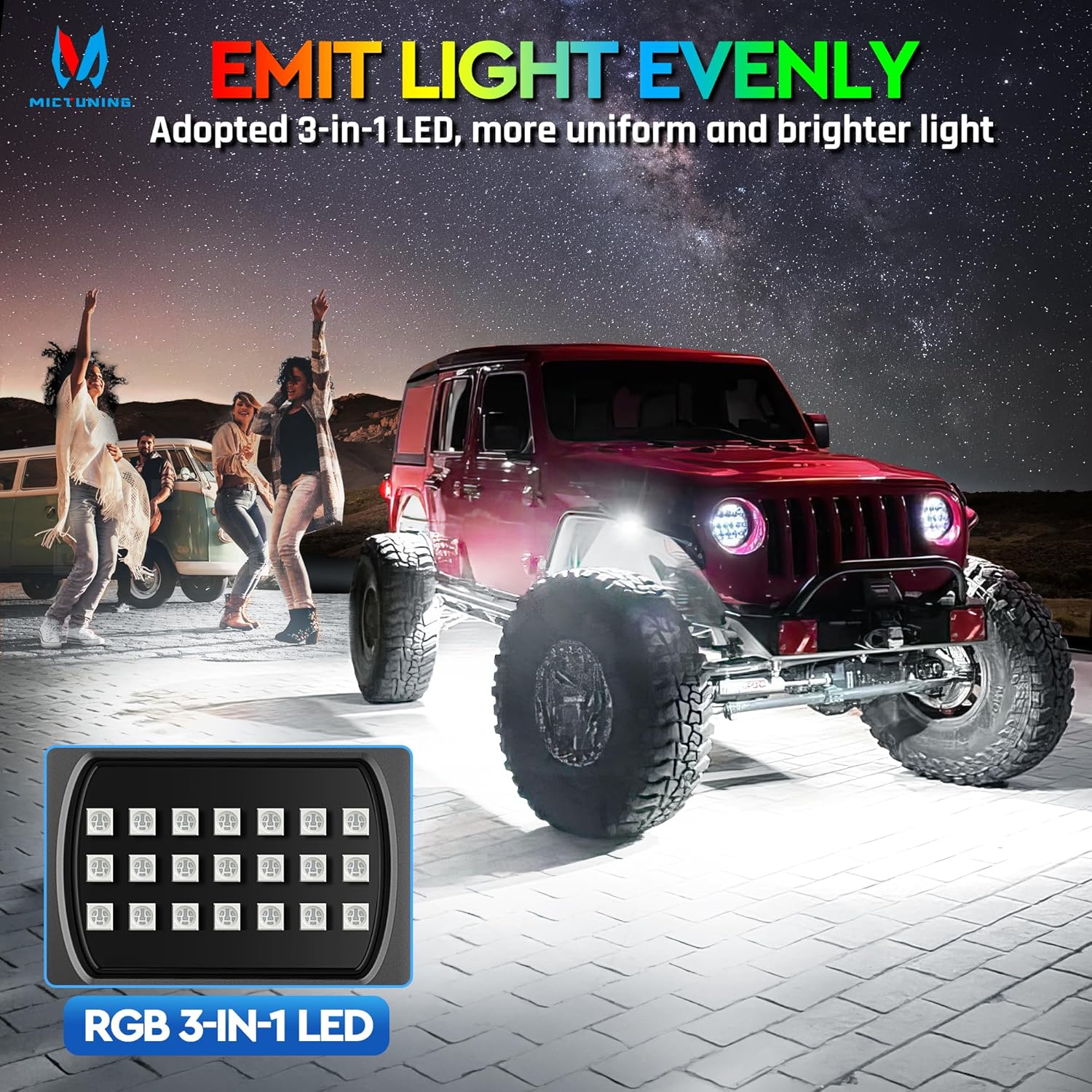
The MICTUNING Q1 MAX 12-Pod Chasing Color Rock Lights are designed to provide ultra-bright, dynamic lighting for various off-road vehicles including trucks, UTVs, SUVs, and ATVs. This kit features 288 individual light chips across 12 pods, offering a 160° wide beam for enhanced visibility. The system supports expandable configurations up to 24 pods and includes multiple lighting effects controllable via a user-friendly application, along with music synchronization capabilities. Constructed with IP68 waterproof aluminum housing, these lights are built for durability in challenging environments.
Package Contents
Before installation, verify that all components are present in your package:
- 12 x Q1 MAX Rock Light Pods
- Wiring Harness with Control Box
- Mounting Hardware (screws, nuts, washers)
- Instruction Manual

Setup and Installation
Proper installation is crucial for optimal performance and longevity of your rock lights. It is recommended to have basic electrical knowledge or seek professional assistance for installation.
Mounting the Light Pods
- Choose Mounting Locations: Select flat, secure surfaces under your vehicle (e.g., wheel wells, frame rails) that provide maximum light coverage and are protected from direct impact. The compact 3.3" x 1.9" pods fit various locations.
- Clean Surface: Ensure mounting surfaces are clean and dry.
- Secure Pods: Use the provided screws and nuts to firmly attach each light pod. Ensure the pods are oriented to direct light as desired.

Wiring Connection
The Q1 MAX system features dual-path wiring, allowing for series or parallel connections. The smart series-parallel wiring simplifies installation.
- Power Source: Connect the main power wires from the control box to your vehicle's 12V DC power source (e.g., battery), ensuring proper polarity.
- Fuse Protection: The system includes a built-in 7.5A fuse for protection against electrical shorts.
- Connecting Pods: Connect the individual light pods to the main wiring harness. The system supports up to 24 pods (12 per side) for expanded coverage.
- Conceal Wiring: Route and secure all wiring to prevent damage from heat, moving parts, or road debris.
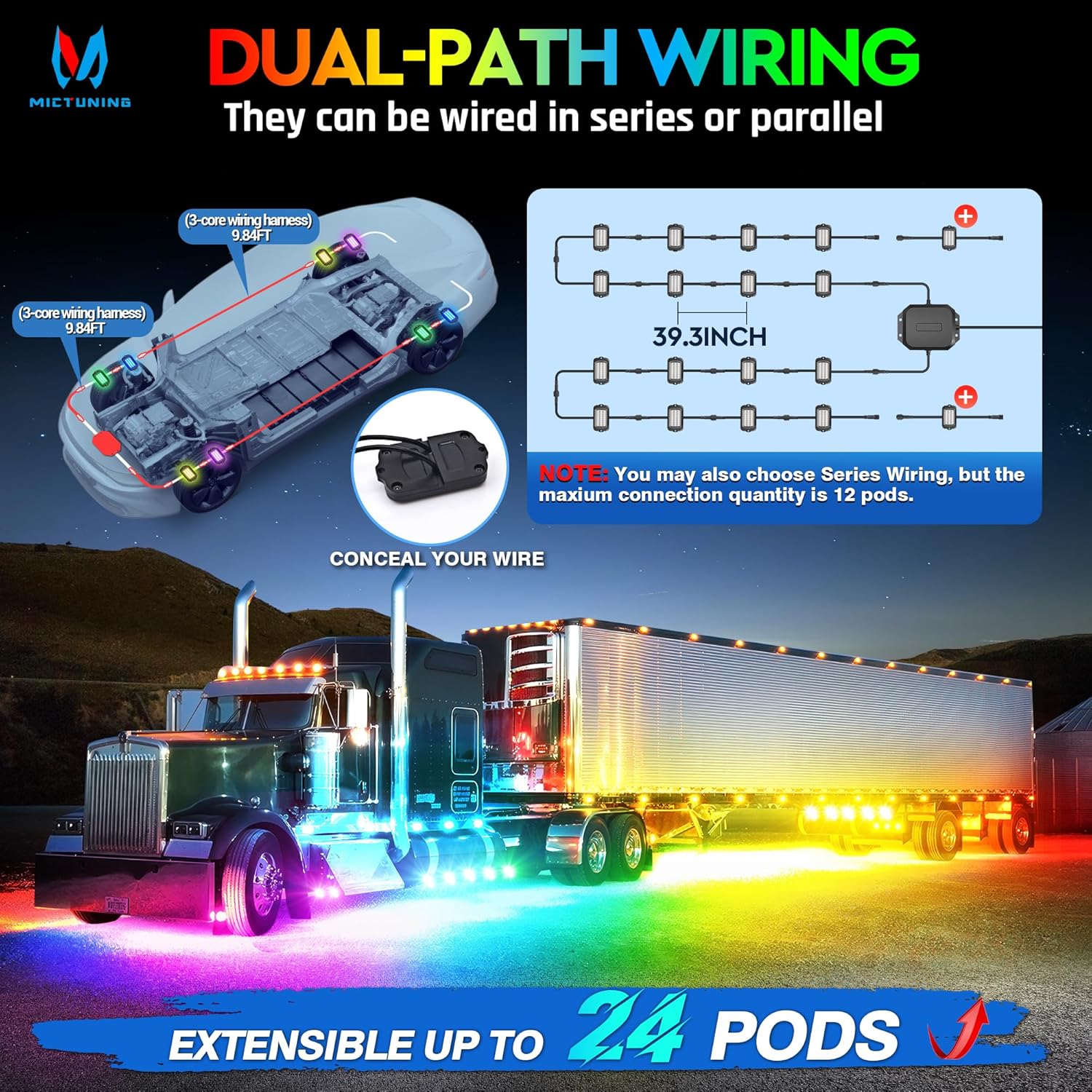
Note: For optimal performance and to avoid overloading, ensure your vehicle's electrical system can support the total power draw of all connected pods.
Video: Product Unboxing and Setup Overview
Video: This video provides an overview of the MICTUNING Q1 MAX RGB+IC Rock Lights, including unboxing the product and initial setup considerations. (Source: Nado Stuff, Authorized Dealer)
Operating Instructions
The MICTUNING Q1 MAX Rock Lights are controlled via a user-friendly mobile application, compatible with both Android and iOS devices.
App Download and Connection
- Download App: Search for the "MICTUNING" app in your device's app store (Google Play Store for Android, Apple App Store for iOS).
- Enable Bluetooth: Ensure Bluetooth is enabled on your mobile device.
- Connect: Open the MICTUNING app. The app will automatically detect and connect to your Q1 MAX Rock Lights via Bluetooth.

Lighting Modes and Customization
The app provides extensive control over your rock lights:
- Preset Patterns: Choose from 76 pre-programmed lighting effects, including flowing chase, breathing glow, and strobe.
- DIY Customization: Utilize 8 DIY slots to create your own unique lighting patterns. Adjust colors, speed, and transitions to personalize your display.
- Music Mode: Activate Music Mode to synchronize your lights with the rhythm of your music, creating dynamic visual effects.
- Brightness Control: Adjust the brightness level to suit your preference and environment.
Video: Product Features and App Control
Video: This video details the features of the MICTUNING Q1 MAX RGB+IC Rock Lights, including a demonstration of the app control and various lighting modes. (Source: Nado Stuff, Authorized Dealer)
Maintenance
The MICTUNING Q1 MAX Rock Lights are designed for durability and require minimal maintenance.
- Cleaning: Periodically clean the light pods with a soft cloth and mild detergent to remove dirt and debris, ensuring maximum light output. Avoid abrasive cleaners.
- Wiring Inspection: Regularly inspect all wiring connections for signs of wear, corrosion, or damage. Secure any loose wires.
- Waterproof Design: The lights feature an IP68 waterproof rating, meaning they are protected against dust ingress and can withstand immersion in water up to 1.5 meters for 30 minutes. However, avoid prolonged submersion or high-pressure washing directly on the pods.
- Aluminum Housing: The aviation-grade aluminum housing provides strength and impact resistance. Special surface treatment makes it scratch and wear-proof.

Troubleshooting
If you encounter issues with your MICTUNING Q1 MAX Rock Lights, refer to the following common troubleshooting steps:
| Problem | Possible Cause | Solution |
|---|---|---|
| Lights do not turn on. | No power connection, blown fuse, loose wiring. | Check power connections to the battery. Inspect the 7.5A fuse and replace if blown. Verify all wiring is securely connected. |
| Lights flicker or dim. | Insufficient power, loose connection, damaged wiring. | Ensure stable 12V power supply. Check for loose connections at the pods and control box. Inspect wiring for damage. |
| App cannot connect to lights. | Bluetooth off, app not updated, interference. | Ensure Bluetooth is enabled on your device. Restart the app and lights. Try connecting in a different location to rule out interference. |
| Some pods not working. | Faulty pod, damaged connection to specific pod. | Inspect the wiring to the non-functional pod. If wiring is intact, the pod may be faulty and require replacement. |
Video: Common Troubleshooting Guide
Video: This video offers a common troubleshooting guide for rock lights, addressing various issues and providing solutions. (Source: Nado Stuff, Authorized Dealer)
Specifications
| Feature | Detail |
|---|---|
| Brand | MICTUNING |
| Model Number | MIC-LRL-843 |
| Color | RGB+IC Dreamcolor |
| Light Source Type | Neon LED |
| Form Factor | Pod |
| Beam Angle | 160° Wide Beam |
| Number of Pods | 12 (Expandable up to 24) |
| Light Chips per Kit | 288 |
| Material | Aluminum Housing |
| Water Resistance Level | IP68 Waterproof |
| Connectivity | Bluetooth (App Control) |
| Vehicle Service Type | ATV, Golf Cart, Pickup Truck, Trailer, Truck, Van |
| Special Features | Customizable up to 24 pods, multiple lighting modes (76 presets, 8 DIY), Music Sync, User-friendly APP, Built-in 7.5A Fuse Protection |
Warranty and Support
MICTUNING provides a 2-Year Warranty for the Q1 MAX Rock Lights. This warranty covers manufacturing defects and ensures product reliability. For any issues or inquiries, please contact MICTUNING customer support. Their support team aims to respond within 24 hours to provide solutions.
MICTUNING is committed to innovation, reliability, and user satisfaction in automotive lighting. For more information or assistance, visit the official MICTUNING website or contact their customer service department.


