
Important Safety Information
Please read this manual carefully before operating your Omethey safe. Keep this manual for future reference.
- Do not keep emergency keys inside the safe.
- Ensure the safe is placed on a stable, level surface.
- Remove batteries if the safe will not be used for an extended period to prevent leakage.
- This safe does not contain lithium batteries.
Product Overview
The Omethey 5.0 Cu ft Extra Large Safe is designed to provide secure storage for your valuables. It features a dual-door design, digital keypad, and robust construction.

Figure 1: Front view of the Omethey 5.0 Cu ft Safe with both doors closed.
Key Features:
- Extra Large Capacity: 5.0 Cubic Feet, suitable for various valuables.
- Dual Door Design: Allows separate access and organization.
- Anti-theft Heavy Duty Construction: Reinforced low carbon alloy steel, pry-resistant thick door, and 4 solid living bolts.
- Metal Storage Box & Deposit Slot: Convenient for quick deposits without opening the main safe.
- Dual Alarm System: Activates after 3 incorrect passwords or violent vibrations.
- Backlit Keypad: Easy operation in low-light conditions.
- Built-in LED Light: Illuminates the interior upon opening.
- Mute Function: For silent operation.
- Mounting Options: Pre-drilled holes for floor and wall mounting.
Box Contents
Verify that all items listed below are included in your package:
- 1 x Omethey 5.0 Cub Safe
- 4 x Emergency Keys
- 6 x Expansion Screws
- 1 x USB Type-C Cable
- 4 x Non-slip Pads
- 1 x User Manual (this document)

Figure 2: Included accessories and components.
Setup
1. Unboxing and Inspection:
Carefully remove the safe from its packaging. Inspect the safe for any signs of damage during transit. The packaging includes extra Styrofoam and corner protectors to ensure safe delivery.
Video 1: Demonstrates the unboxing process and secure packaging of the Omethey safe.
2. Installing Batteries:
Locate the battery compartment on the inside of the safe door. Insert four 'AA' alkaline batteries (not included) according to the polarity markings. Close the battery compartment cover securely.
3. Setting Up the Code:
Refer to the included instruction manual for detailed steps on setting the first and second user codes for the digital keypad. The default code is 123456 and should be changed immediately after receiving the safe.
4. Mounting the Safe (Optional):
The safe can be bolted to the floor or a wall for added security. Pre-drilled mounting holes are provided on the back (four) and bottom (two) of the safe. Use the included expansion screws to secure the safe to a solid surface.
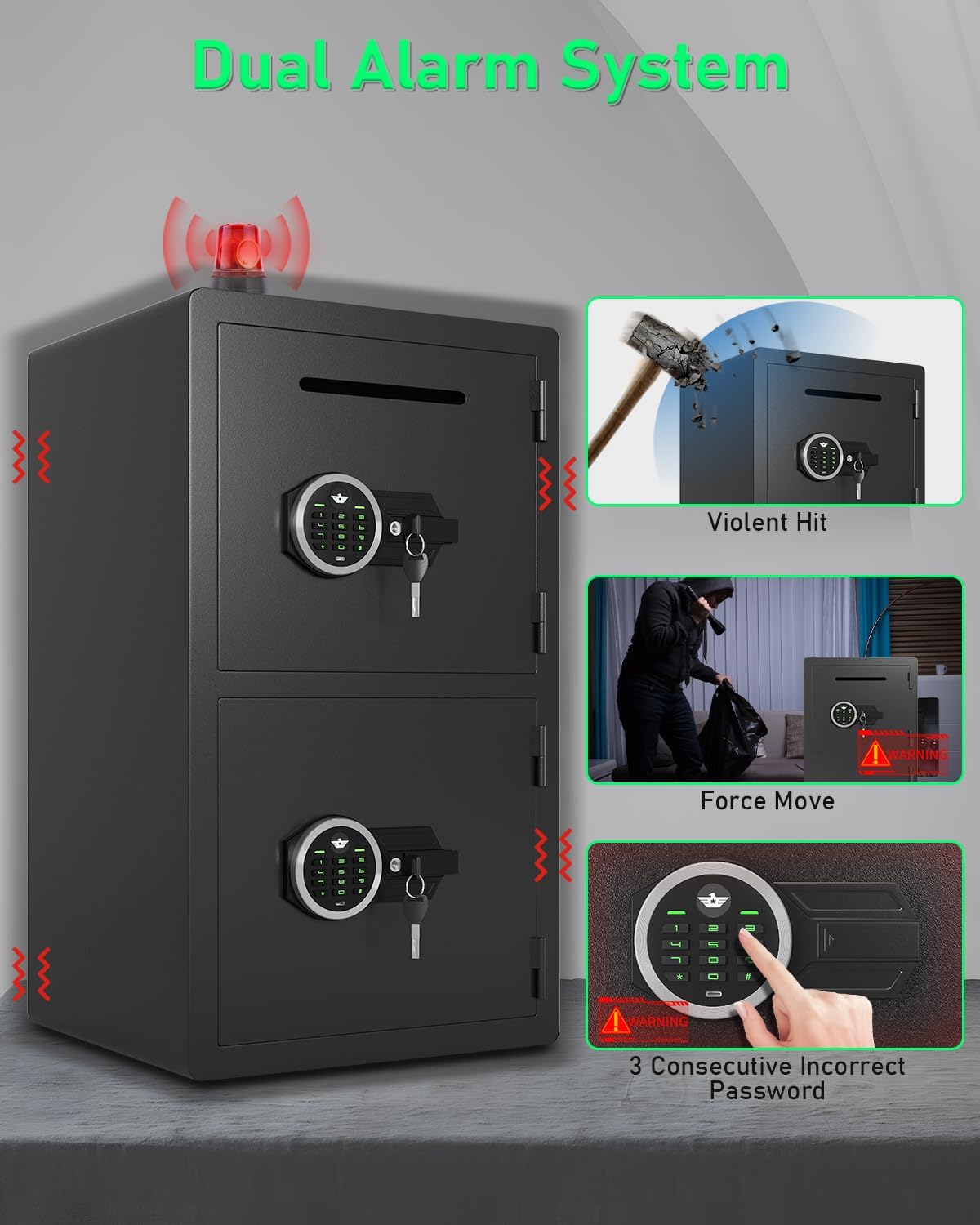
Figure 3: Illustration of mounting points on the safe.
Operating Instructions
Opening the Safe:
- Using the Digital Keypad: Enter your programmed code, then press the '#' or 'Enter' key. The keypad will illuminate green, and you can turn the knob to open the door.
- Using Emergency Key: In case of battery failure or forgotten code, insert the emergency key into the keyhole, turn it, and then turn the knob to open the door.
- Using USB Type-C Cable (External Power): If batteries are dead, connect a USB Type-C cable to an external power bank and the safe's external power port. Then, use the digital keypad to enter your code and open the safe.

Figure 4: Visual guide to opening methods.
Closing the Safe:
Close the safe door firmly. Turn the knob to engage the locking bolts. Ensure the door is fully secured.
Using the Deposit Slot:
The top compartment features a deposit slot, allowing you to insert cash, envelopes, or small documents without opening the safe door. This is ideal for quick, secure deposits.

Figure 5: Demonstrating the deposit slot feature.
Maintenance
- Battery Replacement: Replace batteries when the low battery indicator appears or when the keypad becomes unresponsive. Always use four new 'AA' alkaline batteries.
- Cleaning: Wipe the safe's exterior with a soft, damp cloth. Avoid abrasive cleaners or solvents.
- Interior Care: The interior is lined with soft material to protect valuables from scratches. Avoid placing sharp objects directly on the lining.
Troubleshooting
| Problem | Possible Cause | Solution |
|---|---|---|
| Safe does not open with code. | Incorrect code entered; Low battery; System error. | Re-enter correct code; Replace batteries; Use emergency key or external power. |
| Alarm sounds unexpectedly. | 3 consecutive incorrect passwords; Violent vibration/tampering. | Enter correct code to stop alarm. Avoid strong impacts to the safe. |
| Keypad not lighting up. | Low or dead batteries. | Replace batteries or use external USB Type-C power. |
Dual Alarm System:
The safe is equipped with a dual alarm system that activates if three incorrect codes are entered consecutively or if the safe experiences violent vibrations. The alarm produces a 70-decibel sound for 60 seconds. To stop the alarm, enter the correct password.

Figure 6: Dual Alarm System triggers.
Mute Function:
The mute function allows for silent operation of the keypad, preventing audible feedback when entering codes. This can be useful in situations where discretion is required.
Specifications
| Feature | Detail |
|---|---|
| Brand | Omethey |
| Model Number | KM-50 |
| External Dimensions (D x W x H) | 12.6"D x 13.8"W x 19.7"H |
| Capacity | 5.0 Cubic Feet |
| Lock Type | Electronic Combination Lock |
| Material | Alloy Steel |
| Alarm Type | Audible & Vibration |
| Mounting Type | Wall & Floor Mount |
| Power Source | 4 x 'AA' Alkaline Batteries (not included) |
| Special Features | Alarm System, Anti-Theft, Combination Lock, Removable Shelf, Sensor Light, Deposit Slot |
Warranty and Support
Omethey provides lifetime customer service for each cabinet safe sold. If you have any questions or require assistance, please contact Omethey customer service. You will always enjoy 7*24h friendly customer service from Omethey.
For further support, please visit the Omethey Store on Amazon.