1. Introduction and Overview
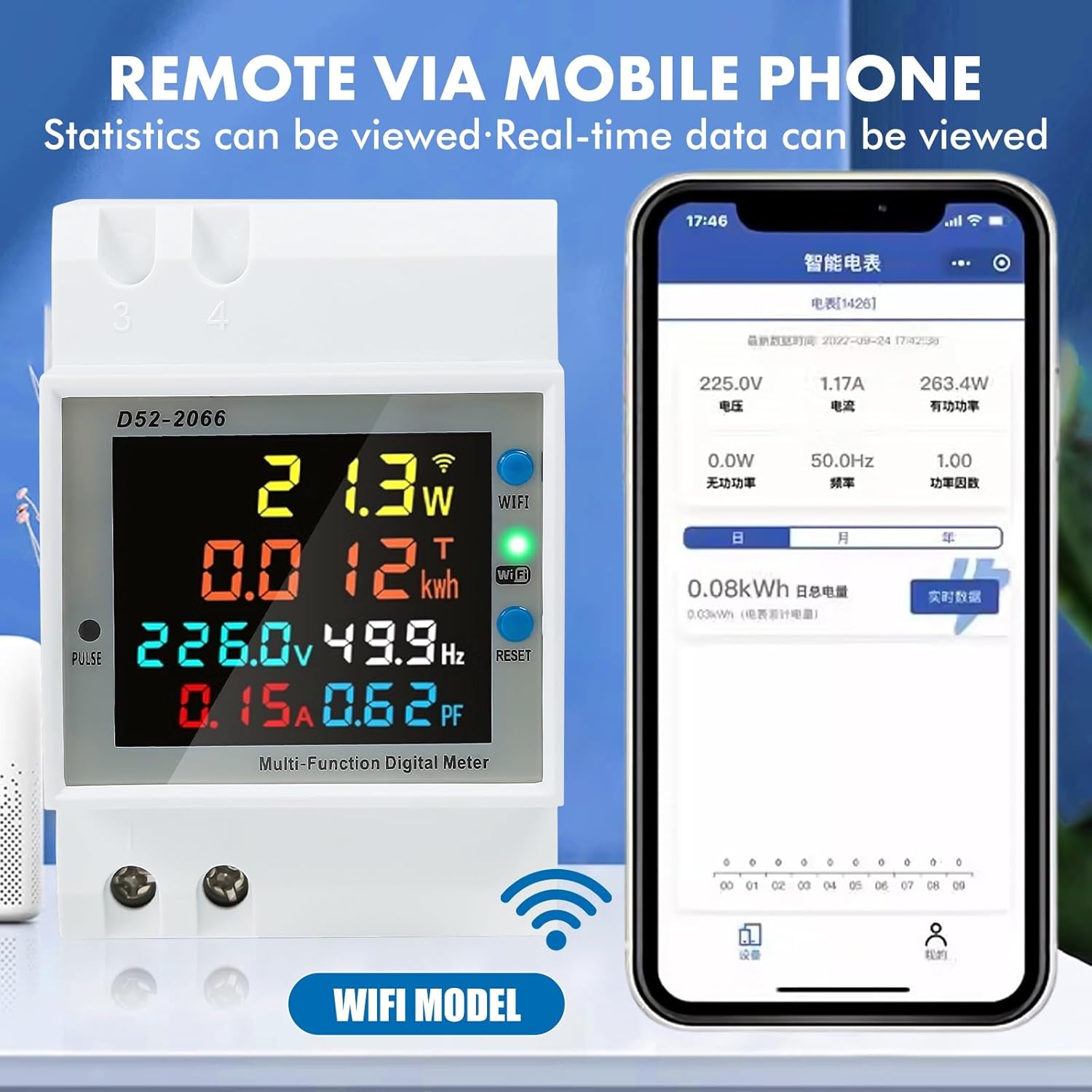
The DEWIN D52-2066 Smart Electric Meter is a versatile 6-in-1 digital display device designed for monitoring electrical parameters. It provides real-time measurements of AC voltage, current, active power, electric energy (kWh), frequency, and power factor. This meter features a high-resolution color LCD and WiFi connectivity for remote monitoring and control via a mobile application. It is suitable for various applications including energy management in homes, schools, industrial settings, and laboratories.
This manual provides essential information for the safe and efficient installation, operation, and maintenance of your DEWIN Smart Electric Meter.
2. Product Features
- Six-in-One Digital Display: Simultaneously displays AC Voltage (40-300V), Current (0-100A), Power (0-45000W), Electric Energy (0-9999 Kwh), Frequency (45-65 Hz), and Power Factor (0-1PF).
- High-Resolution LCD Screen: Features a color LCD with a 178° field of view and backlight for clear visibility day and night.
- WiFi Connectivity: Enables intelligent control and real-time data monitoring via the Tuya mobile application.
- One-Click Clear Function: Allows for easy clearing of electric energy data for precise measurement tracking.
- Data Storage: Automatically saves the last test data upon power loss, ensuring continuity when power is reconnected.
- DIN Rail Installation: Designed for easy installation on a standard universal DIN35mm rail without the need for screws.
- Durable Construction: Made from PC flame-retardant material for enhanced safety and longevity.

3. Safety Information
WARNING: Electrical installation and wiring should only be performed by qualified personnel to prevent electric shock or fire hazards.
- Ensure the power supply is disconnected before any installation, wiring, or maintenance.
- Do not operate the device in wet or damp conditions.
- Verify that the voltage and current ratings of your electrical system are within the meter's specifications (AC 40-300V, 0-100A).
- Use appropriate personal protective equipment (PPE) during installation.
- Do not attempt to disassemble or modify the meter. Refer all servicing to qualified personnel.
4. Package Contents
Upon opening the package, please verify that all items are present and undamaged:
- 1 x DEWIN D52-2066 Smart Electric Meter (DIN Rail Type Digital Display Gauge)
- 1 x User Manual (English)
5. Specifications
| Parameter | Value |
|---|---|
| Product Name | DIN Rail Type Digital Display Measuring Meter |
| Model Number | D52-2066 (QYQYRRDRD-GS110247-01) |
| Material | PC Flame Retardant Material |
| Voltage Range | AC 40-300V |
| Current Range | 0-100A |
| Power Range | 0-45000W |
| Electric Energy Range | 0-9999 Kwh |
| Frequency Range | 45-65 Hz |
| Power Factor | 0-1PF |
| CT Type | Integrated |
| Dimensions (L x W x H) | 8 x 5.5 x 8 cm (approx.) |
| Weight | 150 grams (approx.) |
6. Installation
The DEWIN D52-2066 Smart Electric Meter is designed for easy installation on a standard DIN35mm rail. Follow these steps carefully:
- Power Disconnection: Before starting, ensure that the main power supply to the circuit where the meter will be installed is completely disconnected.
- Mounting: Clip the meter onto a standard DIN35mm rail in your electrical distribution box. No screws are required for mounting.
- Wiring: Refer to the wiring diagram below. Connect the measurement input wires to the designated terminals. For current measurement, pass the load wire through the round hole on the lower right side of the meter, which houses the integrated Current Transformer (CT). Ensure all connections are secure.
- Power Reconnection: Once all connections are verified and secure, restore power to the circuit. The meter display should illuminate.

7. Operation
Once installed and powered, the DEWIN D52-2066 meter will automatically begin displaying electrical parameters on its LCD screen.
7.1 Display Readings
The meter's color LCD simultaneously shows the following six parameters:
- Voltage (V): AC voltage of the circuit.
- Current (A): Current flowing through the circuit.
- Power (W): Instantaneous active power consumption.
- Electric Energy (kWh): Accumulated electric energy consumption.
- Frequency (Hz): Frequency of the AC power supply.
- Power Factor (PF): Power factor of the load.
7.2 One-Click Clear Function
To reset the accumulated electric energy (kWh) reading:
- Locate the 'RESET' button on the front panel of the meter.
- Press and hold the 'RESET' button for approximately five seconds.
- The electric energy (kWh) reading will reset to zero. This function is useful for tracking consumption over specific periods.
7.3 Data Storage
The meter is equipped with a data storage feature. In the event of a power outage, the last recorded electric energy data will be automatically saved. When power is restored, the meter will continue to accumulate data from the last saved point, preventing data loss.

8. WiFi Connectivity and App Usage
The DEWIN D52-2066 meter integrates WiFi functionality, allowing for remote monitoring and control via the Tuya Smart application.
8.1 Connecting to WiFi
- Download the Tuya Smart app from your smartphone's app store (available for iOS and Android).
- Register or log in to your Tuya Smart account.
- Ensure your smartphone is connected to a 2.4GHz WiFi network (5GHz networks are not supported by the meter).
- On the meter, the WiFi indicator light should be blinking, indicating it's in pairing mode. If not, refer to the app's instructions for initiating pairing mode.
- In the Tuya Smart app, tap '+' to add a new device. Follow the on-screen instructions to discover and connect your DEWIN D52-2066 meter.
- Once connected, the WiFi indicator on the meter will become solid.
8.2 App Features
Through the Tuya Smart app, you can:
- View real-time electrical data (voltage, current, power, energy, frequency, power factor) from anywhere.
- Access historical data and consumption statistics.
- Monitor energy usage patterns to identify high-consumption periods or devices.
- Potentially control connected devices (if integrated with other smart home components via Tuya).
9. Maintenance
The DEWIN D52-2066 Smart Electric Meter requires minimal maintenance to ensure optimal performance and longevity.
- Cleaning: Periodically wipe the meter's display and casing with a soft, dry cloth. Do not use abrasive cleaners or solvents.
- Connection Checks: Occasionally, with power disconnected, inspect the wiring connections to ensure they remain tight and free from corrosion.
- Environmental Conditions: Ensure the meter is operated within its specified environmental conditions (temperature, humidity) to prevent damage.
10. Troubleshooting
If you encounter issues with your DEWIN D52-2066 Smart Electric Meter, refer to the following common troubleshooting steps:
- No Display/Power:
- Check if the main power supply to the circuit is active.
- Verify all wiring connections are secure and correct according to the installation diagram.
- Incorrect Readings:
- Ensure the load wire passes correctly through the integrated CT hole. Incorrect routing will result in inaccurate current and power readings.
- Confirm the meter's specifications match your electrical system.
- WiFi Connection Issues:
- Ensure your router is broadcasting a 2.4GHz WiFi signal.
- Check that the meter is within range of your WiFi router.
- Restart your router and attempt the pairing process again.
- Verify that the Tuya Smart app is updated to the latest version.
- kWh Not Resetting:
- Ensure you are pressing and holding the 'RESET' button for the required duration (approximately five seconds). A short press may not activate the reset function.
If the problem persists after attempting these steps, please contact customer support for further assistance.
11. Warranty and Support
For warranty information and customer support, please refer to the documentation provided with your purchase or contact the retailer/manufacturer directly. Typically, warranty details cover manufacturing defects and are subject to specific terms and conditions.
When contacting support, please have your product model number (D52-2066) and purchase details readily available.