1. Introduction and Overview
This manual provides essential instructions for the safe operation, assembly, and maintenance of your VOLANTEXRC P40 Warhawk Fighter RC Plane. Please read this manual thoroughly before operating the aircraft to ensure proper function and to maximize your flying experience.
The P40 Warhawk Fighter is a 4-channel remote control airplane featuring an XPILOT stabilization system with a 6-axis gyro for enhanced stability. It is designed for both beginners and experienced pilots, offering multiple flight control assists and one-key aerobatic capabilities. The model boasts a 400mm wingspan and is constructed from durable materials.

Figure 1: VOLANTEXRC P40 Warhawk Fighter RC Plane, showcasing its detailed camouflage paint scheme and shark mouth nose art.
2. What's in the Box
Upon opening the package, verify that all components are present:
- RC Plane (P40 Warhawk Fighter)
- Transmitter (Remote Control)
- Lipo Batteries (Quantity as specified on packaging, typically two)
- Spare Parts (e.g., propellers, landing gear)
- USB Charging Cable
- User Manual (this document)

Figure 2: Illustration of the box contents, including the P40 plane, remote control, batteries, spare propellers, and charging cable.
3. Setup and Pre-Flight Checklist
The VOLANTEXRC P40 Warhawk Fighter comes fully assembled and ready to fly out of the box. Minimal setup is required.
- Charge Batteries: Fully charge the provided Lipo batteries using the USB charging cable. Ensure the charging process is supervised and follow all safety guidelines for Lipo batteries.
- Install Transmitter Batteries: Insert 2 AA batteries (not included) into the remote control transmitter.
- Power On Sequence:
- Turn on the transmitter first.
- Connect the charged Lipo battery to the aircraft.
- Place the aircraft on a flat surface to allow the gyro to calibrate.
- Wait for the binding process to complete (indicated by a solid light on the aircraft).
- Control Check: Before each flight, perform a range and control surface check. Ensure all control surfaces (ailerons, elevator, rudder) respond correctly to transmitter inputs.
4. Operating Instructions
4.1. XPILOT Stabilization System and Flight Modes
The integrated 6-axis gyro stabilization system (XPILOT) assists in maintaining stable flight. It offers three distinct flight modes:
- Beginner Mode: Provides full flight assist with restricted control angles, making it easier for new pilots to learn.
- Intermediate Mode: Offers partial assist with increased control angles, suitable for pilots gaining confidence.
- Expert Mode: Disables flight assist for full manual control, allowing for advanced maneuvers.
Switch between modes using the designated button on the transmitter. It is recommended to start in Beginner Mode.

Figure 3: Visual representation of the XPILOT Gyro Stabilizer system, illustrating how it helps beginners achieve stable flight.

Figure 4: Diagram illustrating the control angle differences across Beginner, Intermediate, and Expert flight modes.
4.2. 4-Channel Control
The P40 Warhawk Fighter utilizes a 4-channel control system, providing precise command over:
- Throttle: Controls engine speed and thrust.
- Ailerons: Controls roll (banking) of the aircraft.
- Elevator: Controls pitch (nose up/down) for climbing and descending.
- Rudder: Controls yaw (nose left/right) for directional turns.

Figure 5: Depiction of the 4-channel control system, highlighting the flexibility provided by controllable ailerons.
4.3. One-Key Aerobatics
For exciting maneuvers, the aircraft features a one-key aerobatic function. Simply press the designated button on the transmitter to execute pre-programmed rolls or flips. Ensure sufficient altitude and clear airspace before attempting aerobatics.

Figure 6: The P40 Warhawk executing a one-key aerobatic maneuver in the sky.
4.4. Take-off Procedures
The P40 Warhawk Fighter supports two methods for take-off:
- Hand Throw: Hold the aircraft firmly, apply about 70% throttle, and gently throw it forward into the wind.
- Ground Take-off: Place the aircraft on a smooth, flat surface (like a runway), apply throttle, and use rudder control to steer until it gains sufficient speed for lift-off.

Figure 7: Visual guide for performing a hand throw take-off and a ground take-off.
4.5. Safety Features: Low Battery and Out of Range Alarms
The transmitter is equipped with safety alarms to alert you to critical conditions:
- Low Battery Alarm: The transmitter will beep and flash when the aircraft's battery is low, indicating it's time to land.
- Out of Range Alarm: The transmitter will alert you if the aircraft flies beyond the effective control range, prompting you to bring it closer.

Figure 8: The remote control indicating a low battery or out-of-range condition with visual and auditory alerts.
4.6. Official Product Video
Watch the official product video for a dynamic demonstration of the VOLANTEXRC P40 Warhawk Fighter in action, showcasing its flight capabilities and features.
Video 1: Official demonstration of the VOLANTEXRC P40 Warhawk Fighter RC Plane, highlighting its stability, aerobatic functions, and range.
5. Maintenance
Regular maintenance ensures the longevity and performance of your RC plane.
- Propeller Saver: The propeller is designed to detach upon impact to protect the motor and electronic components. Reattach it securely after any impact.
- Access Panels: The aircraft features accessible panels for easy replacement of electronic components if needed.
- Cleaning: Keep the aircraft clean from dirt and debris. Use a soft, dry cloth.
- Storage: Store the aircraft and batteries in a cool, dry place away from direct sunlight.

Figure 9: The propeller saver feature, showing how the propeller detaches to prevent damage during impacts.
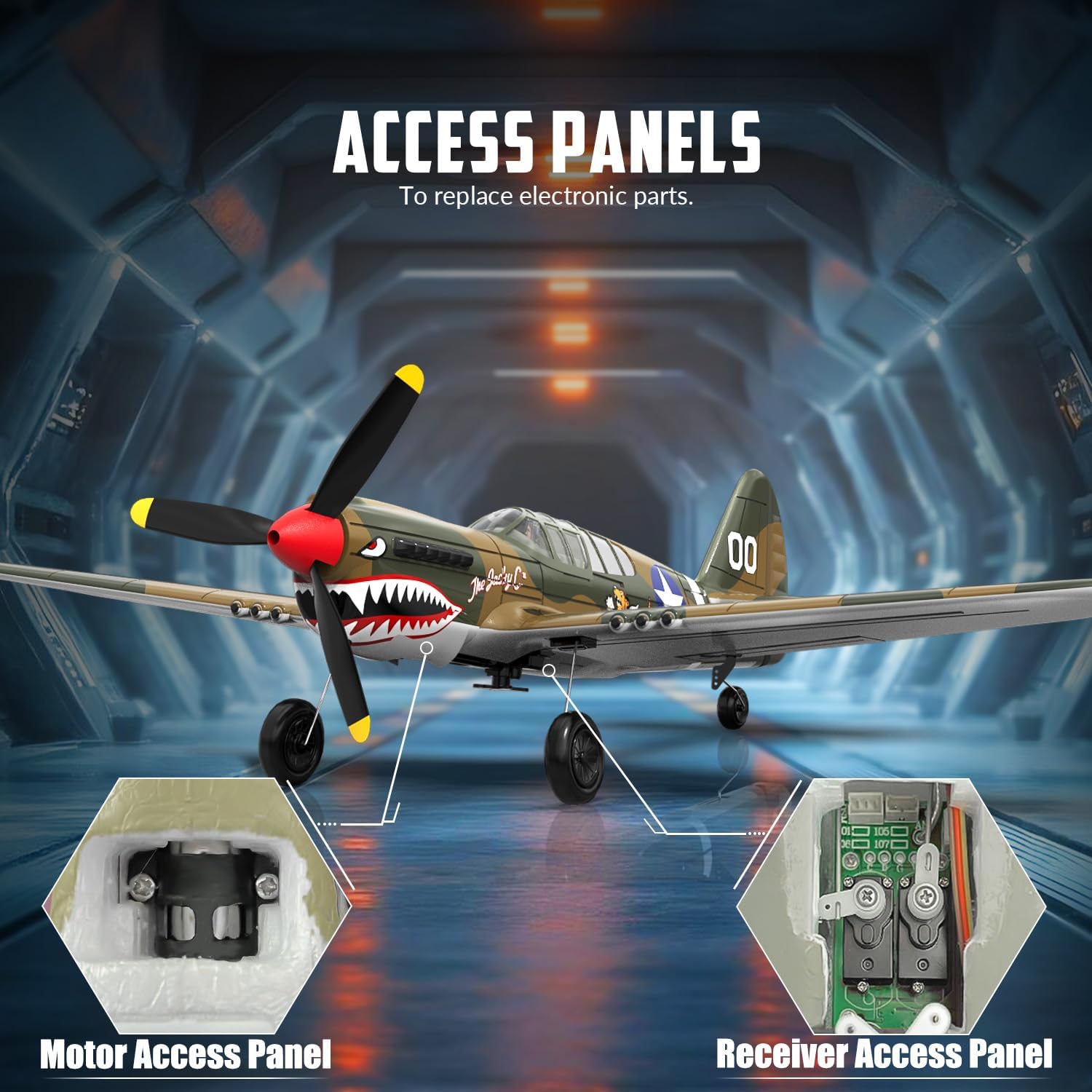
Figure 10: Location of the motor and receiver access panels for maintenance and component replacement.
6. Troubleshooting
| Problem | Possible Cause | Solution |
|---|---|---|
| Aircraft does not respond to transmitter. | Low battery in aircraft or transmitter; not bound; out of range. | Charge batteries; re-bind aircraft and transmitter; ensure aircraft is within range. |
| Aircraft flies erratically or is unstable. | Gyro not calibrated; damaged propeller; control surface damage. | Ensure aircraft is on a flat surface during power-on for gyro calibration; replace propeller; inspect and repair control surfaces. |
| Propeller not spinning. | Propeller detached; motor issue; low battery. | Reattach propeller; check motor connections; charge battery. |
| Short flight time. | Battery not fully charged; old battery; aggressive flying. | Ensure full charge; consider replacing old batteries; practice smoother flying. |
7. Specifications
- Model Number: US-76113V2
- Product Dimensions: 15.75 x 2 x 12.48 inches
- Item Weight: 1.37 pounds
- Control Channels: 4 Channel
- Stabilization: 6-Axis Gyro (XPILOT System)
- Recommended Age: 14 years and up
- Transmitter Batteries: 2 AA batteries (not included)
- Manufacturer: EXHOBBY

Figure 11: Detailed dimensions of the VOLANTEXRC P40 Warhawk Fighter RC Plane.
8. Warranty and Support
For warranty information, technical support, or to purchase replacement parts, please contact EXHOBBY, the manufacturer of your VOLANTEXRC product. Refer to the contact information provided on the product packaging or visit the official EXHOBBY website.
Optional protection plans may be available for purchase separately. Please refer to your retailer for details on extended protection options.


