1. Product Overview
The NEWFAST NF-A882 AC1200 Outdoor WiFi Repeater is a high-performance dual-band device engineered to significantly extend wireless network coverage in challenging outdoor environments. It delivers robust connectivity and is built with durability to withstand various weather conditions, making it an ideal solution for large outdoor areas.
Key Features
- Optimal Speed and Coverage (1200Mbps): This dual-band outdoor WiFi repeater achieves speeds up to 1200Mbps (300Mbps on 2.4GHz band, 867Mbps on 5.8GHz band), making it suitable for demanding applications like 4K/8K video streaming and online gaming. It integrates two 5dBi external antennas and high-quality chips to effectively extend long-range signal coverage.
- Outdoor Design and Durability (IP66): Featuring an IP66 protection rating, ESD protection, and lightning protection, this outdoor access point is designed to endure harsh weather conditions including rain, snow, wind, sand, and lightning. This ensures a stable and reliable connection in outdoor settings such as gardens, swimming pool areas, and courtyards.
- 3 Gigabit Ethernet Ports: Equipped with three Gigabit ports (one WAN port and two LAN ports), the repeater provides fast and stable wired connectivity, significantly improving network performance. The multiple ports allow for more flexible deployment to adapt to complex environments, reducing cabling difficulties and meeting diverse usage requirements.
- PoE/DC Power Support: The outdoor WiFi extender supports standard IEEE802.3af Power over Ethernet (PoE) with an included 48V/0.32A PoE adapter. This enables flexible installation in locations inconvenient for power outlets, using a single Ethernet cable for both power and data. The device also supports 12V/1A DC power input (DC power cable not included).
- Multiple Modes, Flexible Use: This device can operate in AP (Access Point), Repeater, Router, and Bridge modes, catering to various outdoor networking needs and applications. It is ideal for providing WiFi services in large areas such as farms, gardens, garages, courtyards, and shopping centers, supporting simultaneous connections for over 76 devices.
2. Package Contents
Please verify that all the following items are included in your package:
- 1 x AC1200 Outdoor WiFi Repeater
- 1 x Multi-language Instruction Manual
- 1 x PoE Power Adapter + Power Cable
- 1 x Network Cable
- 2 x Cable Ties + 2 x Screws + 2 x Silicone Gaskets
3. Product Components and Interfaces
Familiarize yourself with the physical components and ports of your NEWFAST NF-A882 device.

Image: Rear view of the NEWFAST NF-A882 showing the Gigabit Ethernet ports (WAN and LAN), DC power input, and Reset button. This illustrates the various connectivity options available for network integration.
- WAN Port (RJ45): A 10/100/1000Mbps port used for connecting the device to your main network, modem, or router. This port also supports PoE input.
- LAN Ports (RJ45): Two 10/100/1000Mbps ports for connecting wired devices such as computers, IP cameras, or other network-enabled equipment.
- DC Power Port: An input for a +12V 1A DC power adapter (not included), providing an alternative power source if PoE is not utilized.
- Reset Button: Used to restore the device to its factory default settings. To perform a reset, press and hold this button for approximately 5-7 seconds until the indicator lights flash.
- Antennas: Two external 5dBi omnidirectional antennas responsible for transmitting and receiving the wireless signal, ensuring broad coverage.
4. Installation
Mounting Options
The NEWFAST NF-A882 is designed for flexible outdoor deployment and can be securely mounted on a pole or wall using the provided hardware.
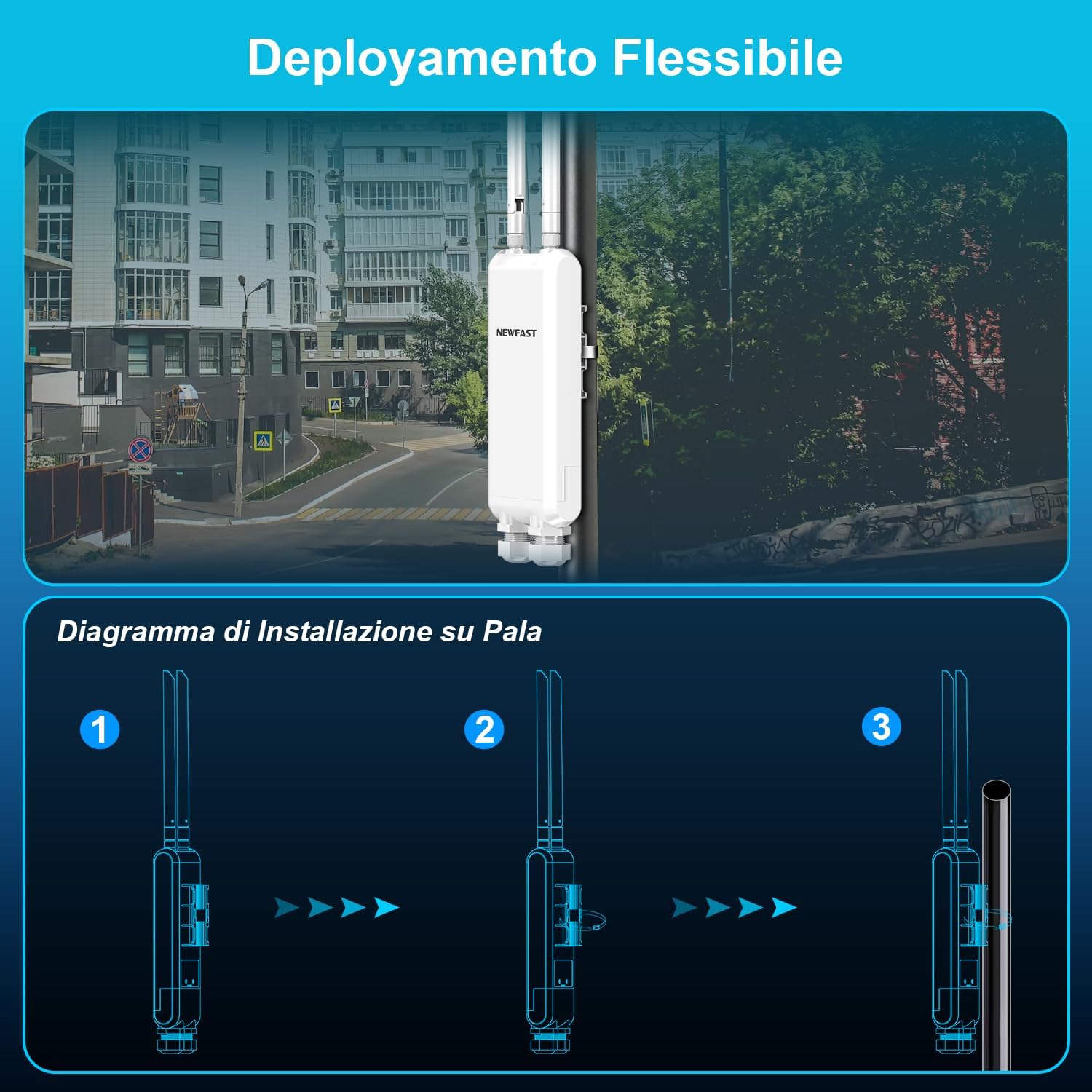
Image: A step-by-step diagram illustrating how to mount the device onto a pole using the provided cable ties and mounting hardware. This method ensures secure and stable outdoor placement for optimal signal distribution.
Pole Installation Steps:
- Attach the mounting bracket to the back of the device.
- Secure the device to the pole using the provided cable ties or screws, ensuring a tight and stable fit.
- Verify that the device is firmly attached and oriented correctly for optimal signal transmission and reception.
Powering the Device
The device supports both Power over Ethernet (PoE) and direct DC power input.

Image: A diagram illustrating two power options: using the included PoE adapter via an Ethernet cable, or connecting a 12V DC power supply directly. PoE simplifies outdoor installation by combining power and data over a single cable, reducing wiring complexity.
- PoE (Recommended for Outdoor Installations): Connect one end of an Ethernet cable to the PoE port on the included PoE adapter and the other end to the WAN port of the repeater. Then, connect the PoE adapter to a standard power outlet. This method allows both power and data to be transmitted over a single Ethernet cable, simplifying outdoor wiring and installation.
- DC Power: If PoE is not being utilized, connect a compatible 12V/1A DC power adapter (not included) to the DC power port on the device.
5. Operating Modes
The NEWFAST NF-A882 supports multiple operating modes, providing versatility to meet various network requirements and deployment scenarios.

Image: Visual representation of the four main operating modes: AP (Access Point), Repeater, Router, and Bridge. Each diagram illustrates how the device integrates into different network setups to either extend existing Wi-Fi coverage or create new network segments.
5.1. Access Point (AP) Mode
In AP mode, the device connects to an existing wired network (e.g., from a router or switch) and broadcasts a new wireless signal. This allows wireless clients (smartphones, laptops, tablets) to connect to the network. This mode is ideal for creating a new Wi-Fi hotspot in an area with existing wired network infrastructure.
5.2. Repeater Mode
Repeater mode is used to extend the range of an existing wireless network. The device receives the wireless signal from your main router or access point and then re-transmits it, effectively boosting coverage to areas with weak or no signal (often referred to as "dead zones").
5.3. Router Mode
In Router mode, the device functions as a primary router. It connects directly to a modem (e.g., cable, DSL, fiber modem) and provides internet access to both wired and wireless clients. This mode is suitable for setting up a new network from scratch.
5.4. Bridge Mode
Bridge mode creates a wireless link between two wired networks or devices. It can be used to connect a wired device (like a desktop PC, gaming console, or network printer) to a wireless network without requiring a long Ethernet cable, or to connect two separate wired networks wirelessly.
6. Configuration (General Steps)
The specific configuration steps for your NEWFAST NF-A882 will vary depending on the chosen operating mode and your existing network setup. For precise, detailed instructions, please refer to the multi-language instruction manual included in your package. The general configuration process typically involves the following steps:
- Connect to the Device: Connect your computer to the NF-A882 using an Ethernet cable (recommended for initial setup) or wirelessly connect to its default Wi-Fi network. The default SSID (Wi-Fi name) and password are usually printed on a label on the device itself or found in the included manual.
- Access Web Interface: Open a web browser (e.g., Chrome, Firefox, Edge) on your connected computer and enter the default IP address of the device (e.g., 192.168.1.1). This IP address will be specified in your instruction manual.
- Login: At the login prompt, enter the default username and password. Common defaults are 'admin' for both username and password, but always refer to your manual for the exact credentials.
- Select Operating Mode: Once logged in, you will typically be presented with an option to select your desired operating mode (AP, Repeater, Router, or Bridge). Choose the mode that best fits your network requirements.
- Configure Settings: Follow the on-screen setup wizard or navigate through the web interface to configure the necessary network settings. This includes setting a new Wi-Fi name (SSID), creating a strong Wi-Fi password, and configuring any specific network parameters required for your chosen mode (e.g., WAN settings for Router mode, upstream Wi-Fi for Repeater mode).
- Save and Reboot: After configuring all settings, save your changes. The device will typically prompt you to reboot for the new settings to take effect. Allow the device to complete the reboot process before attempting to connect.
7. Maintenance
Proper maintenance ensures the longevity and optimal performance of your NEWFAST NF-A882 Outdoor WiFi Repeater.
- Regular Cleaning: Periodically clean the exterior casing of the device with a soft, dry cloth to remove any accumulated dust, dirt, or debris. Ensure that no foreign objects obstruct the ports or antennas.
- Firmware Updates: Regularly check the official NEWFAST website for any available firmware updates. Keeping the device's firmware updated is crucial for ensuring optimal performance, enhancing security features, and maintaining compatibility with new technologies.
- Environmental Protection: While the device boasts an IP66 rating for weather resistance, it is advisable to avoid exposing it to extreme environmental conditions that fall outside its specified operating temperature and humidity ranges. Always ensure that all cable glands and port covers are properly sealed to maintain its water and dust resistance.
- Cable Inspection: For outdoor installations, it is important to periodically inspect all connected cables (Ethernet and power) for any signs of wear, damage, fraying, or corrosion. Damaged cables can compromise performance and safety.
8. Troubleshooting
Common Issues and Solutions
- No Power:
- Solution: Ensure the PoE adapter is correctly plugged into a working power outlet and that the Ethernet cable is securely connected from the PoE adapter to the device's WAN port. If using direct DC power, verify the power adapter is properly connected and functional.
- No Wi-Fi Signal or Device Not Broadcasting:
- Solution: Check if the device is powered on and if the Wi-Fi indicator light is active. Verify that the device is configured in either AP or Repeater mode. Confirm that the Wi-Fi settings (SSID and password) are correctly configured and match your client devices. Ensure both antennas are securely attached.
- Poor Signal Strength or Slow Speed:
- Solution: Relocate the device to a more central position or a higher elevation, away from significant physical obstructions such as thick walls, large metal objects, or dense foliage. Adjust the orientation of the antennas for better signal reception. Check for potential interference from other wireless devices operating on similar frequencies. Please note that the signal expansion range can be significantly affected by the specific usage environment and obstacles.
- Cannot Access the Web Management Interface:
- Solution: Ensure your computer is properly connected to the device's network (either via Ethernet or its default Wi-Fi). Double-check that the IP address entered in your web browser is correct as specified in the manual. Try clearing your browser's cache or using a different web browser. If the issue persists, consider performing a factory reset on the device.
- Device Not Responding (Freezing/Crashing):
- Solution: Unplug the power adapter from the device, wait for approximately 10 seconds, and then plug it back in to perform a power cycle. If the problem continues, perform a factory reset by pressing and holding the reset button for 5-7 seconds.
- Difficulty with Configuration (e.g., IP address settings):
- Solution: The included multi-language manual provides crucial step-by-step guidance for configuration. If you encounter significant difficulties, particularly with advanced network settings like IP address division or subnet configurations, it is highly recommended to consult a qualified network technician for assistance.
Note: If you have any further questions or require additional technical assistance that is not covered in this manual, please do not hesitate to contact NEWFAST customer support. Contact information can typically be found in the included manual or on the brand's official website.
9. Specifications
| Feature | Detail |
|---|---|
| Brand | NEWFAST |
| Model Number | NF-A882 |
| Wireless Type | 802.11a, 802.11ac, 802.11b, 802.11g, 802.11n |
| Data Transfer Rate | 1200 Megabits per second (300Mbps 2.4GHz, 867Mbps 5.8GHz) |
| Frequency Band Class | Dual Band |
| Antennas | 2 x 5dBi External Omnidirectional Antennas |
| Ethernet Ports | 3 x Gigabit Ethernet (1 WAN, 2 LAN) |
| Power Supply | 48V PoE (IEEE802.3af standard) / 12V DC |
| Weather Protection | IP66 Rated, ESD Protection, Lightning Protection |
| Dimensions | 25 x 20.4 x 5.2 cm |
| Weight | 650 grams |
| Max Connected Devices | 76+ devices simultaneously |
| Max Coverage Range | Up to 200 meters (actual range may vary based on environment) |
10. Warranty and Support
For detailed warranty information and technical support, please refer to the documentation included with your NEWFAST NF-A882 Outdoor WiFi Repeater or visit the official NEWFAST website. It is important to retain your purchase receipt as proof of purchase for any warranty claims.
- Return Policy: The product is subject to a 14-day return/replacement policy from the date of purchase. Please consult the retailer's specific return terms.
- Software Updates: Software updates are guaranteed until an unspecified date. For the latest information regarding firmware updates and support, please check the manufacturer's official website regularly.


