
TOWILD CL450
TOWILD CL450 Bike Light User Manual
Model: CL450
1. Introduction
Thank you for choosing the TOWILD CL450 Bike Light. This ultra-lightweight and versatile bike light is designed to enhance your visibility and safety during night riding. With its powerful 450-lumen output, USB-C rechargeable battery, and durable aluminum alloy construction, the CL450 is an ideal companion for all your cycling adventures. Please read this manual thoroughly before use to ensure proper operation and maintenance.
2. Safety Information
- Always ensure the light is securely mounted before riding.
- Do not look directly into the light beam to avoid temporary vision impairment.
- Keep the light away from children.
- Ensure the USB rubber plug is fully closed to maintain IPX6 waterproof rating, especially in wet conditions.
- Charge the battery in a well-ventilated area and avoid charging overnight unattended.
- Use only the provided USB-C cable or a certified equivalent for charging.
3. Package Contents
Verify that all items are present in your package:
- TOWILD CL450 Bike Light
- USB-C Charging Cable
- ALB-07 Mount (Handlebar Mount)
- GoPro Mount Adapter
- L-Shaped Allen Wrench
- User Manual
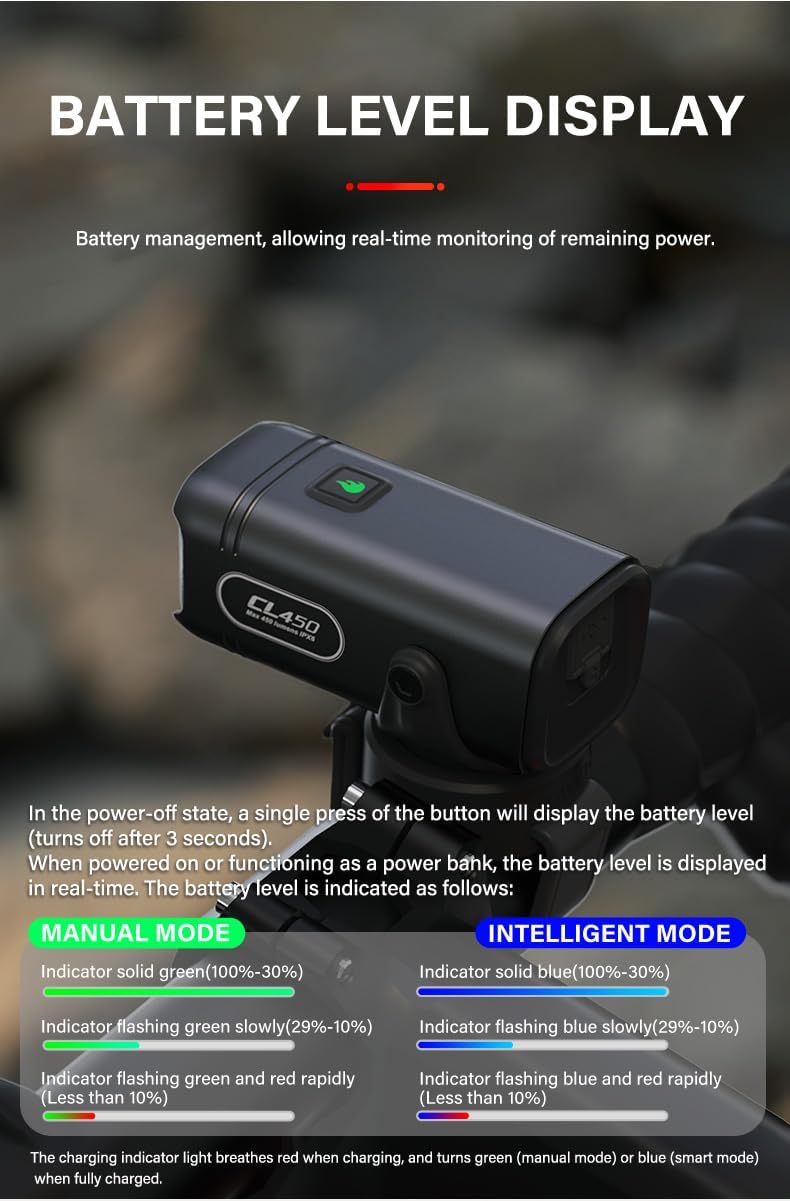
Figure 3.1: Contents of the TOWILD CL450 Bike Light package.
4. Setup and Installation
4.1 Charging the Battery
Before first use, fully charge the CL450 bike light. The light features a USB-C charging port for convenient and fast charging.
- Locate the USB-C charging port on the light.
- Connect the provided USB-C cable to the light and to a USB power source (e.g., computer, wall adapter, power bank).
- The charging indicator light will flash red while charging.
- Once fully charged (approximately 2 hours), the indicator light will turn solid green.
Figure 4.1: Connecting the USB-C charging cable to the CL450 light.
4.2 Mounting the Light
The CL450 offers versatile mounting options, including a handlebar mount and compatibility with Garmin and GoPro bases.
4.2.1 Handlebar Mount (ALB-07)
- Attach the ALB-07 mount to your bicycle handlebar using the adjustable strap. Ensure it is tight and secure.
- Align the CL450 light with the mount and slide it into place until it clicks securely.
- The light can be mounted above or below the handlebar.
4.2.2 Garmin/GoPro Base Compatibility
The CL450 can be attached to existing Garmin quarter lock mounts or GoPro bases using the provided adapter.
- Attach the GoPro Mount Adapter to your Garmin or GoPro base.
- Secure the CL450 light to the adapter.

Figure 4.2: CL450 mounted on a bicycle handlebar.

Figure 4.3: CL450 compatibility with Garmin and GoPro mounts.
5. Operating Instructions
5.1 Power On/Off and Mode Switching
The CL450 features a single button for all operations.
- Power On/Off: Press and hold the button for approximately 0.5 seconds to turn the light on or off.
- Switch Modes (Manual Mode): With the light on, single press the button to cycle through brightness modes: High → Medium → Low → Flash 1 → Flash 2.
- Enter Intelligent Mode: From the OFF state, press and hold the button for 3 seconds to enter Intelligent Mode.
5.2 Light Modes and Runtimes
The CL450 offers various modes for different riding conditions:
| Mode | Output | Runtime |
|---|---|---|
| Low | 100 LM | 6h |
| Medium | 200 LM | 3h |
| High | 450 LM | 1.5h |
| Night Warning (Flash 1) | 200 LM | 6h |
| Day Warning (Flash 2) | 400 LM | 7h |

Figure 5.1: CL450 Light Modes and Runtimes.
5.3 Intelligent Mode (Vibration Sensing)
In Intelligent Mode, the light automatically adjusts based on movement to conserve battery.
- If the light detects no movement for 120 seconds, it will automatically turn off.
- Upon detecting vibration, the light will automatically turn back on.
- Mode selection in Intelligent Mode is the same as Manual Mode for solid-on modes.

Figure 5.2: Intelligent Mode with Vibration Sensing.
5.4 Battery Level Display
The indicator light on top of the CL450 provides real-time battery status.
- From Power-Off State: A single press of the button will display the battery level for 3 seconds.
- When Powered On or Charging: The battery level is continuously displayed.
| Battery Level | Manual Mode Indicator | Intelligent Mode Indicator |
|---|---|---|
| 100% - 30% | Solid Green | Solid Blue |
| 29% - 10% | Flashing Green Slowly | Flashing Blue Slowly |
| Less than 10% | Flashing Green and Red Rapidly | Flashing Blue and Red Rapidly |
During charging, the indicator light breathes red. It turns green (Manual Mode) or blue (Intelligent Mode) when fully charged.

Figure 5.3: Battery Level Display in Manual Mode.

Figure 5.4: Battery Level Display in Intelligent Mode.
6. Maintenance
- Cleaning: Wipe the light with a soft, damp cloth. Do not use abrasive cleaners or solvents.
- Waterproofing: The CL450 has an IPX6 waterproof rating, meaning it can withstand heavy rain or strong water splashes. Always ensure the USB rubber plug is securely closed to maintain its waterproof integrity.
- Storage: If storing the light for an extended period, charge it to approximately 50% and recharge every 3-6 months to preserve battery life. Store in a cool, dry place.

Figure 6.1: IPX6 Waterproof Rating.
7. Troubleshooting
| Problem | Possible Cause | Solution |
|---|---|---|
| Light does not turn on. | Battery is depleted. | Charge the light fully. |
| Light does not turn on. | Button not pressed correctly. | Press and hold the button for 0.5 seconds. |
| Light does not charge. | Faulty cable or power source. | Try a different USB-C cable or power adapter. |
| Light turns off unexpectedly in Intelligent Mode. | No movement detected for 120 seconds. | This is normal behavior. Light will reactivate with movement. If preferred, switch to Manual Mode. |
| Light seems dim. | Low battery or incorrect mode. | Check battery level and recharge if necessary. Cycle through modes to ensure desired brightness is selected. |
8. Specifications
| Feature | Detail |
|---|---|
| Model Name | CL450 |
| Brightness | 450 Lumens (Max) |
| Battery Capacity | 900 mAh (from image) |
| Charging Port | USB-C |
| Material | Aluminum Alloy |
| Water Resistance | IPX6 Waterproof |
| Item Weight | 95g (from feature bullets) / 4.8 ounces |
| Product Dimensions (L x W x H) | 69.5mm x 31mm x 31mm (from image) / 2.74"L x 1.22"W x 1.22"H |
| Mounting Type | Handlebar Mount, Garmin/GoPro Compatible |
| Number of Settings | 5 (Low, Medium, High, Night Warning, Day Warning) |
9. Warranty and Support
The TOWILD CL450 Bike Light comes with a 2-Year Guarantee from the date of purchase.
This warranty covers manufacturing defects and issues arising from normal use. It does not cover damage caused by misuse, accidents, unauthorized modifications, or improper maintenance.
For warranty claims, technical support, or any questions regarding your TOWILD CL450 Bike Light, please contact TOWILD customer service through the retailer where you purchased the product or visit the official TOWILD website for contact information.
Please retain your proof of purchase for warranty purposes.
Related documentsCL450


Ask a question about this manual
Ask about setup, troubleshooting, compatibility, parts, safety, or missing instructions. Manuals+ will review the question and use this page’s manual context to help answer it.