
1. Product Overview
The Garmin Instinct® E is a supertough 40 mm GPS smartwatch designed for outdoor enthusiasts. It offers up to 14 days of battery life and includes essential features such as smart notifications and Connect IQ™ Store compatibility. This device is built to withstand challenging environments, engineered to MIL-STD-810 for thermal and shock resistance, and is 10 ATM water-rated. It also provides comprehensive health and wellness tracking, including wrist-based heart rate, advanced sleep monitoring, and Pulse Ox (note: this is not a medical device, and data presented is intended to be a close estimation of metrics tracked; Pulse Ox not available in all countries). For navigation, it features a 3-axis compass, barometric altimeter, and multi-GNSS support.

Figure 1.1: The Garmin Instinct® E 40mm Smartwatch in Charcoal, showcasing its robust design and digital display.
Key Features
- Rugged Design: 40 mm smartwatch, 10 ATM water-rated, engineered to MIL-STD-810 for thermal and shock resistance.
- Extended Battery Life: Up to 14 days on a single charge.
- Health Monitoring: Wrist-based heart rate, advanced sleep monitoring, and Pulse Ox (not a medical device).
- Navigation: Integrated 3-axis compass, barometric altimeter, and multi-GNSS support.
- Smart Connectivity: Smart notifications and Connect IQ™ Store integration for apps and watch faces (when paired with a compatible smartphone).
2. Setup
2.1 What's in the Box
Upon unboxing your Garmin Instinct® E, you will find the following components:
- Instinct E series smartwatch
- Charging/data cable
- Documentation (Quick Start Manual, Safety and Product Information)
2.2 Initial Charging
Before first use, fully charge your smartwatch. Connect the charging/data cable to the charging port on the back of the watch and plug the USB end into a power source (e.g., computer USB port or USB wall adapter). The watch display will indicate charging status.
2.3 Pairing with Your Smartphone
To unlock the full potential of your Instinct® E, pair it with the Garmin Connect™ app on your compatible smartphone.
- Download the Garmin Connect™ app from your smartphone's app store.
- Open the app and follow the on-screen instructions to create an account or sign in.
- On your Instinct® E, press the MENU button (left middle) to access the main menu.
- Navigate to Settings > Phone > Pair Phone.
- In the Garmin Connect™ app, select Add Device and choose your Instinct® E from the list.
- Follow the prompts on both your watch and smartphone to complete the pairing process.

Figure 2.1: The Garmin Connect™ app, available for smartphone, tablet, or desktop, used for tracking and analyzing activities.
3. Operating Instructions
3.1 Button Functions
The Instinct® E features five physical buttons for navigation and control:
- CTRL (Control): Top left. Press to turn backlight on/off. Hold to open the controls menu.
- MENU (Menu): Middle left. Press to scroll through widgets and data screens. Hold to open the main menu.
- ABC (ABC): Bottom left. Press to open the altimeter, barometer, and compass app. Hold to view coordinates.
- GPS (GPS): Top right. Press to start an activity or select an option. Hold to view GPS details.
- SET (Set): Bottom right. Press to return to the previous screen or select an option. Hold to open the settings menu.
3.2 Navigation and Outdoor Features
Utilize the built-in sensors for accurate outdoor tracking.
- Multi-GNSS Support: Connects to multiple global navigation satellite systems (GPS, GLONASS, Galileo) for improved accuracy in challenging environments.
- 3-Axis Compass: Provides accurate heading information even when stationary.
- Barometric Altimeter: Tracks changes in elevation and can be used to predict weather changes.

Figure 3.1: The Instinct® E showcasing its navigation tools, health monitoring, and general smartwatch features.
3.3 Health and Wellness Monitoring
The Instinct® E provides continuous health data to help you understand your body.
- Wrist-Based Heart Rate: Monitors your heart rate 24/7, providing insights into your activity levels and recovery.
- Advanced Sleep Monitoring: Tracks your sleep stages (light, deep, REM) and provides a sleep score.
- Pulse Ox: Measures your blood oxygen saturation levels (SpO2) to assess how well your body is absorbing oxygen (not available in all countries).
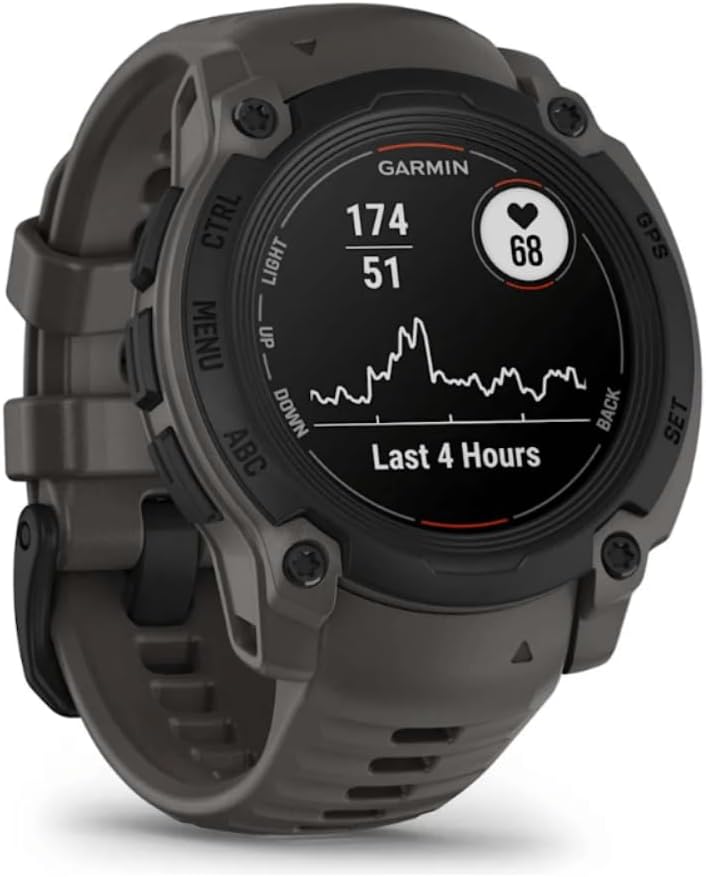
Figure 3.2: The Instinct® E displaying a graph of heart rate data over the last four hours.
3.4 Smart Features and Connectivity
Stay connected and customize your watch experience.
- Smart Notifications: Receive alerts for calls, texts, emails, and other app notifications directly on your watch when paired with your smartphone.
- Connect IQ™ Store: Download custom watch faces, data fields, widgets, and apps to personalize your device.
- LiveTrack: Allows friends and family to follow your activities in real-time (requires compatible smartphone).

Figure 3.3: The Instinct® E showing smart notifications and the LiveTrack feature, keeping you connected on the go.
4. Maintenance
4.1 Cleaning Your Device
Regular cleaning helps maintain the performance and appearance of your Instinct® E.
- Watch Body: Wipe with a soft, damp, lint-free cloth. For stubborn dirt, use a mild soap solution and rinse thoroughly.
- Watch Band: For silicone bands, rinse with water and wipe dry. For other materials, refer to Garmin's official cleaning guidelines.
- Charging Contacts: Periodically clean the charging contacts on the back of the watch with a cotton swab lightly dampened with rubbing alcohol to ensure proper charging and data transfer.
Avoid using harsh chemicals, abrasive cleaners, or solvents that could damage the watch's finish or internal components.
4.2 Battery Care
To maximize battery life and longevity:
- Avoid exposing the device to extreme temperatures (hot or cold) for extended periods.
- Charge the device fully before long periods of inactivity.
- For optimal performance, use the original Garmin charging cable.
5. Troubleshooting
This section addresses common issues you might encounter with your Instinct® E.
5.1 Device Not Turning On or Responding
- Check Battery: Ensure the device is sufficiently charged. Connect it to the charging cable and a power source for at least 30 minutes.
- Soft Reset: If the device is unresponsive, try holding the CTRL button for 15 seconds until the screen turns off. Then, press CTRL again to restart.
5.2 GPS Signal Acquisition Issues
- Outdoor Location: Ensure you are in an open area with a clear view of the sky.
- Sync with Phone: Syncing your watch with the Garmin Connect™ app regularly updates GPS satellite data, which can improve acquisition times.
5.3 Inaccurate Heart Rate or Pulse Ox Readings
- Proper Fit: Ensure the watch is snug but comfortable on your wrist, above the wrist bone.
- Clean Sensor: Keep the optical heart rate sensor on the back of the watch clean and free of debris.
- Stillness for Pulse Ox: For Pulse Ox readings, remain still for accurate measurement.
5.4 Connectivity Problems (Bluetooth)
- Bluetooth On: Verify Bluetooth is enabled on both your watch and smartphone.
- Restart Devices: Try restarting both your watch and smartphone.
- Forget Device: In your smartphone's Bluetooth settings, "forget" or "unpair" the Instinct® E, then re-pair it through the Garmin Connect™ app.
For more detailed troubleshooting or specific issues, please refer to the official Garmin support website or contact Garmin customer service.
6. Specifications
| Feature | Detail |
|---|---|
| Product Dimensions | 1.57 x 1.57 x 5.35 inches |
| Item Weight | 1.87 ounces (53 Grams) |
| Model Number | 010-02932-00 |
| Batteries | 1 CR5 batteries required (included) |
| Display Size | 1.2 Inches |
| Memory Storage Capacity | 128 MB |
| Operating System | Garmin OS |
| Connectivity Technology | Bluetooth, Wi-Fi, USB |
| GPS | Built-in GPS |
| Water Rating | 10 ATM |
| Manufacturer | Garmin |
| Country of Origin | Taiwan |
7. Warranty and Support
7.1 Product Warranty
Garmin products are warranted to be free from defects in materials or workmanship for one year from the date of purchase. For full warranty terms and conditions, please refer to the documentation included with your device or visit the official Garmin website.
7.2 Extended Protection Plans
Extended protection plans are available for purchase to provide additional coverage beyond the standard manufacturer's warranty. These plans offer peace of mind against accidental damage or extended mechanical failures.
- 2-Year Protection Plan: Extends coverage for an additional two years.
- 3-Year Protection Plan: Extends coverage for an additional three years.
- Complete Protect: A monthly subscription plan covering eligible past and future purchases.
Details regarding these plans, including terms, conditions, and pricing, can be found at the point of purchase or through authorized retailers.
7.3 Customer Support
For technical assistance, product inquiries, or warranty claims, please contact Garmin customer support. You can find contact information and a comprehensive knowledge base on the official Garmin website.
Visit the Garmin Store on Amazon for more product information and accessories.