
1. Product Overview
The Tecaki Mini Projector (Model X5) is a portable smart projector designed for versatile entertainment. It features official Netflix licensing, WiFi 6, Bluetooth 5.2, a 180-degree rotatable stand, auto keystone correction, and electric focus, supporting up to 4K resolution for a clear and immersive viewing experience.

Image: Tecaki Mini Projector with key features highlighted, including Netflix licensing, WiFi 6, Bluetooth 5.2, auto keystone, and electric focus.
2. Package Contents
Please verify that all items listed below are included in your package:
- Mini Portable Projector with Netflix
- HDMI Cable
- Power Cord
- Remote Control (AAA batteries not included)
- Cleaning Kit
- User Manual
- Warranty Card

Image: The Tecaki Mini Projector neatly packed in its clear carry bag, demonstrating its portability.
3. Product Features & Components
Familiarize yourself with the key features and physical components of your Tecaki Mini Projector.
3.1. Physical Components

Image: Rear view of the Tecaki Mini Projector, detailing its input/output ports including HDMI, USB, and power input.
- Projection Lens: Emits the image.
- Power Input: Connects to the power adapter.
- HDMI Port: Connects to external devices like laptops, game consoles, or TV sticks.
- USB Port: Connects to USB drives for media playback.
- Audio Output: Connects to external speakers or headphones.
- 180° Rotatable Stand: Allows flexible projection angles.
3.2. Key Features
- Netflix Officially Licensed: Pre-loaded with Netflix, Prime Video, and YouTube for direct streaming.
- WiFi 6 Connectivity: Ensures faster and more stable wireless screen mirroring from iOS, Android, and Windows devices.
- Bluetooth 5.2: For seamless connection to external Bluetooth audio devices.
- 180° Rotation: Project onto walls, ceilings, or floors without moving the device.
- Electric Focus & Auto Keystone: Provides instant, clear, and perfectly aligned images.
- Large Projection Size: Capable of projecting a 30" to 200" display.
- FHD 1080P Supported: Delivers vivid, crystal-clear visuals with high contrast.
4. Setup Guide
4.1. Placement & Projection Adjustment
The Tecaki Mini Projector's 180° rotatable stand offers exceptional flexibility for placement.
- Choose a Surface: Project onto any smooth, light-colored surface such as a wall, ceiling, or projection screen.
- Adjust Angle: Use the 180° rotatable stand to direct the projection to your desired location.
- Projection Distance: Adjust the distance from the projection surface to achieve your desired screen size (e.g., 3.2ft for 30", 16.4ft for 200").

Image: The 180-degree rotatable stand of the Tecaki Mini Projector, enabling flexible projection onto walls, ceilings, or floors in various settings.

Image: Visual representation of the Tecaki Mini Projector's ability to project screen sizes from 30 inches to 200 inches, with corresponding projection distances.
4.2. Powering On
- Connect the power cord to the projector's power input port.
- Plug the other end of the power cord into a power outlet.
- Press the power button on the projector or the remote control to turn on the device.
4.3. Focus and Keystone Adjustment
Achieve a clear and perfectly rectangular image using the automatic and electric adjustment features.
- Electric Focus: Use the remote control to fine-tune the image sharpness. This provides a clear picture with a single touch.
- Auto Keystone Correction: The projector automatically corrects distorted images (trapezoid effect) to ensure a rectangular display, even when projected at an angle.

Image: The remote control for the Tecaki Mini Projector, highlighting the electric focus and auto keystone correction features for clear image adjustment.
5. Operating Instructions
5.1. Smart OS & Pre-installed Apps
The Tecaki Mini Projector comes with a smart operating system and pre-installed streaming applications.
- Access Apps: Navigate the home screen using the remote control to select and launch pre-installed apps like Netflix, Prime Video, and YouTube.
- Login: Log in to your accounts for each streaming service to access content.

Image: The Tecaki Mini Projector displaying the Netflix interface in a home environment, showcasing its built-in streaming capabilities.
5.2. Wireless Connectivity (WiFi 6 & Screen Mirroring)
Connect your projector to a wireless network and mirror content from your devices.
- Connect to WiFi: Go to the projector's settings menu, select 'Network' or 'WiFi', and connect to your desired WiFi 6 network.
- Screen Mirroring: Select the screen mirroring option on the projector. Follow the on-screen instructions to connect your iOS, Android, or Windows device wirelessly.

Image: Illustration of WiFi 6 technology providing faster and more stable screen mirroring compared to WiFi 5, enhancing the visual experience.
5.3. Bluetooth Audio Pairing
Enhance your audio experience by connecting external Bluetooth speakers or headphones.
- Enable Bluetooth: Go to the projector's settings menu, select 'Bluetooth', and turn on Bluetooth.
- Pair Device: Put your Bluetooth audio device into pairing mode. Select your device from the list on the projector's screen to connect.
Note: Bluetooth supports audio devices only, not smartphones for data transfer.

Image: The Tecaki Mini Projector demonstrating Bluetooth 5.2 connectivity with external audio devices like headphones and speakers, for immersive sound.
5.4. Connecting External Devices (HDMI, USB)
The projector offers multiple ports for connecting various external devices.
- HDMI: Connect laptops, game consoles (PS5, Xbox, Switch), TV sticks, or other HDMI-enabled devices using an HDMI cable. Select the HDMI input source from the projector's menu.
- USB: Insert a USB drive into the USB port to play media files directly from the drive. Navigate to the media player application on the projector to access your files.

Image: The Tecaki Mini Projector's universal compatibility, showing connections for HDMI devices (Xbox, TV Stick, PC, Phone) and USB drives.
6. Maintenance & Care
Proper maintenance ensures the longevity and optimal performance of your projector.
- Cleaning the Lens: Use a soft, lint-free cloth or a lens cleaning brush to gently wipe the projector lens. Avoid using abrasive cleaners or excessive force.
- Cleaning the Exterior: Wipe the projector's exterior with a soft, dry cloth. Do not use liquid cleaners directly on the device.
- Ventilation: Ensure the projector's ventilation openings are not blocked to prevent overheating.
- Storage: When not in use, store the projector in a cool, dry place, away from direct sunlight and extreme temperatures.
7. Troubleshooting
This section addresses common issues you might encounter with your Tecaki Mini Projector.
| Problem | Possible Cause | Solution |
|---|---|---|
| No image projected | Power not connected; Input source incorrect; Lens cap on. | Check power connection; Select correct input source (HDMI, USB, Smart OS); Remove lens cap. |
| Image is blurry | Out of focus; Projector too close/far. | Use electric focus to adjust sharpness; Adjust projection distance. |
| Image is distorted (trapezoid) | Projector not perpendicular to screen. | Auto keystone correction should adjust automatically. If not, manually adjust projector position. |
| No sound | Volume too low; External audio device not connected/paired. | Increase volume; Check Bluetooth connection for external audio devices; Ensure HDMI audio is enabled on source. |
| Cannot connect to WiFi/Bluetooth | Incorrect password; Device out of range; Interference. | Re-enter password; Move projector closer to router/device; Reduce interference from other electronics. |
8. Technical Specifications
Detailed technical specifications for the Tecaki Mini Projector (Model X5).
- Model Number: X5
- Display Resolution: 1280 x 720 (Native), 4K Supported
- Connectivity Technology: Bluetooth 5.2, HDMI, USB, Wi-Fi 6, Wireless
- Special Features: Built-In Media Player, Built-In Wi-Fi, Digital Keystone Correction, Internet Built-In, Portable, 180° Rotatable Stand, Electric Focus
- Item Weight: 1.34 pounds
- Product Dimensions: 7.28 x 4.72 x 5.2 inches
- Contrast Ratio: 20,000:1
- Brightness: Enhanced brightness (+116.5%)
- Color Gamut: 95% NTSC gamut, 18 million color reproduction
- Recommended Uses: Home Cinema, Party, Club, Sports, Gaming, Outdoor, Education, Business, Camping, Fitness, Family gatherings, weekend relaxation, personal theater setups.
9. Warranty & Customer Support
Tecaki is committed to providing excellent customer service and support for your projector.
9.1. Warranty Information
- Manufacturer Warranty: The product comes with a 12-month manufacturer warranty from the date of order.
- Extended Warranty: An optional 24-month extended warranty may be available. Consult Tecaki service support to activate your product warranty.
- Return Policy: Enjoy a 30-day no-reason return policy.
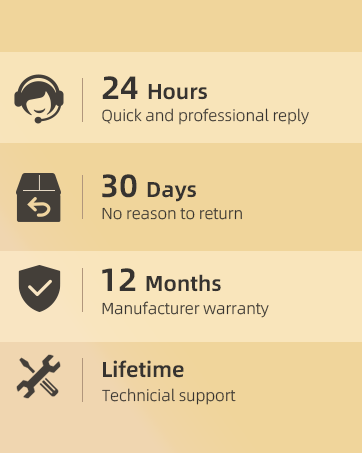
Image: Visual representation of the 12-month product warranty and optional 24-month extended warranty for the Tecaki Mini Projector.
9.2. Technical Support
Our dedicated support team is available to assist you with any issues or questions.
- Availability: 24/7 assistance for setup or troubleshooting.
- Lifetime Technical Support: We offer lifetime technical support for your product.
- Contact: For prompt and friendly assistance, please reach out to our support team.
Image: Summary of Tecaki's customer support and warranty services, including 24-hour support, 30-day return policy, 12-month manufacturer warranty, and lifetime technical support.