
1. Introduction
Thank you for choosing the TRUEFREE Clip C10 Ear Cuff Earphones. These innovative open-ear wireless earphones are designed to provide a comfortable listening experience while keeping you aware of your surroundings. Featuring advanced Bluetooth 5.4 technology, multipoint connectivity, and long battery life, the Clip C10 is ideal for various daily activities.

Image: The TRUEFREE Clip C10 Ear Cuff Earphones with their charging case.
2. Package Contents
Please ensure all items are present in your package:
- TRUEFREE Clip C10 Earphones (Left and Right)
- Charging Case
- USB Charging Cable
- User Manual (this document)
3. Product Overview
Familiarize yourself with the main components and features of your Clip C10 earphones.
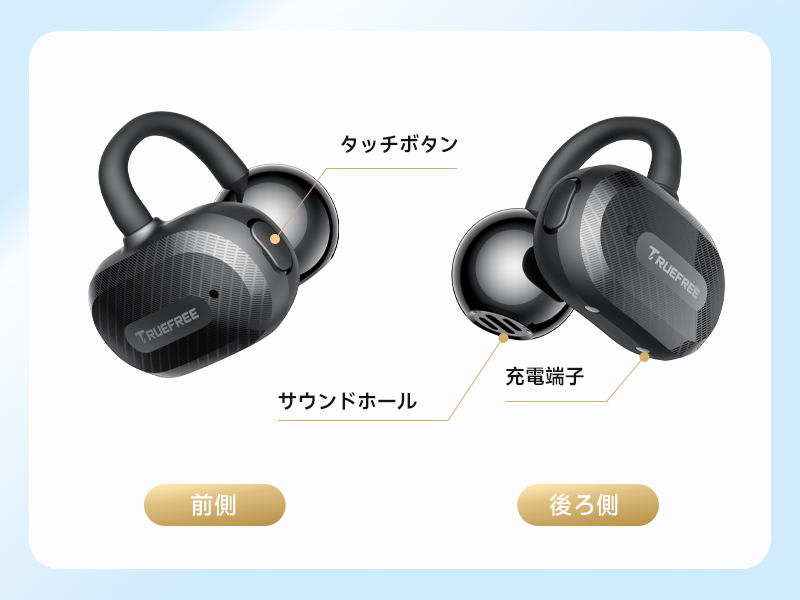
Image: Front and rear view of the earphone, highlighting the touch button, sound hole, and charging terminals.
- Touch Button: For controlling playback, calls, and voice assistant.
- Sound Hole: Where audio is emitted.
- Charging Terminals: For charging the earphones inside the case.
- Microphone: Integrated for calls and voice commands.
4. Setup
4.1 Charging
Before first use, fully charge the earphones and the charging case.
- Place the earphones into the charging case.
- Connect the charging case to a power source using the provided USB cable.
- The indicator lights on the case will show charging status.
The earphones offer up to 8 hours of continuous playback on a single charge, and up to 28 hours with the charging case. A quick 10-minute charge provides approximately 1.5 hours of playback.

Image: Visual representation of the 8-hour earphone battery life and 28-hour total playback with the charging case.
4.2 Pairing
The Clip C10 earphones utilize Bluetooth 5.4 for stable and efficient connection.
- Open the charging case. The earphones will automatically enter pairing mode.
- On your device (smartphone, tablet, PC), enable Bluetooth.
- Search for "TRUEFREE Clip C10" in the list of available devices and select it to connect.
- Once connected, you will hear a confirmation tone.
The earphones support multipoint connection, allowing simultaneous connection to two devices. They also feature automatic left/right recognition when placed in the charging case, simplifying future use.

Image: The earphones automatically recognize left and right channels when returned to the case.

Image: The Clip C10 earphones connected to multiple devices, showcasing Bluetooth 5.4 and multipoint capabilities.
5. Operating Instructions
5.1 Wearing the Earphones
The Clip C10 features an ergonomic ear-cuff design for a comfortable and secure fit without blocking your ear canal.
- Gently hook the earphone over the top of your ear.
- Adjust the earphone until it rests comfortably and securely in place.
- Ensure the sound hole is positioned correctly for optimal audio experience.

Image: A woman wearing the Clip C10 earphones, demonstrating the comfortable and non-intrusive fit.

Image: Step-by-step guide on how to properly wear and adjust the earphones for the best fit and sound.
5.2 Touch Controls
The earphones feature intuitive touch controls on the outer surface of each earbud.

Image: Visual guide to the touch control functions on the earphones.
| Action | Function (Right Earphone) | Function (Left Earphone) |
|---|---|---|
| Single Tap | Volume Up | Volume Down |
| Double Tap | Answer/End Call, Play/Pause | Answer/End Call, Play/Pause |
| Triple Tap | Voice Assistant | Game Mode On/Off |
| Long Press (1.5s) | Reject Call, Next Track | Reject Call, Previous Track |
5.3 TRUEFREE App Functionality
Enhance your experience by downloading the dedicated TRUEFREE app. The app allows for advanced customization and features.
- Dynamic EQ: Automatically adjusts sound quality based on music genre.
- Spatial Audio: Creates a 360° immersive soundstage.
- Customizable Touch Controls: Personalize earphone controls.
- Firmware Updates: Keep your earphones up-to-date with the latest features and improvements.
- Hearing Test: Optimize sound settings based on your individual hearing profile.
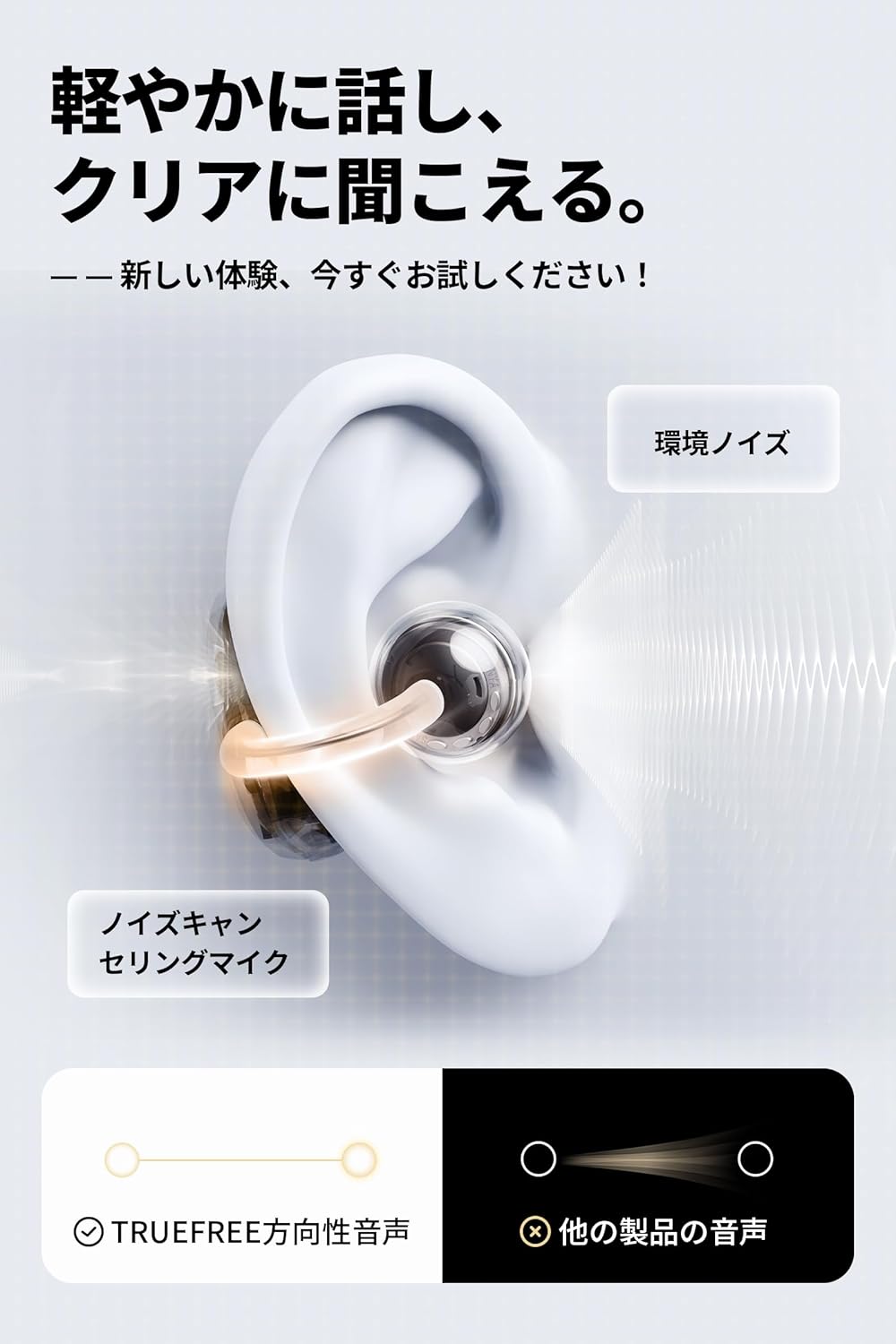
Image: The TRUEFREE app interface, showing options for game mode, custom controls, equalizer, and sound effects.
5.4 Sound Features
- 12mm Dual Magnet Driver: Delivers powerful bass and clear treble for a rich audio experience.
- Ultra-Low Latency Game Mode: Achieves 0.06 seconds latency for perfect audio-visual synchronization during gaming.
- Wind Noise Cancellation Microphone: Reduces ambient wind noise for clearer calls, especially outdoors.
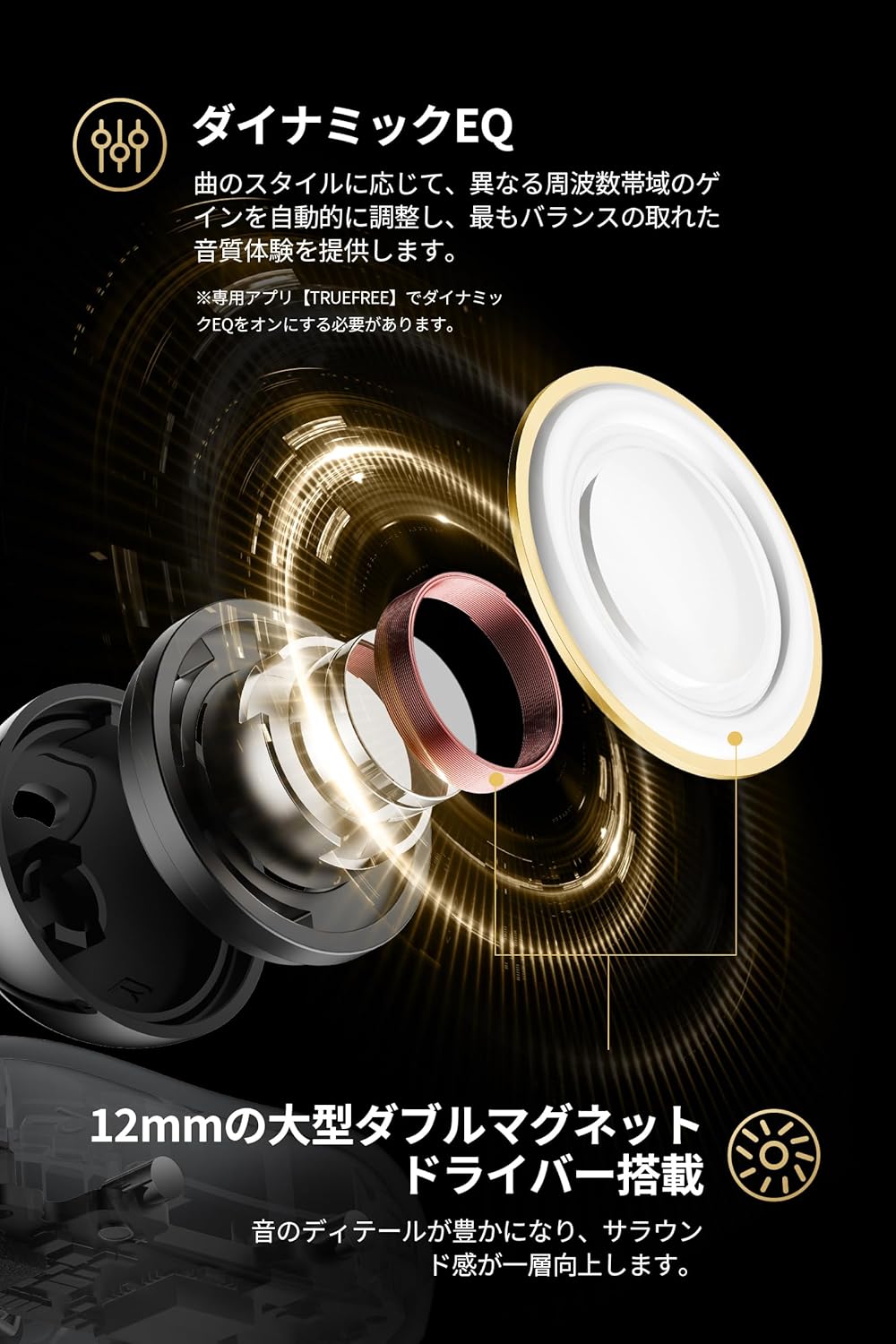
Image: An exploded view of the 12mm dual magnet driver, highlighting its components and sound production.

Image: Illustration of how the wind noise cancellation microphone works to filter out environmental noise during calls.
6. Maintenance
To ensure the longevity and optimal performance of your TRUEFREE Clip C10 earphones, follow these maintenance guidelines:
- Cleaning: Regularly wipe the earphones and charging case with a soft, dry, lint-free cloth. Avoid using harsh chemicals or abrasive materials.
- Water Resistance: The earphones are IPX5 water-resistant, meaning they can withstand splashes and sweat. Do not submerge them in water or expose them to heavy rain. Dry them thoroughly if they get wet before placing them back in the charging case.
- Storage: Store the earphones in their charging case when not in use to protect them and keep them charged. Store in a cool, dry place away from extreme temperatures.

Image: The IPX5 water resistance rating ensures protection against sweat and light splashes.
7. Troubleshooting
If you encounter any issues with your TRUEFREE Clip C10 earphones, please refer to the following common solutions:
- No Sound/Connection Issues:
- Ensure earphones are charged.
- Check if Bluetooth is enabled on your device and the earphones are selected.
- Try unpairing and re-pairing the earphones.
- Restart your device.
- One Earphone Not Working:
- Place both earphones back in the charging case, close the lid, wait a few seconds, then open again.
- Ensure both earphones are clean and making proper contact with the charging pins.
- Sound Quality Issues:
- Adjust the volume on both the earphones and your connected device.
- Try adjusting the Dynamic EQ settings in the TRUEFREE app.
- Ensure there are no obstructions between the earphones and your device.
- Firmware Update Issues (Specific to v0.5.5 on Windows PC):
- Some users have reported one-sided audio when playing YouTube on Windows PCs after updating to firmware v0.5.5.
- Workaround: Disconnect and reconnect Bluetooth, or toggle between Game Mode and Normal Mode.
- Future firmware updates may resolve this. Always check the TRUEFREE app for the latest firmware.
8. Specifications
| Feature | Description |
|---|---|
| Model Name | Clip C10 |
| Brand | Truefree |
| Connectivity Technology | Wireless (Bluetooth 5.4) |
| Ear Placement | Open-Ear |
| Headphone Style | Open-Ear |
| Color | Black |
| Impedance | 30 Ohms |
| Noise Control | None (Wind noise cancellation for mic) |
| Water Resistance | IPX5 |
| Battery Required | Yes |
| Package Dimensions | 10.3 x 9.3 x 4.2 cm; 100 g |
9. Warranty and Support
For warranty information, please refer to the warranty card included in your product packaging or visit the official Truefree website. Support contact details can typically be found on the manufacturer's website or through your point of purchase.
Always ensure you are using the latest firmware by checking the TRUEFREE app for updates to ensure optimal performance and access to new features.
