
MeowWhimsy NEO-AE
MeowWhimsy Self-Cleaning Cat Litter Box User Manual
Model: NEO-AE
Introduction
This user manual provides comprehensive instructions for the setup, operation, and maintenance of your MeowWhimsy Self-Cleaning Cat Litter Box. Designed for convenience and hygiene, this automatic litter box offers advanced features to simplify pet care for multi-cat households.
Safety Information
Your MeowWhimsy automatic cat litter box is equipped with advanced sensors to ensure your cat's safety. It detects the presence of your pet and automatically pauses operation. A built-in delay mechanism provides additional protection. Always ensure the device is placed on a stable, level surface to prevent tipping, especially if placed on carpet.
Important: Do not allow children to operate or play with the litter box. Keep hands clear of moving parts during operation. Unplug the unit before performing any maintenance or cleaning.
Package Contents
Please verify that all items are present in your package:
- Self Cleaning Cat Litter Box (MeowWhimsy)
- Power Adapter (USA)
- 2 Trash Bags
- 1 Cleaning Brush
- Incense Box & Scented Stick
- MeowWhimsy User Manual (this document)
Setup Guide
1. Unboxing and Placement
Carefully remove all components from the packaging. Ensure all foam pads and protective materials inside the litter box drum are removed before first use. Place the litter box on a firm, level surface. It can be placed on carpet, flooring, or a litter mat, provided it remains stable.
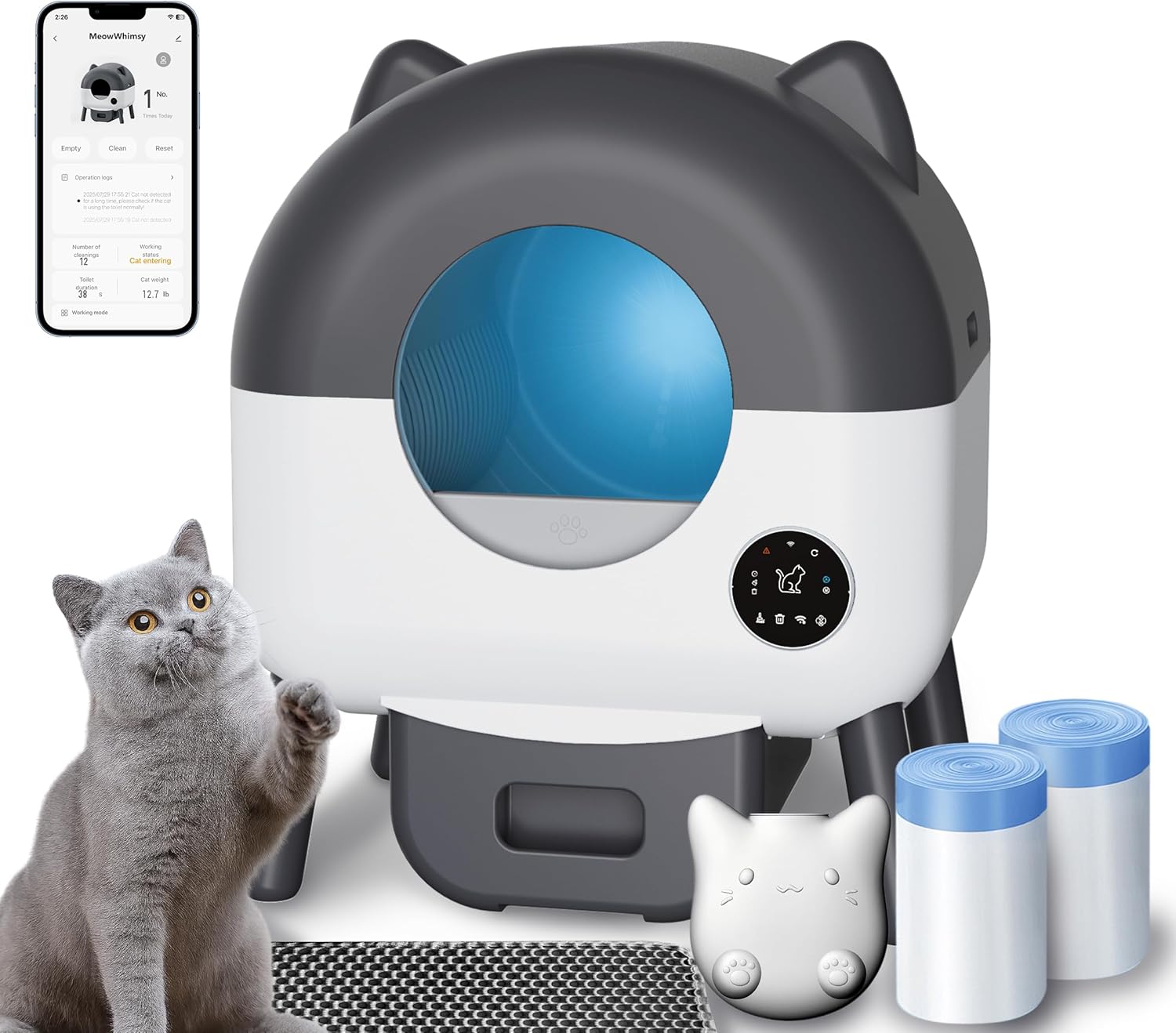
Figure 1: MeowWhimsy Self-Cleaning Cat Litter Box and included accessories.
2. Power Connection
Connect the power adapter to the litter box and plug it into a standard electrical outlet. The device will perform a 1-minute self-check and reset upon startup. This is normal operation and not a malfunction.
3. Litter Filling
Fill the litter box drum with your preferred clumping cat litter. The MeowWhimsy litter box is compatible with most types of clumping cat litter. Do not overfill; refer to the maximum fill line inside the drum.

Figure 2: The litter box is compatible with various clumping litter types.
4. App Control Setup
Download the intuitive app (e.g., Tuya Smart app, as mentioned in reviews) to monitor usage, adjust settings, and receive notifications. The device connects to a 2.4GHz Wi-Fi signal. Ensure your router is configured to support 2.4GHz for successful connection.

Figure 3: Control and monitor your litter box using the dedicated app.
Operating Instructions
Automatic Cleaning Cycle
The MeowWhimsy litter box automatically detects when your cat has used it and initiates a cleaning cycle after a set delay. This delay can typically be adjusted via the app (e.g., 6 or 10 minutes). During the cleaning cycle, the drum rotates to separate waste from clean litter, depositing waste into the sealed drawer below.
Manual Cleaning
You can initiate a cleaning cycle manually through the control panel on the unit or via the mobile app. This is useful for immediate cleaning or to observe the cleaning process.

Figure 4: The internal mechanism efficiently separates waste.
App Features
The companion app allows you to:
- Monitor litter box usage statistics (e.g., frequency, duration).
- Adjust cleaning cycle settings, including delay times.
- Receive notifications for waste drawer full, cat presence, or system alerts.
- Initiate cleaning cycles remotely.
- Manage multiple litter boxes (if applicable).
Maintenance
Emptying the Waste Drawer
The sealed waste drawer effectively locks in odors. When the drawer is full, the app will notify you, or you can check it manually. Simply pull out the drawer, seal the waste bag, and dispose of it. The waste bin features magnetic suction to ensure a snug fit and reduce odor spread.
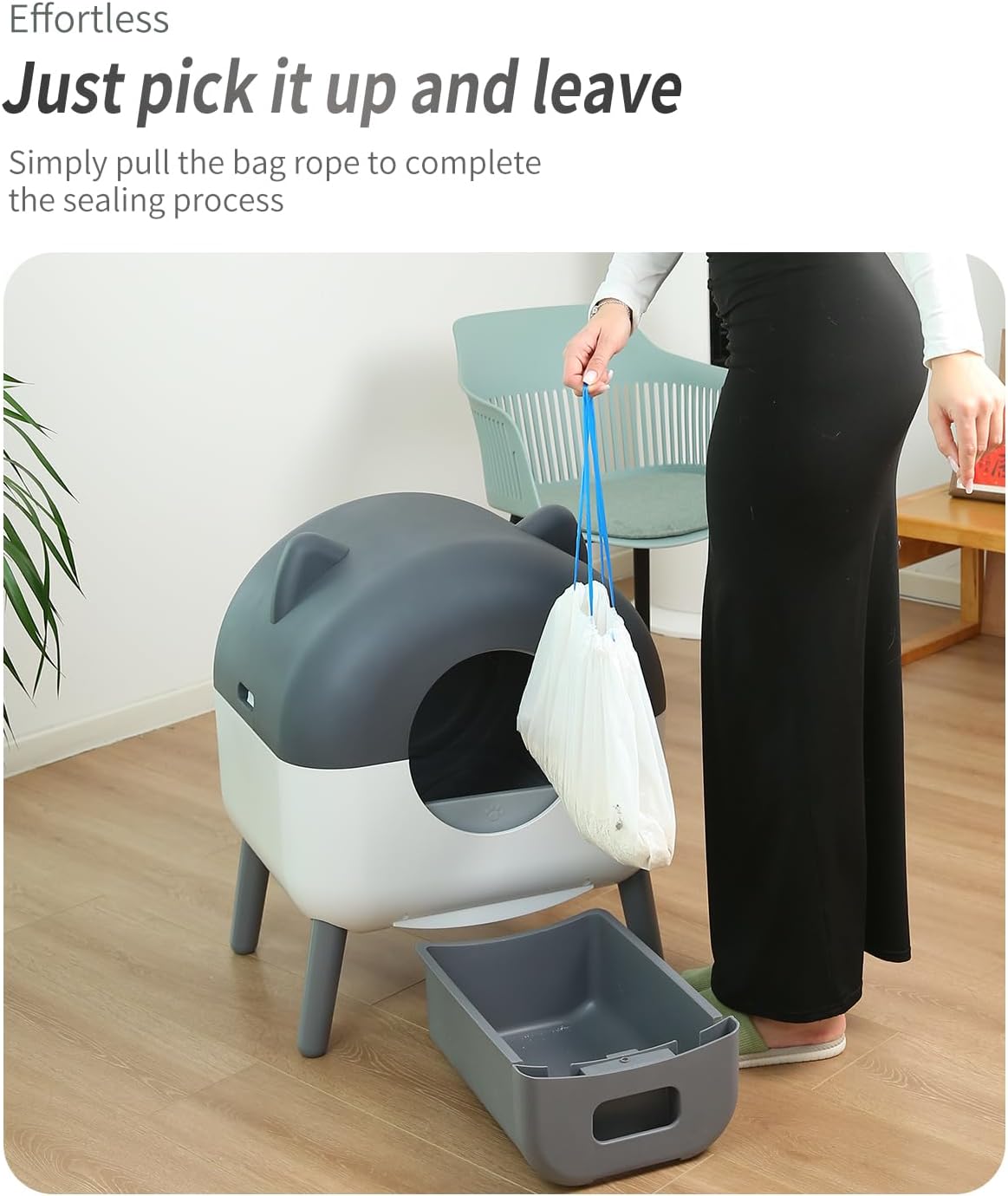
Figure 5: Effortless waste disposal with the pull-and-seal bag system.
Cleaning the Unit
We recommend cleaning the drum and waste bin every 25 days, excluding electrical parts. The removable litter tray makes cleaning and replacement quick and hassle-free. Use a mild detergent and water for cleaning, ensuring all parts are completely dry before reassembly.
Troubleshooting
| Problem | Possible Cause / Solution |
|---|---|
| Cat refuses to use the litter box. | Most cats adapt within a month. Place your cat's favorite toys in the litter box to encourage use. If more time is needed, contact support. |
| Machine rotates every time it is powered on. | This is normal. The device performs a 1-minute self-check and reset at startup. This is not a malfunction. |
| Waste bin has magnetic suction. | This is by design to ensure the drawer fits snugly and reduces odor spread. |
| Cannot connect to Wi-Fi. | The litter box connects to a 2.4GHz wireless signal. Ensure your router is broadcasting a 2.4GHz network and your device is attempting to connect to it. |
| Unit glitches on "pinch" sensor or won't clean. | Try rebooting the apparatus by unplugging it and plugging it back in. Ensure the inside of the unit, especially sensor areas, is clean and free of debris. If the issue persists, contact customer support. |
Specifications
| Feature | Detail |
|---|---|
| Model Number | NEO-AE |
| Item Weight | 30 Pounds |
| Product Dimensions (LxWxH) | 18"L x 18"W x 19"H |
| Material | Acrylonitrile Butadiene Styrene (ABS) |
| Color | White gray |
| Target Audience | House-cats (2.5-23 lbs) |
| Litter Compatibility | Most types of clumping cat litter |
| Overall Capacity | 110L |
| Drum Capacity | 95L |
| Waste Drawer Capacity | 15L |
Warranty and Support
The MeowWhimsy Self-Cleaning Cat Litter Box comes with a 1-year manufacturer's warranty covering major parts. For any concerns, questions, or after-sales service, please do not hesitate to reach out to the MeowWhimsy support team. We are committed to supporting you every step of the way.
Contact: Refer to the contact information provided with your product packaging or visit the official MeowWhimsy website for support details.
Related Documents - NEO-AE
 |
MeowWhimsy S7 Automatic Self-Cleaning Cat Litter Box Product Specification Product specification and features for the MeowWhimsy S7 Automatic Self-Cleaning Cat Litter Box, including safety compliance and usage notes. |
Ask a question about this manual
Ask about setup, troubleshooting, compatibility, parts, safety, or missing instructions. Manuals+ will review the question and use this page’s manual context to help answer it.