
Introduction
This manual provides essential information for the setup, operation, maintenance, and troubleshooting of your Garmin Montana 710 Rugged GPS Handheld Navigator. Please read this manual thoroughly to ensure proper use and to maximize the device's capabilities.
What's in the Box
- Garmin Montana 710 GPS Handheld Navigator
- Li-ion battery pack
- USB cable
- Wearable4U Power Bank
- Documentation

Image: Contents of the Garmin Montana 710 bundle, including the navigator, power bank, and USB cable.
Setup
1. Battery Installation and Charging
- Install the Li-ion Battery Pack: Open the battery compartment cover on the back of the device. Insert the provided Li-ion battery pack, ensuring correct orientation. Close the cover securely.
- Charge the Device: Connect the Garmin Montana 710 to a power source using the supplied USB cable. A full charge is recommended before first use. The Wearable4U Power Bank can be used to charge the device on the go.
2. Initial Power-On and Basic Settings
- Power On: Press and hold the power button located on the side of the device until the screen illuminates.
- Language and Region: Follow the on-screen prompts to select your preferred language, region, and other initial settings.
- GPS Acquisition: For optimal performance, power on the device outdoors with a clear view of the sky to allow it to acquire GPS satellite signals.
Operating the Device
1. Touchscreen Navigation
The Garmin Montana 710 features a 5-inch glove-friendly touchscreen. Use taps, swipes, and pinches to interact with menus, maps, and other functions.
2. Maps and Navigation
- TopoActive Maps: The device comes preloaded with TopoActive maps, providing terrain, elevation, and landmark information for routing on roads and trails.
- Satellite Imagery: Downloadable high-resolution satellite imagery offers photorealistic overhead views, allowing for waypoint creation based on visual landmarks.
- Additional Maps: The device supports additional map types, such as City Navigator maps for streets and BlueChart g3 charts for marine environments (sold separately).
- Outdoor Maps+: With a subscription to Outdoor Maps+ (sold separately), gain access to a wide variety of premium mapping content, downloadable via Wi-Fi.

Image: The Garmin Montana 710 displaying a detailed topographical map.
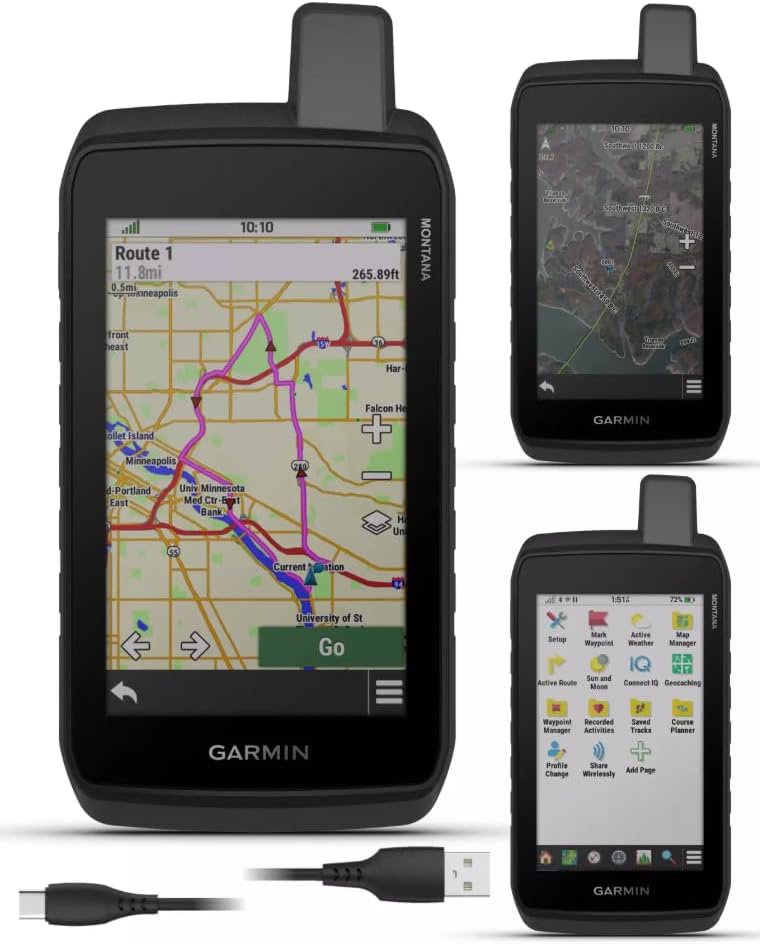
Image: The Garmin Montana 710 showing a route on a street map, ready for navigation.
3. Sensors and Data
- ABC Sensors: The device includes a built-in altimeter for elevation data, a barometer to monitor weather trends, and a 3-axis electronic compass for accurate heading information.
- Active Weather: Access up-to-date active weather forecasts by connecting the device to the Garmin Connect app on a compatible smartphone.

Image: The Garmin Montana 710 displaying an elevation profile and current activity metrics.
4. Connectivity and App Integration
- Garmin Explore App: Compatible with the Garmin Explore smartphone app for planning and reviewing trip data, and managing waypoints, courses, and activities.
- LiveTrack: When paired with a compatible smartphone, the LiveTrack feature allows other compatible Garmin GPS users to follow your tracks, routes, waypoints, and adventures wirelessly.
Video: An overview of the Garmin Montana GPS Handheld Navigator's features, including mapping, communication, and app integration.
Maintenance
1. Cleaning the Device
Regularly clean the device to ensure optimal performance and longevity. Use a soft, lint-free cloth dampened with water. Avoid harsh chemicals or abrasive cleaners, as these can damage the screen and casing.
2. Battery Care
To prolong battery life, avoid exposing the device to extreme temperatures. If storing the device for an extended period, ensure the battery is charged to approximately 50% and store it in a cool, dry place.
3. Software Updates
Periodically check for software updates to ensure your device has the latest features and performance enhancements. Updates can typically be performed via Wi-Fi or by connecting the device to a computer with Garmin Express software.
Troubleshooting
1. Device Not Powering On
- Ensure the battery is properly installed and fully charged.
- Connect the device to a power source using the USB cable and attempt to power it on.
2. GPS Signal Issues
- Ensure you are outdoors with a clear view of the sky, away from tall buildings or dense foliage.
- Allow several minutes for the device to acquire satellite signals.
3. Touchscreen Unresponsive
- Perform a soft reset by holding the power button until the device restarts.
- Ensure the screen is clean and free of debris or moisture.
4. Connectivity Problems (Wi-Fi, Bluetooth)
- Verify that Wi-Fi or Bluetooth is enabled on both the device and the connected smartphone.
- Ensure the device and smartphone are within range of each other.
- Restart both devices.
Specifications
| Feature | Specification |
|---|---|
| Model Name | Montana 710 |
| Display Size | 5 Inches |
| Item Weight | 14.5 ounces (411 grams) |
| Product Dimensions | 7 x 4 x 1 inches (17.8 x 10.2 x 2.5 cm) |
| Battery Type | Li-ion battery pack (included) |
| Battery Life | Up to 24 Hours |
| Internal Memory | 32 GB |
| Operating System | Garmin OS |
| Connectivity Technology | USB, Wi-Fi, Wireless |
| Map Type | Satellite, Topographical |
| Water Resistance | IPX7 |
| Ruggedness Standard | MIL-STD 810 (thermal, shock, vibration) |
Warranty and Support
The Garmin Montana 710 comes with a 1-year limited warranty from the date of purchase. This warranty covers defects in materials and workmanship under normal use.
For detailed warranty information, technical support, or to register your product, please visit the official Garmin website or contact their customer service. Keep your proof of purchase for warranty claims.