
EPOCH BATTERIES BB51105A-Kit
Epoch 48V 105Ah Lithium (LiFePO4) Golf Cart Battery - Complete Kit User Manual
Model: BB51105A-Kit | Brand: EPOCH BATTERIES
1. Introduction
This manual provides comprehensive instructions for the installation, operation, maintenance, and troubleshooting of your Epoch 48V 105Ah Lithium (LiFePO4) Golf Cart Battery Complete Kit. This advanced battery system is designed for optimal performance in golf cart applications, featuring a built-in Smart 200A BMS, Bluetooth App connectivity, and a long cycle life.
What's Included in the Kit:
- Epoch 48V 105Ah LiFePO4 Battery
- 48V 15A Lithium Charger & Cable
- Battery Gauge (LCD Meter) & Cable
- 12V Converter
- Mounting Screws
- User Manual (this document)

Figure 1: Epoch 48V 105Ah Lithium Golf Cart Battery.

Figure 2: Overview of the complete kit components, including the battery, charger, converter, and display.
2. Key Features
- Complete Lithium Conversion Kit: Provides all necessary components for upgrading your golf cart to lithium power.
- Integrated Smart BMS: Built-in 200A Battery Management System with 700A peak discharge for robust performance and protection.
- Bluetooth App Connectivity: Monitor battery status, voltage, current, and temperature via a dedicated iOS & Android application. Supports over-the-air firmware updates.
- High Power Output: 200A Max Continuous Discharge, 300A @ 15s, 700A @ 2s Peak Discharge.
- Efficient Charging: 100A Max Continuous Charge, 300A @ 15s Peak Charge/Regen.
- Long Cycle Life: Designed for 3,500+ charge cycles, ensuring extended battery longevity.
- Included Accessories: Comes with a 48V 15A Lithium Charger, Battery Gauge, and 12V Converter.
3. Setup and Installation
Before beginning installation, ensure the golf cart is turned off and disconnected from any power sources. Always wear appropriate safety gear, including gloves and eye protection.
3.1 Battery Installation
- Remove Old Battery System: Carefully disconnect and remove your existing golf cart batteries and any associated wiring.
- Prepare Battery Compartment: Clean the battery compartment and ensure it is free of debris. The Epoch battery is designed for a direct fit in many golf cart models, including the Easy-Go RXV.
- Position the Battery: Place the Epoch 48V 105Ah LiFePO4 battery into the designated compartment. Ensure it sits securely. The battery features specially built brackets to fit plastic trays.
- Secure the Battery: Use the provided mounting screws to secure the battery in place.

Figure 3: Top view of the Epoch battery, showing handles and connection points.

Figure 4: Side view of the Epoch battery, highlighting the M8 terminals for connection.
3.2 Wiring Connections
- Connect Main Power Cables: Connect the main positive (+) and negative (-) cables from the golf cart to the corresponding M8 terminals on the Epoch battery. Ensure connections are tight and secure.
- Install 12V Converter: Mount the 12V converter in a suitable location and connect it according to your golf cart's wiring diagram. This converter provides 12V power for accessories.
- Install Battery Gauge (LCD Meter): Install the LCD battery meter in a convenient location on the dashboard. Connect its cable to the designated port on the battery. This meter displays voltage, current, and State of Charge (SOC).
- Install Charge Port Adapter: Replace the old charge receptacle with the provided charge port adapter. This allows for easy charging using a standard extension cord.

Figure 5: The charge port adapter, designed for easy replacement of the old receptacle.
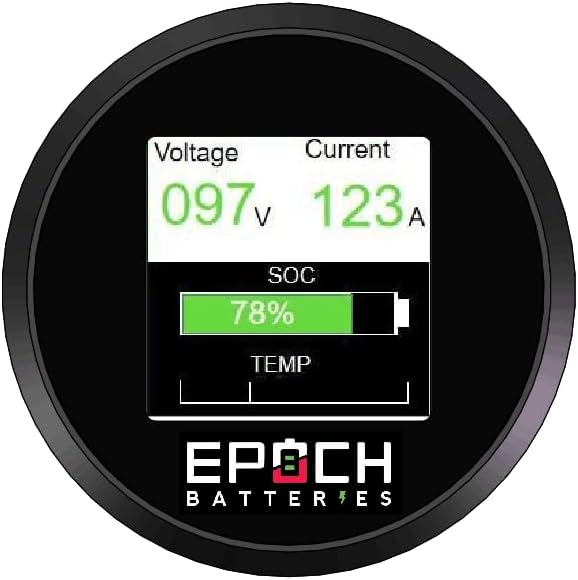
Figure 6: The LCD battery meter, showing voltage, current, and State of Charge (SOC).

Figure 7: The included 48V 15A Lithium Charger.

Figure 8: The 12V converter and wiring harness with power switch.
4. Operating Instructions
4.1 Initial Power-Up
After installation, ensure all connections are secure. Turn on the main power switch (if applicable) or the remote on/off power button if installed on the dash. The LCD meter should illuminate, displaying battery status.
4.2 Charging the Battery
- Connect the 48V 15A Lithium Charger to the charge port adapter on your golf cart.
- Plug the charger into a standard AC power outlet.
- The charger will automatically begin charging. Monitor the charging status via the LCD meter or the Bluetooth app.
- Once fully charged, the charger will indicate completion (refer to charger's specific indicator lights) and can be disconnected.
Note: Only use the provided Epoch 48V 15A Lithium Charger or an approved compatible LiFePO4 charger. Using incompatible chargers can damage the battery and void the warranty.
4.3 Bluetooth App Usage
Download the Epoch Batteries app from your device's app store (iOS or Android). The app allows you to:
- Monitor real-time battery voltage, current, and temperature.
- View the State of Charge (SOC).
- Access diagnostic information.
- Receive over-the-air firmware updates for the BMS.
Follow the in-app instructions for pairing your device with the battery via Bluetooth.
5. Maintenance
The Epoch LiFePO4 battery requires minimal maintenance due to its advanced design and built-in BMS. However, following these guidelines will ensure optimal performance and longevity:
- Regular Cleaning: Keep the battery and its terminals clean and free of dirt, dust, and moisture. Use a dry cloth for cleaning.
- Terminal Inspection: Periodically check battery terminals for corrosion or loose connections. Tighten if necessary.
- Storage: If storing the golf cart for an extended period, ensure the battery is charged to approximately 50-70% SOC. Disconnect the battery from the golf cart to prevent parasitic drain. Store in a cool, dry place.
- Avoid Deep Discharge: While the BMS protects against over-discharge, it is best practice to recharge the battery before it reaches extremely low levels to maximize cycle life.
- Temperature: Operate and store the battery within its specified temperature ranges (refer to specifications section).
6. Troubleshooting
This section addresses common issues you might encounter. For problems not listed here, please contact Epoch Batteries support.
| Problem | Possible Cause | Solution |
|---|---|---|
| Battery not charging. | Charger not plugged in, faulty charger, loose connection, BMS protection activated. | Ensure charger is properly connected and plugged into a live outlet. Check all cable connections. If BMS protection is active (check app), disconnect load and allow battery to reset. Contact support if issue persists. |
| Golf cart not powering on. | Battery discharged, main power switch off, loose battery terminals, BMS protection activated. | Check battery SOC on LCD meter or app. Ensure main power switch/remote button is ON. Verify all battery terminal connections are tight. If BMS protection is active, charge the battery. |
| Bluetooth app not connecting. | Bluetooth off on device, battery not powered on, app issue. | Ensure Bluetooth is enabled on your mobile device. Confirm the battery is powered on. Restart the app or your mobile device. Ensure you are within Bluetooth range. |
| Reduced range or power. | Battery not fully charged, aging battery, excessive load. | Ensure battery is fully charged before use. Review driving habits and reduce excessive loads if possible. If battery is old, consider its cycle life. |
7. Product Specifications
| Attribute | Detail |
|---|---|
| Brand | EPOCH BATTERIES |
| Model | BB51105A-Kit (48V 105Ah) |
| Battery Type | Lithium Iron Phosphate (LiFePO4) |
| Nominal Voltage | 48V (51.2V) |
| Capacity | 105Ah |
| Energy | 5.376 kWh |
| Max Continuous Discharge | 200A |
| Peak Discharge (15s) | 300A |
| Peak Discharge (2s) | 700A |
| Max Continuous Charge | 100A |
| Peak Charge/Regen (15s) | 300A |
| Cycle Life | 3,500+ cycles |
| Product Dimensions (D x W x H) | 13.4"D x 18.1"W x 9.8"H |
| Item Weight | 102.3 pounds (46.4 kg) |
| Terminal Type | M8 Terminal |
| Number of Cells | 16 |
| Internal Resistance | 20 Milliohms |
| Country of Origin | China |
8. Warranty Information
The Epoch 48V 105Ah Lithium (LiFePO4) Golf Cart Battery comes with an 11-Year Warranty. This warranty covers defects in materials and workmanship under normal use and service. Please retain your proof of purchase for warranty claims. For full warranty terms and conditions, refer to the official Epoch Batteries website or contact customer support.
9. Customer Support
For technical assistance, troubleshooting, or warranty inquiries, please contact Epoch Batteries customer support:
- Website: www.epochbatteries.com
- Store Page: Epoch Batteries Amazon Store
- Refer to the product packaging or official website for direct contact methods (phone/email).
Related documentsBB51105A-Kit


Ask a question about this manual
Ask about setup, troubleshooting, compatibility, parts, safety, or missing instructions. Manuals+ will review the question and use this page’s manual context to help answer it.