
runstar FG2015-S
Runstar FG2015-S Smart Body Composition Scale User Manual
Model: FG2015-S
1. Introduction
Welcome to the Runstar FG2015-S Smart Body Composition Scale user manual. This guide provides essential information for setting up, operating, and maintaining your new smart scale. The Runstar FG2015-S is designed to offer precise full-body measurements of 28 body composition metrics using 8 high-sensitivity electrodes and dual-frequency BIA technology. By following these instructions, you can optimize your fitness plan and track your health progress effectively.

Image 1.1: Runstar FG2015-S Smart Body Composition Scale, showing the scale, its display, and companion app interface on a smartphone and smartwatch.
This scale measures various metrics including weight, BMI, muscle mass, body fat, body water, bone mass, and more, providing a comprehensive overview of your body's composition.
2. Setup Guide
2.1 Unpacking and Initial Placement
- Carefully remove the scale from its packaging.
- Place the scale on a flat, hard, and clean floor. Avoid carpets or soft surfaces, as this can affect measurement accuracy.
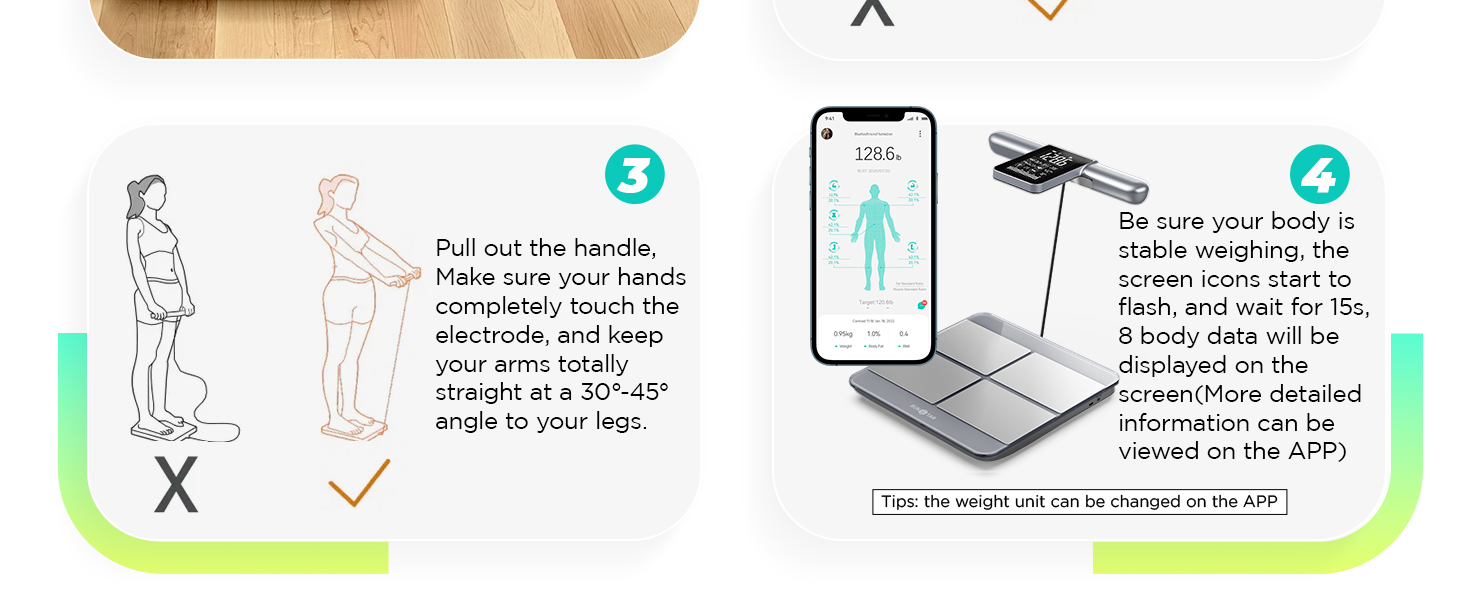
Image 2.1: Illustration showing the correct placement of the scale on a flat, hard floor, not on carpet.
2.2 Battery Installation and Charging
- The scale includes 1 x 12V battery. Ensure it is correctly installed if not pre-installed.
- The scale features a Type-C charging port. A full charge takes approximately 2 hours and provides over 90 days of daily use. Connect the scale to a power source using a Type-C cable when the battery indicator is low.

Image 2.2: The Runstar scale showing its extra-wide weighing surface and the USB Type-C charging port.
2.3 Starfit App Download and Bluetooth Connection
- Download the "Starfit" app from your device's app store (Apple App Store or Google Play Store).
- Complete the registration process within the Starfit app.
- In the app, navigate to "Account" and then "My Devices".
- Click the "+" icon in the upper right corner, then select the "Bluetooth" logo to begin searching for smart devices.
- When "Runstar-RX" appears in the list, click to connect. A connected logo will appear on the scale's screen upon successful pairing.

Image 2.3: The Starfit app interface, highlighting its compatibility with Apple Health, Health Connect, Fitbit, and Apple Watch, and options to download from app stores.
3. Operating Instructions
3.1 Taking a Measurement
For accurate body composition measurements, ensure the Starfit app is open and connected via Bluetooth before stepping on the scale.
- Ensure your feet are bare and dry.
- Step onto the scale, placing your feet on the four corresponding electrode positions. Stand straight.
- Pull out the handle and make sure your hands completely touch the electrodes. Keep your arms totally straight at a 30-45 degree angle to your legs.
- Remain stable during the measurement. The screen icons will flash, and after approximately 15 seconds, 8 core data points will be displayed on the scale's screen. More detailed information will be available in the Starfit app.
Image 3.1: Step-by-step guide for correct measurement, including scale placement, foot positioning, and handle usage.
3.2 Understanding the Display and App Data
The 4.1-inch anti-glare LCD screen on the handle displays 8 core metrics: weight, BMI, muscle mass, body fat, body water, bone mass, body age, and weight status.

Image 3.2: Close-up of the scale's display, indicating where weight, BMI, body fat, body water, muscle mass, bone mass, body age, and weight status bar are shown.
The Starfit app provides a more detailed analysis of all 28 body composition metrics. You can set goals, analyze trends, and track your health progress over time (week, month, year). The app also allows you to generate and print detailed health analysis reports.

Image 3.3: The Starfit app displaying options for generating printable professional analysis reports and supporting up to 24 users.
3.3 Multiple User Support and Data Sync
- The Starfit app supports multiple users, making it suitable for household use.
- Data can be easily synced with Apple Health, Health Connect, and Fitbit.
4. Maintenance
4.1 Cleaning
To clean your scale, wipe it with a damp cloth and mild detergent. Do not immerse the scale in water or use abrasive cleaners. Ensure the surface is dry before storage or next use.
4.2 Charging
Recharge the scale using the provided Type-C cable when the battery indicator on the display shows low power. A full charge takes approximately 2 hours.
5. Troubleshooting
- Scale not turning on: Ensure the battery is charged. Connect the scale to a power source using the Type-C cable.
- Inaccurate weight readings:
- Ensure the scale is placed on a hard, flat surface, not carpet.
- Make sure you are standing still and centered on the scale.
- Ensure your feet are bare and dry, making full contact with the electrodes.
- Avoid taking measurements immediately after intense exercise, showering, or consuming large amounts of liquid, as this can temporarily affect readings.
- Body composition metrics seem inconsistent:
- Consistency in measurement conditions (time of day, hydration level, clothing) is crucial for reliable trend tracking.
- Ensure proper posture: stand straight, hold the handle with straight arms at a 30-45 degree angle, and ensure full contact with all 8 electrodes (4 on platform, 4 on handle).
- Bluetooth connection issues:
- Ensure Bluetooth is enabled on your smartphone.
- Verify the Starfit app is open and attempting to connect.
- Restart both the scale (if possible, by cycling power) and your smartphone.
- Refer to section 2.3 for detailed connection steps.
- App not syncing data:
- Confirm a stable Bluetooth connection between the scale and the app.
- Check your phone's internet connection for cloud syncing.
- Ensure the app has necessary permissions (e.g., Bluetooth, storage).
6. Specifications
| Model Number | FG2015-S |
| Brand | runstar |
| Color | Silver |
| Product Dimensions | 16 x 14 x 2 inches |
| Item Weight | 6.9 Pounds |
| Batteries | 1 x 12V batteries (included) |
| Display Type | LCD |
| Special Features | Auto Shut Off, Body Fat Measurement, Carry Handle, Large Display, Muscle Mass Measurement |
| Recommended Uses | Adults |

Image 6.1: Visual representation of the 28 body composition metrics measured by the scale, including fat-free weight, body water, BMI, and more.

Image 6.2: Diagram illustrating the 8-electrode AC dual-frequency measurement technology used by Runstar, compared to single-frequency 8-electrode and conventional 4-electrode scales.
7. Warranty and Support
7.1 Warranty Information
Specific warranty details are typically provided with your product packaging or can be found on the official Runstar website. Please retain your proof of purchase for warranty claims.
7.2 Customer Support
For any questions, technical assistance, or support regarding your Runstar FG2015-S Smart Body Composition Scale, please contact Runstar customer service. Contact information can usually be found on the product packaging or the official Runstar website.
This item is also FSA/HSA eligible. Consult your plan administrator for details on reimbursement.
8. Important Information
8.1 Legal Disclaimer
Statements regarding dietary supplements have not been evaluated by the FDA and are not intended to diagnose, treat, cure, or prevent any disease or health condition. This scale is intended for informational purposes only and should not be used as a substitute for professional medical advice. Always consult with a healthcare professional for any health concerns.
9. Product Videos
No official product videos from the seller were provided in the available data for embedding.
Related documentsFG2015-S


Ask a question about this manual
Ask about setup, troubleshooting, compatibility, parts, safety, or missing instructions. Manuals+ will review the question and use this page’s manual context to help answer it.