
1. Introduction
This manual provides instructions for the installation, operation, and maintenance of the ocioc M1 Smart Ceiling Fan Remote Control Kit with Receiver. This kit is specifically designed as a replacement for ocioc M1 Smart 18 Inch dimmable Ceiling Fans only. It is not a universal remote control kit. Please ensure compatibility with your existing ocioc M1 Smart Ceiling Fan before proceeding with installation.
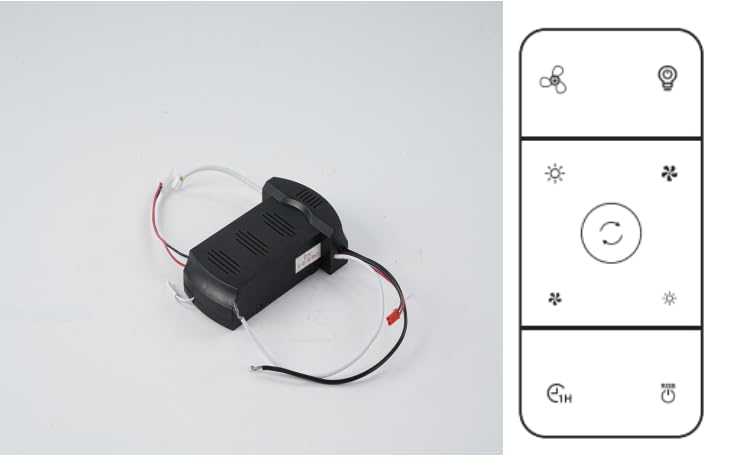
Image showing the ocioc M1 Smart Ceiling Fan Remote Control and its receiver unit.
2. Setup and Installation
Important: Before beginning any installation, ensure the power supply to the ceiling fan is turned off at the circuit breaker to prevent electrical shock.
2.1. Receiver Installation
- Turn off the main power to the ceiling fan at the circuit breaker.
- Remove the canopy or housing of your existing ocioc M1 Smart Ceiling Fan to access the wiring compartment.
- Disconnect the existing receiver (if present) and carefully note the wiring connections.
- Connect the new ocioc receiver according to the wiring diagram provided with your original ocioc M1 Smart Ceiling Fan or the diagram on the receiver itself. Typically, this involves connecting the receiver's input wires to the household supply wires and the receiver's output wires to the fan motor and light kit wires.
- Ensure all wire connections are secure using wire nuts.
- Carefully tuck the receiver and wiring into the fan's canopy, ensuring no wires are pinched.
- Reattach the fan canopy or housing.
2.2. Remote Control Battery Installation
- Open the battery compartment on the back of the remote control.
- Insert the required batteries (typically AAA, not included) according to the polarity indicators (+/-).
- Close the battery compartment securely.
2.3. Pairing the Remote Control
- Restore power to the ceiling fan at the circuit breaker.
- Within 30 seconds of restoring power, press and hold the 'PAIR' button (or a similar designated button, refer to your remote's specific markings) on the remote control for 3-5 seconds.
- The fan light should blink or the fan should briefly turn on/off to indicate successful pairing.
- If pairing is unsuccessful, turn off power, wait 10 seconds, and repeat the process.
3. Operating Instructions
Once the remote control and receiver are successfully paired, you can operate your ocioc M1 Smart Ceiling Fan using the remote.
- Fan ON/OFF: Press the fan power button to turn the fan on or off.
- Fan Speed Control: Use the speed buttons (e.g., 1, 2, 3 or up/down arrows) to adjust the fan's rotation speed.
- Light ON/OFF: Press the light power button to turn the fan light on or off.
- Light Dimming: If your ocioc M1 Smart Ceiling Fan supports dimming, press and hold the light button to adjust the brightness. Release when the desired brightness is reached.
- Timer Function (if available): Some remotes may include a timer button to set the fan to turn off automatically after a set period. Refer to your remote's specific markings.
4. Maintenance
4.1. Remote Control Care
- Keep the remote control dry. Avoid exposure to moisture or liquids.
- Clean the remote control with a soft, dry cloth. Do not use abrasive cleaners or solvents.
- Avoid dropping the remote control or subjecting it to strong impacts.
4.2. Battery Replacement
Replace the batteries in the remote control when its operating range decreases or if the remote becomes unresponsive. Always use new batteries of the specified type and dispose of old batteries responsibly.
5. Troubleshooting
| Problem | Possible Cause | Solution |
|---|---|---|
| Remote control not working / Fan not responding | Dead or incorrectly installed batteries. Remote not paired with receiver. Power to fan is off. | Check and replace batteries. Re-pair the remote control (refer to Section 2.3). Ensure power to the fan is on at the circuit breaker and wall switch. |
| Fan light not working | Light bulb faulty. Wiring issue. | Check and replace the light bulb. Verify wiring connections to the light kit. |
| Fan operates intermittently | Loose wiring connection. Interference. | Turn off power and check all wiring connections. Ensure the receiver is not obstructed. |
If you continue to experience issues after attempting these troubleshooting steps, please contact customer support.
6. Specifications
| Feature | Detail |
|---|---|
| Brand | ocioc |
| Model | M1 (Replacement Kit) |
| Compatible Devices | ocioc M1 Smart 18 Inch Dimmable Ceiling Fans ONLY |
| Connector Type | 2 Pin |
| Terminal | Screw |
| Material | Metal (Contact Material: Copper) |
| Controller Type | Push Button |
| Control Method | Remote |
| Specification Met | ETL, UL, cUL |
| Number of Items | 1 (Remote Control and Receiver) |
7. Warranty Information
The ocioc M1 Smart Ceiling Fan Remote Control Kit with Receiver comes with a 5-year warranty from the date of purchase. This warranty covers defects in materials and workmanship under normal use. Please retain your proof of purchase for warranty claims. The warranty does not cover damage caused by improper installation, misuse, accidents, or unauthorized modifications.
8. Customer Support
For technical assistance, troubleshooting beyond this manual, or warranty inquiries, please contact ocioc customer support. You can find contact information on the official ocioc website or through your purchase platform.
For more information about ocioc products, visit the ocioc Store on Amazon.


