
GMKtec EVO-X1
GMKtec EVO-X1 Mini PC User Manual
Model: EVO-X1
1. Introduction
Thank you for choosing the GMKtec EVO-X1 Mini PC. This compact yet powerful computer is designed for a wide range of applications, from everyday computing and office tasks to gaming and professional content creation. Featuring the AMD Ryzen AI 9 HX-370 processor with XDNA 2 architecture and Radeon 890M graphics, it offers exceptional performance and AI capabilities. This manual provides essential information for setting up, operating, maintaining, and troubleshooting your new Mini PC.

Image: The GMKtec EVO-X1 Mini PC, showcasing its compact design and various ports on both the front and rear panels.
2. What's in the Box
Please check the contents of your package to ensure all items are present:
- 1 x GMKtec Nucbox EVO-X1 AMD Ryzen AI 9 HX 370 Mini PC
- 1 x Power Adapter
- 1 x VESA Mount with Screws
- 1 x HDMI Cable
- 1 x User Manual (this document)
- 1 x Vertical Stand

Image: An illustration of the retail packaging contents, including the Mini PC, power adapter, VESA mount, HDMI cable, user manual, and vertical stand.
3. Setup Instructions
Follow these steps to set up your GMKtec EVO-X1 Mini PC:
- Connect to Display: Connect your monitor(s) to the Mini PC using the HDMI 2.1, DisplayPort 2.1, or USB4 ports. The EVO-X1 supports up to three 8K displays simultaneously.
- Connect Peripherals: Plug in your keyboard, mouse, and other USB devices into the available USB 3.0, USB 2.0, or USB4 ports.
- Connect to Network: For wired internet, connect an Ethernet cable to one of the dual 2.5Gbps LAN ports. For wireless internet, the device supports WiFi 6.
- Connect Power: Plug the power adapter into the DC IN port on the Mini PC, then connect the adapter to a power outlet.
- Power On: Press the power button located on the front of the Mini PC. The system will boot up.

Image: A close-up view of the GMKtec EVO-X1's rich interface, highlighting the USB, HDMI, DisplayPort, LAN, and Oculink ports for various connections.
4. Operating Your Mini PC
4.1 Power On/Off
- Power On: Press the power button once.
- Shut Down: Use the operating system's shutdown procedure (e.g., Start > Power > Shut down in Windows).
- Restart: Use the operating system's restart procedure.
- Force Shut Down: If the system is unresponsive, press and hold the power button for approximately 5-10 seconds until the device powers off. Use this only as a last resort.
4.2 Key Features and Capabilities
- Processor: Equipped with the AMD Ryzen AI 9 HX-370, featuring Zen 5 microarchitecture and XDNA 2 NPU for advanced AI processing and high clock speeds up to 5.1GHz.
- Graphics: Integrated AMD Radeon 890M iGPU provides strong graphics performance for gaming and visual tasks.
- Memory: Utilizes LPDDR5X 7500MHz Quad Channel memory for high-speed data access and multitasking efficiency.
- Storage: Supports PCIe 4.0 M.2 2280 SSDs, with dual slots allowing for significant storage expansion up to 8TB.
- Oculink Port: An ultra-fast Oculink port enables connection to external GPUs, offering enhanced graphics capabilities for demanding applications and gaming.
- Display Output: Supports triple screen 8K display output via HDMI 2.1, DisplayPort 2.1, and USB4, ideal for multi-monitor setups.
- Networking: Features dual Intel i226V 2.5Gbps LAN ports for high-speed wired networking and WiFi 6 for robust wireless connectivity. Bluetooth 5.2 is also integrated for peripheral connections.
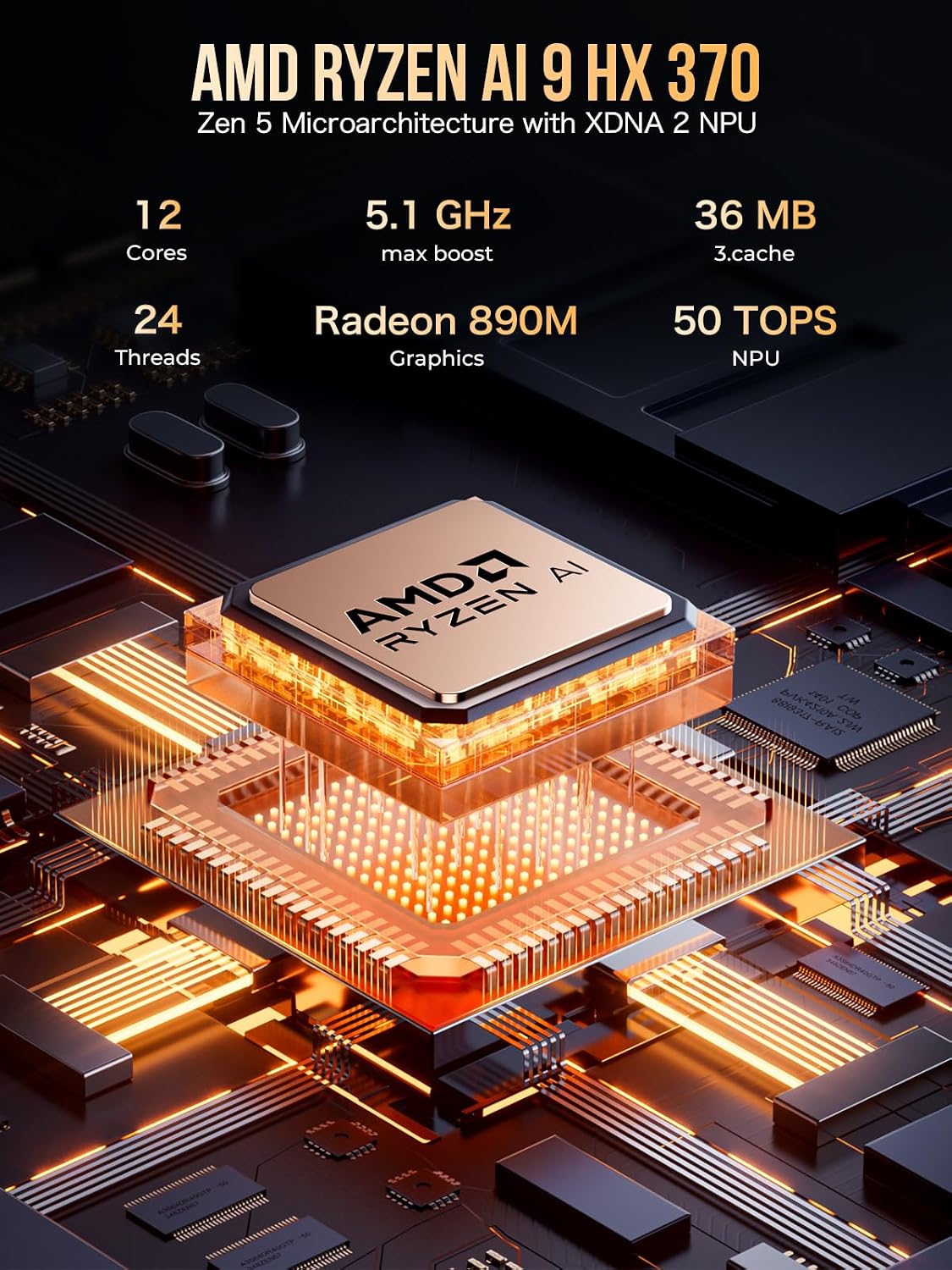
Image: Detailed specifications of the AMD Ryzen AI 9 HX 370 processor, including 12 cores, 24 threads, 5.1 GHz max boost, Radeon 890M graphics, and 50 TOPS NPU.

Image: The GMKtec EVO-X1 Mini PC connected to an external GPU via its Oculink port, illustrating its expandability for high-performance graphics.

Image: The GMKtec EVO-X1 Mini PC connected to three monitors, demonstrating its capability for triple screen display output at up to 8K resolution.
5. Maintenance
Proper maintenance ensures the longevity and optimal performance of your Mini PC:
- Cleaning: Regularly clean the exterior of the Mini PC with a soft, dry cloth. Use compressed air to gently clear dust from ventilation grilles to ensure proper airflow. Do not use liquid cleaners directly on the device.
- Ventilation: Ensure the Mini PC is placed in a well-ventilated area. Do not block the air vents. The device features dual cooling fans for efficient heat dissipation.
- Software Updates: Keep your operating system and drivers updated to the latest versions for improved performance, security, and compatibility.
- Storage Management: Periodically clean up unnecessary files and applications to maintain optimal storage performance.

Image: A diagram illustrating the upgraded twin cooling fan system of the EVO-X1, designed to efficiently cool the SSD and DDR components through intelligent system fans and surround convection ducts.
6. Troubleshooting
If you encounter issues with your GMKtec EVO-X1, refer to the following common problems and solutions:
| Problem | Possible Cause | Solution |
|---|---|---|
| No power/System does not turn on | Power adapter not connected properly; Power outlet issue; Faulty power adapter. | Ensure power adapter is securely connected to both the Mini PC and a working power outlet. Try a different outlet. |
| No display on monitor | Display cable loose or faulty; Incorrect input selected on monitor; Monitor not powered on. | Check display cable connections. Ensure monitor is powered on and set to the correct input source (HDMI, DisplayPort, USB-C). Try a different cable or port. |
| No internet connection (wired) | Ethernet cable loose or faulty; Router/modem issue; Network driver issue. | Check Ethernet cable connection. Restart your router/modem. Check network adapter status in Device Manager. |
| No internet connection (wireless) | WiFi disabled; Incorrect WiFi password; Router too far; Driver issue. | Ensure WiFi is enabled in the OS. Re-enter WiFi password. Move closer to the router. Update WiFi drivers. |
| System runs slow or freezes | Too many applications running; Insufficient RAM; Overheating; Malware. | Close unnecessary applications. Check task manager for resource usage. Ensure proper ventilation. Run antivirus scan. |
7. Specifications
Detailed technical specifications for the GMKtec EVO-X1 Mini PC:
| Feature | Specification |
|---|---|
| Processor | AMD Ryzen AI 9 HX-370 (5.2 GHz, 8 Cores) |
| Graphics Coprocessor | AMD Radeon 890M (Integrated) |
| RAM | DDR5 (32GB Flash Memory Size, 5600 MHz Memory Speed) |
| Storage | 1 TB M.2 2280 PCIe 3.0 SSD / M.2 2280 PCIe 4.0 SSD (Max. 8TB) |
| Operating System | Windows 11 Pro |
| Max Screen Resolution | 7680x4320 Pixels (8K) |
| Display Output | HDMI 2.1 (4K@60Hz), DisplayPort 2.1 (8K@60Hz), USB4 (40Gbps, PD3.0/DP1.4/DATA) |
| USB Ports | 2 x USB 2.0, 2 x USB 3.0, 1 x USB4 (Full Function) |
| Networking | Dual Intel i226V 2.5Gbps LAN, WiFi 6 (802.11ax), Bluetooth 5.2 |
| Special Ports | Oculink Port (PCIe x4 speeds for eGPU) |
| Item Weight | 3.89 pounds |
| Dimensions | 10.63 x 7.28 x 5.35 inches |
8. Warranty and Support
GMKtec is committed to providing reliable products and professional after-sales service.
8.1 Warranty Information
Your GMKtec EVO-X1 Mini PC comes with a 12-month satisfying service warranty. For specific details regarding warranty coverage and terms, please refer to the documentation provided with your purchase or contact GMKtec support.
8.2 Technical Support
For technical assistance, troubleshooting, or any product-related inquiries, please contact our support team:
- Email Support: You can reach our after-sales team by sending an email to support@gmktec.com. Our customer support is available 24/7.
- Amazon Support: If you purchased your product through Amazon, you can also contact us via your Amazon account. Log in to Amazon, go to 'Your Orders', and select 'Ask Product Question' for assistance.
For more information about GMKtec products and services, please visit the official GMKtec Store on Amazon: GMKtec Amazon Store.
Related documentsEVO-X1


Ask a question about this manual
Ask about setup, troubleshooting, compatibility, parts, safety, or missing instructions. Manuals+ will review the question and use this page’s manual context to help answer it.