
INIU P81
INIU 3-in-1 Portable Charger User Manual
Model: P81 | Brand: INIU

The INIU 3-in-1 Portable Charger, a compact 5000mAh power bank with built-in USB-C cable and Apple Watch charger.
Introduction
Thank you for choosing the INIU 3-in-1 Portable Charger. This compact and versatile power bank is designed to keep your devices charged on the go, featuring a built-in USB-C cable, an Apple Watch charger, and an additional USB-C port. Please read this manual carefully to ensure proper use and maintenance of your device.
Safety Information
To ensure safe operation and prolong the lifespan of your INIU portable charger, please observe the following safety guidelines:
- Do not expose the device to extreme temperatures (above 60°C/140°F or below 0°C/32°F).
- Avoid dropping, disassembling, or attempting to repair the device yourself.
- Keep away from water, moisture, and flammable materials.
- Use only original or certified cables for charging the power bank and your devices.
- Keep out of reach of children.
- This device features Temp°Guard 3.0 for real-time temperature monitoring, dynamically optimizing power allocation for enhanced safety.
Product Overview
The INIU P81 portable charger is designed for maximum convenience and multi-device compatibility.
- Built-in USB-C Cable: Integrated for direct charging of compatible devices without needing an extra cable.
- Apple Watch Charger: A dedicated magnetic pad for wireless charging of your Apple Watch.
- Additional USB-C Port: For charging a third device or recharging the power bank itself.
- Digital LED Display: Shows the remaining battery percentage of the power bank.
- Keychain: A durable metal keychain for easy attachment to bags or keys, enhancing portability.

The compact size of the INIU P81, measuring 3.2 x 1.5 x 1.1 inches and weighing just 4.1 ounces, makes it highly portable.
Setup
Before first use, it is recommended to fully charge your INIU portable charger.
- Charging the Power Bank:
- Connect the built-in USB-C cable or an external USB-C cable to the IN/OUT2 port on the power bank.
- Plug the other end into a compatible USB-C wall adapter or a computer's USB-C port.
- The LED display will show the charging progress, reaching 100% when fully charged.
- Checking Battery Level:
- Press the small power button on the top of the device.
- The LED display will illuminate, showing the current battery percentage.
Operating Instructions
Charging Apple Watch
- Place your Apple Watch directly onto the magnetic charging pad on the front of the power bank.
- Press the small power button located near the charging pad to activate wireless charging.
- The watch display will indicate that charging has begun.
The INIU P81 offers up to 5W fast wireless charging for compatible Apple Watch models (S1-S10/SE/SE 2/Ultra/Ultra 2), fully charging an iWatch S10 in approximately 1.1 hours.

The INIU P81 charges Apple Watch models significantly faster than standard 2.5W chargers.
Charging USB-C Devices (Phones, Tablets, AirPods)
- Using Built-in USB-C Cable: Pull out the built-in USB-C cable from its slot. Connect it directly to your USB-C compatible device.
- Using Additional USB-C Port: If you need to charge a second USB-C device, connect your own USB-C cable to the IN/OUT2 port and then to your device.
- The power bank will automatically begin charging your device.
The INIU P81 supports 20W PD Fast Charging, capable of charging an iPhone 16 up to 91% from empty. It can also charge AirPods (4/3/Pro 2/2/1/Max) simultaneously with other devices.
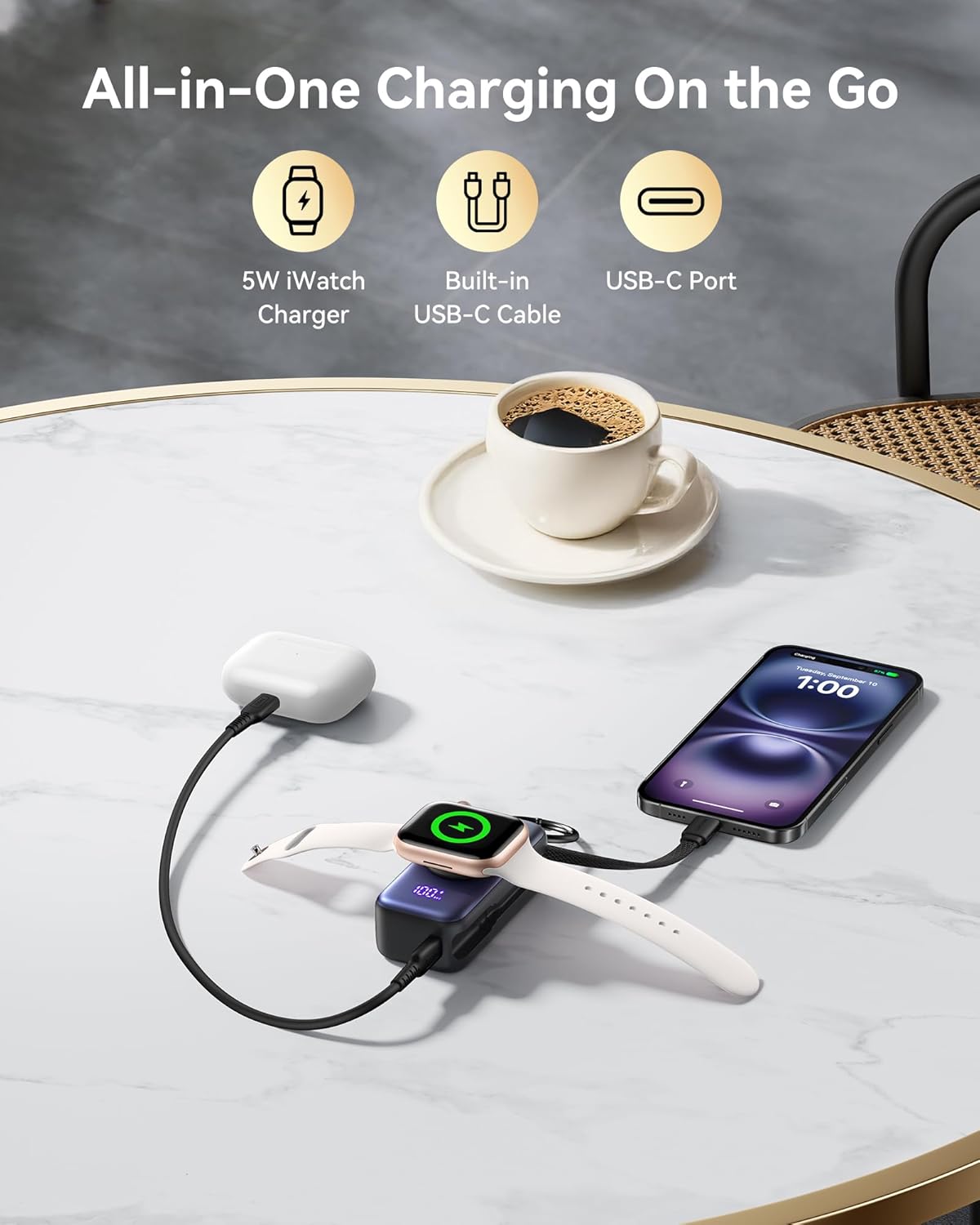
Charge your iPhone, Apple Watch, and AirPods simultaneously with the INIU 3-in-1 Portable Charger.
Pass-Through Charging
The INIU P81 supports pass-through charging, meaning you can charge your devices while the power bank itself is being recharged. The power bank will prioritize charging your connected devices first, then recharge its internal battery.
Portability
The compact design and integrated keychain make the INIU P81 ideal for travel. It is TSA-compliant, allowing you to carry it in your carry-on luggage.

Easily clip the INIU P81 to your bag or backpack for convenient on-demand power.
Maintenance
- Cleaning: Use a soft, dry cloth to clean the surface of the power bank. Do not use harsh chemicals or abrasive materials.
- Storage: Store the device in a cool, dry place away from direct sunlight and extreme temperatures.
- Battery Care: To maintain battery health, fully charge the power bank at least once every three months if not in regular use. Avoid completely draining the battery for extended periods.
Troubleshooting
- Device not charging:
- Ensure the power bank has sufficient charge.
- Check all cable connections for secure fit.
- For Apple Watch charging, ensure the watch is properly placed on the magnetic pad and the power button is pressed to activate.
- Slow charging:
- Verify that your device and cable support fast charging.
- Ensure the power bank itself is adequately charged.
- Try a different cable or power adapter.
- LED display not working:
- Press the power button firmly. If it still doesn't light up, the battery might be completely depleted. Recharge the power bank.
- If the issue persists, contact customer support.
Specifications
| Model | P81 |
| Battery Capacity | 5000mAh |
| Product Dimensions | 3.2 x 1.5 x 1.1 inches |
| Item Weight | 4.1 ounces |
| USB-C Output | 20W Power Delivery (PD) |
| Wireless Output (Watch) | 5W |
| Compatibility | iPhone 8-16/SE series, Apple Watch S1-S10/SE/SE 2/Ultra/Ultra 2, AirPods 4/3/Pro 2/2/1/Max |
Warranty & Support
INIU provides an industry-leading 3-year INIU care warranty for this product, along with lifetime technical support.
For any questions, concerns, or technical assistance, please contact INIU customer support through their official website or the contact information provided in your product packaging.
Please retain your purchase receipt for warranty claims.
Related documentsP81


Ask a question about this manual
Ask about setup, troubleshooting, compatibility, parts, safety, or missing instructions. Manuals+ will review the question and use this page’s manual context to help answer it.