
Edillas Edi8207B
Contents
Edillas Kids Digital Watch Instruction Manual
Model: Edi8207B
Introduction
Thank you for choosing the Edillas Kids Digital Watch. This watch is designed for children aged 4-15, featuring a durable, waterproof design with multiple functions including time display, alarm, stopwatch, and colorful LED lights. This manual will guide you through the setup and operation of your new watch.

Figure 1: Edillas Kids Digital Watch (Black Model)
Watch Components and Buttons
Familiarize yourself with the watch's buttons and display areas:
- LIGHT Button: Activates backlight and changes light color.
- MODE Button: Switches between different functions (Time, Alarm, Stopwatch).
- START Button: Used for setting values and starting stopwatch.
- RESET Button: Used for switching values and resetting stopwatch.

Figure 2: Watch Button Layout
Setup
1. Setting Time and Date
Follow these steps to set the current time and date on your watch:
- From the time display mode, press the MODE button three times to enter the time setting interface. The seconds will start flashing.
- Press the RESET button to switch to minutes.
- Press the START button to set the minute number.
- Press the RESET button to switch to hours.
- Press the START button to set the hour number (note AM/PM or 24H format).
- Press the RESET button to switch to days.
- Press the START button to set the day number.
- Press the RESET button to switch to months.
- Press the START button to set the month number.
- Press the RESET button to switch to weeks.
- Press the START button to set the week.
- Press the RESET button to switch to seconds.
- Press the START button to set the seconds.
- Press the MODE button to save the settings and return to the main time display.
Video 1: How to set the time and date on the Edillas 8207B Kids Watch.
2. Setting the Alarm
To set an alarm on your watch:
- Press the MODE button twice to enter the alarm setting interface. The hour will flash.
- Press the START button to set the desired alarm hour.
- Press the RESET button to switch to minutes.
- Press the START button to set the desired alarm minutes.
- Press the MODE button to confirm the setting and return to the default interface.
- To view the set alarm time, press and hold the RESET button.
Video 2: How to set an alarm on the Edillas 8207B Kids Digital Watch.
Operating Instructions
1. Using the Stopwatch Function
The watch includes a stopwatch for timing activities:
- Press the MODE button once to enter the stopwatch interface.
- Press the START button to begin timing.
- Press the START button again to pause the stopwatch.
- Press the START button a third time to continue timing.
- Press the RESET button to reset the stopwatch to zero.
- Press the MODE button to exit the stopwatch function and return to the default interface.
Video 3: How to use the stopwatch function on the Edillas 8207B Kids Watch.
2. Changing Light Color
The watch features colorful LED lights. To activate and change the light color:
- Press the LIGHT button to turn on the light.
- Long press the LIGHT button to switch between the 7 available light colors (blue, green, red, light blue, yellow, purple, white) and a colorful flashing mode.
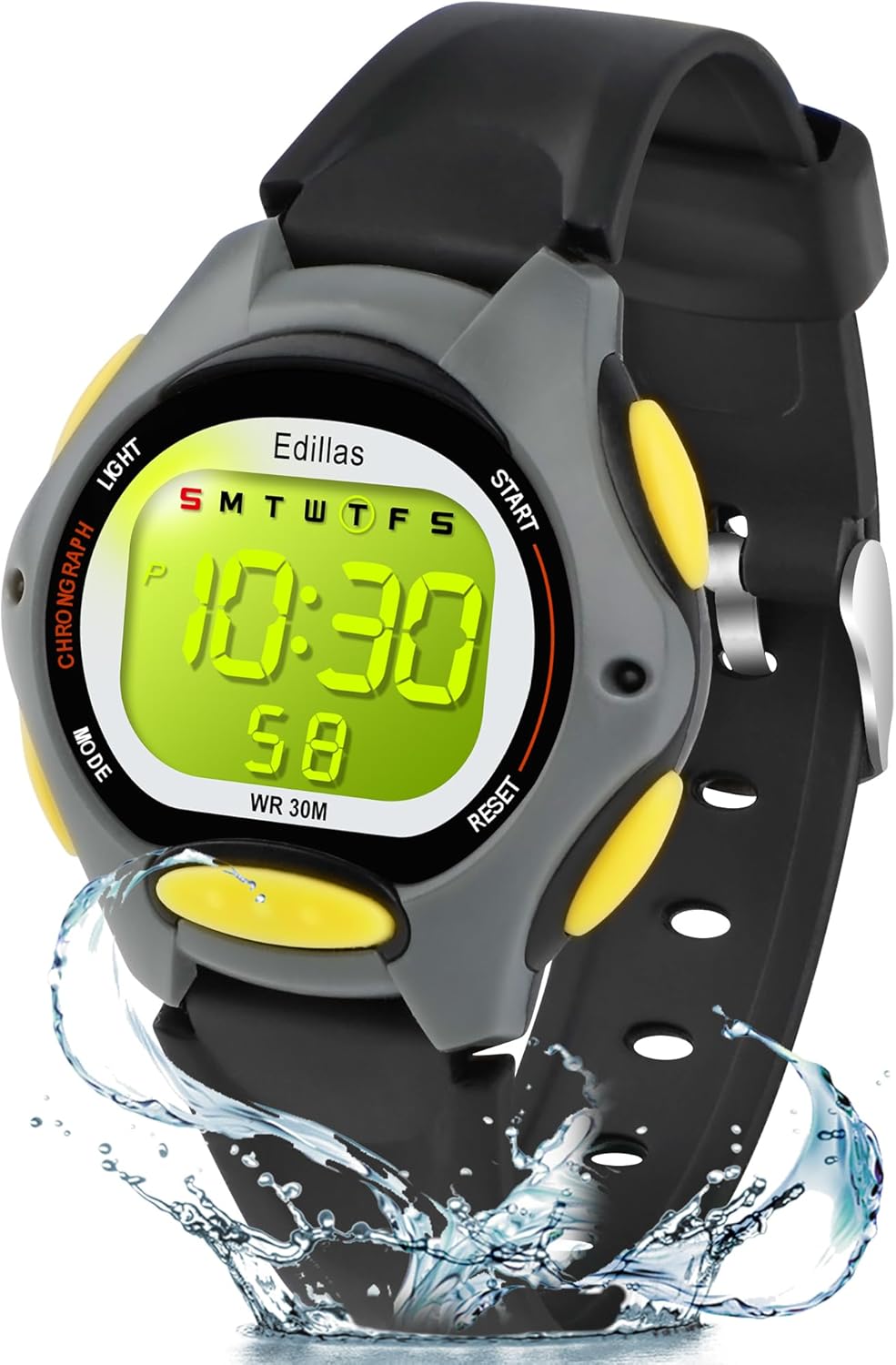
Figure 3: Watch display with different colorful LED lights.
Video 4: How to set the light on the Edillas 8207B Kids Watch.
3. Hourly Chime On/Off
To turn the hourly chime on or off:
- Begin with the time display mode.
- To turn the hourly chime off: Press and hold the RESET button and the MODE button simultaneously. A black border around the letters (SMTWTFS) indicates the chime is off.
- To turn the hourly chime on: Press and hold the RESET button and the MODE button simultaneously again. The black border will disappear, indicating the chime is on.
Video 5: How to use the hourly chime on the Edillas 8207B Kids Watch.
4. Switching Time Format (12H/24H)
To switch between 12-hour (AM/PM) and 24-hour time formats:
- Press the MODE button three times to enter the time setting interface.
- Press the RESET button twice to navigate to the hour setting.
- Press the START button to toggle between 12H (indicated by A for AM or P for PM) and 24H (indicated by H) formats.
- Press the MODE button to save the setting and return to the main time display.
Video 6: How to switch the time format on your Edillas 8207B kids watch.
Maintenance
Water Resistance
The Edillas Kids Digital Watch is 30M/3 ATM waterproof, suitable for daily life activities such as getting wet, sweating, washing hands, and cold baths. Dirty watches can be rinsed directly with cold water.
Important: Avoid pressing the watch buttons under water, as this can compromise the waterproof seal and damage the watch.
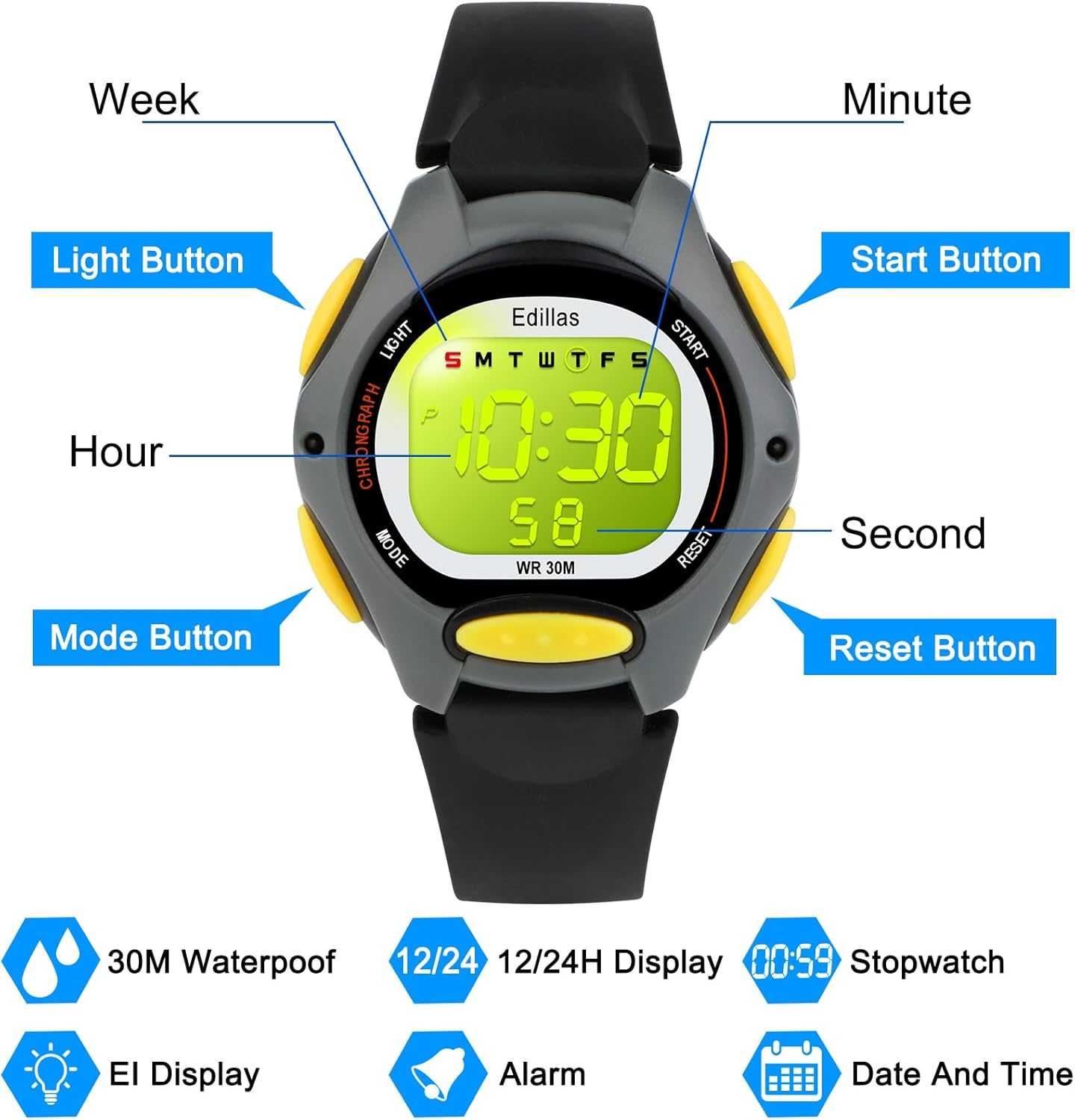
Figure 4: Watch being used in water.
Troubleshooting
Hourly Chime Issues
If your hourly chime is not working as expected, please refer to the "Hourly Chime On/Off" section in this manual. Ensure the chime is properly activated. If issues persist, please contact customer support.
General Issues
For any other issues not covered in this manual, such as problems with the battery or movement, please contact Edillas customer support for assistance. We are committed to providing satisfactory service.
Specifications
| Feature | Detail |
|---|---|
| Product Dimensions | 8.66 x 0.55 x 0.39 inches |
| Item Weight | 0.8 ounces |
| Model Number | Edi8207B |
| Water Resistance | 30M / 3 ATM |
| Movement | Japan Imported Movement |
| Battery | 1 Lithium Ion battery (included) |
| Display Type | Digital |
| Clasp Type | Buckle |
| Material | Soft strap, fine metal steel case, stainless steel case back, high-transparency resin glass |

Figure 5: Watch Dimensions
Warranty and Support
Edillas is a professional brand committed to product quality and customer satisfaction. If you encounter any problems with the watch, especially concerning the battery or movement, we are ready to assist with replacements or support.
For any inquiries or support needs, please feel free to contact our sales team. Your satisfaction is our priority.
You can also refer to the official User Manual (PDF) for additional information.
Documents and downloads
Ask a question about this manual
Ask about setup, troubleshooting, compatibility, parts, safety, or missing instructions. Manuals+ will review the question and use this page’s manual context to help answer it.