
1. Introduction
This manual provides comprehensive instructions for the setup, operation, and maintenance of your Geevon Model 246278 Wireless Weather Station. Please read this manual thoroughly before using the device to ensure proper function and longevity.
2. Product Overview
The Geevon Model 246278 is a wireless weather station featuring a color display, digital hygrometer, thermometer, alarm clock, and backlight. It monitors indoor and outdoor temperature and humidity, provides a 12-hour weather forecast, and records maximum/minimum values.
Key Features:
- VA Color HD Display with adjustable backlight.
- Wireless transmission range of up to 200 feet (60 meters) for the remote sensor.
- High-precision temperature and humidity measurements.
- Alarm clock with snooze function.
- Two power supply modes: USB cable (included) or 2 AAA batteries (not included).
- Displays past 24-hour maximum/minimum temperature and humidity records.
- 12-hour weather forecast function.


3. Package Contents
Verify that all items are present in the package:
- Geevon Weather Thermometer (Main Unit)
- TX19 Outdoor Sensor (Remote Sensor)
- USB Cable
- User Manual (this document)
4. Setup Guide
Follow these steps for initial setup:
- Insert Batteries into Remote Sensor: Open the battery compartment of the TX19 outdoor sensor. Select the desired channel (1, 2, or 3) using the switch inside the compartment. Insert 2 AAA batteries (not included), ensuring correct polarity. Close the compartment.
- Power the Main Unit: Open the battery compartment of the main weather station unit. Insert 3 AAA batteries (not included), ensuring correct polarity. Alternatively, connect the included USB cable to the main unit and a power adapter (not included) or a USB port.
- Initial Pairing: Place the main unit and the remote sensor next to each other during initial setup. The main unit will automatically search for and connect to the remote sensor. This process may take a few minutes. Once connected, the outdoor temperature and humidity readings will appear on the main unit's display.
- Placement of Main Unit: The main unit can be placed on a tabletop using its integrated stand, mounted on a wall, or attached to a magnetic surface.


5. Operating Instructions
5.1 Display and Backlight
- The main unit features a 5-inch large color HD display.
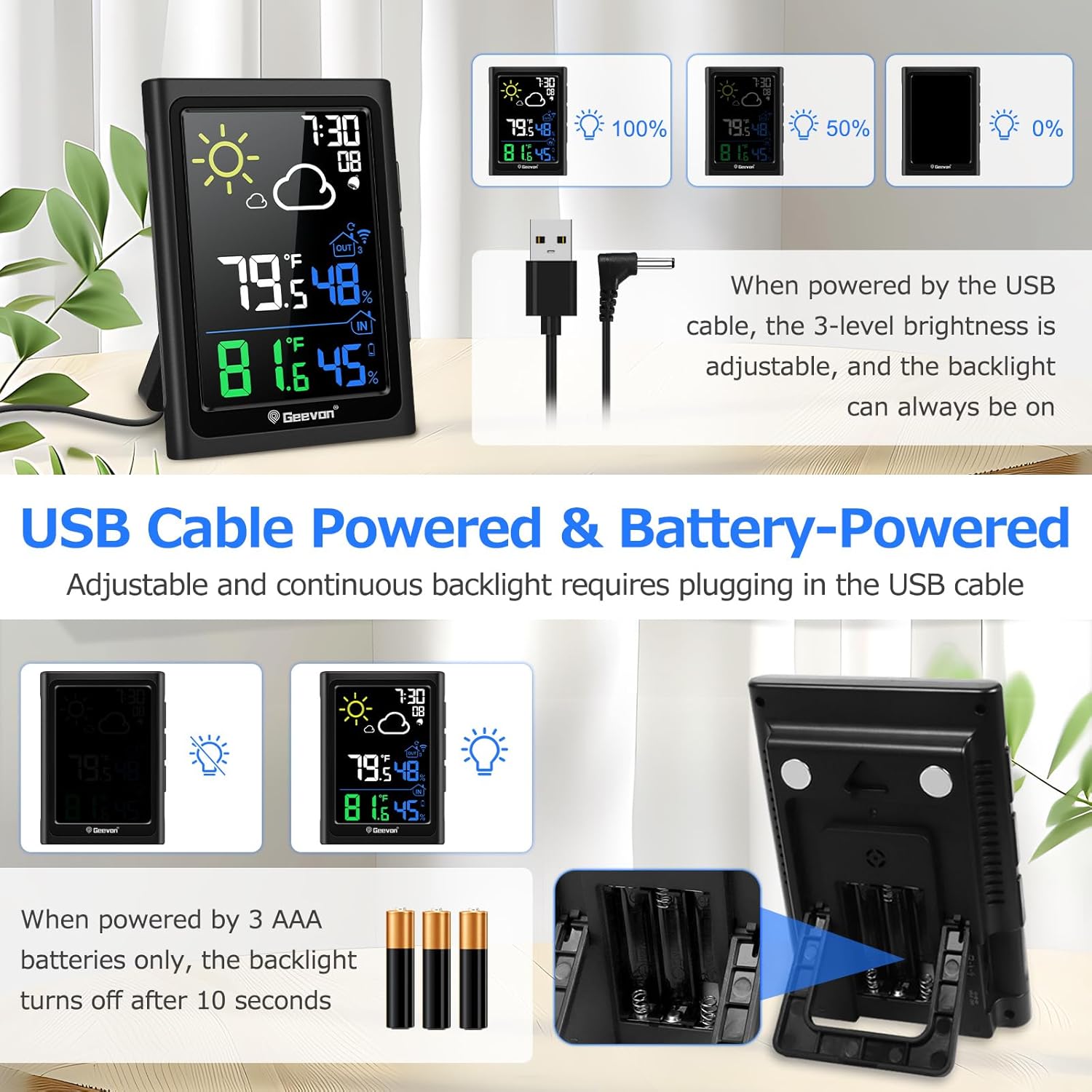
- When powered by the USB cable, the backlight can remain continuously on, and its brightness is adjustable (3 levels).
- When powered by batteries only, the screen will light up for 10 seconds after pressing the SNZ/LIGHT button to conserve power.
5.2 Temperature and Humidity Display
- The display shows real-time indoor and outdoor temperature and humidity.
- Temperature units can be switched between Celsius (°C) and Fahrenheit (°F). Refer to the specific button on the back of the unit for this function.
- The unit records and displays the maximum and minimum temperature and humidity values over the past 24 hours.

5.3 Alarm Clock Function
- The weather station includes an alarm clock with a 5-minute snooze function.
- To activate the snooze function, touch the SNZ/LIGHT button on the top of the unit when the alarm sounds.
- To turn off the alarm, press any other button on the back of the unit.
5.4 USB Charging Port
- The main unit features a built-in USB port (Output: 5V/1A) for charging compatible devices.

6. Important Considerations for Sensor Placement
Proper placement of the remote sensor is crucial for accurate readings and optimal wireless transmission.
- Transmission Range: The sensor supports wireless transmission up to 200 feet (60 meters) in an open area. Walls, metal structures, and other obstructions can reduce this range.
- Mounting: Mount the sensor vertically for best performance.
- Protection from Elements: Place the sensor in a location that avoids direct sunlight and rain. An ideal location is under an eave, porch, or other sheltered area.
- Interference: Keep the sensor at least 3 feet (1 meter) away from electronic devices that may cause interference.


7. Specifications
| Feature | Specification |
|---|---|
| Model Number | 246278 |
| Product Dimensions (Main Unit) | 1"D x 3.9"W x 5.3"H (10cm x 13.5cm x 1.5cm) |
| Product Dimensions (Remote Sensor) | 0.8"D x 1.6"W x 3.7"H (2cm x 3.8cm x 11.9cm) |
| Indoor Temperature Range | 14°F ~ 122°F (-10°C ~ 50°C) |
| Outdoor Temperature Range | -40°F ~ 140°F (-40°C ~ 60°C) |
| Temperature Accuracy | ±1.8°F (±1°C) |
| Humidity Range (Indoor & Outdoor) | 20% - 95% |
| Humidity Accuracy | ±5% |
| Wireless Frequency | 433 MHz |
| Wireless Transmission Range | 200ft / 60m (open area) |
| Main Unit Power Source | USB Cable (included) or 3 x AAA Batteries (not included) |
| Remote Sensor Power Source | 2 x AAA Batteries (not included) |
| Material | Acrylonitrile Butadiene Styrene (ABS) |
| Color | Black |
8. Troubleshooting
If you encounter issues with your weather station, refer to the following common problems and solutions:
- No outdoor reading on the main unit:
- Ensure both the main unit and remote sensor have fresh batteries or are properly powered.
- Verify the remote sensor is within the 200ft (60m) transmission range and free from major obstructions.
- Confirm the channel selected on the remote sensor matches the main unit's setting (if applicable, refer to main unit's specific instructions for channel selection).
- Try bringing the sensor closer to the main unit to re-establish connection.
- Inaccurate readings:
- Ensure the remote sensor is not in direct sunlight or exposed to rain, which can affect temperature and humidity readings.
- Place the sensor away from heat sources (e.g., vents, appliances) or cold sources.
- Allow both units to stabilize for at least 30 minutes after setup, as initial readings may fluctuate.
- Display is dim or not lighting up:
- If using batteries, the backlight only stays on for 10 seconds. For continuous backlight, connect the USB cable.
- Check battery levels and replace if necessary.
- Ensure the USB cable is securely connected if using external power.
9. Maintenance
To ensure optimal performance and longevity of your Geevon Weather Station:
- Clean the display and unit surfaces with a soft, dry cloth. Avoid abrasive cleaners or solvents.
- Do not expose the main unit to water or extreme temperatures.
- Regularly check and replace batteries in both units when the low battery indicator appears.
- Ensure the remote sensor remains protected from direct weather elements.
10. Warranty and Support
Geevon provides an additional 12-month warranty for this product. For technical assistance or warranty claims, please contact Geevon customer support. Lifetime technical support is available for all Geevon products.
For further assistance, please refer to the contact information provided with your purchase or visit the official Geevon website.


