
1. Product Overview
The Veise VE017-H Fingerprint Smart Front Door Lock Set combines a traditional handle set with advanced smart lock features, offering multiple access options and enhanced security for your home. This manual provides detailed instructions for installation, operation, and maintenance.

Figure 1: Overview of the Veise VE017-H Smart Lock components, including the exterior keypad and handle, interior assembly, two physical keys, and two IC key fobs.
2. Included Components
The Veise VE017-H Smart Lock package includes the following items:
- Fingerprint Smart Lock with 2 Handles (Exterior and Interior Assemblies)
- Latch
- Strike Plate
- Mounting Plate
- Screws for installation
- 2 Physical Keys
- 2 IC Cards (Key Fobs)
- Installation Manual (separate document)
- User Manual (this document)
3. Installation
The Veise VE017-H Smart Lock is designed for easy installation, typically taking about 15 minutes. It is compatible with both left-handed and right-handed US-standard doors. Ensure your door dimensions meet the requirements before beginning installation.
3.1 Door Compatibility and Dimensions
Verify your door's specifications to ensure proper fit and function. Three holes are needed for installation. The lock thickness may interfere with existing screen or storm doors.
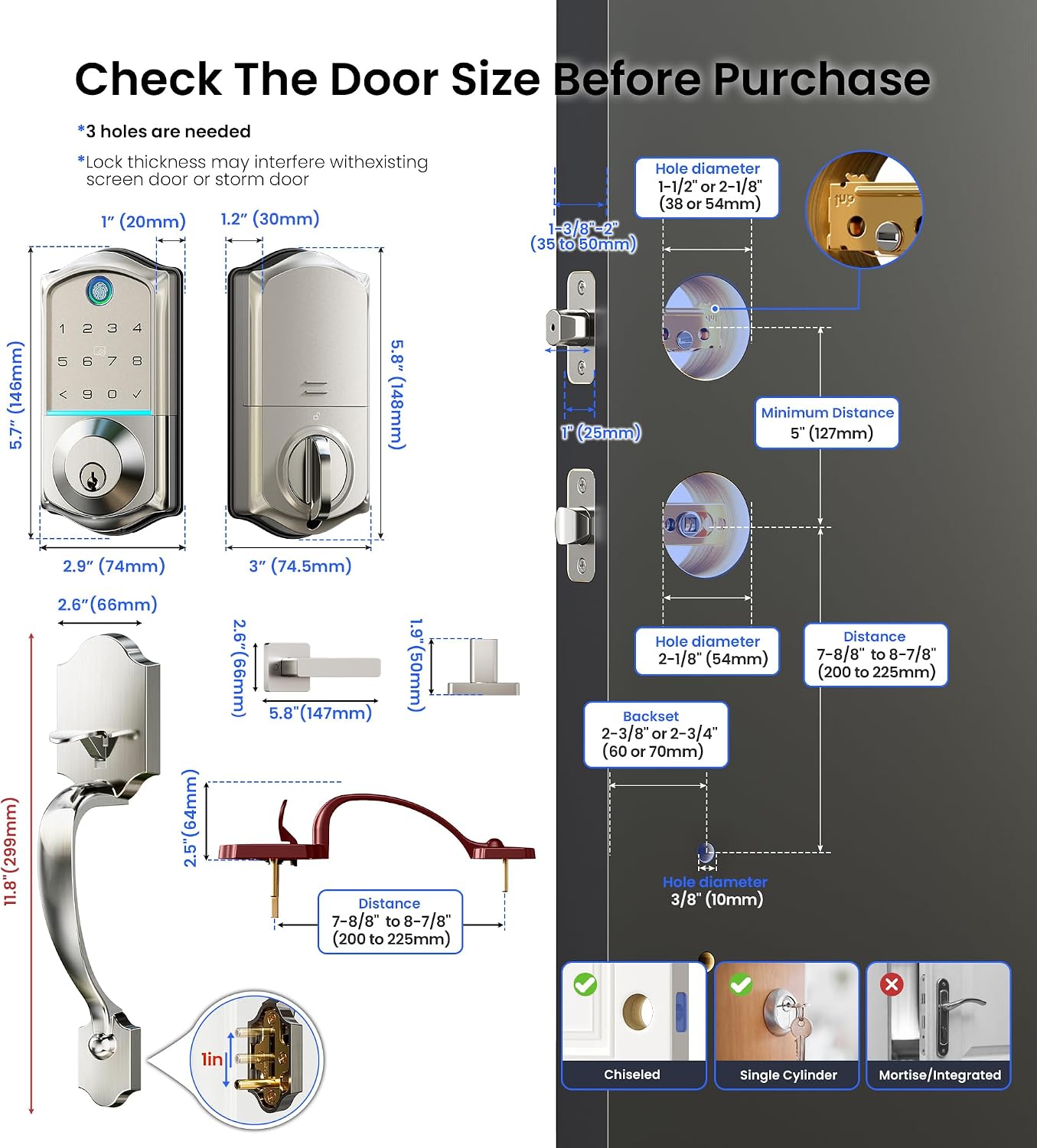
Figure 2: Detailed diagram illustrating required door hole diameters, backset, hole spacing for the handle, and door thickness for the Veise VE017-H Smart Lock. Ensure your door matches these measurements for proper installation.
For detailed step-by-step installation instructions, please refer to the dedicated Installation Manual included with your product.
4. Operating the Smart Lock
The Veise VE017-H Smart Lock offers multiple convenient ways to unlock and lock your door, including app control, fingerprint, password, key fobs, and traditional keys. The lock also supports smart home integration with a separately sold gateway.
4.1 KK Home App Control & Setup
The KK Home App allows you to manage access, generate temporary codes, and share keys remotely. It also supports voice announcements in English, Spanish, and French.

Figure 3: The KK Home App interface, demonstrating features such as offline remote access sharing, access record viewing, smart user management, and code sharing.
Watch the comprehensive guide on setting up and using the KK Home App:
Video 1: "Know Your KK Home App" - A detailed video guide covering app pairing, setting passcodes, adding fingerprints, adding key cards, managing share permissions, setting auto-lock, viewing usage records, adding multiple locks, adding a gateway for remote control, connecting with Alexa, and real-time information push notifications.
4.2 Unlock and Lock Options
The lock provides five methods for access:
- Fingerprint: Quick access with a registered fingerprint. (Refer to Video 1, timestamp 02:04 for adding fingerprints)
- PIN Code: Enter a personalized code on the touchscreen keypad. (Refer to Video 1, timestamp 01:45 for setting passcodes)
- Key Fobs (IC Cards): Tap a registered key fob to unlock. (Refer to Video 1, timestamp 02:23 for adding key cards)
- Traditional Keys: Use physical keys for manual override.
- App Control: Unlock/lock remotely via the KK Home App.

Figure 4: The smart lock supports various access methods for user convenience, including the KK Home App, AI-self learning fingerprint recognition, PIN codes, key fobs, and traditional spare keys.
4.3 Auto-Lock Feature
The auto-lock feature automatically locks the door after a set period, enhancing security. You can configure the auto-lock timer via the KK Home App. (Refer to Video 1, timestamp 03:08 for setting auto-lock)

Figure 5: The smart lock can be secured instantly with a 0.3-second fingerprint lock, any key lock, app control, or traditional key lock. The auto-lock feature can be set from 10 seconds to 180 seconds.
4.4 Remote Control with G1 Gateway (Sold Separately)
For full smart home control, including voice commands, remote unlocking, and real-time activity logs, pair your smart lock with the Veise G1 Gateway. (Refer to Video 1, timestamp 04:01 for adding a gateway)

Figure 6: The Veise smart lock is compatible with Alexa and Google Home when paired with the Veise G1 WiFi Gateway (sold separately), allowing for voice commands and remote control.
4.5 Real-time Information Push
With the G1 Gateway connected, receive real-time notifications on your smartphone about lock activity, such as when the door is unlocked or locked. (Refer to Video 1, timestamp 04:59 for real-time information push)
4.6 Share Permission
You can share access permissions with family members, friends, or guests through the KK Home App. Note: If the authorized admin account is paused or deleted, the sharing function will not work. (Refer to Video 1, timestamp 02:38 for share permission setup)
4.7 View Lock Usage Records
The KK Home App allows you to view a detailed history of lock usage, including who unlocked the door and when. (Refer to Video 1, timestamp 03:22 for viewing lock usage records)
5. Maintenance
5.1 Battery Replacement
The lock requires 4 AA batteries. The smart lock features an energy-efficient design, providing approximately 10 months of battery life. The app will provide a low battery alert when replacement is needed.
5.2 Emergency Power Port
In case of complete battery depletion, an emergency Type-C power port is available to temporarily power the lock for access. This port supports power only and is not for data transfer or charging the internal batteries.

Figure 7: The smart lock offers a battery life of 10+ months and includes a Type-C emergency port for power in case of battery depletion.
5.3 Cleaning
Clean the lock's exterior and keypad with a soft, damp cloth. Avoid abrasive cleaners or solvents that could damage the finish or electronic components.
6. Troubleshooting
If you encounter issues with your Veise VE017-H Smart Lock, refer to the following common problems and solutions:
-
App cannot find the lock during pairing:
- For Android: Ensure Bluetooth and location permissions are enabled for the KK Home app in your phone settings.
- For iOS: Ensure Bluetooth permission is enabled.
- Test the lock to see if it works independently.
- Perform a resetting on the lock. The default master code (12345678) works to unlock after a reset.
- Ensure the lock is supplied with power.
-
Two accounts cannot add the same lock or gateway:
- After an account is added, share permissions to other accounts. Refer to the steps for sharing permissions (Video 1, timestamp 02:38).
-
Remote control not working:
- You need to use a Veise G1 gateway (sold separately) and connect to a 2.4G WiFi network. Refer to the steps for adding a gateway (Video 1, timestamp 04:01).
-
Connection failed during pairing or lock not found in list:
- Ensure the lock is supplied with power and Bluetooth is on.
- Make sure your master code is correct.
-
Lock not responding:
- Check battery levels and replace if necessary.
- Use the emergency power port if batteries are completely drained.
- Perform a factory reset if the issue persists.
7. Specifications
| Feature | Detail |
|---|---|
| Brand | Veise |
| Model Name | VE017-H |
| Lock Type | Biometric, Deadbolt, Keypad |
| Material | Aluminum |
| Color | Satin Nickel |
| Finish Type | Satin Nickel |
| Item Dimensions L x W x H | 3.78 x 9.45 x 12.91 inches |
| Item Weight | 5.28 pounds |
| Power Source | 4 AA batteries (not included) |
| Connectivity Protocol | Bluetooth, WiFi (Veise G1 WiFi Gateway Required) |
| Special Features | Smart Lock with Retro Handle Set, User Friendly KK Home App, Access Sharing, Voice Prompts in 3 Languages, Event History, Auto-Lock, Touchscreen Keypad, Remote Control with G1 Gateway, Alexa and Google Compatible (Veise G1 WiFi Gateway Required), Back-Lit Keypad, Excellent Customer Service |
8. Warranty and Support
Veise provides reliable US-based support and a 1-year warranty for the VE017-H Smart Lock. Additionally, lifetime online support is available to assist with any product-related inquiries or issues.
- Warranty: 1-year limited warranty.
- Online Support: Lifetime online support available.
- Customer Service Hours: Monday-Friday (9 AM–5 PM PST).
- Email Support: 24/7 email support for after-sales assistance.

Figure 8: Veise offers dedicated customer service to assist users with their smart lock.


