Introduction
Thank you for choosing the Morphy Richards 13F Heat Wave Oil Filled Room Heater. This manual provides essential information for the safe and efficient operation, maintenance, and troubleshooting of your new appliance. Please read these instructions carefully before use and retain them for future reference.
Important Safety Instructions
When using electrical appliances, basic precautions should always be followed to reduce the risk of fire, electric shock, and injury to persons, including the following:
- Read all instructions before using this heater.
- This heater is hot when in use. To avoid burns, do not let bare skin touch hot surfaces. Use handles or knobs when moving this heater.
- Keep combustible materials, such as furniture, pillows, bedding, papers, clothes, and curtains at least 3 feet (0.9 meters) from the front of the heater and keep them away from the sides and rear.
- Extreme caution is necessary when any heater is used by or near children or invalids and whenever the heater is left operating and unattended.
- Always unplug heater when not in use.
- Do not operate any heater with a damaged cord or plug or after the heater malfunctions, has been dropped or damaged in any manner. Return heater to authorized service facility for examination, electrical or mechanical adjustment, or repair.
- Do not use outdoors.
- This heater is not intended for use in bathrooms, laundry areas, and similar indoor locations. Never locate heater where it may fall into a bathtub or other water container.
- Do not run cord under carpeting. Do not cover cord with throw rugs, runners, or similar coverings. Arrange cord away from traffic area and where it will not be tripped over.
- To disconnect heater, turn controls to OFF, then remove plug from outlet.
- Do not insert or allow foreign objects to enter any ventilation or exhaust opening as this may cause an electric shock or fire, or damage the heater.
- To prevent a possible fire, do not block air intakes or exhaust in any manner. Do not use on soft surfaces, like a bed, where openings may become blocked.
- A heater has hot and arcing or sparking parts inside. Do not use it in areas where gasoline, paint, or flammable liquids are used or stored.
- Use this heater only as described in this manual. Any other use not recommended by the manufacturer may cause fire, electric shock, or injury to persons.
- Always plug heaters directly into a wall outlet/receptacle. Never use with an extension cord or relocatable power tap (outlet/power strip).
- This heater includes an overheat protection system that automatically shuts off the unit if it overheats. If this occurs, unplug the heater, wait 30 minutes for it to cool, and then plug it back in.
- The heater is equipped with a tip-over switch that automatically turns off the unit if it is accidentally tipped over. If this happens, place the heater upright on a firm, level surface.
Product Overview
Key Features
- Total 2900W Heating Power: Combines 2500W oil-filled radiator with a 400W PTC fan for rapid heating.
- 13 Extended Oil Fins: Designed for wider heat distribution, suitable for medium to large rooms.
- PTC Ceramic Fan Heater: Enhances air circulation for quick temperature rise.
- 3 Heat Settings: Allows adjustment of heating levels to suit room size and weather conditions.
- Thermostatic Temperature Control: Maintains consistent warmth and optimizes energy consumption.
- Overheat Protection System: Automatically shuts off the unit if internal temperature exceeds safe limits.
- Tip-Over Protection: Ensures safety by switching off the heater if it falls or tilts.
- Silent & Efficient Heating: Operates quietly, ideal for use during nighttime.
- Castor Wheels for Mobility: Facilitates easy movement of the heater between rooms.
- Robust & Long-Lasting Design: Constructed with high-quality materials for stable and safe performance.
Included Components
The product package includes:
- 1 Room Heater
- Castor wheels set (2N)
- 1 "U" Clamp
- WARRANTY Card
- Instruction Manual (this document)
Product Diagram
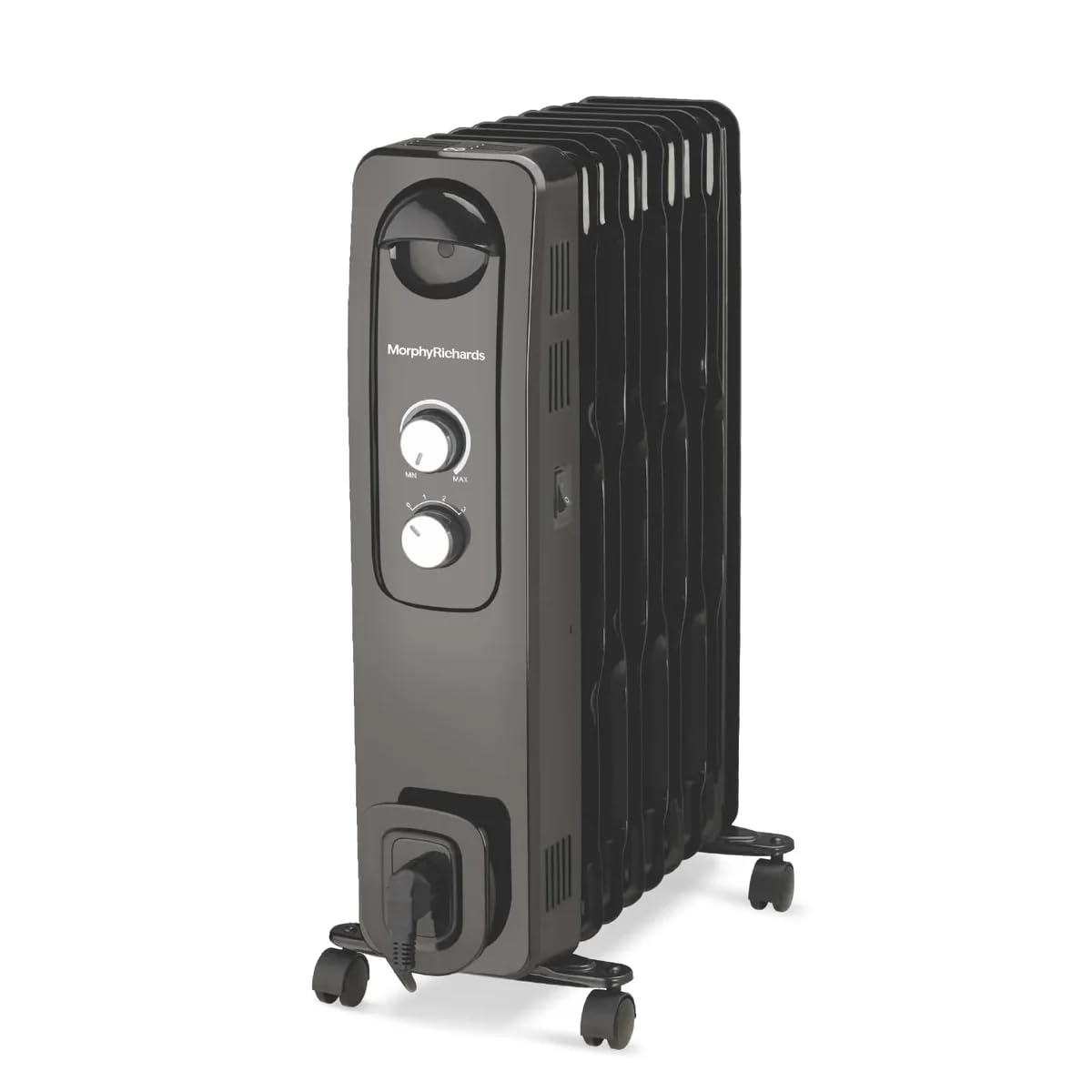

Setup
Before operating the heater, ensure it is properly assembled and placed.
Attaching the Castor Wheels
- Carefully invert the heater, ensuring it is stable.
- Locate the mounting points for the castor wheels at the bottom of the heater.
- Insert the castor wheel stems into the designated holes.
- Secure the castor wheels using the provided "U" clamps and nuts, ensuring they are firmly attached.
- Return the heater to an upright position.
Placement
- Place the heater on a firm, level surface.
- Ensure there is at least 3 feet (0.9 meters) of clear space around the heater from walls, furniture, and other combustible materials.
- Do not place the heater directly below a power outlet.
- Ensure the power cord is not obstructed or placed in a high-traffic area where it could be tripped over.

Operating Instructions
Follow these steps to operate your Morphy Richards 13F Heat Wave Oil Filled Room Heater.
Power Connection
- Ensure the heater is switched off (all knobs set to '0' or 'Min').
- Plug the power cord directly into a suitable 230V AC wall outlet. Do not use extension cords or power strips.
Setting Heat Levels
The heater offers three heat settings:
- Setting 1 (Low): For gentle, continuous warmth.
- Setting 2 (Medium): For moderate heating.
- Setting 3 (High): For maximum heating power and rapid temperature increase.
Turn the heat setting knob to your desired level (1, 2, or 3).
Adjusting the Thermostat
The adjustable thermostat allows you to maintain a comfortable room temperature.
- Turn the thermostat knob to the 'MAX' position.
- Once the room reaches your desired temperature, slowly turn the thermostat knob counter-clockwise until you hear a click and the heater turns off.
- The heater will now cycle on and off automatically to maintain the set temperature.

Maintenance
Regular maintenance ensures optimal performance and longevity of your heater.
Cleaning
- Always unplug the heater and allow it to cool completely before cleaning.
- Wipe the exterior surfaces with a soft, damp cloth. Do not use abrasive cleaners or solvents.
- Do not immerse the heater in water or allow water to drip into the interior.
- Clean the air intake and exhaust openings regularly with a vacuum cleaner or a soft brush to remove dust and lint.
Storage
- If storing the heater for an extended period, ensure it is clean and dry.
- Wrap the power cord neatly around the cord storage area (if available) or secure it with a tie.
- Store the heater in a cool, dry place, away from direct sunlight and extreme temperatures.
Troubleshooting
If you encounter issues with your heater, refer to the following common problems and solutions.
| Problem | Possible Cause | Solution |
|---|---|---|
| Heater does not turn on. | No power supply. Overheat protection activated. Tip-over switch activated. | Check if the plug is securely in the outlet and the outlet is functional. Unplug, wait 30 minutes, then plug back in. Ensure the heater is upright on a firm, level surface. |
| Heater produces insufficient heat. | Low heat setting selected. Thermostat set too low. Room size too large for heater. | Increase the heat setting. Adjust the thermostat to a higher setting. Ensure the heater is appropriate for the room size. |
| Heater turns off unexpectedly. | Overheat protection activated. Tip-over switch activated. Thermostat reached set temperature. | Unplug, wait 30 minutes, then plug back in. Ensure the heater is upright on a firm, level surface. This is normal operation; adjust thermostat if more heat is desired. |
| Unusual noise or smell. | First-time use (minor smell is normal). Dust accumulation. Internal malfunction. | Initial smell should dissipate after a few hours of use. Clean the heater as per maintenance instructions. If persistent or severe, discontinue use and contact customer support. |
If the problem persists after trying these solutions, please contact Morphy Richards customer support.
Specifications
| Brand | Morphy Richards |
| Model Number | OFR 9f |
| Special Features | Adjustable Thermostat, Castor Wheels, PTC Ceramic Fan, Tip-Over Protection, Wave Fin Technology |
| Colour | Black |
| Form Factor | Freestanding |
| Indoor/Outdoor Usage | Indoor |
| Product Dimensions | 14D x 43.5W x 63.5H Centimeters |
| Recommended Uses | Bedrooms, Home Office, Living Rooms, Medium Rooms, Small Rooms |
| Mounting Type | Floor Standing |
| Heating Coverage | Small To Medium Rooms |
| Burner Type | Oil Filled With PTC Fan |
| Fuel Type | Electric |
| Number of Speeds | 3 |
| Voltage | 230 Volts |
| Amperage | 10 Amps |
| Min Temperature Setting | 15 Degrees Celsius |
| Max Temperature Setting | 35 Degrees Celsius |
| Item Weight | 4 kg 500 g |
Warranty and Support
Warranty Information
Your Morphy Richards 13F Heat Wave Oil Filled Room Heater comes with a standard manufacturer's warranty. Please refer to the WARRANTY Card included in your package for specific terms, conditions, and duration of the warranty. Keep your purchase receipt as proof of purchase for warranty claims.
Customer Support
For any product-related queries, technical assistance, or service requests, please contact Morphy Richards customer support. Contact details can typically be found on the product packaging, the warranty card, or the official Morphy Richards website.
When contacting support, please have your model number (OFR 9F) and purchase details ready.