
powkey R300
Portable Power Station 407Wh/110000mAh User Manual
Model: R300 | Brand: powkey
1. Introduction
Thank you for purchasing the powkey R300 Portable Power Station. This device is a versatile and reliable power solution designed for various applications, including home backup, outdoor activities, camping, and emergency situations. With its large capacity, multiple output ports, and advanced safety features, it provides stable and clean power for your electronic devices.
This manual provides essential information on how to safely set up, operate, and maintain your portable power station. Please read this manual thoroughly before using the product and keep it for future reference.
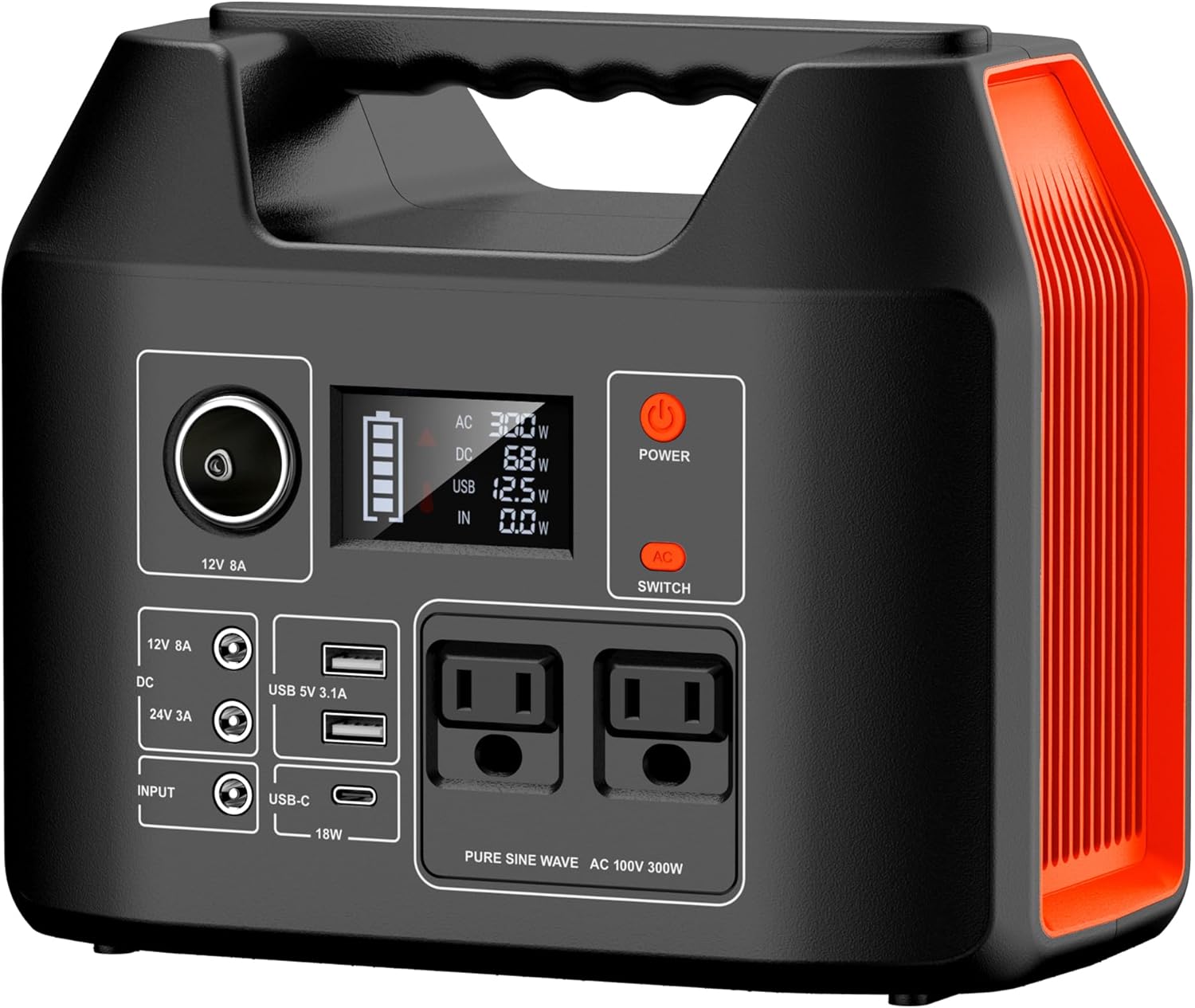
Figure 1: Front view of the powkey R300 Portable Power Station, displaying its control panel, various output ports, and LCD screen.
2. Safety Precautions
To ensure safe operation and prolong the lifespan of your device, please observe the following safety guidelines:
- Do not expose the unit to water, rain, or moisture. Keep it away from liquids.
- Avoid operating the unit in direct sunlight or in extremely hot environments. Ensure proper ventilation.
- Do not disassemble, repair, or modify the unit yourself. Refer all servicing to qualified personnel.
- Keep the unit away from children and pets.
- Use only the provided or approved charging accessories.
- Do not shine the LED light directly into the eyes of people or animals.
- Avoid dropping, puncturing, or subjecting the unit to severe impacts.
- Do not use the unit if it is damaged or has been modified.
- Ensure that the total power consumption of connected devices does not exceed the rated output of the power station (300W).

Figure 2: Examples of high-power appliances (microwave ovens, water heaters, electric rice cookers, induction cookers) that are not supported by this portable power station due to their high wattage requirements.
3. Package Contents
Please check the package to ensure all items are present and undamaged:
- 1 x powkey R300 Portable Power Station
- 1 x Instruction Manual
- 1 x AC Charging Adapter
- 1 x Car Charging Cable

Figure 3: The complete set of items included in the powkey R300 Portable Power Station package.
4. Product Features
4.1. Large Capacity & Pure Sine Wave Output
The R300 boasts a substantial 407Wh (110,000mAh) capacity. Its two AC outlets provide a pure sine wave output (rated 300W, peak 600W), delivering stable and clean power comparable to household electricity. This makes it safe for sensitive electronics like laptops and speakers. It can power an LED light (5W) for approximately 70 hours, a mobile phone (12W) for 30-35 charges, a Nintendo Switch (18W) for 15-20 charges, a laptop (50W) for 5-7 charges, a small drone for 5-7 charges, or a mini-refrigerator (40W) for 7-9 hours.

Figure 4: Estimated power supply duration for various devices based on the 407Wh/110000mAh capacity.
4.2. Advanced Battery Management System (BMS)
Equipped with a sophisticated BMS, the R300 ensures high safety and extends battery life. It features multiple protections including overcharge, over-discharge, over-voltage, over-current, short-circuit, and overheat protection. The unit has obtained essential certifications such as PSE, FCC, UN38.3, CE, and RoHS.

Figure 5: Illustration of the internal Battery Management System (BMS) and its comprehensive safety protections.
4.3. LCD Display & Integrated LED Light
The large LCD screen on the front provides real-time information on battery level, input power, and output wattage, making it easy to monitor the unit's status. The integrated LED light offers versatile illumination modes: soft warm light, strobe, and SOS flash, suitable for various situations from reading to emergency signaling.

Figure 6: The clear LCD screen displaying battery status and power flow.

Figure 7: The LED light offering continuous, flashing, and SOS modes for various lighting needs.
4.4. Multiple Output Ports
The R300 features 8 output ports, allowing simultaneous charging of multiple devices:
- 2 x Pure Sine Wave AC Outlets: 100V (±10V) 60Hz (AC rated 300W, peak 600W)
- 2 x DC Output Ports: DC1: 12V/8A, DC2: 24V/3A
- 1 x Cigarette Lighter Socket Output: 12V/8A
- 1 x Type-C Output: Quick Charge QC3.0 compatible, 5V/3A, 9V/2A, 12V/1.5A (Max 18W)
- 2 x USB Output Ports: Total Max 5V/3.1A
DC, Type-C, and USB outputs can be used simultaneously even while the power station is being charged.

Figure 8: Detailed view of all output ports available on the R300 Portable Power Station.
4.5. Compact and Lightweight Design
Measuring 23 x 19 x 14 cm and weighing only 3.4 kg, the R300 is designed for portability, making it easy to carry for any adventure or emergency.

Figure 9: The compact size and light weight of the R300, demonstrating its ease of portability.
5. Setup
Before first use, it is recommended to fully charge the portable power station. This ensures optimal battery performance and calibration.
- Unpack the power station and all accessories from the box.
- Inspect the unit and accessories for any visible damage. If any damage is found, do not use the product and contact customer support.
- Connect the AC charging adapter to the input port of the power station and plug it into a wall outlet. The LCD screen will indicate charging status.
6. Operating Instructions
6.1. Turning On/Off
Press and hold the 'POWER' button for a few seconds to turn the unit on or off. The LCD screen will illuminate when the unit is on.
6.2. Using Output Ports
To use the output ports:
- AC Output: Press the 'AC SWITCH' button to activate the AC outlets. Plug your AC-powered devices into the outlets. Press the button again to turn off AC output when not in use.
- DC Output: The DC output ports (12V/8A and 24V/3A) are always active when the unit is on. Simply plug in your DC-powered devices.
- Cigarette Lighter Socket: This port (12V/8A) is also active when the unit is on. Connect your car charger compatible devices.
- USB & Type-C Output: The USB-A and Type-C ports are active when the unit is on. Connect your USB-powered devices for charging.
6.3. Using the LED Light
Press the dedicated LED light button to cycle through its modes: continuous illumination, flashing mode, and SOS mode. Press again to turn off the light.
6.4. Charging the Power Station
The R300 supports three charging methods:
- AC Adapter: Connect the included AC adapter to the input port and a wall outlet. This method charges the unit to 80% in approximately 6 hours and fully in about 9 hours.
- 12V Car Charger: Use the included car charging cable to charge the unit from your vehicle's cigarette lighter socket. A full charge takes approximately 10-15 hours.
- Solar Panel (Sold Separately): Connect a compatible solar panel (not included) to the input port. Charging time varies based on sunlight intensity, typically 10-15 hours for a full charge in sunny conditions.

Figure 10: Visual representation of the three available charging methods for the R300.
7. Maintenance
Proper maintenance ensures the longevity and performance of your power station:
- Storage: Store the unit in a cool, dry place, away from direct sunlight and extreme temperatures.
- Regular Charging: If not used for extended periods, charge the unit every 3-6 months to maintain battery health.
- Cleaning: Use a soft, dry cloth to clean the exterior of the unit. Do not use abrasive cleaners or solvents.
- Ventilation: Ensure the ventilation openings are clear and not obstructed during use and charging.
8. Troubleshooting
If you encounter issues with your power station, refer to the following common problems and solutions:
| Problem | Possible Cause | Solution |
|---|---|---|
| Unit does not turn on | Battery is completely depleted. | Charge the unit using the AC adapter for at least 30 minutes. |
| No output from ports | Output function not activated (for AC). Device power exceeds unit's capacity. Unit is in protection mode. | Ensure AC output is turned on. Check device wattage; reduce load. Turn off the unit, wait a few minutes, then restart. |
| Unit not charging | Charging cable or adapter is loose/damaged. Charging source is not providing power. | Check all connections. Try a different outlet. Ensure the charging source is active. |
| LCD display not working | Unit is off or battery is too low. | Turn on the unit. If still off, charge the unit. |
If the problem persists after trying these solutions, please contact customer support.
9. Specifications
| Feature | Specification |
|---|---|
| Model | R300 |
| Capacity | 407Wh / 110,000mAh |
| Battery Type | Lithium Ion |
| AC Output | 2 x 100V (±10V) 60Hz, Rated 300W, Peak 600W (Pure Sine Wave) |
| DC Output | DC1: 12V/8A, DC2: 24V/3A |
| Cigarette Lighter Output | 12V/8A |
| USB-C Output | 5V/3A, 9V/2A, 12V/1.5A (Max 18W, QC3.0) |
| USB-A Output | 2 x 5V/3.1A (Total Max) |
| Charging Input | AC Adapter, 12V Car Charger, Solar Panel (sold separately) |
| Dimensions (L x W x H) | 19 x 23 x 14 cm |
| Weight | 3.4 kg |
| Manufacturer | Hengke Energy(GuangDong) Co.,Ltd |
| Country of Origin | China |
10. Warranty and Support
For any questions, concerns, or issues regarding your powkey R300 Portable Power Station, please contact our customer support team. Our dedicated team is ready to provide prompt assistance and resolve any problems you may encounter.
Please refer to your purchase documentation for specific warranty terms and conditions. Keep your proof of purchase for warranty claims.
Related documentsR300

Ask a question about this manual
Ask about setup, troubleshooting, compatibility, parts, safety, or missing instructions. Manuals+ will review the question and use this page’s manual context to help answer it.