1. Introduction
Thank you for choosing the OSCAL PowerMax 2400 Portable Power Station. This device is a high-capacity, versatile power solution designed for home backup, outdoor activities, and commercial use. It features a durable LiFePO4 battery, multiple output ports, fast charging capabilities, and smart control options. This manual provides essential information for safe operation, setup, maintenance, and troubleshooting.

Figure 1.1: OSCAL PowerMax 2400 Portable Power Station with accompanying solar panels.
2. Safety Information
Please read all safety warnings and instructions carefully before using this product. Failure to follow these instructions may result in electric shock, fire, or serious injury.
- Do not disassemble, repair, or modify the unit. Incorrect reassembly may cause fire or electric shock.
- Do not place the unit near fire or expose it to heat. Keep out of direct sunlight.
- Do not charge, use, or store the unit in a bathroom or an area exposed to water or moisture.
- Use only the provided or approved accessories.
- Do not use the unit if it is damaged or has been dropped.
- Keep out of reach of children and pets.
- Ensure proper ventilation during use and charging. Do not block ventilation openings.
- Operate within the specified temperature range (-4°F to 113°F / -20°C to 45°C).
3. Product Overview
The OSCAL PowerMax 2400 is designed with user convenience and versatility in mind. It features a robust display and a variety of input/output ports to meet diverse power needs.
3.1. Display Indicators
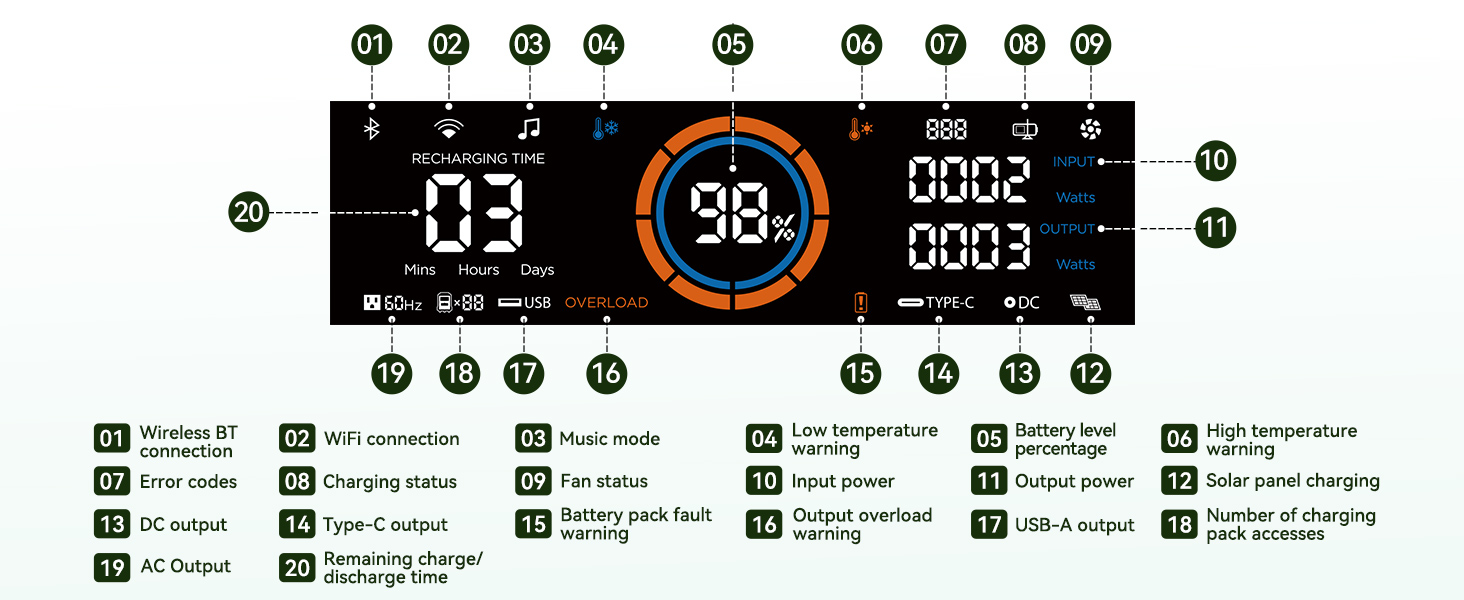
Figure 3.1: PowerMax 2400 Display Panel.
- Wireless BT connection indicator
- WiFi connection indicator
- Music mode indicator
- Low temperature warning
- Battery level percentage
- High temperature warning
- Error codes
- Charging status
- Fan status
- Input power (Watts)
- Output power (Watts)
- Solar panel charging indicator
- DC output indicator
- Type-C output indicator
- Battery pack fault warning
- Output overload warning
- USB-A output indicator
- Number of charging pack accesses
- AC output indicator
- Remaining charge/discharge time (Mins, Hours, Days)
3.2. Ports and Controls

Figure 3.2: PowerMax 2400 Ports and Controls.
- 2400W AC Ports (x4): For powering standard household appliances.
- 18W USB-A Ports (x4): For charging USB-A compatible devices.
- 100W USB-C Ports (x2): For fast charging USB-C compatible devices like laptops and smartphones.
- 60W DC5521 Ports (x2): For DC-powered devices.
- 240W Anderson Connector (x1): For high-power DC devices or solar input.
- 240W Car Cigarette Lighter Port (x1): For car appliances.
- 15W Wireless Charging Pads (x2): Located on top for wireless charging compatible devices.
- LED Light: Integrated light with multiple modes.
- HD Stereo Speakers: For audio playback.
4. Setup
Before first use, ensure the PowerMax 2400 is fully charged.
4.1. Initial Charging
The PowerMax 2400 can be charged using multiple methods. For the fastest charge, use the AC charging cable.
- AC Charging: Connect the provided AC charging cable to the AC input port on the PowerMax 2400 and then to a standard wall outlet. The unit can achieve a full charge in approximately 1.5 hours.
- Solar Charging: Connect compatible solar panels (e.g., OSCAL PM200) to the solar input port. Ensure the panels are placed in direct sunlight for optimal charging efficiency.
- Car Charging: Use the provided car charging cable to connect the unit to your vehicle's 12V cigarette lighter port.
- EV Station Charging: The unit supports charging from EV stations.
- Generator Charging: The unit can be charged using a compatible generator.

Figure 4.1: Fast charging capabilities of the PowerMax 2400.
5. Operating Instructions
5.1. Powering On/Off
Press and hold the main power button for a few seconds to turn the unit on or off. The display will illuminate upon activation.
5.2. Using Output Ports
To use the AC, DC, or USB output ports, ensure the unit is powered on. Press the respective AC ON/OFF, DC ON/OFF, or USB ON/OFF buttons to activate the desired output group. The corresponding indicator on the display will light up.
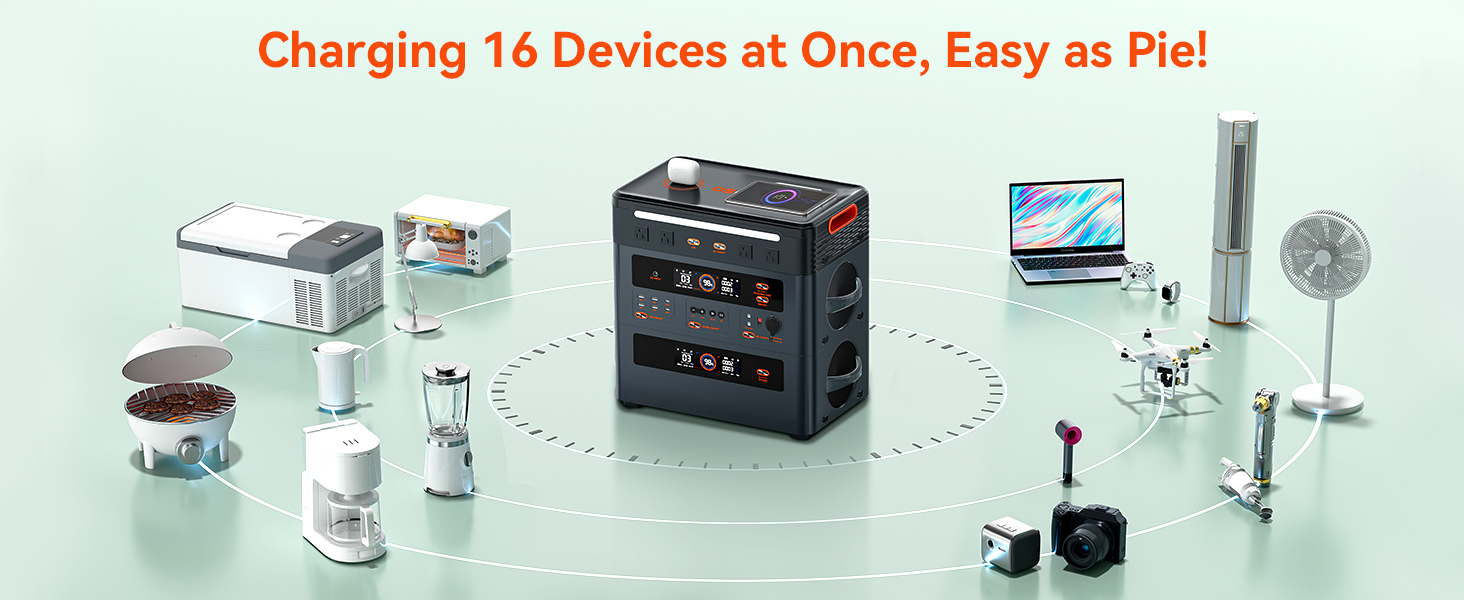
Figure 5.1: The PowerMax 2400 can charge up to 16 devices simultaneously.
5.3. Wireless Charging
Place your Qi-compatible device on one of the two 15W wireless charging pads located on the top of the unit. Ensure the device is properly aligned for charging to begin.
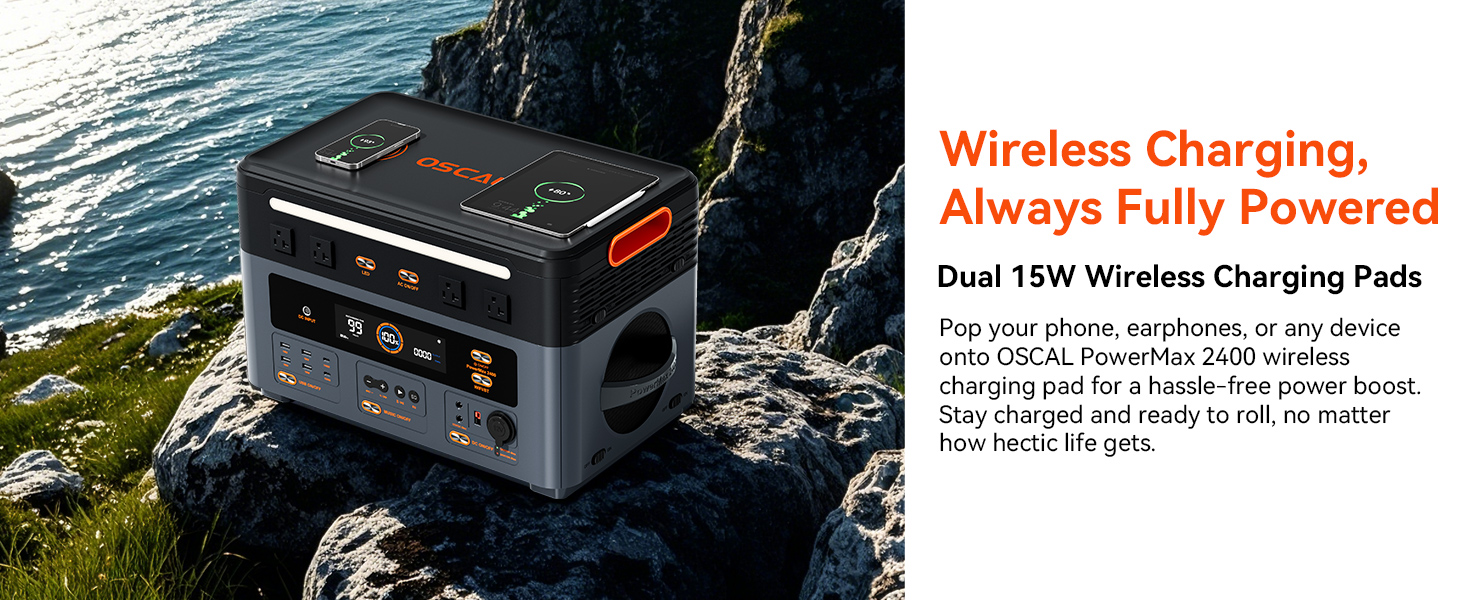
Figure 5.2: Wireless charging in action.
5.4. Uninterruptible Power Supply (UPS) Function
When the PowerMax 2400 is connected to household power and devices are plugged into its AC outlets, it can function as an Uninterruptible Power Supply (UPS). In the event of a power outage, the unit will automatically switch to its internal battery power within 5-8 milliseconds, ensuring continuous operation for connected devices.
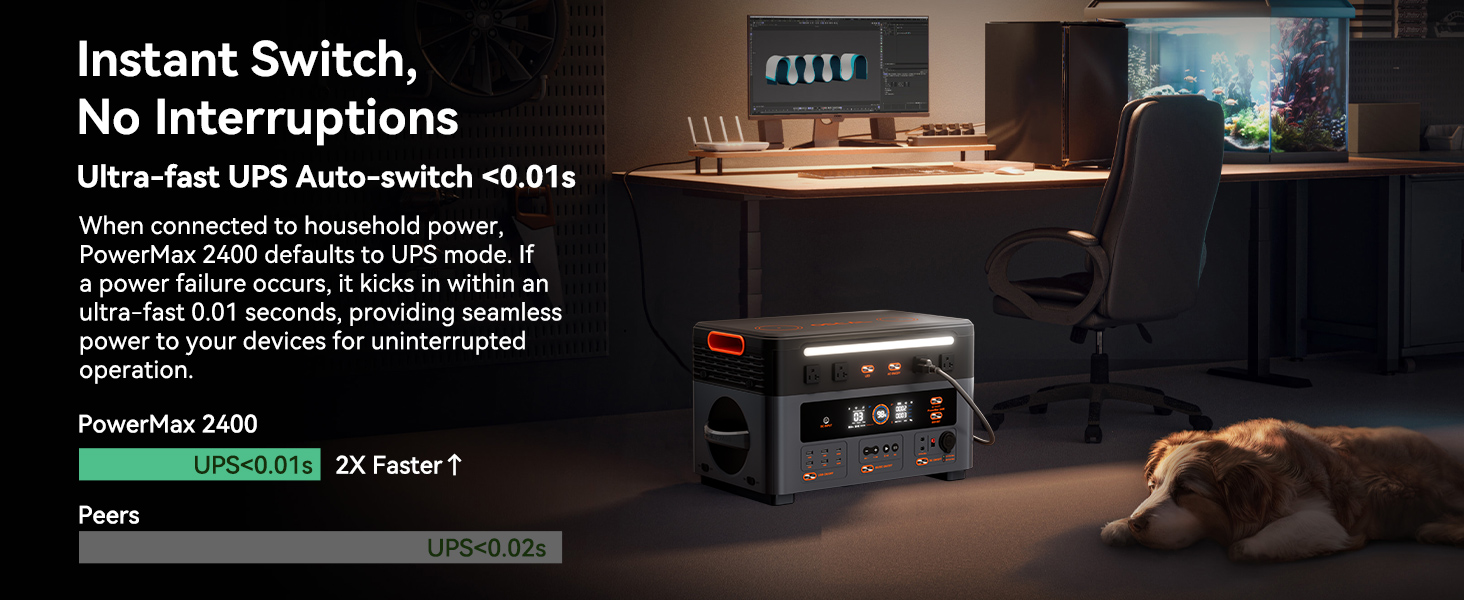
Figure 5.3: Instantaneous power transfer with UPS function.
5.5. Smart Remote Control (App)
Download the OSCAL application on your smartphone to control the PowerMax 2400 via Wi-Fi or Bluetooth. The app allows you to monitor power usage, activate/deactivate outputs, and manage settings remotely.
5.6. LED Light Modes
The integrated LED light offers multiple modes for various situations:
- Dim Mode: Low brightness for ambient lighting.
- Bright Mode: High brightness for general illumination.
- Blink Mode: Flashing light for signaling.
- SOS Mode: Standard SOS signal for emergencies.
- Morse Code Signal: Capable of transmitting information via Morse code.
5.7. HD Stereo Speakers
The PowerMax 2400 includes HD stereo speakers for quality audio playback. Connect your device via Bluetooth to enjoy music or other audio content.

Figure 5.4: Integrated HD stereo speakers for outdoor activities.
6. Maintenance
Proper maintenance ensures the longevity and optimal performance of your PowerMax 2400.
- Cleaning: Use a dry, soft cloth to wipe the unit. Do not use abrasive cleaners or solvents.
- Storage: If storing for an extended period, charge the unit to approximately 50-80% every 3-6 months to preserve battery health. Store in a cool, dry place away from direct sunlight and extreme temperatures.
- Battery Care: The LiFePO4 battery is designed for long life (up to 3500 cycles). Avoid fully discharging the battery frequently to maximize its lifespan.
- Ventilation: Ensure the ventilation openings are clear of dust and debris to prevent overheating.
7. Troubleshooting
If you encounter issues with your PowerMax 2400, refer to the following common problems and solutions:
| Problem | Possible Cause | Solution |
|---|---|---|
| Unit does not turn on | Battery is completely discharged; Power button not held long enough. | Charge the unit using AC power. Press and hold the power button for 3-5 seconds. |
| No output from AC/DC/USB ports | Output group not activated; Overload protection triggered; Device power consumption too high. | Press the corresponding output button (AC/DC/USB). Reduce the load. Check for overload warning on display. |
| Unit is not charging | Charging cable not properly connected; Charger fault; Extreme temperature. | Ensure all connections are secure. Try a different charging method. Move the unit to a suitable temperature environment. |
| High temperature warning | Overheating due to heavy load or poor ventilation. | Reduce the load. Ensure ventilation openings are clear. Allow the unit to cool down. |
| Wireless charging not working | Device not Qi-compatible; Misalignment; Foreign objects on pad. | Ensure device supports Qi wireless charging. Realign the device. Remove any objects from the charging pad. |
If the problem persists, please contact OSCAL customer support.
8. Specifications
Detailed technical specifications for the OSCAL PowerMax 2400.
| Feature | Specification |
|---|---|
| Brand | OSCAL |
| Model Name | PowerMax 2400 |
| Battery Type | LiFePO4 |
| Capacity | 1872Wh |
| AC Output | 2400W (4800W Peak) |
| USB-A Output | 4x 18W |
| USB-C Output | 2x 100W PD |
| DC5521 Output | 2x 60W |
| Car Cigarette Lighter Output | 1x 240W |
| Anderson Connector Output | 1x 240W |
| Wireless Charging | 2x 15W Pads |
| Fast Charging (AC) | 1.5 Hours (Full Charge) |
| UPS Switchover Time | 5-8 ms |
| Operating Temperature | -4°F to 113°F (-20°C to 45°C) |
| Dimensions (L x W x H) | 18.26" x 11.42" x 11.1" |
| Weight | Approx. 42.33 lbs (19.2 kg) for main unit |
| Included Components | PowerMax 2400, 2xPM200 Solar Panels (for PM2400+2xPM200 model), AC charging cable, car charging cable, solar charging cable, user manual, warranty card. |
9. Warranty and Support
The OSCAL PowerMax 2400 comes with a 2-year warranty from the date of purchase, ensuring peace of mind and product reliability.
For technical support, warranty claims, or any inquiries regarding your OSCAL PowerMax 2400, please contact OSCAL customer service through the official website or the contact information provided in your product packaging. Please have your model number and purchase date ready when contacting support.
Online Resources: Visit the official OSCAL website for FAQs, updated manuals, and software downloads.


