
dormzie ST06
dormzie ST06 Portable Tire Inflator User Manual
Model: ST06 | Brand: dormzie
1. Product Overview
The dormzie ST06 Portable Tire Inflator is engineered for durability and superior performance, offering a maximum pressure of 150 PSI. It inflates tires significantly faster than standard pumps, making it ideal for cars, trucks, SUVs, motorcycles, and bicycles. This device ensures quick and efficient inflation, enhancing convenience and peace of mind during your travels.
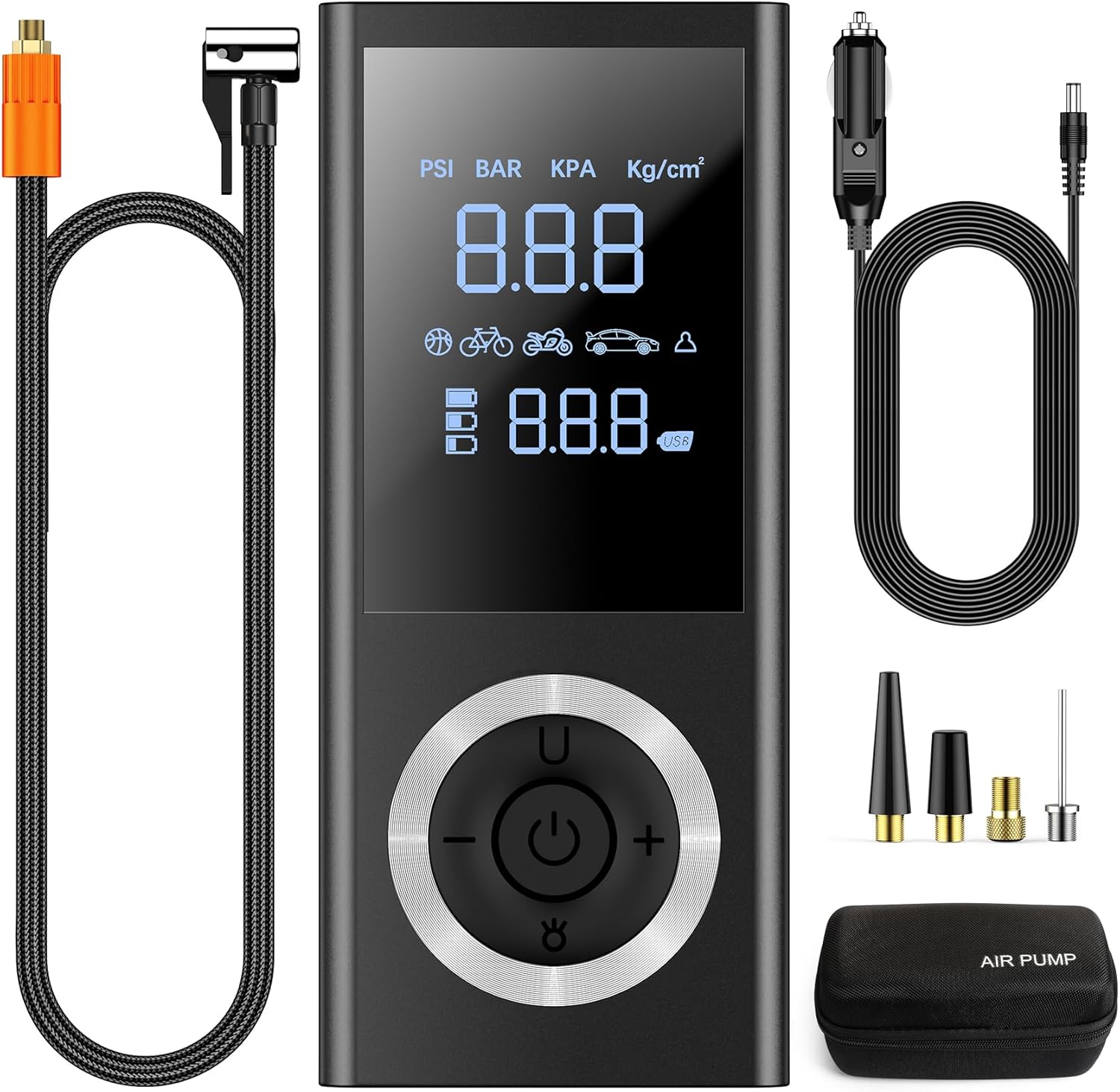
Equipped with smart inflation and auto shut-off capabilities, the ST06 features a sensitive pressure sensor and advanced chip. It offers 5 preset modes for various items: bicycle, motorcycle, car, ball, and a custom setting. The clear LCD provides accurate real-time and preset pressure monitoring, supporting 4 units (BAR, KPA, PSI, KG/CM²) with an accuracy of ±1 PSI. The inflator automatically stops once the preset pressure is reached, preventing over-inflation.
For versatile power, the ST06 tire inflator includes a rechargeable 10,000mAh lithium-ion battery for cordless operation and a 12V car power adapter. This dual power solution ensures uninterrupted inflation wherever you are, eliminating concerns about battery depletion during your journey.
Beyond tire inflation, this compact device serves as a multifunctional emergency tool. It integrates an LED light with multiple modes for illuminating dark areas, assisting with tire changes, or signaling other vehicles at night. Additionally, with a C-type charging port and a 5V/2A USB output port, it can function as an emergency power source for your electronic devices.
The cordless tire inflator boasts a compact and portable design, accompanied by a high-strength storage box to keep all accessories neatly organized. Its portability makes it perfect for easy storage in vehicles, bike racks, or backpacks, suitable for inflation needs during travel or at home.
2. Product Components
The dormzie ST06 Portable Tire Inflator comes with a comprehensive set of components to meet various inflation needs:
- ST06 Air Pump Unit
- Storage Bag
- 26.6 Inch Air Tube
- Type-C Charging Cable
- 12V Car Power Adapter
- Various Nozzle Accessories (e.g., Presta valve adapter, ball needle, swimming ring nozzle)

3. Setup
- Initial Charging: Before first use, fully charge the inflator using the provided Type-C charging cable and a compatible USB power source, or the 12V car power adapter. The battery indicator on the LCD will show charging status.
- Attach Air Tube: Screw the air tube securely onto the inflator's air outlet.
- Select Nozzle: Choose the appropriate nozzle accessory for the item you wish to inflate (e.g., Presta valve adapter for bicycles, ball needle for sports balls). Attach it to the end of the air tube.
4. Operating Instructions
4.1 Basic Inflation Steps
- Connect to Item: Attach the selected nozzle and air tube firmly to the valve of the item you intend to inflate.
- Power On: Long press the power button on the inflator to turn it on. The digital display will illuminate.
- Select Unit and Mode: Press the 'U' button to cycle through pressure units (PSI, BAR, KPA, KG/CM²). Use the mode selection button (icon with different items) to choose one of the 5 preset inflation modes (bicycle, motorcycle, car, ball, custom).
- Set Target Pressure: Use the '+' and '-' buttons to adjust the target pressure to your desired level.
- Start Inflation: Press the power button again to begin inflation. The inflator will automatically stop once the preset pressure is reached.
- Disconnect: Once inflation is complete, carefully disconnect the air tube from the item's valve.

4.2 Preset Modes and Pressure Ranges
- Car Tires: Typically 30-36 PSI.
- Motorcycles: Typically 28-33 PSI.
- Bicycles: Typically 0-120 PSI (check specific tire recommendations).
- Balls: Typically 0-8 PSI (check specific ball recommendations).
- Inflatable Products: Typically 9-12 PSI (check specific product recommendations).


4.3 LED Light Function
The built-in LED light offers three modes for various situations:
- Normal: Provides steady illumination for general use in low-light conditions.
- Emergency: A brighter, more focused light for roadside emergencies or detailed work.
- Strobe: A flashing light for signaling or attracting attention in critical situations.

4.4 Power Bank Function
To use the inflator as an emergency power bank, connect your electronic device to the 5V/2A USB output port using a compatible cable. This feature is useful for charging smartphones or other small devices when a power outlet is unavailable.


5. Maintenance
- Cleaning: Wipe the exterior of the inflator with a soft, damp cloth. Do not use harsh chemicals or abrasive cleaners. Ensure the device is dry before storage.
- Battery Care: To prolong battery life, avoid completely draining the battery frequently. Recharge the device regularly, even if not in active use, especially if storing for extended periods.
- Storage: Store the inflator and its accessories in the provided storage box in a cool, dry place, away from direct sunlight and extreme temperatures.
- Air Tube Inspection: Periodically check the air tube and nozzles for any signs of wear, cracks, or damage. Replace if necessary to ensure optimal performance and safety.
6. Troubleshooting
- Inflator Not Turning On: Ensure the battery is charged. If using the 12V car adapter, check the vehicle's power outlet and the adapter connection.
- Slow Inflation or No Air Output: Check that the air tube and nozzle are securely attached to both the inflator and the item's valve. Ensure there are no leaks. Verify the target pressure is set correctly.
- Inaccurate Pressure Reading: Ensure the nozzle is properly sealed to the valve. Recalibrate if necessary (refer to specific instructions in the full manual if available).
- Over-inflation: The auto shut-off feature should prevent this. If it occurs, immediately turn off the device and manually release air from the tire/item. Ensure the target pressure was set correctly before inflation.
- Device Overheating: If the device feels excessively hot, turn it off and allow it to cool down before resuming use. Avoid continuous operation for prolonged periods.
7. Specifications
| Feature | Specification |
|---|---|
| Brand | dormzie |
| Model Number | ST06 |
| Maximum Pressure | 150 PSI |
| Power Source | Battery Powered / 12V DC Car Adapter |
| Battery Capacity | 10,000mAh Lithium-Ion |
| Voltage | 12 Volts |
| Material | Plastic |
| Item Weight | 1.85 pounds |
| Package Dimensions | 8.15 x 4.29 x 4.09 inches |
| Sound Level | 65 Decibels |
| Charging Port | Type-C |
| USB Output | 5V/2A |
8. Warranty and Support
For warranty information, technical support, or any product-related inquiries, please refer to the documentation included in your product packaging or contact dormzie customer service directly. Keep your purchase receipt as proof of purchase for warranty claims.
Ask a question about this manual
Ask about setup, troubleshooting, compatibility, parts, safety, or missing instructions. Manuals+ will review the question and use this page’s manual context to help answer it.