Introduction
This manual provides detailed instructions for the safe and efficient operation of your Happybuy Industrial Counting Scale, Model KF-H2C. Please read this manual thoroughly before using the scale to ensure proper function and to prevent damage. Keep this manual for future reference.
Safety Information
- Place the scale on a stable, level surface away from vibrations, drafts, and direct sunlight.
- Avoid exposing the scale to extreme temperatures or humidity.
- Do not overload the scale beyond its maximum capacity of 15 kg (33.07 lb).
- Keep the scale clean and dry. Use a soft, damp cloth for cleaning; do not use abrasive cleaners.
- Ensure the power supply matches the scale's requirements.
- Do not attempt to disassemble or repair the scale yourself. Contact qualified service personnel.
What's in the Box
Carefully unpack all items and check against the following list:
- 1 x Counting Scale
- 1 x Stainless Steel Weighing Pan
- 4 x Weighing Pan Foot Pads
- 1 x Power Cord

Figure 1: The Happybuy Industrial Counting Scale shown with its power cord and four weighing pan foot pads.
Product Overview
The Happybuy Industrial Counting Scale KF-H2C is designed for precise weighing and counting of various items. It features a high-precision sensor, three LCD screens for simultaneous display of weight, unit weight, and total count, and an integrated keypad for easy operation.

Figure 2: Overview of the scale's precision capabilities, featuring a high-precision sensor for accurate measurements.
Key Features:
- High Precision: Measures items from 10 g to 15 kg with 0.5 g accuracy.
- Three LCD Screens: Displays weight, unit weight, and total count simultaneously.
- RS232 Port: For convenient data transfer to computers or printers.
- Dual Power Options: Rechargeable battery for cordless use and direct plug-in for continuous operation.
- Customizable Alerts: Set upper and lower quantity limits with audible notifications.
- Manual Calibration: Ensures consistent and accurate results.
Setup
- Unpacking: Carefully remove the scale and all accessories from the packaging.
- Placement: Place the scale on a firm, level, and stable surface. Ensure the surface is free from vibrations and drafts that could affect readings.
- Install Weighing Pan: Place the stainless steel weighing pan securely on the scale platform.
- Power Connection:
- For direct power: Connect the power cord to the scale's power input and then to a suitable electrical outlet.
- For battery operation: Ensure the internal rechargeable battery is charged. The scale can be used while charging.

Figure 3: The scale operating with direct power connection, highlighting its dual power capability.
- Initial Power On: Press the ON/OFF button to turn on the scale. The display will perform a self-test and then show "0.00" or "0.0".
Operating Instructions
Basic Weighing
- Turn on the scale. Wait for the display to show "0.00".
- Place the item(s) to be weighed on the center of the weighing pan.
- Read the weight displayed on the "WEIGHT" LCD screen.
- To change units (g/kg/lb), press the UNIT button.
Tare Function
The tare function allows you to subtract the weight of a container, so only the net weight of the contents is measured.
- Place an empty container on the weighing pan.
- Press the TARE button. The display will reset to "0.00", indicating the container's weight has been tared.
- Add items to the container. The display will show the net weight of the items.
- To clear the tare, remove the container and press TARE again.
Counting Function
This scale can count items based on a sample unit weight.
- Ensure the scale is at zero.
- Place a known quantity of sample items (e.g., 10, 20, 50, 100 pieces) on the weighing pan.
- Enter the sample quantity using the numeric keypad (e.g., "10" for 10 pieces).
- Press the SMPL (Sample) button. The scale will calculate and store the unit weight, and the "TOTAL COUNT(PCS)" display will show the sample quantity.
- Remove the sample items. The "TOTAL COUNT(PCS)" display should return to zero.
- Place the items to be counted on the weighing pan. The "TOTAL COUNT(PCS)" display will show the total number of items.
Manual Calibration
Regular calibration ensures the accuracy of your scale. This scale features an easy manual calibration mode.
- Refer to the specific calibration procedure outlined in the full product manual or contact customer support for detailed steps. Typically, this involves entering a calibration mode, placing a known calibration weight, and confirming the reading.
- Ensure you use certified calibration weights for the best accuracy.

Figure 4: Performing manual calibration with a standard weight to maintain accuracy.
Customizable Alerts (Quantity Limits)
Set upper and lower quantity limits to monitor your parts count. The scale will alert you if the count falls outside the specified range.
- While in counting mode, press the ALARM button (or similar, refer to specific model buttons).
- Use the numeric keypad to enter the desired lower limit. Press a confirmation button (e.g., M+ or SET).
- Enter the desired upper limit. Press a confirmation button.
- The scale will now beep if the counted quantity is below the lower limit or above the upper limit.

Figure 5: The scale's alarm feature, indicating different modes for quantity monitoring.
Data Transfer (RS232 Port)
The integrated RS232 port allows for seamless data transmission to external devices like computers or printers.
- Connect an RS232 cable (not included) from the scale's RS232 port to your computer or compatible printer.
- Ensure the receiving device (computer/printer) is properly configured to accept data from the scale (e.g., correct baud rate, data bits, parity).
- Press the PRT (Print) button on the scale to send the current display data.
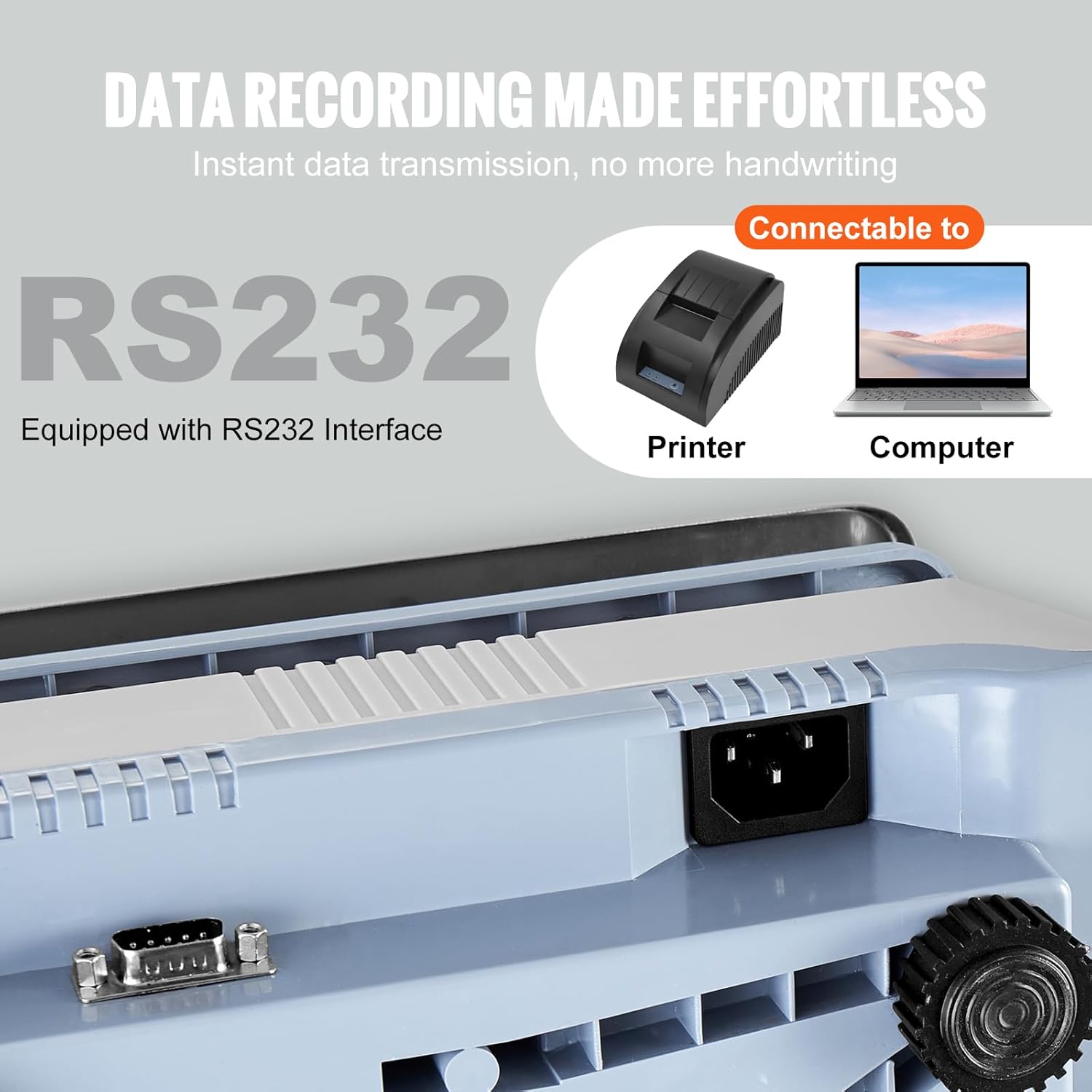
Figure 6: The RS232 interface for connecting to external devices for data recording.
Maintenance
- Cleaning: Wipe the scale surface and weighing pan with a soft, damp cloth. Do not use harsh chemicals or abrasive materials.
- Storage: When not in use for extended periods, store the scale in a dry, dust-free environment.
- Battery Care: If using the rechargeable battery, ensure it is periodically charged to maintain its lifespan. Avoid complete discharge for prolonged periods.
- Calibration: Perform manual calibration regularly, especially if accuracy is critical or if the scale has been moved.
Troubleshooting
| Problem | Possible Cause | Solution |
|---|---|---|
| Scale does not turn on. | No power, discharged battery, faulty power cord. | Check power connection. Charge battery. Replace power cord if damaged. |
| Inaccurate readings. | Unstable surface, drafts, scale needs calibration, overloaded. | Place on stable surface. Avoid drafts. Perform calibration. Do not exceed max capacity. |
| "Err" or error message on display. | Overload, internal error. | Remove weight if overloaded. Turn off and on again. If persistent, contact support. |
| Counting function is incorrect. | Incorrect sample quantity, inconsistent item weight. | Re-enter sample quantity carefully. Ensure items are uniform in weight for best counting accuracy. |
Specifications
| Parameter | Value |
|---|---|
| Model Number | KF-H2C |
| Max Scale Capacity | 15 kg / 33.07 lb |
| Min Scale Capacity | 10 g |
| Division Value / Precision | 0.5 g |
| Measurement Units | g / kg / lb |
| Product Weight | 3.46 kg / 7.41 lb |
| Product Size (L x W x H) | 30.5 x 31.5 x 11.5 cm / 12.01 x 12.40 x 4.53 in |
| Connectivity | RS232 Port |
| Power Options | Rechargeable Battery, AC Power Adapter |
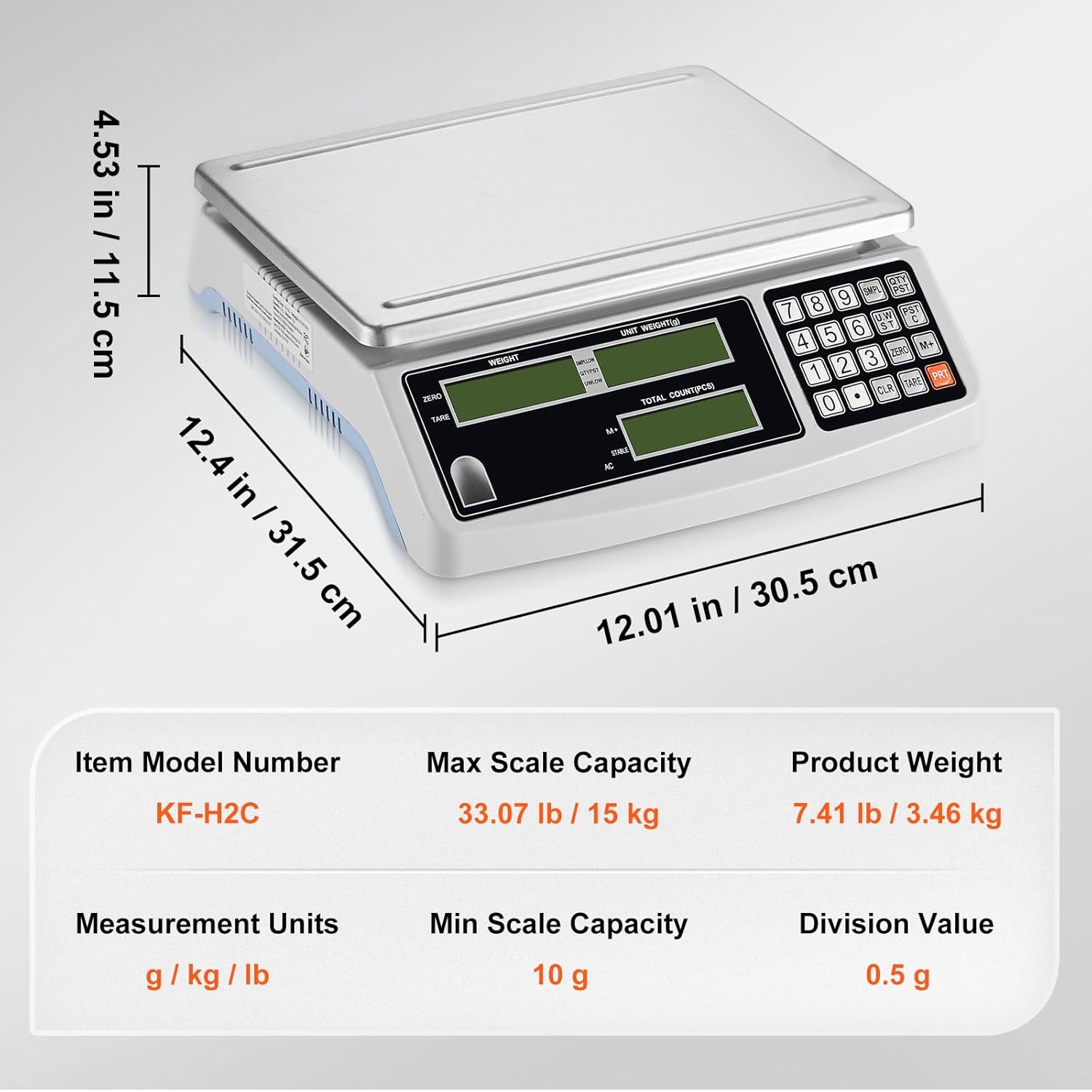
Figure 7: Detailed dimensions and key specifications of the counting scale.
Warranty and Support
For warranty information or technical support, please refer to the warranty card included with your product or visit the official Happybuy website. Please have your model number (KF-H2C) and purchase date available when contacting support.
Manufacturer: Happybuy
Date First Available: January 2, 2025