
1. Setup
The FUNMILY Walking Pad is designed for immediate use with no assembly required. Simply unbox the unit and place it on a flat, stable surface.
1.1 Initial Placement & Power Connection
- Place the walking pad on a level floor, ensuring adequate space around the unit for safe operation.
- Connect the power cord to the treadmill and then to a standard electrical outlet.
- Locate the main power switch on the side of the treadmill (near the power cord connection) and turn it ON. The LED display will illuminate.
1.2 Moving and Storage
The walking pad is equipped with built-in wheels for easy portability and compact storage. To move the unit, gently lift one end until the wheels engage with the floor, then roll it to your desired location. Its slim design (6.1 inches high) allows it to be stored under furniture like a sofa or bed.

Image: A person demonstrating how to easily move the walking pad using its built-in transport wheels.

Image: The walking pad is shown stored under a sofa, illustrating its space-saving design.
2. Operation
The FUNMILY Walking Pad is controlled via a remote control, allowing for convenient adjustment of settings during your workout.
2.1 Remote Control Functions
- Power Button: Press to turn the treadmill ON/OFF.
- Play/Pause Button: Press to start or pause your workout. After pressing play, the treadmill will count down from 3 before starting.
- Speed Adjustment (+/-): Use the '+' button to increase speed and the '-' button to decrease speed. Speed adjusts in 0.1 MPH increments. The maximum speed is 4 MPH.
- Mode (M) Button: Cycle through different display metrics on the LED screen (Time, Speed, Distance, Calories).

Image: The LED display shows workout metrics, and the remote control is visible for easy adjustments.
2.2 LED Display
The integrated LED display provides real-time feedback on your workout progress. It clearly shows:
- Time: Duration of your workout.
- Speed: Current walking/jogging speed in MPH.
- Distance: Total distance covered.
- Calories: Estimated calories burned.
2.3 Usage Modes
The walking pad supports various activity levels:
- Working Mode: 0.5-1.6 MPH (ideal for walking while working at a standing desk).
- Walking Mode: 0.6-2.4 MPH (suitable for light exercise).
- Running Mode: 2.6-4.0 MPH (for more vigorous activity).

Image: Demonstrates the versatility of the walking pad for working, walking, and light jogging.
2.4 Safety Considerations
Always prioritize safety during operation:
- There are no handrails on this model. Maintain balance and use the remote control to adjust speed or pause the unit.
- If you need to stop quickly, press the pause button on the remote or step off the treadmill carefully.
- Avoid multitasking at higher speeds to prevent loss of balance.
2.5 Video Demonstration
Watch this video for a detailed demonstration of the treadmill's setup and operation:
Video: A user demonstrates the setup, remote control functions, and various speeds of the FUNMILY Walking Pad.
3. Maintenance
Regular maintenance ensures the longevity and optimal performance of your walking pad.
3.1 Lubrication
- The treadmill comes with lubrication oil. Apply it periodically to keep the running belt smooth and reduce friction. Refer to the included user manual for specific lubrication intervals and instructions.
3.2 Belt Alignment
- If the running belt becomes misaligned, use the provided Allen wrench to adjust it. Detailed instructions for belt alignment are included in the physical user manual that came with your product.
4. Troubleshooting
For common issues, refer to the troubleshooting tips below. More detailed guidance can be found in the physical user manual.
4.1 Remote Control Issues
- If the remote control is not responding, check its battery.
- Ensure there are no obstructions between the remote and the treadmill's receiver.
- Refer to the troubleshooting sheet included in the product packaging for specific pairing or reset instructions if the remote is still unresponsive.
4.2 Treadmill Not Powering On
- Verify that the power cord is securely plugged into both the treadmill and the electrical outlet.
- Check that the main power switch on the side of the treadmill is in the 'ON' position.
- Inspect the fuse reset button (located near the main power switch). If it has tripped, press it to reset.
5. Specifications
| Feature | Detail |
|---|---|
| Brand | FUNMILY |
| Model Name | Treadmill Pro |
| Color | Black |
| Product Dimensions (LxWxH) | 47.24"D x 22.44"W x 6.1"H |
| Item Weight | 40.57 Pounds |
| Material | Alloy Steel |
| Maximum Speed | 4 Miles per Hour |
| Minimum Speed | 0.5 Miles per Hour |
| Maximum Horsepower | 2.5 Horsepower |
| Maximum Weight Recommendation | 300 Pounds |
| Running Belt Surface (LxW) | 42" x 17" (approximate, derived from product description) |
| Display Type | LED |
| Metrics Measured | Calories Burned, Distance, Speed, Time |
| Special Features | No Assembly, Portable, Lightweight, Easy Move & Storage, Shock Absorbent, Wheeled, LED Display, Remote Easy Control, 7-Layer Anti-Slip Walking Mat |
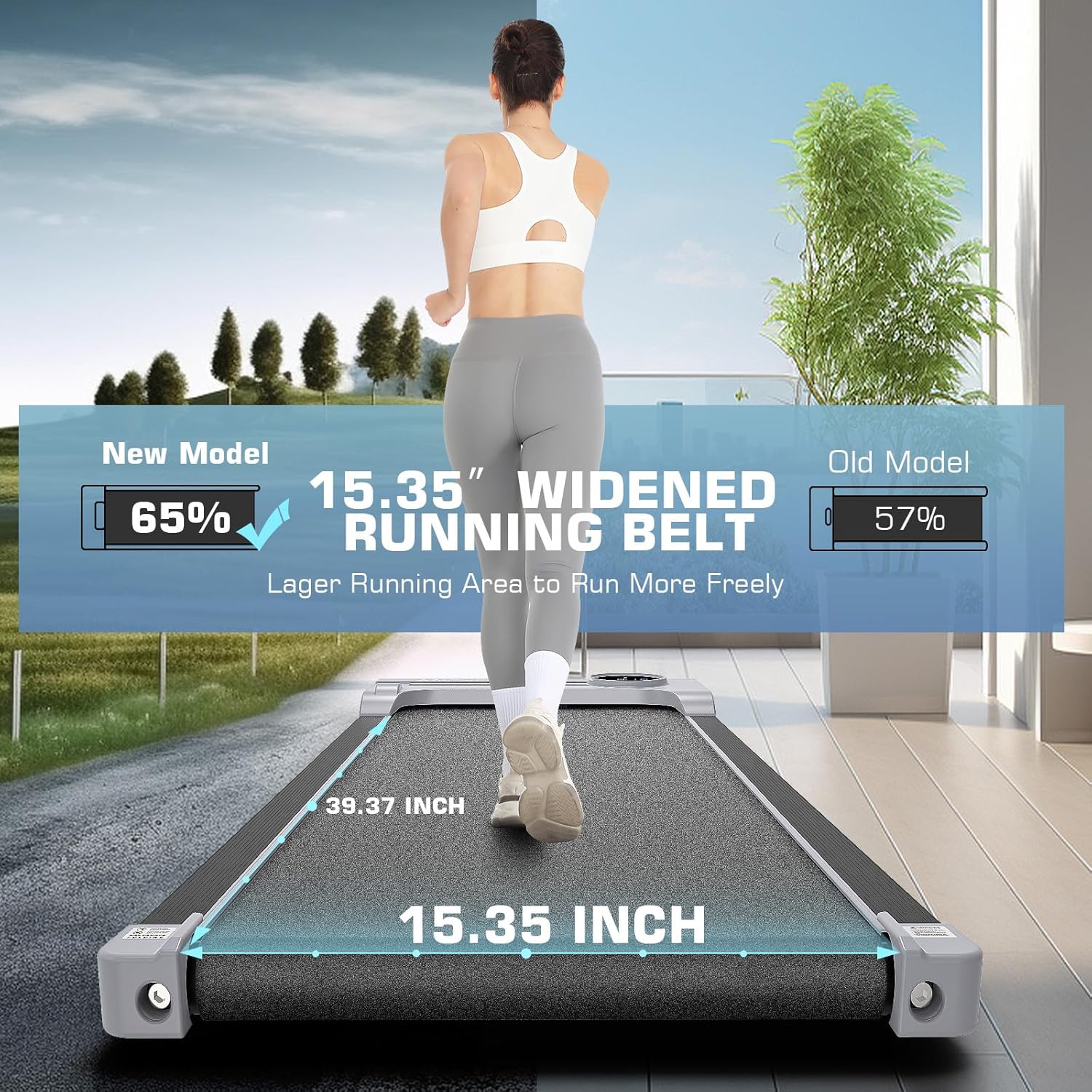
Image: Visual representation of the running belt dimensions, highlighting the spacious area.

Image: Cross-section view detailing the 7-layer running belt and shock absorption system for joint protection.
6. Warranty & Support
6.1 Warranty Information
The FUNMILY Walking Pad comes with a one-year warranty. This warranty covers free part replacement during the specified period. Please retain your proof of purchase for warranty claims.
6.2 Customer Support
For any questions, concerns, or assistance with your product, please contact FUNMILY customer service. Contact details can typically be found in the included user manual or on the official FUNMILY website.