
Introduction
The DIYmalls ESP32-2424S012C-I-Y(B) module integrates an ESP32-C3 development board with a 1.28-inch capacitive touchscreen IPS display. This compact unit is designed for various embedded projects requiring a small, interactive display interface. It features a 240x240 resolution TFT LCD module and supports programming via the Arduino IDE or ESP32 flash tools.
What's in the Box
- 1x 1.28 inch ESP32-C3 Round Display with Black Case
- 1x 1.25mm 2-pin Cable
- 1x 1.0mm 4-pin to Female Dupont Wire
- 1x 1.0mm 4-pin to Male Dupont Wire
Video: This video demonstrates the contents of the product package, showing the 1.28 inch ESP32-C3 touchscreen module and included cables.
Product Overview
The ESP32-2424S012C-I-Y(B) features a circular IPS display with capacitive touch capabilities, housed in a protective black case. It integrates an ESP32-C3 microcontroller, providing Wi-Fi and Bluetooth connectivity for various applications.
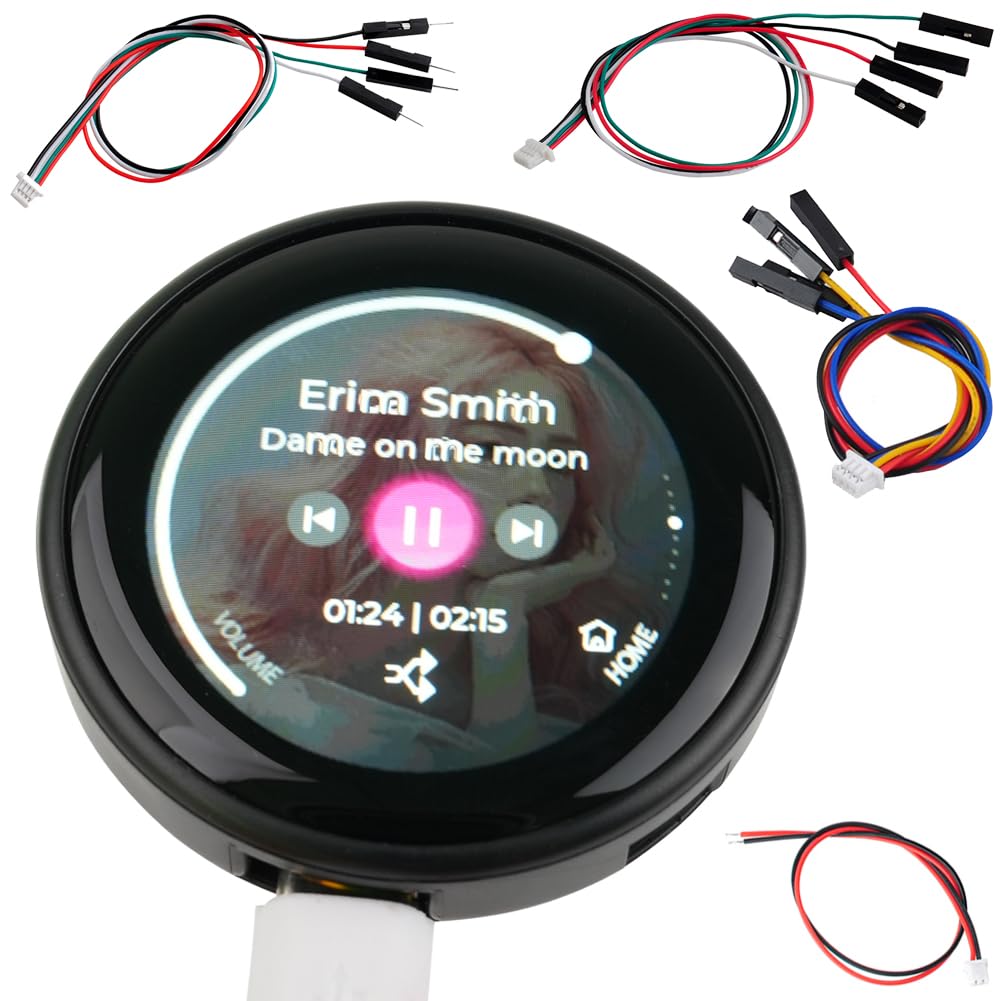
Image: Front view of the DIYmalls 1.28 inch ESP32-C3 Round Display, showcasing its circular screen and black enclosure.
Video: A brief overview of the front side of the DIYmalls 1.28 inch ESP32-C3 Round Display.

Image: Detailed view of the ESP32-C3 module inside the display, highlighting the reset and boot buttons, 1.0mm 4-pin connector, Type-C USB port, and 1.25mm 2-pin battery connector.
Video: A brief overview of the back side of the DIYmalls 1.28 inch ESP32-C3 Round Display, showing the various ports and buttons.
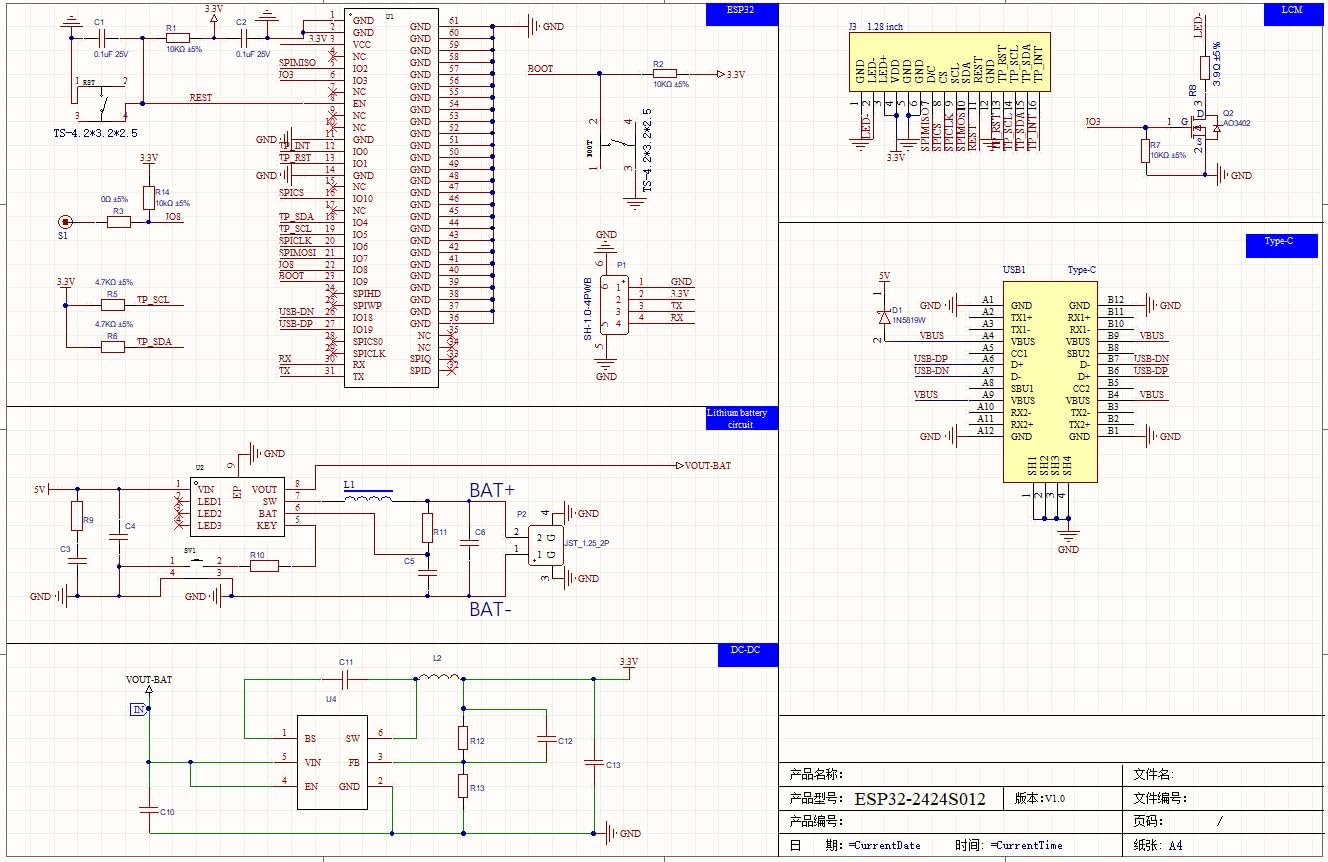
Image: Detailed schematic diagram of the ESP32-2424S012C-I-Y(B) module, including pin configurations and power management.
Setup
- Power Connection: Connect the module to a 5V power adapter using the Type-C USB port. It is recommended to use a dedicated power adapter rather than a PC USB port for stable operation.
- Software Installation: To program the ESP32-C3, install the Arduino IDE or an ESP32 flash tool on your computer. Ensure you have the necessary ESP32 board definitions and libraries installed in your chosen development environment.
- Code Upload: Connect the module to your computer via the Type-C USB port. Use the Arduino IDE or ESP32 flash tool to upload your code to the ESP32-C3. Refer to online tutorials for specific library requirements and programming procedures for the ESP32-2424S012C-I-Y(B) module.

Image: This image illustrates the process of uploading code to the ESP32-C3 display using the Arduino IDE and the ESP32 Download Tool.
Operating Instructions
Once programmed, the 1.28-inch IPS capacitive touchscreen allows for interactive control and data display. The display supports various graphical interfaces and can be used for applications such as sensor data visualization, smart home controls, or custom wearable projects.
- Capacitive Touch: Interact with the display by touching the screen. The capacitive touch panel provides responsive input for menu navigation and control.
- Display Modes: The functionality and display modes are determined by the uploaded firmware. Examples include displaying time, weather, fitness data, or custom user interfaces.

Image: The 1.28 inch ESP32-C3 display showcasing a weather interface with temperature and conditions.
Video: This video demonstrates the capacitive touch functionality of the DIYmalls 1.28 inch ESP32-C3 display, showing interaction with various on-screen elements.
Maintenance
- Cleaning: Use a soft, dry cloth to clean the display surface. Avoid abrasive materials or harsh chemicals.
- Storage: Store the module in a cool, dry environment away from direct sunlight and extreme temperatures.
- Handling: Handle the module with care to prevent damage to the screen or internal components. Avoid applying excessive force to the display.
Troubleshooting
- Display Not Powering On: Ensure the 5V power adapter is correctly connected and providing sufficient power. Try a different USB cable or power source.
- Programming Issues: Verify that the correct ESP32 board definitions and libraries are installed in your Arduino IDE or flash tool. Check the COM port selection and baud rate settings. Ensure the module is in bootloader mode if required by your programming method.
- Touchscreen Unresponsive: Confirm that the firmware uploaded supports touch input and that the touch controller is correctly initialized. Check for any physical damage to the screen.
- Display Glitches/Artifacts: This may indicate a software issue or insufficient power. Re-upload your code or ensure a stable 5V power supply.
Specifications
| Feature | Detail |
|---|---|
| Brand | DIYmalls |
| Model Name | ESP32-2424S012C-I-Y(B) |
| Display Size | 1.28 inch |
| Resolution | 240x240 |
| Display Type | IPS TFT LCD |
| Touch Type | Capacitive |
| Microcontroller | ESP32-C3 |
| Operating Voltage | 5V |
| RAM Memory Installed Size | 400 KB |
| Memory Storage Capacity | 4 MB |
| Connectivity Technology | USB |
Warranty Information
This product comes with a 30-day warranty from the date of purchase. The warranty covers manufacturing defects and malfunctions under normal use. Please retain your proof of purchase for any warranty claims.
Support
For further assistance, technical documentation, or to inquire about specific programming examples, please visit the official DIYmalls store on Amazon or contact their customer support. You can often find additional resources by searching for "ESP32-2424S012C" online.
DIYmalls Store: Visit the DIYmalls Store on Amazon