
Introduction
Thank you for choosing the Wkzay Dual RV Backup Camera Wireless System R73. This system is designed to enhance your driving and parking safety for RVs, trailers, campers, and trucks. Featuring 1080P HD resolution, stable wireless signal, solar charging, and a magnetic mount for easy installation, this manual provides detailed instructions for setup, operation, and maintenance to ensure optimal performance.
What's in the Box
- 1x 7 Inch LCD Monitor
- 2x Solar Magnetic Backup Cameras
- 2x Iron Sheet Bracket for Magnetic Backup Camera
- 1x User Manual
Setup and Installation
Camera Installation
The Wkzay R73 cameras feature a strong magnetic base for tool-free installation. For vehicles with non-magnetic surfaces (e.g., aluminum, fiberglass, plastic), use the provided iron sheet brackets. Ensure the camera is securely attached to prevent detachment during travel.

Image: Magnetic camera installation on a vehicle tailgate, showing no drilling is required.

Image: A comparison illustrating the ease of magnetic bracket installation (less than 1 minute, no drilling) versus ordinary bracket installation (20-30 minutes, requires drilling).
Powering the Camera
Each camera is equipped with a 15000mAh battery and a 3W solar panel. The solar panel recharges the battery during daylight, providing up to 25 hours of use on a full charge. For initial setup or when solar power is insufficient, use the included charger to fully charge the camera via USB-C.

Image: Close-up of the camera unit highlighting the high-power 3W solar panel and the 15000mAh battery.
Monitor Setup
The 7-inch LCD monitor can be powered via a cigarette lighter adapter or a USB plug. Mount the monitor on your dashboard or windshield using the appropriate bracket (windshield mount not included). The monitor and cameras are pre-paired for immediate use.
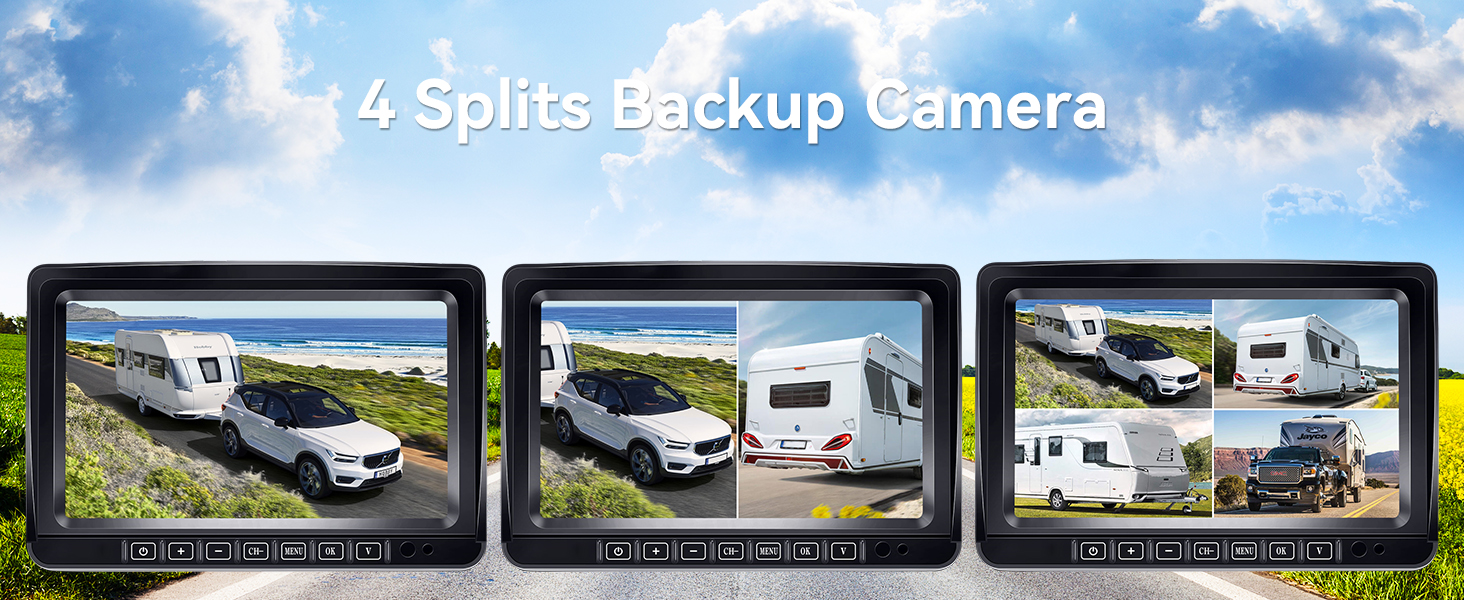
Image: The 7-inch monitor displayed on a car dashboard, illustrating power options (cigarette lighter, USB) and the DIY guide line and image flip features.
Video Guide: Wkzay Solar RV Backup Camera Wireless with Magnetic Base
Video: This video demonstrates the magnetic base installation of the Wkzay Solar RV Backup Camera and its wireless functionality, including powering the monitor and switching between camera channels.
Operating Instructions
Monitor Controls
The 7-inch LCD monitor features touch buttons for easy operation. Use the 'CH' button to switch between camera channels (up to four supported) or to activate split-screen viewing. The 'MENU' button accesses settings for various functions.

Image: The 7-inch LCD monitor displaying its full-color display and touch key controls for settings and durability.
Split-Screen Display
The 7-inch monitor supports up to four camera feeds, allowing for split-screen viewing. This feature is ideal for monitoring multiple angles simultaneously, such as the rear of your RV and an interior view of a horse trailer.

Image: The 7-inch split-screen display showing multiple camera feeds for comprehensive monitoring, including views for hooking up trailers, checking road conditions, reversing, and monitoring horses.

Image: Three monitors demonstrating different 4-way split-screen configurations for backup cameras, providing extensive coverage.
Adjustable Parking Guides
Customize parking lines on the monitor to align your vehicle with precision. Adjust the width, height, and left/right position of the guide lines to suit various models and reversing needs.

Image: The monitor screen showing adjustable parking assisting lines, with options to modify width, height, and horizontal position.
Image Flip Function
The system supports image flip options (Normal, Mirror, Inverted Front Image, Inverted Mirror Image) to adapt to different mounting positions and viewing preferences.

Image: Various image flip options (Normal, Mirror, Inverted Front Image, Inverted Mirror Image) demonstrated on the screen.
Video Guide: VEKOOTO VK7 Backup Camera Kit
Video: This video provides an overview of the VEKOOTO VK7 Backup Camera Kit, demonstrating the monitor's interface, parking lines, and general operation.
Features
- Easy Installation with Magnetic Mount: Magnetic mount installation requires no tools or professional help, allowing for quick setup and detachment.
- Enhanced 1080P HD Visibility: Provides crystal-clear 1080P HD views for parking, reversing, or driving, eliminating blind spots.
- Stable Signal – Reliable Dual Antenna Tech: Advanced 2.4G wireless frequency and dual antennas ensure stable connections up to 328ft in open areas.
- Solar Powered – Long-Lasting Battery Life: 15000mAh battery offers up to 25 hours of use, with a 3W solar panel for recharging. (Note: Solar power serves as a backup; use the included charger for primary charging when power is low).
- Weatherproof & Durable – Built to Endure: Rugged IP69K waterproof design and shockproof aluminum alloy construction withstand harsh environments.
- 7-Inch Split-Screen Display – Monitor Everything: The LCD monitor supports up to four camera feeds, allowing for split-screen viewing and easy switching between angles.
- Dual Camera System for 360° Safety: Provides full rear and side-view coverage with 170° wide-angle views to minimize blind spots.
- Loop Recording: Built-in loop recording automatically saves and overwrites old footage, allowing for continuous travel recording.
- Crystal-Clear Night Vision – Safety in Darkness: Infrared LED lights illuminate low-light conditions without glare, offering clear visibility at night.
- Adjustable Parking Guides – Precision Parking: Customizable parking lines simplify parking and reversing, ideal for tight spaces.
Maintenance
To ensure the longevity and optimal performance of your Wkzay R73 system, follow these maintenance guidelines:
- Cleaning: Regularly clean the camera lenses and monitor screen with a soft, damp cloth. Avoid abrasive cleaners that could scratch surfaces.
- Battery Care: Ensure cameras are regularly charged, especially before long trips. While solar charging is convenient, use the USB-C charger for a full charge when needed.
- Connection Check: Periodically inspect all connections (power cables, antenna connections) for any signs of wear or damage.
- Storage: When not in use for extended periods, store the monitor and cameras in a cool, dry place.
Troubleshooting
If you encounter issues with your Wkzay R73 system, refer to the following common troubleshooting steps:
- No Signal:
- Ensure both the camera(s) and monitor are powered on.
- Check that the antennas are securely attached to both the camera(s) and monitor.
- Verify there are no major obstructions between the camera and monitor that could interfere with the wireless signal.
- Move the monitor closer to the camera(s) to test signal strength.
- Poor Image Quality:
- Clean the camera lens for any dirt or smudges.
- Ensure the camera is securely mounted and not vibrating.
- Check for strong electromagnetic interference from other devices.
- Camera Not Charging:
- Ensure the solar panel is exposed to direct sunlight.
- Connect the camera to the USB-C charger to confirm it charges via cable.
- Check the charging cable and adapter for damage.
- Monitor Not Powering On:
- Verify the power cable is securely plugged into the monitor and the vehicle's power source (cigarette lighter or USB).
- Check the vehicle's power outlet for functionality.
Specifications
| Feature | Detail |
|---|---|
| Product Dimensions | 8 x 3.5 x 10.8 inches |
| Item Weight | 2.86 pounds |
| Item Model Number | R73 |
| Batteries | 3 AAA batteries required (included) |
| Display Technology | LCD |
| Other Display Features | Wireless |
| Color | Black |
| What's in the Box | 1* 7 Inch LCD Monitor, 1* User Manual, 2 * Iron Sheet Bracket for Magnetic Backup Camera, 2* Solar Magnetic Backup Cameras |
| Manufacturer | Shenzhen Yuweixin Electronic Co., Ltd |
| Screen Size | 7 Inches |
| Compatible Devices | Monitor |
| Installation Type | Surface Mount, Dashboard Mount |
| Voltage | 12 Volts |
| Optical Sensor Technology | CMOS, Infrared |
| Lens Type | Wide Angle, Fixed |
| Real Angle of View | 170 Degrees |
| Connector Type | USB |
| Optical Sensor Size | 1/3 inch |
Warranty and Support
For warranty information and technical support, please refer to the contact details provided by the manufacturer, Shenzhen Yuweixin Electronic Co., Ltd, or the seller. Keep your purchase receipt for any warranty claims.