
Introduction
This manual provides detailed instructions for the safe and efficient operation, maintenance, and troubleshooting of your Gevi Coffee Grinder, Model CGA0. Please read this manual thoroughly before first use and retain it for future reference.

Image: The Gevi Coffee Grinder, showcasing its main components including the bean hopper, ground coffee container, and portafilter cradle. Accessories like measuring spoons are also visible.
Important Safety Instructions
Always follow basic safety precautions when using electrical appliances to reduce the risk of fire, electric shock, and/or injury to persons, including the following:
- Read all instructions.
- Do not immerse the appliance, cord, or plug in water or other liquids.
- Close supervision is necessary when any appliance is used by or near children.
- Unplug from outlet when not in use, before putting on or taking off parts, and before cleaning.
- Avoid contact with moving parts.
- Do not operate any appliance with a damaged cord or plug or after the appliance malfunctions, or has been dropped or damaged in any manner.
- The use of attachments not recommended or sold by the manufacturer may cause fire, electric shock, or injury.
- Do not use outdoors.
- Do not let cord hang over edge of table or counter, or touch hot surfaces.
- Do not place on or near a hot gas or electric burner, or in a heated oven.
- Do not use appliance for other than intended use.
Product Overview
The Gevi Coffee Grinder is designed for precise and consistent grinding of coffee beans, offering various grind settings for different brewing methods.
Key Components:
- Bean Hopper: Holds whole coffee beans. Capacity up to 240g (8.5 oz).
- Upper Conical Burr: Grinds the coffee beans. Removable for cleaning.
- Grind Setting Collar: Adjustable ring for selecting grind fineness (1-35 settings).
- Digital Display: Shows selected cup amount or time.
- Control Panel: Buttons for cup selection, time adjustment, and Start/Stop.
- Ground Coffee Container: Collects ground coffee. Capacity up to 130g.
- Portafilter Cradle: Allows direct grinding into a 51-54mm portafilter.

Image: The Gevi Coffee Grinder with its compact dimensions highlighted: 7.8 inches (L), 3.72 inches (W), and 11.85 inches (H).
Setup
- Unpacking: Carefully remove all components from the packaging. Retain packaging for future storage or transport.
- Initial Cleaning: Before first use, clean all removable parts (bean hopper, ground coffee container, upper burr, portafilter cradle) with warm soapy water. Rinse thoroughly and dry completely. Wipe the main unit with a damp cloth.
- Assemble Hopper: Place the bean hopper onto the top of the grinder, aligning the arrows and twisting to lock it into place. Ensure it is securely seated.
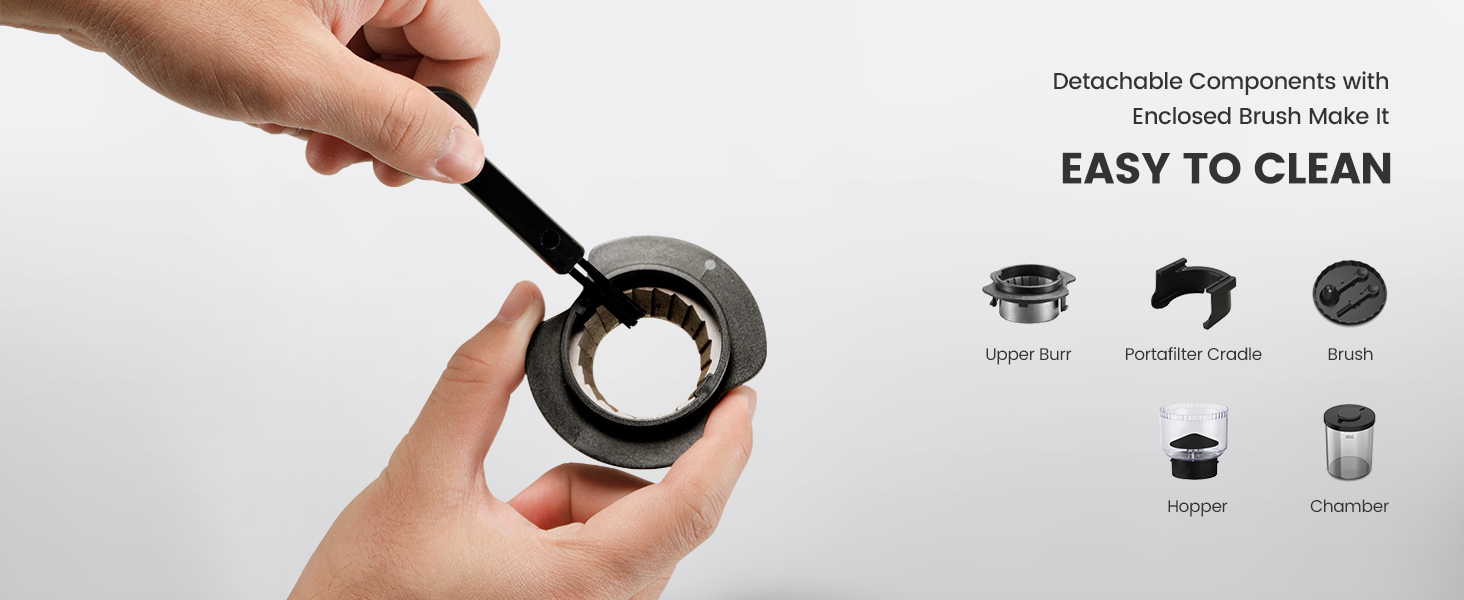
Image: A hand demonstrating the locking system of the bean hopper, which has an 8.5 oz capacity.
- Place Ground Coffee Container or Portafilter Cradle: Position the ground coffee container under the dispensing chute, or insert the portafilter cradle if grinding directly into a portafilter.

Image: The Gevi Coffee Grinder with a portafilter cradle attached, designed for direct grinding into 51-54mm portafilters.
- Add Coffee Beans: Pour desired amount of whole coffee beans into the bean hopper. Do not overfill.
- Connect Power: Plug the power cord into a suitable electrical outlet.
Operating Instructions
1. Adjusting Grind Settings:
The grinder features 35 precise grind settings, allowing you to customize the fineness for various brewing methods. Rotate the grind setting collar to select your desired fineness.
- Settings 1-10 (Espresso): Fine grind for espresso machines.
- Settings 11-25 (Drip/Pour Over): Medium grind for drip coffee makers and pour-over methods.
- Settings 26-35 (French Press): Coarse grind for French press.

Image: The Gevi Coffee Grinder's grind setting dial, illustrating the 35 precise grind settings and corresponding coffee grounds for Espresso, Drip/Pour Over, and French Press.
2. Selecting Grind Amount:
The digital display allows you to select the amount of coffee to grind, either by cups or by time.
- Cup Selection (1-14 Cups): Press the "Cup" button to cycle through the desired number of cups. The grinder will automatically stop when the selected amount is reached. (1 cup ≈ 0.35 oz).
- Time Selection (1-60 Seconds): Press the "Time" button to adjust the grinding duration in seconds. The grinder will stop automatically after the set time.
- Manual Operation: Long press and hold the "Start/Stop" button to grind continuously. Release the button to stop grinding.

Image: Close-up of the Gevi Coffee Grinder's digital display and control buttons, highlighting options for cup selection (1-14 cups), time selection (1-60 seconds), and manual operation via the Start/Stop button.
3. Grinding Process:
Once settings are selected, press the "Start/Stop" button to begin grinding. The grinder will operate until the selected amount/time is reached or the button is released (for manual mode).
Note: For safety, the grinder will automatically rest for 30 minutes if the working time exceeds 3 minutes continuously.
Maintenance and Cleaning
Regular cleaning ensures optimal performance and extends the lifespan of your Gevi Coffee Grinder. Always unplug the grinder before cleaning.
- Emptying: Empty the bean hopper and ground coffee container after each use.
- Cleaning the Upper Burr:
- Twist and lift the bean hopper to remove it.
- Carefully remove the upper conical burr.
- Use the provided cleaning brush to remove any coffee grounds from the upper burr and the lower burr assembly.
- Wipe the burrs with a dry cloth. Do not wash burrs with water.
- Reinsert the upper burr, ensuring it clicks into place, then reattach the bean hopper.

Image: A hand demonstrating the removal of the detachable upper burr for cleaning, with the included brush visible.
- Cleaning the Ground Coffee Container and Portafilter Cradle: Wash these parts with warm soapy water, rinse thoroughly, and dry completely before reattaching. The anti-static technology helps minimize mess.

Image: The Gevi Coffee Grinder highlighting its anti-static design, which contributes to a mess-free grinding experience, particularly with the hopper and ground coffee chamber.
- Cleaning the Main Unit: Wipe the exterior of the grinder with a soft, damp cloth. Do not use abrasive cleaners or immerse the unit in water.
Troubleshooting
| Problem | Possible Cause | Solution |
|---|---|---|
| Grinder does not start. | Not plugged in; Hopper not correctly installed; Overheating protection activated. | Ensure power cord is securely plugged in. Check if the bean hopper is locked into place. Allow the unit to cool down for 30 minutes if it has been running for more than 3 minutes. |
| Coffee is not grinding or grinding slowly. | No beans in hopper; Burrs are clogged; Grind setting too fine for beans. | Add coffee beans to the hopper. Clean the burrs and dispensing chute. Adjust to a coarser grind setting. |
| Ground coffee is inconsistent. | Burrs are dirty or worn; Incorrect grind setting. | Clean the burrs thoroughly. Ensure the grind setting is appropriate for your brewing method. |
| Excessive static cling of ground coffee. | Environmental factors (dry air); Certain bean types. | While the grinder has anti-static technology, some static may occur. Lightly misting beans with water before grinding can help, but ensure beans are dry before adding to hopper. |
Specifications
- Model Number: CGA0
- Brand: Gevi
- Color: Blue
- Product Dimensions: 7.8"L x 3.72"W x 11.85"H
- Item Weight: 5.92 pounds
- Voltage: 220.01 Volts
- Bean Hopper Capacity: Up to 240g (approx. 8.5 oz)
- Ground Coffee Container Capacity: Up to 130g
- Grind Settings: 35 precise settings
- UPC: 767791874967, 767791226360, 767791163344, 767791226339, 767791226315, 767791226414, 767791874998
Warranty and Support
Gevi is committed to providing reliable quality products. The product comes with a 12-Month Warranty from the date of purchase.
If you encounter any problems with your Gevi Coffee Grinder, please contact Gevi customer service for assistance. Please have your model number (CGA0) and purchase information ready when contacting support.
For further assistance, you may also refer to the official Gevi website or the provided PDF user manual: Gevi Coffee Grinder User Manual (PDF).
Note: No official product videos with 'Seller' creator type or m3u8 format were available in the provided data to embed.