
1. Introduction
The GOLDCHAMP GC-T0-ADKS-4 is a professional 4-in-1 multi-gas detector designed for industrial safety. It accurately monitors concentrations of Hydrogen Sulfide (H2S), Carbon Monoxide (CO), Combustible Gas (LEL), and Oxygen (O2). This device features high-sensitivity sensors, a triple alarm system, a long-lasting rechargeable battery, and a durable triple-proof design, making it suitable for various hazardous environments. This manual provides essential information for the safe and effective use of your gas monitor.
2. Product Overview
2.1 Components
Familiarize yourself with the main components of your GC-T0-ADKS-4 gas monitor:

Figure 2.1: Front and back view of the GC-T0-ADKS-4 gas monitor with key components labeled. This includes the warning light, LCD display, control buttons, speaker, gas sensor holes, back clip, and the internal 2000 mAh lithium battery.
- Warning Light: Visual indicator for alarms and status.
- LCD Display: Shows real-time gas concentrations, battery status, and other information.
- Buttons: For power on/off, menu navigation, and settings adjustment.
- Speaker: Emits audible alarms.
- Gas Sensor Holes: Openings for gas detection.
- Back Clip: For attaching the device to clothing or a belt.
- Lithium Battery: Internal rechargeable 2000mAh battery.
2.2 Detected Gases and Ranges
The GC-T0-ADKS-4 monitors four types of gases with the following detection ranges:

Figure 2.2: Gas detection ranges for the GC-T0-ADKS-4. The device detects Combustible Gas (EX), Hydrogen Sulfide (H2S), Carbon Monoxide (CO), and Oxygen (O2).
| Gas Type | Range | Low Alarm | High Alarm | Resolution |
|---|---|---|---|---|
| EX (Combustible Gas) | 0-100% LEL | 20% LEL | 50% LEL | 1% LEL |
| H2S (Hydrogen Sulfide) | 0-100 PPM | 10 PPM | 20 PPM | 1 PPM |
| CO (Carbon Monoxide) | 0-1000 PPM | 50 PPM | 200 PPM | 1 PPM |
| O2 (Oxygen) | 0-30% VOL | 19.5% VOL | 23.5% VOL | 0.1% VOL |
3. Setup
3.1 Initial Charge
Before first use, fully charge the device. Connect the included USB charging cable to the monitor and a compatible USB power adapter (e.g., the included wall charger). The LCD display will indicate "Charging..." during the process. A full charge provides up to 18 hours of continuous operation.

Figure 3.1: The gas monitor connected to a power source for charging. Ensure the device is fully charged before initial use.
3.2 Power On/Off
- To Power On: Press and hold the power button (usually marked with a ⏻ symbol) for a few seconds until the LCD screen illuminates and the device performs a self-test.
- To Power Off: Press and hold the power button again until the device powers down.
4. Operating Instructions
4.1 Real-time Monitoring
Once powered on, the device will automatically begin monitoring gas concentrations and display them on the LCD screen. The screen shows readings for EX, O2, H2S, and CO in real-time.

Figure 4.1: The LCD display provides clear, real-time gas concentration readings, even in low-light conditions due to its backlight.
4.2 Triple Alarm System
The GC-T0-ADKS-4 is equipped with a triple alarm system to alert users to hazardous gas levels:
- Audible Alarm: A loud sound emitted from the speaker.
- Visual Alarm: The warning light flashes brightly.
- Vibration Alarm: The device vibrates to provide a tactile alert.
These alarms activate simultaneously when gas concentrations exceed the preset low or high alarm thresholds. Alarms will continue until the gas levels return to safe limits or are manually acknowledged/silenced (refer to specific model settings for silencing options).
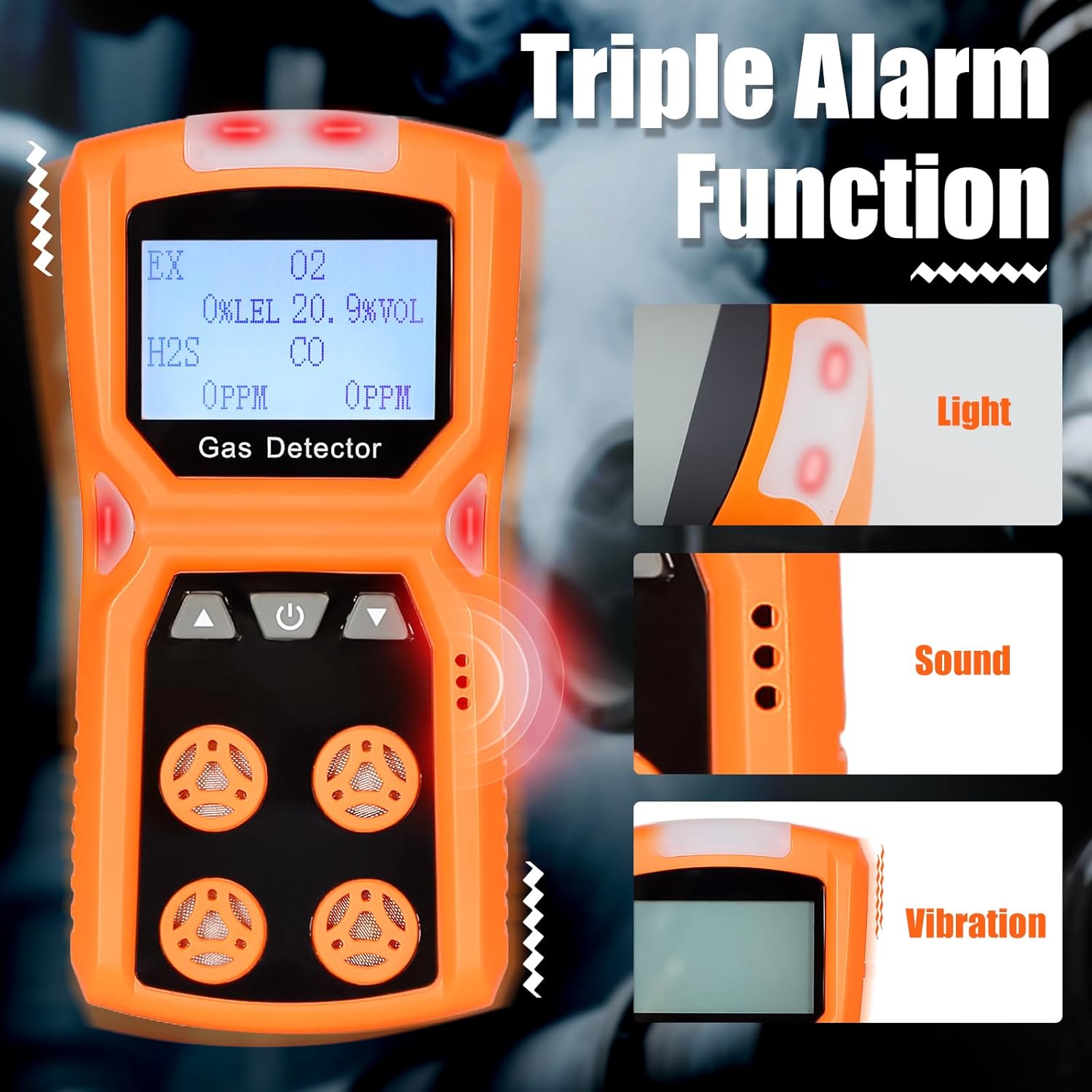
Figure 4.2: The triple alarm system ensures immediate notification through light, sound, and vibration when gas levels become unsafe.
4.3 Data Storage
The device automatically stores gas concentration data, allowing for historical tracking and analysis. Consult the device's on-screen menu or accompanying software (if applicable) to access and review stored data. This feature is crucial for compliance and safety audits.

Figure 4.3: The gas monitor's data storage capability allows users to review past gas concentration readings.
5. Maintenance
5.1 Cleaning
Regularly clean the exterior of the device with a soft, damp cloth. Do not use abrasive cleaners, solvents, or immerse the device in water. Ensure the gas sensor holes are free from dust and debris.
5.2 Battery Care
- Charge the battery fully before long periods of storage.
- Avoid completely draining the battery frequently to prolong its lifespan.
- Use only the provided charging cable and a compatible power adapter.
5.3 Sensor Calibration
Gas sensors require periodic calibration to maintain accuracy. Refer to local safety regulations and manufacturer recommendations for calibration frequency. Calibration should be performed by qualified personnel using appropriate calibration gases.
6. Troubleshooting
If you encounter issues with your GC-T0-ADKS-4 gas monitor, refer to the following common problems and solutions:
| Problem | Possible Cause | Solution |
|---|---|---|
| Device does not power on | Low or depleted battery | Charge the device fully. |
| Device does not power on | Power button not held long enough | Press and hold the power button for at least 3-5 seconds. |
| Inaccurate gas readings | Sensors are dirty or blocked | Clean the sensor holes. |
| Inaccurate gas readings | Sensors require calibration | Perform sensor calibration or contact qualified service personnel. |
| Alarm activates frequently in clean air | False alarm due to environmental factors or sensor drift | Ensure the device is in a clean air environment. Consider zero-point calibration or full calibration. |
| Display is dim or unreadable | Backlight is off or low battery | Check backlight settings. Charge the device. |
If the problem persists after attempting these solutions, please contact GOLDCHAMP customer support.
7. Specifications
Key technical specifications for the GOLDCHAMP GC-T0-ADKS-4 gas monitor:
- Brand: GOLDCHAMP
- Model Number: GCUS-T0-ADKS-4
- Detected Gases: H2S, CO, LEL, O2
- Power Source: Battery Powered (2000mAh Lithium Battery)
- Alarm Type: Audible, Visual (Light), Vibration
- Product Dimensions: 2.5"D x 1.7"W x 5.1"H
- Item Weight: 9.6 ounces
- Display: Large LCD with Backlight
- Durability: Waterproof, Dustproof, Explosion-proof
- Continuous Operation: Up to 18 hours (after full charge)
- Response Time: < 45 seconds

Figure 7.1: The triple-proof design ensures the device's durability and reliability in harsh industrial environments.
8. Package Contents
The standard package for the GOLDCHAMP GC-T0-ADKS-4 includes the following items:

Figure 8.1: Contents included in the GOLDCHAMP GC-T0-ADKS-4 package.
- 1 x GOLDCHAMP GC-T0-ADKS-4 Gas Monitor
- 1 x Operation Manual
- 1 x USB Charging Cable
- 1 x Wall Power Adapter
- 1 x Carrying Case (as shown in image)
9. Warranty and Support
For warranty information, technical support, or service inquiries, please refer to the contact details provided in the included Operation Manual or visit the official GOLDCHAMP website. Keep your purchase receipt as proof of purchase for warranty claims.