
1. Introduction
This manual provides essential instructions for the safe and efficient operation, maintenance, and troubleshooting of your Ocean Loong Bladeless Tower Fan and Space Heater Combo, Model AB01H. Please read this manual thoroughly before use and retain it for future reference.

Figure 1: Ocean Loong Bladeless Tower Fan and Space Heater Combo (Model AB01H) with remote control.
2. Safety Information
Your safety is paramount. This appliance is designed with multiple safety features. Always follow basic safety precautions to reduce the risk of fire, electric shock, and injury.
- Bladeless Design: The bladeless design ensures safety for children and pets by eliminating exposed rotating blades.
- Tip-Over Protection: The unit automatically shuts off if accidentally tipped over.
- Overheat Protection: The heater will automatically power off if it detects overheating.
- Non-Combustible Heating Element: Utilizes a ceramic heating element for enhanced safety.
- Child & Pet-Safe Exterior: The exterior remains cool to the touch during operation.
- HEPA Filter: Integrated HEPA filter helps purify the air by capturing airborne particles.

Figure 2: Safety features of the AB01H unit, including tip-over protection, overheat protection, child & pet-safe exterior, and a non-combustible heating element.
3. Product Overview
The Ocean Loong AB01H is a versatile appliance combining a bladeless tower fan and a space heater. It offers year-round comfort with features designed for convenience and efficiency.
- Dual Functionality: Operates as both a cooling fan and a heating unit.
- Remote Control: Full control over all functions from a distance of up to 10 meters.
- Touch Control: Intuitive touch panel on the unit for direct control.
- Oscillation: Wide-angle oscillation (120°) for broad air distribution.
- Adjustable Thermostat: Maintain desired room temperature in heater mode.
- Timer Function: Set the unit to operate for a specific duration (1-9 hours).
- Quiet Operation: Engineered for low noise, especially suitable for sleeping environments.

Figure 3: The AB01H provides all-season comfort with its bladeless fan and space heater functions, remote control, timer, and quiet operation.
4. Setup
- Unpacking: Carefully remove the unit and all accessories from the packaging. Ensure all components are present: main unit, remote control, and user manual.
- Placement: Place the unit on a firm, level surface. Ensure there is at least 12 inches (30 cm) of clear space around the unit to allow for proper airflow and prevent obstruction. Do not place it near curtains, drapes, or other materials that could block air intake or output.
- Power Connection: Plug the power cord into a standard 120V AC electrical outlet. Ensure the outlet is in good condition and not overloaded with other appliances.
- Remote Control Batteries: Insert the included 2 AAA batteries into the remote control, observing the correct polarity.
5. Operating Instructions
The AB01H can be controlled via the touch panel on the unit or the included remote control.

Figure 4: Dual control methods: Touch Control on the unit and Remote Control with a 10-meter range.
5.1. Power On/Off
- Press the Power button on the unit's touch panel or the remote control to turn the unit on or off.
5.2. Fan Mode (Cooling)
- When the unit is on, it typically starts in fan mode.
- Use the Wind Speed + or Wind Speed - buttons to adjust the fan speed. There are 9 power levels available.
5.3. Heater Mode (Heating)
- Press the Heater/Cooler Switch Over button to switch from fan mode to heater mode. The display will show the temperature.
- In heater mode, use the Wind Speed + or Wind Speed - buttons to adjust the desired temperature. The adjustable thermostat range is 16°C to 38°C (61°F to 100°F).
- The unit will automatically turn the heating element on or off to maintain the set temperature.
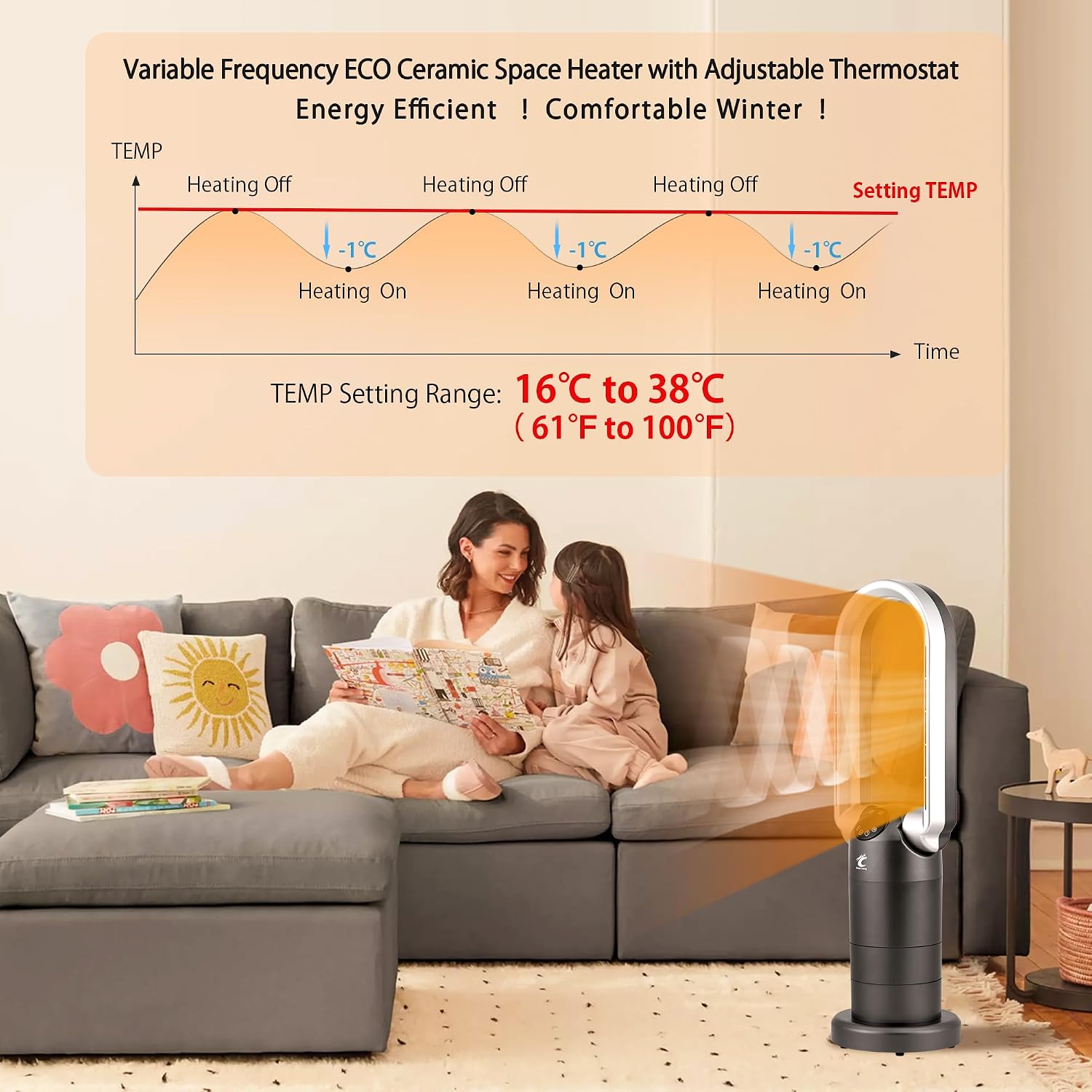
Figure 5: The ECO Ceramic Space Heater maintains a comfortable temperature within the adjustable range of 16°C to 38°C (61°F to 100°F).
5.4. Oscillation
- Press the Sway button to activate or deactivate the 120° oscillation function, distributing air across a wider area.
5.5. Timer Function
- Press the Timer button to set the desired operating time. Each press cycles through 1 to 9 hours. The unit will automatically turn off after the set time.
5.6. Remote Control Usage
- The remote control allows convenient operation from up to 10 meters away. Ensure there are no obstructions between the remote and the unit.

Figure 6: Effortless control with the remote, allowing operation from up to 10 meters away.
5.7. Sleep Mode / Quiet Operation
- The unit is designed for quiet operation, making it suitable for bedrooms. The LED light on the display will turn off automatically within one minute to avoid disturbing sleep.

Figure 7: The AB01H provides quiet and soft airflow, ideal for sleeping, with an adjustable timer.
5.8. Product Demonstration Video
Video 1: A detailed demonstration of the Ocean Loong AB01H Fan Heater for Bedroom, showcasing its features and operation.
6. Maintenance
Regular maintenance ensures optimal performance and longevity of your unit.
- Cleaning the Exterior: Always unplug the unit before cleaning. Use a soft, damp cloth to wipe the exterior surfaces. Do not use abrasive cleaners or solvents.
- Filter Replacement: The unit contains a HEPA filter. The filter should be checked periodically and replaced as needed, typically every 6-12 months depending on usage and air quality. Refer to the filter replacement instructions provided with your replacement filter.
- Storage: If storing the unit for an extended period, unplug it, clean it, and store it in a cool, dry place, preferably in its original packaging.
7. Troubleshooting
If you encounter issues with your Ocean Loong AB01H, refer to the following common problems and solutions:
| Problem | Possible Cause | Solution |
|---|---|---|
| Unit does not turn on | No power, unit tipped over, overheat protection activated | Check power cord connection and outlet. Ensure unit is upright. Allow unit to cool down if overheat protection was triggered. |
| No heat/fan airflow | Incorrect mode selected, fan speed/temperature too low, air intake/output blocked | Switch to desired mode. Increase fan speed or set temperature. Clear any obstructions around the unit. |
| Oscillation not working | Oscillation function not activated | Press the 'Sway' button on the unit or remote to activate oscillation. |
| Remote control not working | Dead batteries, obstruction, out of range | Replace remote control batteries. Ensure clear line of sight to the unit. Move closer to the unit. |
If the problem persists after attempting these solutions, please contact customer support.
8. Specifications
| Feature | Detail |
|---|---|
| Product Dimensions | 8.3 x 8.3 x 29 inches |
| Item Weight | 7.13 pounds |
| Model Name | AB01H |
| Brand | Ocean Loong |
| Finish Type | Matte |
| Efficiency | Efficient |
| Number of Power Levels | 9 |
| Installation Type | Freestanding |
| Batteries | 2 AAA batteries required (included) |
9. Warranty and Support
Specific warranty details and customer support contact information are not provided in the product data. Please refer to the product packaging or the manufacturer's official website for warranty registration and support inquiries.


